Process testimonials with GPT-4 & auto-generate social media cards with Google Sheets
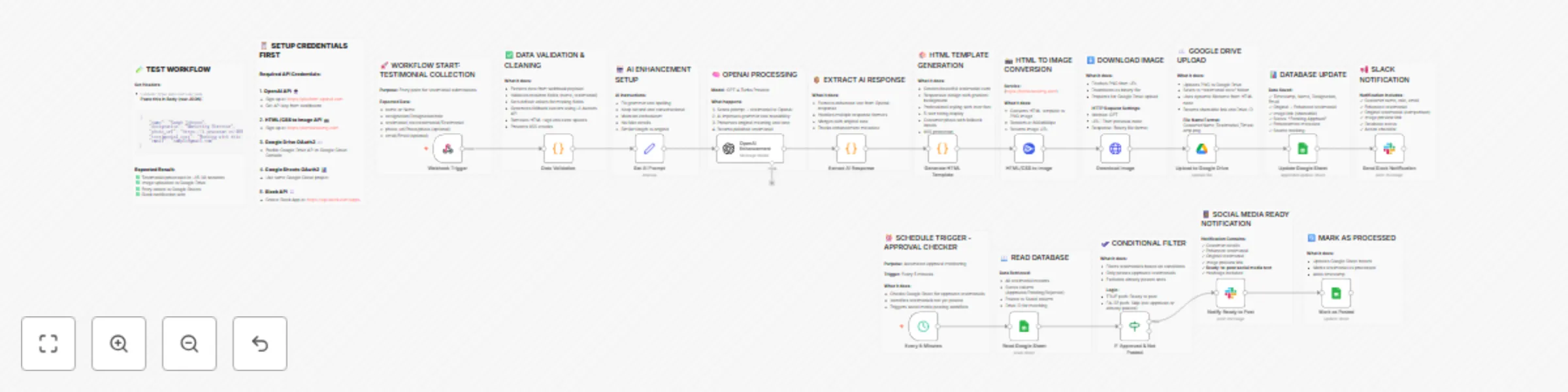
Workflow preview

$20/month : Unlimited workflows
2500 executions/month

THE #1 IN WEB SCRAPING
Scrape any website without limits
HOSTINGER  Early Deal
DISCOUNT 20% Try free
Early DealDISCOUNT 20%
Self-hosted n8n
Unlimited workflows - from $4.99/mo

#1 hub for scraping, AI & automation
6000+ actors - $5 credits/mo
Important notice
This workflow is provided as-is. Please review and test before using in production.
Overview
Automated AI-Powered Testimonial Processing & Social Media Workflow
Overview:
This comprehensive workflow automates the entire testimonial collection and publishing process, from submission to social media-ready content. It uses AI to enhance testimonials, generates beautiful branded cards, and implements an approval system before posting.
Key Features:
- ✅ Webhook-based submission - Accept testimonials via API
- 🤖 AI Enhancement - GPT-4 polishes grammar while maintaining authenticity
- 🎨 Automated Design - Generates professional 800x600px testimonial cards
- ☁️ Cloud Storage - Uploads to Google Drive with organized naming
- 📊 Database Logging - Tracks all testimonials in Google Sheets
- 🔔 Team Notifications - Slack alerts for new and approved testimonials
- ✅ Approval Workflow - Manual review before social media posting
- 🔄 Scheduled Checker - Auto-detects approved testimonials every 5 minutes
Workflow Steps:
Main Flow (Testimonial Processing):
- Receives testimonial via webhook (POST request)
- Validates and cleans data (name, testimonial, photo, email)
- Enhances testimonial using GPT-4 Turbo
- Generates HTML template with customer details
- Converts HTML to PNG image (800x600px)
- Uploads image to Google Drive
- Logs all data to Google Sheets with "Pending Approval" status
- Sends Slack notification to review team
Approval Flow (Scheduled Check):
- Runs every 5 minutes automatically
- Checks Google Sheets for approved testimonials
- Filters testimonials not yet posted
- Sends ready-to-post Slack notification with formatted text
- Marks testimonial as processed in database
Use Cases:
- SaaS companies collecting customer feedback
- Marketing agencies managing client testimonials
- E-commerce businesses showcasing reviews
- Course creators featuring student success stories
- Any business automating social proof collection
What Makes This Workflow Special:
- Zero manual design work - Beautiful cards generated automatically
- AI-powered quality - Professional grammar enhancement
- Audit trail - Complete tracking in Google Sheets
- Approval control - Review before publishing
- Duplicate prevention - Smart matching by Drive ID
- Flexible input - Accepts multiple field name variations
🔧 Required Integrations:
- OpenAI API (GPT-4 Turbo) - AI testimonial enhancement
- HTML/CSS to Image API - Screenshot generation
- Google Drive OAuth2 - Image storage
- Google Sheets OAuth2 - Database management
- Slack API - Team notifications
📋 Prerequisites:
- n8n instance (self-hosted or cloud)
- OpenAI API key (https://platform.openai.com)
- HTML/CSS to Image account (https://htmlcsstoimg.com) - Free tier available
- Google Cloud project with Drive & Sheets API enabled
- Slack workspace with app permissions
🚀 Setup Instructions:
1. Import Workflow
- Download the JSON file
- Import into your n8n instance
- Replace placeholder credentials (see below)
2. Configure Credentials
Add these credentials in n8n:
- OpenAI API - Your API key
- htmlcsstoimgApi - User ID and API key
- Google Drive OAuth2 - Configure OAuth app
- Google Sheets OAuth2 - Same Google Cloud project
- Slack API - Create Slack app with
chat:writescope
3. Update Configuration
Replace in the JSON:
- Google Drive Folder ID - Your testimonial storage folder
- Google Sheets ID - Your database spreadsheet
- Slack Channel ID - Your notification channel
4. Test the Workflow
Send a POST request to your webhook URL:
{
    "name": "Sarah Johnson",
    "designation": "Marketing Director",
    "photo_url": "https://i.pravatar.cc/400?img=5",
    "testimonial_text": "Working with this team was amazing!",
    "email": "[email protected]"
}
📊 Google Sheets Setup:
Create a Google Sheet with these columns:
- Timestamp
- Name
- Designation
- Original Testimonial
- Testimonial (Enhanced)
- Image Link
- Drive ID
- Status
- Original Length
- Enhanced
- Source
- Posted to Social
- Posted At
🎨 Customization Options:
- Modify AI prompt for different enhancement styles
- Change HTML template colors/design
- Add more validation rules
- Integrate with Twitter/LinkedIn APIs for auto-posting
- Add email notifications instead of Slack
- Include rating/score system
- Add custom approval fields
🆘 Troubleshooting:
Webhook not receiving data:
- Check webhook URL is correct
- Verify HTTP method is POST
- Ensure Content-Type is application/json
AI enhancement failing:
- Verify OpenAI API key is valid
- Check API usage limits
- Ensure sufficient credits
Image not generating:
- Confirm htmlcsstoimg credentials are correct
- Check HTML template has no errors
- Verify you haven't exceeded free tier limit
Google Drive upload failing:
- Re-authenticate OAuth2 connection
- Check folder ID is correct
- Verify folder permissions
🏆 Perfect For:
- Marketing teams
- Customer success teams
- Product managers
- Social media managers
- Growth hackers
- Agency owners
⚖️ License:
Free to use and modify for personal and commercial projects.