Block 1 - Gmail Trigger
- Type / Role
- n8n-nodes-base.gmailTrigger - gmailTrigger
- Config choices
- Version 1.2


 Early Deal
This workflow is provided as-is. Please review and test before using in production.
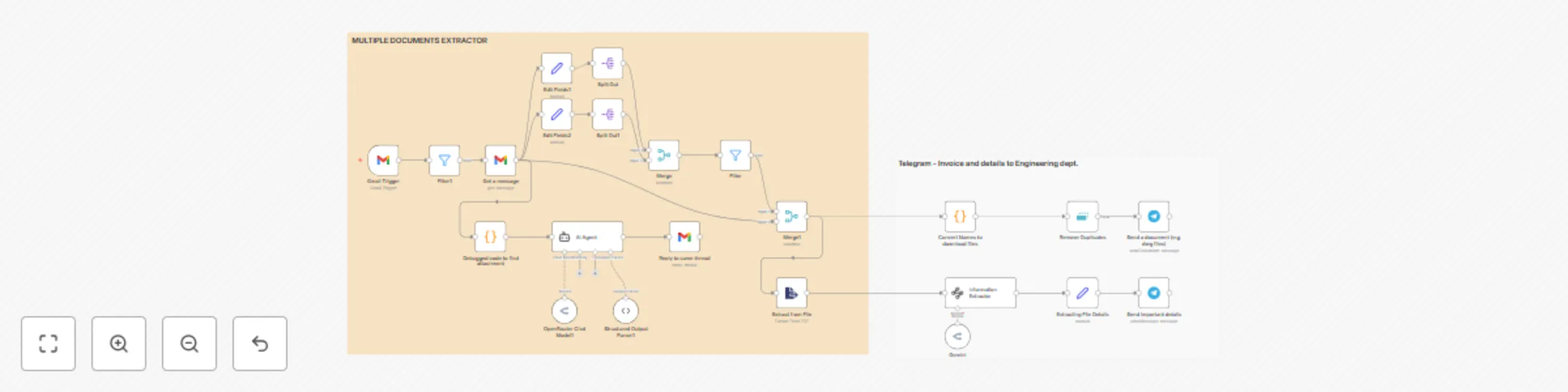
Automate admin tasks for manufacturing companies by processing emails, extracting key data from invoices & purchase orders, and delivering instant alerts via Gmail and Telegram. Description This...
n8n-nodes-base.gmailtrigger, n8n-nodes-base.gmail, @n8n/n8n-nodes-langchain.agent, n8n-nodes-base.code, @n8n/n8n-nodes-langchain.outputparserstructured, @n8n/n8n-nodes-langchain.lmchatopenrouter, @n8n/n8n-nodes-langchain.informationextractor, n8n-nodes-base.splitout
This workflow is cataloged by N8N Workflows and links back to its original n8n.io source page by Limbraj More.
Original n8n.io sourceAutomate admin tasks for manufacturing companies by processing emails, extracting key data from invoices & purchase orders, and delivering instant alerts via Gmail and Telegram.
📝 Description This workflow automatically:
Fetches incoming emails from Gmail
Classifies emails (invoices, purchase orders, payment follow-up, etc.) using AI
Sends tailored auto-replies based on content and attachment presence
Extracts structured data from attached invoices/POs (PDFs etc.)
Delivers alerts and document files to your team via Telegram
Logs or routes data for further use in accounting or internal systems
⚙️ Pre-Conditions & Requirements Before using this workflow, you need:
Gmail Account with API access (for OAuth2 authentication)
Telegram Bot API Token (create a Telegram bot and get your API key)
Optional: API credentials for Google Sheets or other data sinks if you want to log extracted data
OpenRouter API credentials (for LLM-powered nodes, if used)
Access to an n8n instance (cloud or self-hosted)
🛠 Setup Instructions Import the Workflow: Download the JSON file and import it into your n8n instance.
Connect Accounts:
Configure the Gmail Trigger node with your Gmail OAuth2 credentials
Set up the Telegram node with your bot API token
Set Required Variables:
Adjust AI instructions or prompt text if needed (for your company’s tone/templates)
Customize labels, keywords, or filters in code nodes for your use case
Set target Telegram chat/group IDs
Test the Workflow:
Send a sample email with attachments to your Gmail account
Confirm that emails are classified, replies are sent, and Telegram notifications/mobile alerts are delivered as expected
Review and Connect Optional Modules:
For logging or archiving extracted data, connect additional “Google Sheets” or “Webhook” nodes as needed
🧩 Customization Tips Modify Email Categories: Update AI prompt instructions or filters to add/change labels (“Vendor Query,” “Partial Payment,” etc.)
Attachment Handling: Edit the code node logic to detect and process additional file types (DWG, XLSX, ZIP, etc.)
Notification Logic: Change the Telegram destination or add Slack/Microsoft Teams for broader team alerts
Data Logging: Add nodes for CRM, inventory, or ERP integration (push to your accounting or workflow management tool)
Example AI Prompt (for categorization) text You are the personal emailing assistant for Zenith Engineering, a manufacturing company...
Response should be a valid JSON object: {"Label":"Important", "Response":"..."}
If you have any doubts and questions let me know : [email protected] from Pune. Linkedin: https://www.linkedin.com/in/raj-more-171560bb/
This catalog entry is organized from the workflow JSON. The node-level section below shows the executable blocks available for review before importing the template.
Showing the first 24 of 25 workflow blocks. Download the JSON for the full node graph.
| Workflow | Process invoices & engineering emails with Gmail, AI analysis & Telegram alerts |
|---|---|
| Complexity | advanced |
| Nodes | 25 |
| Categories | Invoice Processing, AI Summarization |
| Author | Limbraj More |
| Published | 30 Jul 2025 |
Use the JSON export at /data/workflows/6709/6709.json as the source template for this automation.
Open n8n, import the downloaded JSON, and review each node before activating the workflow.
Replace placeholder credentials, API keys, webhook URLs, account IDs, and environment-specific values with your own settings.
Run the workflow manually or in a staging workspace, inspect node output, and confirm downstream systems receive the expected data.
Enable the workflow only after testing, then monitor executions, errors, and rate limits during the first production runs.
Review imported nodes carefully before activation. This catalog entry is intended to help you inspect the workflow structure, understand required services, and find related templates faster.
Node names, credentials, schedules, webhook paths, and external service limits may need adjustment for your workspace.
Automate admin tasks for manufacturing companies by processing emails, extracting key data from invoices & purchase orders, and delivering instant alerts via Gmail and Telegram. Description This...
Review the workflow JSON, configure any required credentials in n8n, and test the automation in a safe workspace before using it in production.
Yes. Use the block-by-block analysis and the downloadable JSON to inspect each node, then adjust credentials, prompts, schedules, filters, or destinations for your Invoice Processing, AI Summarization use case.