🎯 Precision prospecting: Automate LinkedIn lead gen with Bright Data

Workflow preview

Workflow preview
100%
🎯 Precision prospecting: Automate LinkedIn lead gen with Bright Data preview
Open on n8n.io

Important notice

This workflow is provided as-is. Please review and test before using in production.

1. Workflow Overview

Precision Prospecting: Automate LinkedIn Lead Gen with n8n & Bright Data Overview This workflow turns n8n into an AI powered prospector, automatically searching Goog...

Best for

  • Lead Generation automation workflows
  • AI Chatbot automation workflows
  • intermediate n8n builders looking for reusable templates

Tools used

@n8n/n8n-nodes-langchain.chattrigger, @n8n/n8n-nodes-langchain.memorybufferwindow, n8n-nodes-base.executeworkflowtrigger, @n8n/n8n-nodes-langchain.toolworkflow, n8n-nodes-brightdata.brightdatatool, @n8n/n8n-nodes-langchain.lmchatopenai, n8n-nodes-base.splitout, n8n-nodes-base.html

Source and attribution

This workflow is cataloged by N8N Workflows and links back to its original n8n.io source page by Miquel Colomer.

Original n8n.io source

1.1 Workflow description

Title
🎯 Precision prospecting: Automate LinkedIn lead gen with Bright Data
Workflow name
🎯 Precision prospecting: Automate LinkedIn lead gen with Bright Data

🎯 Precision Prospecting: Automate LinkedIn Lead Gen with n8n & Bright Data

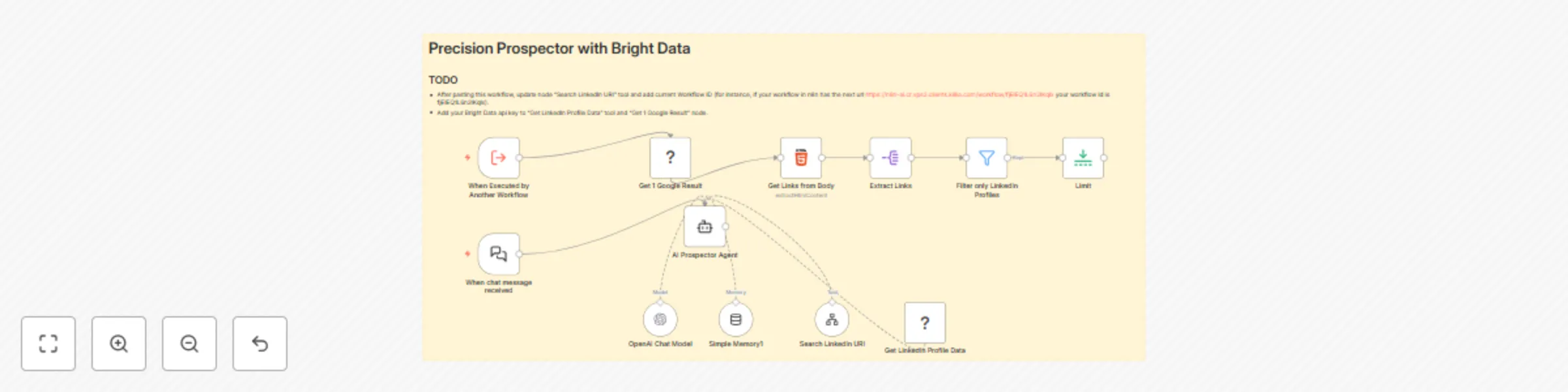
📝 Overview This workflow turns n8n into an AI-powered prospector, automatically searching Google for LinkedIn profiles, scraping profile data via Bright Data, and summarizing key details. Ideal for sales and recruitment teams seeking targeted lead lists without manual research.

🎥 Workflow in Action Want to see this workflow in action? You have a chat window output below:

🔑 Key Features

  • AI Chat Trigger: Start prospecting via conversational prompts.
  • Contextual Memory: Retains the last 20 messages for coherent dialogue.
  • Automated Google Search: Generates site-restricted queries and fetches the top result.
  • Bright Data Scraping: Synchronously scrapes LinkedIn profile details by URL.
  • Intelligent Filtering: Extracts only valid LinkedIn profile links.
  • Limit Control: Returns a single, most relevant profile per request.
  • LLM Summary: Uses GPT-4o-mini to interpret and present scraped data.

🚀 How It Works (Step-by-Step)

  1. Prerequisites:

    • n8n ≥ v1.0 with community nodes: install n8n-nodes-brightdata (not verified community node).
    • API credentials: OpenAI, Bright Data (web unlocker zone “web_unlocker1”).
    • Webhook endpoint for chat trigger.
  2. Node Configuration:

    • When chat message received (chatTrigger): Fires on user prompt.
    • Simple Memory1 (memoryBufferWindow): Stores the last 20 chat messages.
    • AI Prospector Agent (agent): Orchestrates search logic.
    • Get 1 Google Result (brightData): Performs a Google search with site:linkedin.com/in.
    • Get Links from Body (html): Extracts all <a> hrefs from the search result page.
    • Extract Links (splitOut): Splits out individual link entries.
    • Filter only LinkedIn Profiles (filter): Ensures the URL contains “linkedin.com/” and starts with “https://”.
    • Limit (limit): Restricts output to the first valid profile URL.
    • Search LinkedIn URI (toolWorkflow): Passes the URL to a secondary workflow to fetch the first link.
    • Get LinkedIn Profile Data (brightDataTool): Scrapes the profile JSON.
    • OpenAI Chat Model (lmChatOpenAi): Summarizes and formats the scraped data.
  3. Workflow Logic:

    • User asks for a person by company & name, company & position, or LinkedIn URL.
    • Agent builds a Google query (e.g., site:linkedin.com/in bright data cmo) and calls “Get 1 Google Result.”
    • Extracted links are filtered and limited to the top valid profile.
    • If user provided a direct LinkedIn URL, Agent skips search and scrapes immediately.
    • Scraped profile JSON is passed to GPT-4o-mini to generate a concise summary.
  4. Testing & Optimization:

    • Trigger via Execute Workflow for dry runs.
    • Inspect intermediate node outputs in n8n’s Execution panel.
    • Adjust maxIterations or memory window length for performance.
    • Tune Bright Data zone or country settings to optimize scraping speed.
  5. Deployment & Monitoring:

    • Activate the workflow and expose its webhook URL.
    • Use n8n’s built-in Alerts or external monitoring (e.g., Slack notifications) on failures.
    • Rotate credentials via n8n’s Credential Vault when needed.
    • Version-control workflow via duplicates or Git-backed n8n instances.

Pre-requisites

  • OpenAI Account: API key for GPT-4o-mini.
  • Bright Data Account: Zone “web_unlocker1” and dataset gd_l1viktl72bvl7bjuj0.
  • n8n Version: v1.0+ with community nodes installed.
  • Permissions: Webhook access, Credential Vault read/write.

👤 Who Is This For?

  • Sales teams automating outbound LinkedIn prospecting.
  • Recruiters sourcing candidates without manual scraping.
  • Marketing ops looking to enrich CRM with accurate profile data.

📈 Benefits & Use Cases

  • Efficiency: Reduces hours of manual search and data entry to seconds.
  • Accuracy: Filters out non-LinkedIn links and ensures high-quality results.
  • Scalability: Handle multiple prospect requests concurrently via chat or API.
  • Integration: Easily hook into CRMs or email sequencers downstream.

Workflow created and verified by Miquel Colomer https://www.linkedin.com/in/miquelcolomersalas/ and N8nHackers https://n8nhackers.com

1.2 Logical Blocks

This catalog entry is organized from the workflow JSON. The node-level section below shows the executable blocks available for review before importing the template.

2. Block-by-Block Analysis

Block 1 - When chat message received

Type / Role
@n8n/n8n-nodes-langchain.chatTrigger - chatTrigger
Config choices
Version 1.1

Block 2 - Simple Memory1

Type / Role
@n8n/n8n-nodes-langchain.memoryBufferWindow - memoryBufferWindow
Config choices
Version 1.3

Block 3 - When Executed by Another Workflow

Type / Role
n8n-nodes-base.executeWorkflowTrigger - executeWorkflowTrigger
Config choices
Version 1.1

Block 4 - Search LinkedIn URI

Type / Role
@n8n/n8n-nodes-langchain.toolWorkflow - toolWorkflow
Config choices
Version 2.2

Block 5 - Get LinkedIn Profile Data

Type / Role
n8n-nodes-brightdata.brightDataTool - brightDataTool
Config choices
Version 1

Block 6 - OpenAI Chat Model

Type / Role
@n8n/n8n-nodes-langchain.lmChatOpenAi - lmChatOpenAi
Config choices
Version 1.2

Block 7 - Extract Links

Type / Role
n8n-nodes-base.splitOut - splitOut
Config choices
Version 1

Block 8 - Get Links from Body

Type / Role
n8n-nodes-base.html - html
Config choices
Version 1.2

Block 9 - Filter only LinkedIn Profiles

Type / Role
n8n-nodes-base.filter - filter
Config choices
Version 2.2

Block 10 - Limit

Type / Role
n8n-nodes-base.limit - limit
Config choices
Version 1

Block 11 - AI Prospector Agent

Type / Role
@n8n/n8n-nodes-langchain.agent - agent
Config choices
Version 1.9

Block 12 - Sticky Note1

Type / Role
n8n-nodes-base.stickyNote - stickyNote
Config choices
Version 1

Block 13 - Get 1 Google Result

Type / Role
n8n-nodes-brightdata.brightData - brightData
Config choices
Version 1

3. Summary Table

Workflow 🎯 Precision prospecting: Automate LinkedIn lead gen with Bright Data
Complexity intermediate
Nodes 13
Categories Lead Generation, AI Chatbot
Author Miquel Colomer
Published 11 Jun 2025

4. Reproducing the Workflow from Scratch

  1. 1. Download the workflow JSON

    Use the JSON export at /data/workflows/4873/4873.json as the source template for this automation.

  2. 2. Import the template into n8n

    Open n8n, import the downloaded JSON, and review each node before activating the workflow.

  3. 3. Configure credentials and variables

    Replace placeholder credentials, API keys, webhook URLs, account IDs, and environment-specific values with your own settings.

  4. 4. Test with sample data

    Run the workflow manually or in a staging workspace, inspect node output, and confirm downstream systems receive the expected data.

  5. 5. Activate and monitor

    Enable the workflow only after testing, then monitor executions, errors, and rate limits during the first production runs.

5. General Notes & Resources

Review imported nodes carefully before activation. This catalog entry is intended to help you inspect the workflow structure, understand required services, and find related templates faster.

Node names, credentials, schedules, webhook paths, and external service limits may need adjustment for your workspace.

Frequently asked questions

What does 🎯 Precision prospecting: Automate LinkedIn lead gen with Bright Data do?

Precision Prospecting: Automate LinkedIn Lead Gen with n8n & Bright Data Overview This workflow turns n8n into an AI powered prospector, automatically searching Goog...

What do I need before importing this workflow?

Review the workflow JSON, configure any required credentials in n8n, and test the automation in a safe workspace before using it in production.

Can I customize this workflow?

Yes. Use the block-by-block analysis and the downloadable JSON to inspect each node, then adjust credentials, prompts, schedules, filters, or destinations for your Lead Generation, AI Chatbot use case.