M

Miquel Colomer

17
Workflows

Workflows by Miquel Colomer

Workflow preview: 🎯 Precision prospecting: Automate LinkedIn lead gen with Bright Data
Free intermediate

🎯 Precision prospecting: Automate LinkedIn lead gen with Bright Data

![image.png](fileId:1506) 🎯 **Precision Prospecting: Automate LinkedIn Lead Gen with n8n & Bright Data** 📝 **Overview** This workflow turns n8n into an AI-powered prospector, automatically searching Google for LinkedIn profiles, scraping profile data via [Bright Data](https://get.brightdata.com/ar8wlq0xkpv5), and summarizing key details. Ideal for sales and recruitment teams seeking targeted lead lists without manual research. 🎥 **Workflow in Action** Want to see this workflow in action? You have a chat window output below: ![image.png](fileId:1507) 🔑 **Key Features** * **AI Chat Trigger**: Start prospecting via conversational prompts. * **Contextual Memory**: Retains the last 20 messages for coherent dialogue. * **Automated Google Search**: Generates site-restricted queries and fetches the top result. * **Bright Data Scraping**: Synchronously scrapes LinkedIn profile details by URL. * **Intelligent Filtering**: Extracts only valid LinkedIn profile links. * **Limit Control**: Returns a single, most relevant profile per request. * **LLM Summary**: Uses GPT-4o-mini to interpret and present scraped data. 🚀 **How It Works (Step-by-Step)** 1. **Prerequisites**: * n8n ≥ v1.0 with community nodes: install `n8n-nodes-brightdata` (not verified community node). * API credentials: OpenAI, Bright Data (web unlocker zone “web\_unlocker1”). * Webhook endpoint for chat trigger. 2. **Node Configuration**: * **When chat message received** (`chatTrigger`): Fires on user prompt. * **Simple Memory1** (`memoryBufferWindow`): Stores the last 20 chat messages. * **AI Prospector Agent** (`agent`): Orchestrates search logic. * **Get 1 Google Result** (`brightData`): Performs a Google search with `site:linkedin.com/in`. * **Get Links from Body** (`html`): Extracts all `<a>` hrefs from the search result page. * **Extract Links** (`splitOut`): Splits out individual link entries. * **Filter only LinkedIn Profiles** (`filter`): Ensures the URL contains “linkedin.com/” and starts with “https\://”. * **Limit** (`limit`): Restricts output to the first valid profile URL. * **Search LinkedIn URI** (`toolWorkflow`): Passes the URL to a secondary workflow to fetch the first link. * **Get LinkedIn Profile Data** (`brightDataTool`): Scrapes the profile JSON. * **OpenAI Chat Model** (`lmChatOpenAi`): Summarizes and formats the scraped data. 3. **Workflow Logic**: * User asks for a person by company & name, company & position, or LinkedIn URL. * Agent builds a Google query (e.g., `site:linkedin.com/in bright data cmo`) and calls “Get 1 Google Result.” * Extracted links are filtered and limited to the top valid profile. * If user provided a direct LinkedIn URL, Agent skips search and scrapes immediately. * Scraped profile JSON is passed to GPT-4o-mini to generate a concise summary. 4. **Testing & Optimization**: * Trigger via **Execute Workflow** for dry runs. * Inspect intermediate node outputs in n8n’s Execution panel. * Adjust `maxIterations` or memory window length for performance. * Tune Bright Data zone or country settings to optimize scraping speed. 5. **Deployment & Monitoring**: * Activate the workflow and expose its webhook URL. * Use n8n’s built-in Alerts or external monitoring (e.g., Slack notifications) on failures. * Rotate credentials via n8n’s Credential Vault when needed. * Version-control workflow via duplicates or Git-backed n8n instances. ✅ **Pre-requisites** * **OpenAI Account**: API key for GPT-4o-mini. * **Bright Data Account**: Zone “web\_unlocker1” and dataset `gd_l1viktl72bvl7bjuj0`. * **n8n Version**: v1.0+ with community nodes installed. * **Permissions**: Webhook access, Credential Vault read/write. 👤 **Who Is This For?** * Sales teams automating outbound LinkedIn prospecting. * Recruiters sourcing candidates without manual scraping. * Marketing ops looking to enrich CRM with accurate profile data. 📈 **Benefits & Use Cases** * **Efficiency**: Reduces hours of manual search and data entry to seconds. * **Accuracy**: Filters out non-LinkedIn links and ensures high-quality results. * **Scalability**: Handle multiple prospect requests concurrently via chat or API. * **Integration**: Easily hook into CRMs or email sequencers downstream. *Workflow created and verified by Miquel Colomer [https://www.linkedin.com/in/miquelcolomersalas/](https://www.linkedin.com/in/miquelcolomersalas/) and N8nHackers [https://n8nhackers.com](https://n8nhackers.com)*

M
Miquel Colomer
Lead Generation
11 Jun 2025
2400
0
Workflow preview: 🏠 Find your home with Real Estate Agent and Bright Data
Free intermediate

🏠 Find your home with Real Estate Agent and Bright Data

![image.png](fileId:1497) 📝 **Overview** This workflow transforms n8n into a smart real-estate concierge by combining an AI chat interface with [Bright Data](https://get.brightdata.com/ar8wlq0xkpv5)’s marketplace datasets. Users interact via chat to specify city, price, bedrooms, and bathrooms—and receive a curated list of three homes for sale, complete with images and briefings. 🎥 **Workflow in Action** Want to see this workflow in action? Play the [video](https://public.n8nhackers.com/videos/real-estate-agent.webm) 🔑 **Key Features** * **AI-Powered Chat Trigger:** Instantly start conversations using LangChain’s Chat Trigger node. * **Contextual Memory:** Retain up to 30 recent messages for coherent back-and-forth. * **Bright Data Integration:** Dynamically filter “FOR\_SALE” properties by city, price, bedrooms, and bathrooms (limit = 3). * **Automated Snapshot Retrieval:** Poll for dataset readiness and fetch full snapshot content. * **HTML-Formatted Output:** Present results as a `<ul>` of `<li>` items, embedding property images. 🚀 **How It Works (Step-by-Step)** 1. **Prerequisites:** * n8n ≥ v1.0 * Community nodes: install `n8n-nodes-brightdata` (the unverified community node) * API credentials: OpenAI, Bright Data * Webhook endpoint to receive chat messages 2. **Node Configuration:** * **Chat Trigger:** Listens for incoming chat messages; shows a welcome screen. * **Memory Buffer:** Stores the last 30 messages for context. * **OpenAI Chat Model:** Uses GPT-4o-mini to interpret user intent. * **Real Estate AI Agent:** Orchestrates filtering logic, calls tools, and formats responses. * **Bright Data “Filter Dataset” Tool:** Applies user-defined filters plus `homeStatus = FOR_SALE`. * **Wait & Recover Snapshot:** Polls until snapshot is ready, then fetches content. * **Get Snapshot Content:** Converts raw JSON into a structured list. 3. **Workflow Logic:** * User sends search criteria → Agent validates inputs. * Agent invokes “Filter Dataset” once all filters are present. * Upon dataset readiness, the snapshot is retrieved and parsed. * Final output rendered as a bullet list with property images. 4. **Testing & Optimization:** * Use the built-in **Execute Workflow** trigger for rapid dry runs. * Inspect node outputs in n8n’s UI; adjust filter defaults or snapshot limits. * Tune OpenAI model parameters (e.g., `maxIterations`) for faster responses. 5. **Deployment & Monitoring:** * Activate the main workflow and expose its webhook URL. * Monitor executions in the “Executions” panel; set up alerts for errors. * Archive or duplicate workflows as needed; update credentials via credential manager. ✅ **Pre-requisites** * **Bright Data Account:** API key for marketplaceDataset. * **OpenAI Account:** Access to GPT-4o-mini model. * **n8n Version:** v1.0 or later with community node support. * **Permissions:** Webhook access, credential vault read/write. 👤 **Who Is This For?** * Real-estate agencies and brokers seeking to automate client queries. * PropTech startups building conversational search tools. * Data analysts who want on-demand property snapshots without manual scraping. 📈 **Benefits & Use Cases** * **Time Savings:** Replace manual MLS searches with an AI-driven chat. * **Scalability:** Serve multiple clients simultaneously via webchat or embedded widget. * **Consistency:** Always report exactly three properties, ensuring concise results. * **Engagement:** Visual listings with images boost user satisfaction and conversion. *Workflow created and verified by Miquel Colomer [https://www.linkedin.com/in/miquelcolomersalas/](https://www.linkedin.com/in/miquelcolomersalas/) and N8nHackers [https://n8nhackers.com](https://n8nhackers.com)*

M
Miquel Colomer
Lead Nurturing
11 Jun 2025
2948
0
Workflow preview: LinkedIn profile finder via form using Bright Data & GPT-4o-mini
Free advanced

LinkedIn profile finder via form using Bright Data & GPT-4o-mini

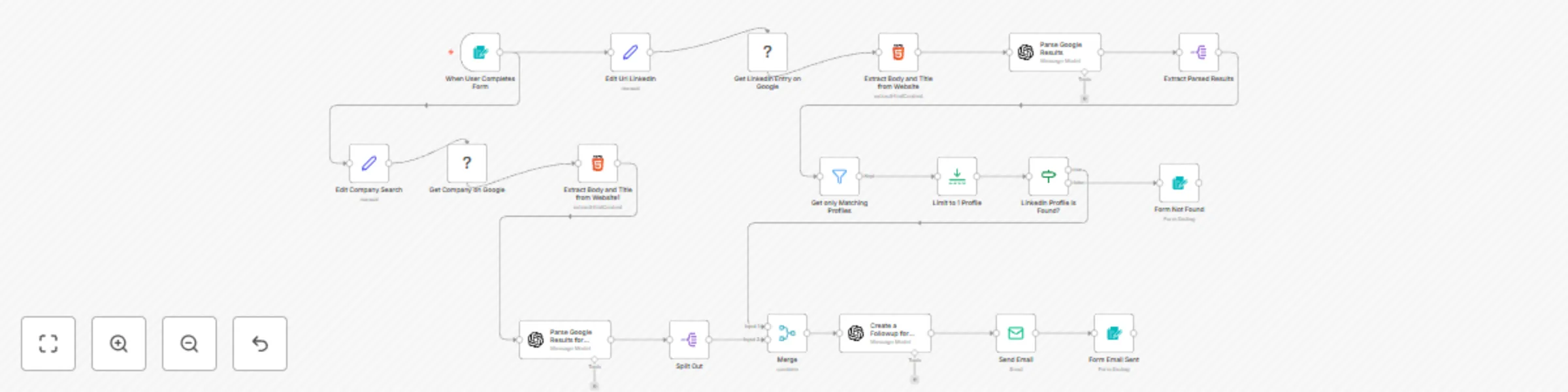
![image.png](fileId:1059) This n8n workflow template automates the process of finding LinkedIn profiles for a person based on their name, and company. It scrapes Google search results via [Bright Data](https://get.brightdata.com/ar8wlq0xkpv5), parses the results with GPT-4o-mini, and delivers a personalized follow-up email with insights and suggested outreach steps. 🚀 What It Does - Accepts a user-submitted form with a person’s full name, and company. - Performs a Google search using Bright Data to find LinkedIn profiles and company data. - Uses GPT-4o-mini to parse HTML results and identify matching profiles. - Filters and selects the most relevant LinkedIn entry. - Analyzes the data to generate a buyer persona and follow-up strategy. - Sends a styled email with insights and outreach steps. 🛠️ Step-by-Step Setup 1. Deploy the form trigger to accept person data (name, position, company). 2. Build a Google search query from user input. 3. Scrape search results using Bright Data. 4. Extract HTML content using the HTML node. 5. Use GPT-4o-mini to parse LinkedIn entries and company insights. 6. Filter for matches based on user input. 7. Merge relevant data and generate personalized outreach content. 8. Send email to a predefined address. 9. Show a final confirmation message to the user. 🧠 How It Works: Workflow Overview - **Trigger:** `When User Completes Form` - **Search:** `Edit Url LinkedIn`, `Get LinkedIn Entry on Google`, `Extract Body and Title`, `Parse Google Results` - **Matching:** `Extract Parsed Results`, `Filter`, `Limit`, `IF LinkedIn Profile is Found?` - **Fallback:** `Form Not Found` if no match - **Company Lookup:** `Edit Company Search`, `Get Company on Google`, `Parse Results`, `Split Out` - **Content Generation:** `Merge`, `Create a Followup for Company and Person` - **Email Delivery:** `Send Email`, `Form Email Sent` 📨 Final Output An HTML-styled email (using Tailwind CSS) with: - Matched LinkedIn profile - Company insights - Persona-based outreach strategy 🔐 Credentials Used - **BrightData account** for scraping Google search results - **OpenAI account** for GPT-4o-mini-powered parsing and content generation - **SMTP account** for sending follow-up emails ❓Questions? Template and node created by [Miquel Colomer](https://www.linkedin.com/in/miquelcolomersalas/) and [n8nhackers](https://n8nhackers.com). Need help customizing or deploying? [Contact]([email protected]) us for consulting and support.

M
Miquel Colomer
Lead Generation
27 Mar 2025
7748
0
Workflow preview: Custom deal recommendations by email using Forms, Bright Data & GPT-4o-mini
Free intermediate

Custom deal recommendations by email using Forms, Bright Data & GPT-4o-mini

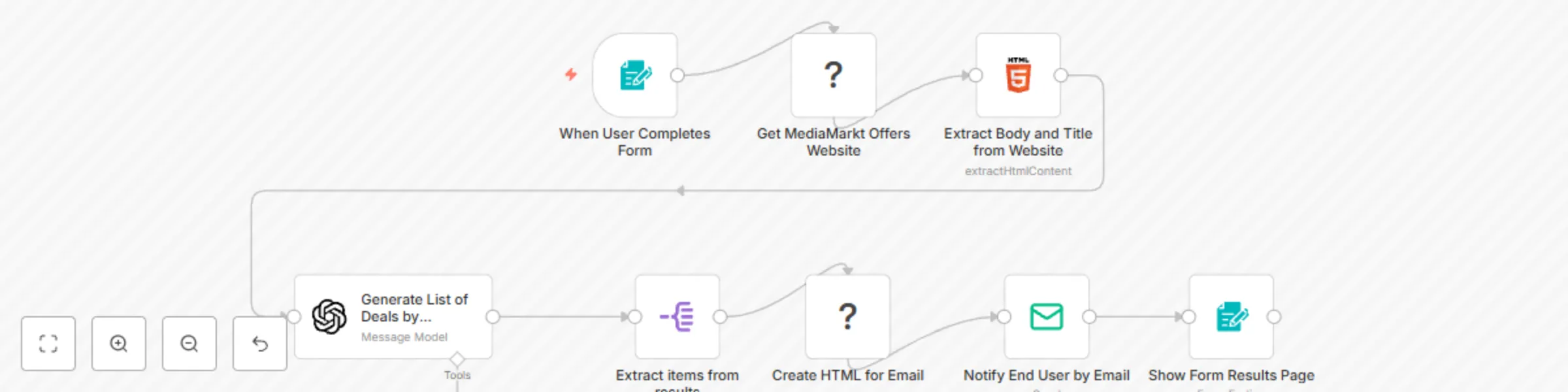
![image.png](fileId:1036) This **n8n workflow template** automates the process of collecting and delivering the **"Top Deals of the Day" from MediaMarkt**, tailored to user preferences. By combining **user-submitted forms**, **Bright Data web scraping**, **GPT-4o-mini deal generation**, and **email delivery**, this workflow sends **personalized product recommendations** straight to a user’s inbox. &gt; ⚠️ *Note: This workflow uses community nodes (Bright Data and Document Generator) which only work on **self-hosted n8n instances***. --- ### 🚀 **What It Does** - Collects user preferences via a form (categories + email) - Scrapes MediaMarkt’s deals page using [Bright Data](https://get.brightdata.com/ar8wlq0xkpv5) - Uses GPT-4o-mini (OpenAI) to recommend top deals - Generates a structured HTML email using a template - Sends the personalized deals directly via email --- ### 🧩 **Community Node Integration** We created and used the following community nodes: - **[Bright Data](https://www.npmjs.com/package/n8n-nodes-brightdata)** – To scrape MediaMarkt deals using proxy-based scraping - **[Document Generator](https://www.npmjs.com/package/n8n-nodes-document-generator)** – To generate a templated HTML document from deal data These nodes are **not available in n8n Cloud** and require **self-hosted n8n**. --- ### 🛠️ **Step-by-Step Setup** 1. **Install Community Nodes** Make sure you're on a self-hosted n8n instance. Install: - `n8n-nodes-brightdata` - `n8n-nodes-document-generator` 2. **Configure Credentials** - **Bright Data API Key** (Proxy + Scraping setup) - **OpenAI API Key** (GPT-4o-mini access) - **SMTP Credentials** for sending emails 3. **Customize the Form** Adapt the form node to collect desired categories and email addresses. Typical categories include appliances, phones, laptops, etc. 4. **Design Your HTML Template** In the Document Generator node, you can tweak the HTML/CSS to change how deals appear in the final email. 5. **Test the Workflow** Submit the form with test data and check that the entire flow—from scraping to email—executes as expected. --- ### 🧠 **How It Works: Workflow Overview** 1. **User Interaction via Form** Users select product categories and enter their email. This triggers the workflow. 2. **Data Extraction via Bright Data** Bright Data scrapes the [MediaMarkt offers page](https://www.mediamarkt.es/es/campaign/campanas-y-ofertas) and returns HTML content. 3. **HTML Parsing** Key elements like product names, prices, and links are extracted for processing. 4. **GPT-4o-mini Recommendation Generation** The extracted data is sent to OpenAI (GPT-4o-mini), which filters, ranks, and enhances deals based on the user’s preferences. 5. **Data Structuring & Split** The result is split into individual deal items to be formatted. 6. **HTML Document Creation** Document Generator populates a clean HTML template with the top recommended deals. 7. **Email Delivery** The final document is emailed via SMTP to the user with a friendly message. --- ### 📨 **Final Output** Users receive a **custom HTML email** featuring a curated list of top MediaMarkt deals based on their selected categories. --- ### 🔐 **Credentials Used** - **Bright Data API** – Web scraping with proxy support - **OpenAI API** – Generating personalized recommendations - **SMTP** – Sending personalized deal emails --- ### ✨ **Customization Tips** - **Change the Data Source**: You can adapt this to scrape other e-commerce sites. - **Update the Email Template**: Make it match your branding or include images. - **Extend the Form**: Add preferences like price range or specific brands. - **Add Scheduling**: Use Cron to run the workflow daily or weekly. --- ### ❓Questions? Template and node created by [**Miquel Colomer**](https://www.linkedin.com/in/miquelcolomersalas/) and [**n8nhackers.com**](https://n8nhackers.com). Need help customizing or deploying? [**Contact us**](mailto:[email protected]) for consulting and support.

M
Miquel Colomer
Social Media
24 Mar 2025
1366
0
Workflow preview: Generate dynamic contents for EMAILS or HTML pages
Free intermediate

Generate dynamic contents for EMAILS or HTML pages

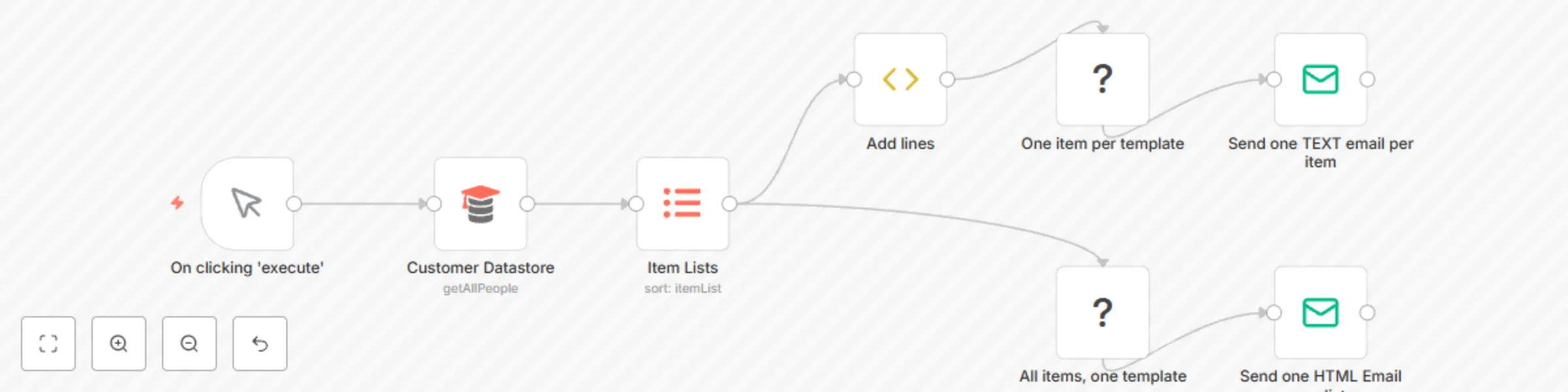
![workflown8nnodesdocumentgenerator.jpeg](fileId:663) ==Disclaimer: This template contains a community node and therefore only works for n8n self-hosted users== This is Miquel from **[Aprende n8n](https://aprenden8n.com)** and **[Automate with n8n](https://automatewithn8n.com)**. We have created a new community node **[Document Generator](https://www.npmjs.com/package/n8n-nodes-document-generator)** that generates dynamic content using templates. You can compose complex content with no SETs or FUNCTION ITEMs nodes using this node, like: - Send one email with a list of items in the body (i.e., one email with the last entries of an RSS feed). - Send one email per item (i.e., one invoice per email). Emails are just a sample. You can create complex dynamic content to: * Send messages to Telegram/Slack. * Create WordPress entries. * Create HTML pages for your website. * Create tickets. And more! The sky is your limit ;) If you want to use this workflow, install the community node **n8n-nodes-document-generator** from *Settings &gt; Community nodes*. Type "n8n-nodes-document-generator", check "I understand the risks..." and click on "Install": ![installn8nnodesdocumentgenerator.jpeg](fileId:662) Later, copy and paste this workflow into your n8n. You will get this workflow: ![workflown8nnodesdocumentgenerator.jpeg](fileId:663) This workflow uses the **Customer Datastore node** to generate sample input items. You can render one template with all items (enable "Render All Items with One Template"): ![onetemplateallitems.jpeg](fileId:664) or one template per input item: ![onetemplateperitem.jpeg](fileId:665) Visit the **[oficial NPM page](https://www.npmjs.com/package/n8n-nodes-document-generator)** to see more samples. Learning n8n by yourself is nice, but a bit tricky :) We offer n8n training video courses at **[Aprende n8n](https://aprenden8n.com)**. If you need custom trainings, [let us know](mailto:[email protected]). Additionally, you can contact us at **[Automate with n8n](https://automatewithn8n.com)** if you need the next services: - Custom installations. - Custom nodes. - Monitor and alarms. - Delegate 12/5 or 24/7 workflow issue resolutions. - Automated backups of your workflows. - HTTP integrations of non-supported APIs. - Complex workflows. I hope you will enjoy this new node and this workflow. Automate your life! Automate it with n8n!

M
Miquel Colomer
Document Extraction
11 Sep 2022
9281
0
Workflow preview: Parse email body message
Free beginner

Parse email body message

# Who we are We are **Aprende n8n**, the first n8n Spanish course for all n8n lovers. If you want to learn more, you can find out more at [Aprende n8n](https://aprenden8n.com). # Task goal This task allows extracting data from any email body with a NoCode snippet. # An small explanation You receive an email when a user submits a form from your website. All those emails usually have the same structure as the next one: ``` Name: Miquel Email: [email protected] Subject: Welcome aboard Message: Hi Miquel! Thank you for your signup! ``` This task allows to parse any email body and assign all values to the defined labels, getting an output like this: ``` { "Name": "Miquel", "Email": "[email protected]", "Subject": "Welcome aboard", "Message" "Hi Miquel! Thank you for your signup!" } ``` # After importing it When you import the import, you get the next task in your n8n: ![aprenden8n.com_email_parser_task.jpeg](fileId:613) We recommend importing this workflow into your current task and adapting it. You define a couple of variables in the "Set values" SET: - body: the email body you want to parse. You can add this as an expression from previous variables. - labels: the keywords you want to detect and parse. Labels are case insensitive. We define the next values: Body ``` Name: Miquel Email: [email protected] Subject: Welcome aboard Message: Hi Miquel! Thank you for your signup! ``` Labels ``` Name,Email,Subject,Message ``` A screenshot of the Set output is the next one ![aprenden8n.com_email_parser_set.jpeg](fileId:611) If we check the "Function item" Node, we get the next content after executing the task: ![aprenden8n.com_email_parser_output.jpeg](fileId:612) # Capabilities The task has the next features: - You can detect as many labels as you want. - Label detection is case insensitive. - You can use the snippet as an independent workflow to call it generically, adding the Function item to the workflow and passing body and labels as paremeters. # Limitations This task has limitations: - The parser only accepts the multiline values at the end of the email. # Help and comments If you have any doubt about this snippet, please, contact us at [email protected]. You can contact us at [Aprende n8n](https://aprenden8n.com) or in the [Spanish n8n community](https://t.me/comunidadn8n)

M
Miquel Colomer
Ticket Management
16 Feb 2022
7074
0
Workflow preview: Scrape and store data from multiple website pages
Free advanced

Scrape and store data from multiple website pages

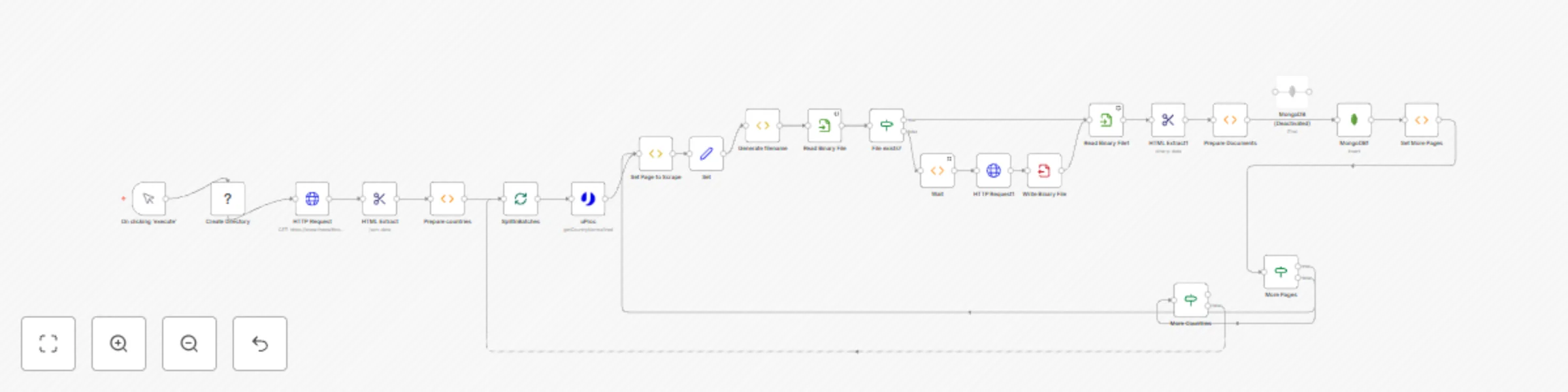
This workflow allows extracting data from multiple pages website. The workflow: 1) Starts in a country list at https://www.theswiftcodes.com/browse-by-country/. 2) Loads every country page (https://www.theswiftcodes.com/albania/) 3) Paginates every page in the country page. 4) Extracts data from the country page. 5) Saves data to MongoDB. 6) Paginates through all pages in all countries. It uses getWorkflowStaticData('global') method to recover the next page (saved from the previous page), and it goes ahead with all the pages. There is a first section where the countries list is recovered and extracted. Later, I try to read if a local cache page is available and I recover the cached page from the disk. Finally, I save data to MongoDB, and we paginate all the pages in the country and for all the countries. I have applied a cache system to save a visited page to n8n local disk. If I relaunch workflow, we check if a cache file exists to discard non-required requests to the webpage. If the data present in the website changes, you can apply a Cron node to check the website once per week. Finally, before inserting data in MongoDB, the best way to avoid duplicates is to check that swift_code (the primary value of the collection) doesn't exist. I recommend using a proxy for all requests to avoid IP blocks. A good solution for proxy plus IP rotation is scrapoxy.io. This workflow is perfect for small data requirements. If you need to scrape dynamic data, you can use a Headless browser or any other service. If you want to scrape huge lists of URIs, I recommend using Scrapy + Scrapoxy.

M
Miquel Colomer
Engineering
7 May 2021
100277
0
Workflow preview: Discover professional emails with uProc and send via Telegram
Free beginner

Discover professional emails with uProc and send via Telegram

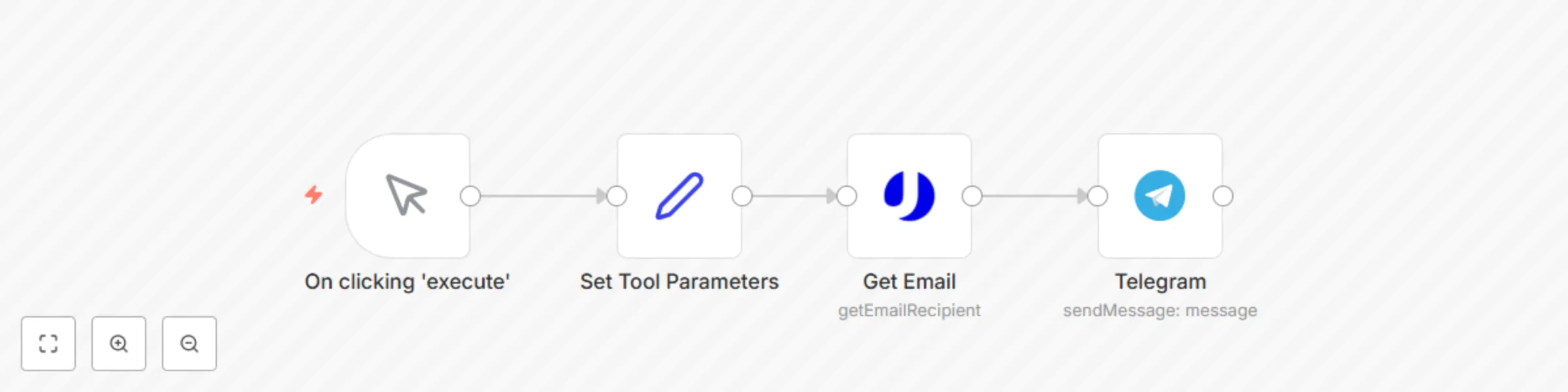
![image.png](fileId:1033) This **n8n workflow template** uses **uProc's "Get Email by Domain, Firstname and Lastname" tool** to discover a professional email address, and then sends that email to a **Telegram channel**. &gt; ⚠️ *Note: You must set up your **uProc credentials (Email + API Key)** from the [**Integration settings**](https://app.uproc.io/#/settings/integration) before running this workflow.* --- ### 🚀 **What It Does** - Uses user-provided data: **first name**, **last name**, and **company domain** - Calls **uProc** to discover the most likely email address for that person - Sends the discovered email and confidence level to a **Telegram group** --- ### 🛠️ **Step-by-Step Setup** 1. **Add uProc Credentials** Go to the [uProc integration page](https://app.uproc.io/#/settings/integration) and copy your **email and API key**. Add them as credentials in your n8n instance. 2. **Set Tool Parameters** - Use the **Set node** to define: - `firstname`: First name of the person - `lastname`: Last name of the person - `domain`: Their company domain 3. **Replace the Set Node (Optional)** You can dynamically fetch the `firstname`, `lastname`, and `domain` from other sources like: - **Google Sheets** - **MySQL or Postgres** - **Webhook or Form submissions** 4. **Run the Workflow** Trigger the flow manually or integrate it with a larger automation. --- ### 🔍 **uProc Parameters Explained** - **domain**: The company domain (e.g., `uproc.io`) - **firstname**: First name of the person - **lastname** (in parameter: `language`): Last name of the person - **mode**: - `verify`: Verifies email in real-time with mail server - `guess`: Guesses based on company format (e.g., `[email protected]`) --- ### 📦 **uProc Response Fields** - `email`: Discovered email address - `confidence`: Indicates if the result is verified or risky (e.g., catch-all) - `score`: Reliability score from **0** (unreliable) to **99** (highly reliable) --- ### 📬 **Notification via Telegram** After discovering the email, the result is sent to a specified **Telegram channel** with this format: ```text User Miquel Colomer has next email on uproc.io: [email protected] (verified - 99) ``` Clicking the email allows you to send a message directly to the recipient. --- ### 🔐 **Credentials Used** - **uProc API** – For discovering email addresses - **Telegram API** – To send messages to a specific group/channel --- ### ✨ **Customization Tips** - **Loop over a list of people**: Replace the set node with a data source that contains multiple people. - **Filter by score or confidence** before sending. - **Add additional outputs**: You can send the data via Email, Slack, or save it to a database. - **Trigger automatically**: Combine with a webhook or time-based trigger for automation. --- ### ❓Questions? Template created by [**Miquel Colomer**](https://www.linkedin.com/in/miquelcolomersalas/) and [**n8nhackers.com**](https://n8nhackers.com). Need help customizing or deploying? [**Contact us**](mailto:[email protected]) for consulting and support.

M
Miquel Colomer
Lead Generation
24 Jan 2021
134
0
Workflow preview: Verify a phone number with uProc
Free beginner

Verify a phone number with uProc

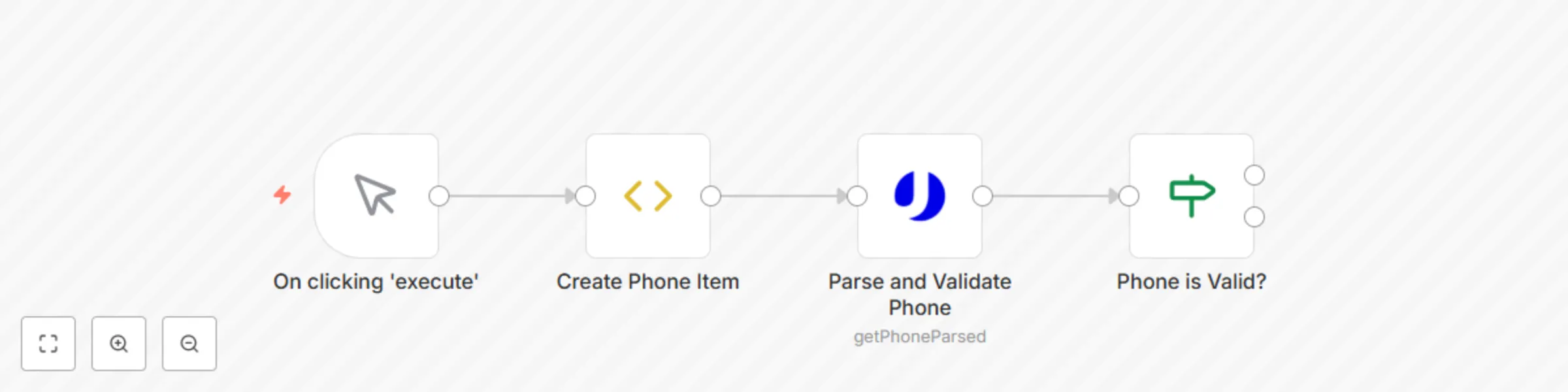
Do you want to avoid communication problems when launching phone calls? This workflow verifies landline and mobile phone numbers using the uProc [**Get Parsed and validated phone tool**](https://app.uproc.io/#/tools/processor/get/phone/parsed) with worldwide coverage. ![workflow-screenshot](fileId:362) You need to add your credentials (Email and API Key - real -) located at [**Integration section**](https://app.uproc.io/#/settings/integration) to n8n. Node "Create Phone Item" can be replaced by any other supported service with phone values, like databases (MySQL, Postgres), or Typeform. The "uProc" node returns the next fields per every parsed and validated phone number: - country_prefix: contains the international country phone prefix number. - country_code: contains the 2-digit ISO country code of the phone number. - local_number: contains the phone number without international prefix. - formatted: contains a formatted version of the phone number, according to country detected. - valid: detects if the phone number has a valid format and prefix. - type: the phone number type (mobile, landline, or something else). "If" node checks if the phone number is valid. You can use the result to mark invalid phone numbers in your database or discard them from future telemarketing campaigns.

M
Miquel Colomer
Lead Generation
30 Dec 2020
1571
0
Workflow preview: Get DNS entries of any domain with uProc
Free beginner

Get DNS entries of any domain with uProc

Do you want to control the DNS domain entries of your customers or servers? This workflow gets DNS information of any domain using the uProc [**Get Domain DNS records tool**](https://app.uproc.io/#/tools/processor/get/domain/records). You can use this workflow to check existing DNS records in real-time to ensure that any domain setup is correct. ![workflow-screenshot](fileId:361) You need to add your credentials (Email and API Key - real -) located at [**Integration section**](https://app.uproc.io/#/settings/integration) to n8n. You can replace "Create Domain Item" with any integration containing a domain, like Google Sheets, MySQL, or Zabbix server. Every "uProc" node returns multiple items with the next fields per every item: - type: Contains the DNS record type (A, ALIAS, AAAA, CERT, CNAME, MX, NAPTR, NS, PTR, SOA, SRV, TXT, URL). - values: Contains the DNS record values.

M
Miquel Colomer
DevOps
30 Dec 2020
1683
0
Workflow preview: Monitor SSL certificate of any domain with uProc
Free intermediate

Monitor SSL certificate of any domain with uProc

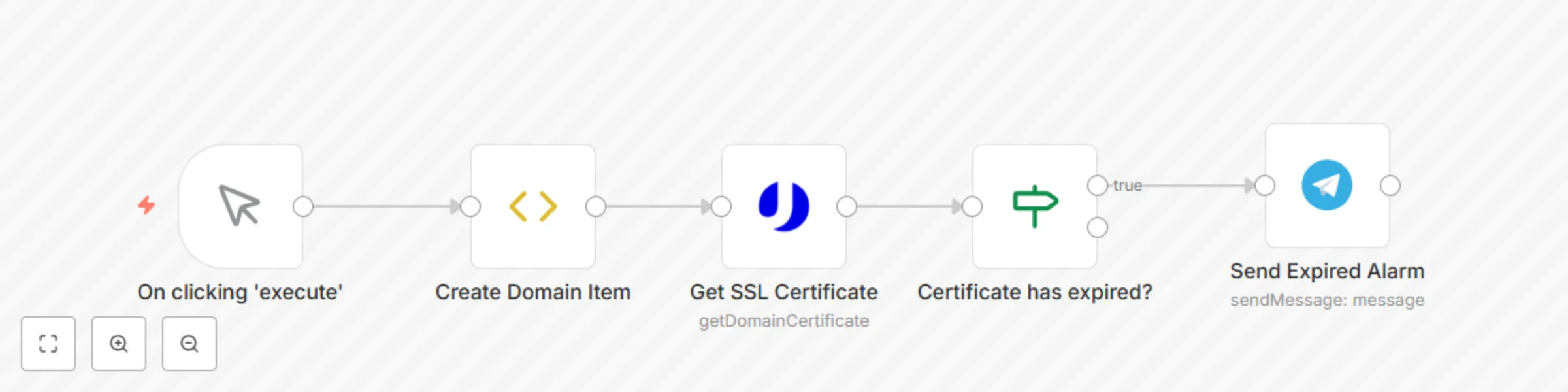
Do you want to check the SSL certificate expiration dates of your customers or servers? This workflow gets information of an SSL certificate using the uProc [**Get Certificate by domain tool**](https://app.uproc.io/#/tools/processor/get/domain/certificate). You can use this workflow to query SSL certificates in bulk and send alarms when any certificate has expired. ![workflow-screenshot](fileId:360) You need to add your credentials (Email and API Key - real -) located at [**Integration section**](https://app.uproc.io/#/settings/integration) to n8n. You can replace "Create Domain Item" with any integration containing a domain, like Google Sheets, MySQL, or Zabbix server. Every "uProc" node returns the next fields per every analyzed SSL certificate: - issuer: Contains the issuer. - provider: Contains the provider. - valid_from: Contains the start date. - valid_to: Contains the end date. - serial_number: Contains the serial number. - type: Contains if supports one or multiple domains. - protocol: Contains the protocol. - valid: Contains its validity. - domains: Contains all domains and subdomains supported. An "IF" node detects if the certificate is valid or not. Finally, the workflow sends an alarm to a Telegram channel to know if the certificate has expired.

M
Miquel Colomer
SecOps
30 Dec 2020
2936
0
Workflow preview: Discover company data by name with uProc
Free beginner

Discover company data by name with uProc

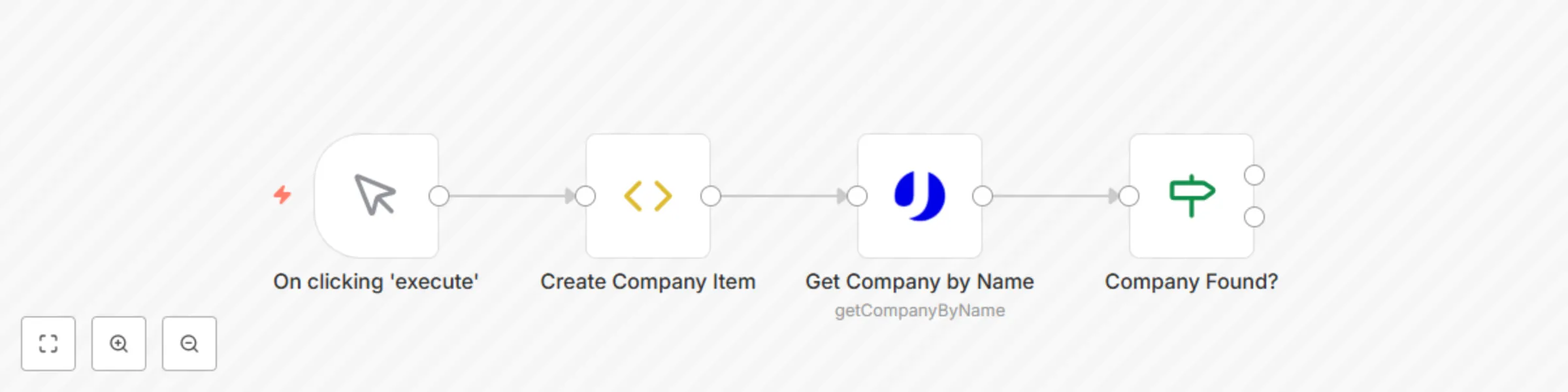
Do you want to discover company-related information to enrich a signup process? This workflow enriches any company by name using the uProc [**Get Company by Name tool**](https://app.uproc.io/#/tools/processor/get/company/by-name). This tool combines Google Maps and emails research on the internet to return results. You get no results if the company has no presence on Google Maps. ![workflow-screenshot](fileId:359) You need to add your credentials (Email and API Key - real -) located at [**Integration section**](https://app.uproc.io/#/settings/integration) to n8n. You can replace node "Create Company Item" with any other supported service returning Company names and countries, like Hubspot, Google Sheets, MySQL, or Typeform. You can set up the uProc node with several parameters: - country: the country name you want to use. - name: the name of the company you need to locate. Every "uProc" node returns the next fields per every located company: - name: Contains the company's given name. - email: Contains the company's given email. - cif: Contains company's cif number. - address: Contains company's formatted address. - city: Contains the city location of the company. - state: Contains province location of the company. - county: Contains state location of the company - country: Contains country location of the company - zipcode: Contains zipcode code of the company - phone: Contains phone number of the company - website: Contains website of the company - latitude: Contains latitude of the company - longitude: Contains longitude of the company Next, you can save results to a CRM or Google Sheets, and prepare returned email or phone to launch an email or telemarketing campaign.

M
Miquel Colomer
Lead Generation
30 Dec 2020
999
0
Workflow preview: Create screenshots with uProc, save to Dropbox and send by email
Free intermediate

Create screenshots with uProc, save to Dropbox and send by email

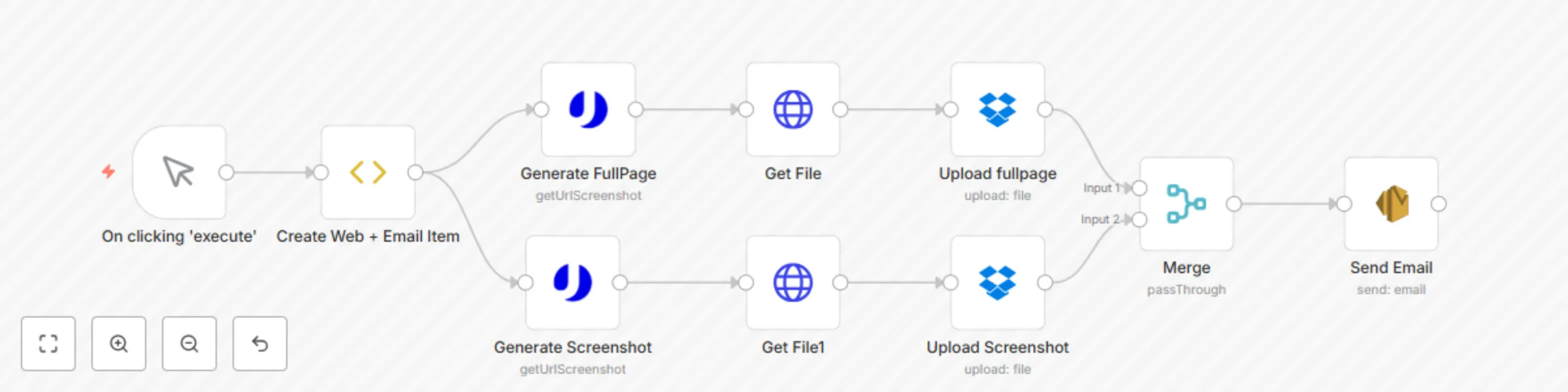
Do you want to create a website screenshot without browser extensions? This workflow creates screenshots of any website using the uProc [**Get Screenshot by URL tool**](https://app.uproc.io/#/tools/processor/get/url/screenshot) and sends an email with the screenshots. ![workflow-screenshot](fileId:357) You need to add your credentials (Email and API Key - real -) located at [**Integration section**](https://app.uproc.io/#/settings/integration) to n8n. Node "Create Web + Email Item" can be replaced by any other supported service returning Website and Email values, like Google Sheets, Mailchimp, MySQL, or Typeform. Every "uProc" node returns an image URL of the captured website. This generated URL will remain only 24 hours in our server. You can set up the uProc node with several parameters: - width: you can choose one of the predefined values to generate the screenshot, or you can set up a custom width you want. - full-page: the tool will return a screenshot of the website from top to bottom with the defined width. In our workflow, we generate two screenshots: 1) One screenshot of 640 pixels width. 2) One full-page screenshot of 640 pixels width. Screenshots are downloaded by "Get File" nodes and saved to the screenshots folder in Dropbox. ![image.png](fileId:356) Finally, we use the Amazon SES node to send an HTML email with both screenshots to the specified email. We will receive the next email: ![image.png](fileId:355)

M
Miquel Colomer
File Management
29 Dec 2020
2452
0
Workflow preview: Detect web visitors country by IP address with uProc
Free intermediate

Detect web visitors country by IP address with uProc

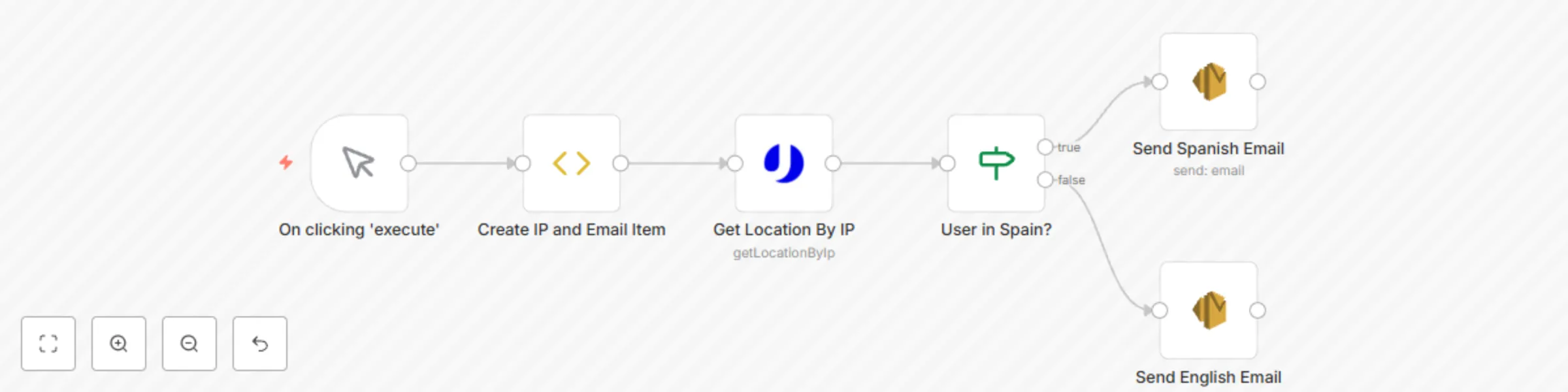
Do you want to know where a web visitor lives? This workflow enriches any lead by IP address using the uProc.io [**Location By IP address tool**](https://app.uproc.io/#/tools/processor/get/location/by-ip) and sends an email in Spanish or English depending on the detected web visitor country. ![workflow-screenshot](fileId:353) You need to add your credentials (Email and API Key - real -) located at [**Integration section**](https://app.uproc.io/#/settings/integration) to n8n. Node "Create IP and Email Item" can be replaced by any other supported service with IP and Email values, like Mailchimp, Calendly, or MySQL. The "uProc" node returns the location of the provided IP address. "If" node checks if the web visitor country code belongs to Spain (ES Isocode). If positive, we use the Spanish language in our emails. Otherwise, we will use the English language in our communications. Depending on the detected country code, we use the Amazon SES node to send the customized email adapted to the right language.

M
Miquel Colomer
Lead Generation
28 Dec 2020
992
0
Workflow preview: Verify an email recipient with uProc
Free beginner

Verify an email recipient with uProc

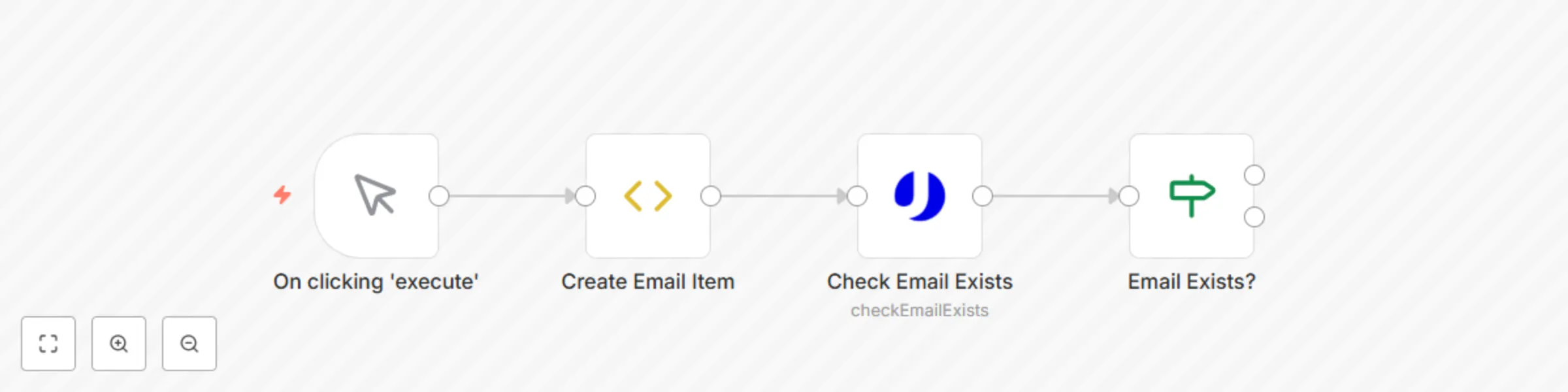
Do you want to avoid bounces in your Email Marketing campaigns? This workflow verifies emails using the [**uProc.io email verifier**](https://app.uproc.io/#/tools/processor/check/email/exists). ![workflow-screenshot](fileId:352) You need to add your credentials (Email and API Key - real -) located at [**Integration section**](https://app.uproc.io/#/settings/integration) to n8n. Node "Create Email Item" can be replaced by any other supported service with email value, like Mailchimp, Calendly, MySQL, or Typeform. The "uProc" node returns a status per checked email (deliverable, undeliverable, spamtrap, softbounce,...). "If" node checks if "deliverable" status exists. If value is not present, you can mark email as invalid to discard bounces. If "deliverable" status is present, you can use email in your Email Marketing campaigns. If you need to know detailed indicators of any email, you can use the tool "Communication" > "Check Email Exists (Extended)" to get advanced information.

M
Miquel Colomer
Lead Generation
28 Dec 2020
1029
0
Workflow preview: Auto-notify on new major n8n releases via RSS, email & telegram
Free intermediate

Auto-notify on new major n8n releases via RSS, email & telegram

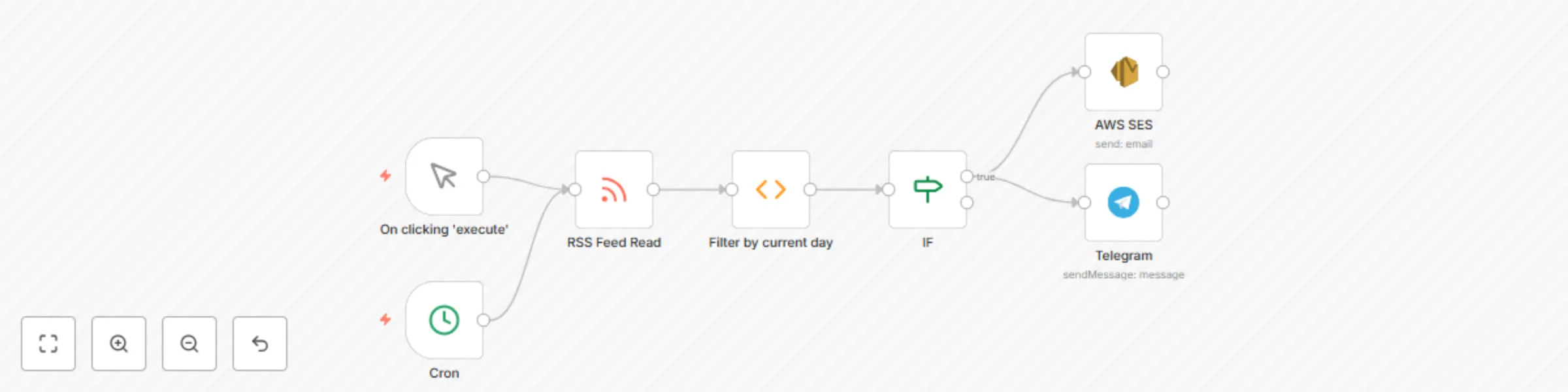
![image.png](fileId:1032) This **n8n workflow template** checks for new **major releases** (tagged with `.0`) of the **n8n project** using its official **GitHub releases feed**. It runs multiple times a day and sends notifications via **email and Telegram** if a new release is found. &gt; ⚠️ *Note: You must **activate the workflow** to start receiving release notifications.* --- ### 🚀 **What It Does** - Monitors the [n8n GitHub releases feed](https://github.com/n8n-io/n8n/releases.atom) - Detects major versions (e.g., `1.0.0`, `2.0.0`) - Sends alert messages via **Telegram** and **email (SES)** when a release is published --- ### ⏰ **Scheduling Details** - The **Cron node** checks for new releases **three times per day**: **10:00, 14:00, and 18:00** server time. --- ### 🛠️ **Step-by-Step Setup** 1. **Configure Telegram Bot** Connect your Telegram bot and specify the chat ID where you want to receive notifications. 2. **Set up AWS SES Credentials** Use a verified sender email and set up AWS SES credentials in your n8n instance. 3. **Activate the Workflow** Enable the workflow in your instance to start receiving notifications. 4. **Customize Notification Messages** *(Optional)* You can modify the email subject, Telegram format, or filter logic. --- ### 🧠 **How It Works: Workflow Overview** 1. **Cron Trigger** Runs the workflow at 10:00, 14:00, and 18:00 daily. 2. **Read RSS Feed** Pulls data from `https://github.com/n8n-io/n8n/releases.atom`. 3. **Filter by Current Day** Filters the feed to match: - Releases **published in the last 4 hours** - Titles starting with `n8n@` and **ending with `.0`** 4. **Condition Check** Uses a regex to check if the filter result contains any release data. 5. **Notifications** - If a new major release is found, sends: - **Telegram message** to a specified chat - **Email** via AWS SES with release info --- ### 📨 **Final Output** You'll receive a **Telegram message** and **email** when a new major n8n version is released. --- ### 🔐 **Credentials Used** - **Telegram API** – For sending chat notifications - **AWS SES** – To send email alerts --- ### ✨ **Customization Tips** - **Change Notification Channels**: Add Slack, Discord, or other preferred channels. - **Adjust Cron Schedule**: Modify the Cron node to fit your check frequency. - **Modify Filters**: Detect patch or beta versions by changing the `.0` condition. - **Send Release Notes**: Extend the feed parsing to include release content. --- ### ❓Questions? Template created by [**Miquel Colomer**](https://www.linkedin.com/in/miquelcolomersalas/) and [**n8nhackers.com**](https://n8nhackers.com). Need help customizing or deploying? [**Contact us**](mailto:[email protected]) for consulting and support.

M
Miquel Colomer
DevOps
26 Oct 2020
1700
0
Workflow preview: Purge n8n execution history located in Mysql
Free beginner

Purge n8n execution history located in Mysql

This workflow is useful if you have lots of tasks running daily. MySQL node (or the database used to save data shown in n8n - could be Mongo, Postgres, ... -) remove old entries from execution_entity table that contains the history of the executed workflows. ![workflow-screenshot](fileId:267) If you have multiple tasks executed every minute, 1024 rows will be created every day (60 minutes x 24 hours) per every task. This will increase the table size fastly. SQL query deletes entries older than 30 days taking stoppedAt column as a reference for date calculations. ![image.png](fileId:265) You only have to setup Mysql connection properly and config cron to execute once per day in a low traffic hour, this way ![image.png](fileId:266)

M
Miquel Colomer
DevOps
5 Oct 2020
2378
0