Personalized outreach for lawyers with LinkedIn scraping, GPT-4o, Google Sheets

Workflow preview

Workflow preview
100%
Personalized outreach for lawyers with LinkedIn scraping, GPT-4o, Google Sheets preview
Open on n8n.io

Important notice

This workflow is provided as-is. Please review and test before using in production.

1. Workflow Overview

️ This template uses only official n8n nodes. No community nodes required. ‍ Who is this for? This workflow is designed for: Legal tech founders ...

Best for

  • Lead Generation automation workflows
  • Multimodal AI automation workflows
  • intermediate n8n builders looking for reusable templates

Tools used

n8n-nodes-base.set, n8n-nodes-base.googlesheets, @n8n/n8n-nodes-langchain.lmchatopenrouter, @n8n/n8n-nodes-langchain.agent, n8n-nodes-base.httprequest, n8n-nodes-base.code, n8n-nodes-base.if, @n8n/n8n-nodes-langchain.openai

Source and attribution

This workflow is cataloged by N8N Workflows and links back to its original n8n.io source page by Ibrahim Malick.

Original n8n.io source

1.1 Workflow description

Title
Personalized outreach for lawyers with LinkedIn scraping, GPT-4o, Google Sheets
Workflow name
Personalized outreach for lawyers with LinkedIn scraping, GPT-4o, Google Sheets

⚠️ This template uses only official n8n nodes. No community nodes required.

🧑‍💼 Who is this for?

This workflow is designed for:

  • Legal tech founders
  • Marketing freelancers or consultants
  • Agencies supporting lawyers and small law firms
  • Anyone doing outbound outreach in the legal niche

❓ What problem is this solving?

LinkedIn is a goldmine for targeting legal professionals — but scraping and personalizing outreach is tedious and expensive. Most tools either:

  • Require paid LinkedIn Sales Navigator
  • Can’t personalize at scale
  • Violate LinkedIn’s TOS

This workflow solves that by using free Google Search, OpenRouter AI, and GPT-4o to find, enrich, and message up to 1,000 solo lawyers per day — without using browser automation or scrapers.


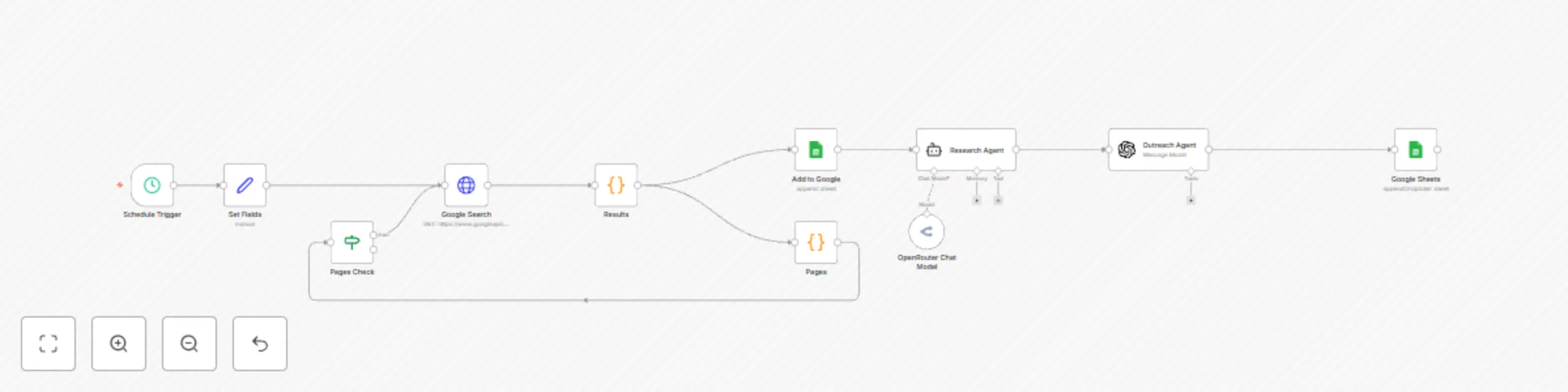
⚙️ What this workflow does

  1. Uses Google Programmable Search to find solo lawyers and small firm founders on LinkedIn
  2. Parses each profile’s name, title, profile URL, and snippet
  3. Saves raw lead data to Google Sheets
  4. Uses OpenRouter Sonar Pro to enrich each profile with external content
  5. Generates a personalized, 1-line message using GPT-4o
  6. Appends the final message into Google Sheets for outreach

🛠️ Setup

Estimated time: 15–20 minutes

✅ Google Programmable Search

  • Enable the Custom Search API on Google Cloud
  • Create a programmable search engine set to search the full web
  • Copy your API key and CX ID

✅ Google Sheets

  • Create a sheet with columns: Name, Title, Profile URL, Outreach Message
  • Share the sheet with your OAuth-connected Google account

✅ OpenRouter

  • Sign up at openrouter.ai
  • Fund with at least $5 and generate your API key
  • Use the model perplexity/sonar-pro for real-time research

✅ GPT-4o (optional)

  • You can use your OpenAI key or route GPT-4o via OpenRouter

All setup-specific values are marked clearly in sticky notes and placeholders.


🛠️ How to customize this workflow to your needs

  • Change the Google search query to match your industry (e.g., "founder" AND "therapist" site:linkedin.com/in)
  • Modify the AI prompt to match your tone (formal, casual, humorous)
  • Connect the final output to your CRM (like HubSpot, Airtable, etc.)
  • Add a second outreach message variant to A/B test performance

📌 Sticky Notes & Annotations

  • All nodes are clearly renamed for understandability (e.g., Find Lawyer Profiles, Parse LinkedIn Search Results)
  • Color-coded sticky notes explain:
    • Setup instructions
    • Required credentials
    • Use case

🗂 Category

  • AI
  • Sales
  • Marketing

1.2 Logical Blocks

This catalog entry is organized from the workflow JSON. The node-level section below shows the executable blocks available for review before importing the template.

2. Block-by-Block Analysis

Block 1 - Set Fields

Type / Role
n8n-nodes-base.set - set
Config choices
Version 3.4

Block 2 - Add to Google

Type / Role
n8n-nodes-base.googleSheets - googleSheets
Config choices
Version 4.5

Block 3 - OpenRouter Chat Model

Type / Role
@n8n/n8n-nodes-langchain.lmChatOpenRouter - lmChatOpenRouter
Config choices
Version 1

Block 4 - Research Agent

Type / Role
@n8n/n8n-nodes-langchain.agent - agent
Config choices
Version 1.7

Block 5 - Google Search

Type / Role
n8n-nodes-base.httpRequest - httpRequest
Config choices
Version 4.2

Block 6 - Results

Type / Role
n8n-nodes-base.code - code
Config choices
Version 2

Block 7 - Pages

Type / Role
n8n-nodes-base.code - code
Config choices
Version 2

Block 8 - Pages Check

Type / Role
n8n-nodes-base.if - if
Config choices
Version 2.2

Block 9 - Google Sheets

Type / Role
n8n-nodes-base.googleSheets - googleSheets
Config choices
Version 4.5

Block 10 - Outreach Agent

Type / Role
@n8n/n8n-nodes-langchain.openAi - openAi
Config choices
Version 1.8

Block 11 - Schedule Trigger

Type / Role
n8n-nodes-base.scheduleTrigger - scheduleTrigger
Config choices
Version 1.2

3. Summary Table

Workflow Personalized outreach for lawyers with LinkedIn scraping, GPT-4o, Google Sheets
Complexity intermediate
Nodes 11
Categories Lead Generation, Multimodal AI
Author Ibrahim Malick
Published 11 Jun 2025

4. Reproducing the Workflow from Scratch

  1. 1. Download the workflow JSON

    Use the JSON export at /data/workflows/4879/4879.json as the source template for this automation.

  2. 2. Import the template into n8n

    Open n8n, import the downloaded JSON, and review each node before activating the workflow.

  3. 3. Configure credentials and variables

    Replace placeholder credentials, API keys, webhook URLs, account IDs, and environment-specific values with your own settings.

  4. 4. Test with sample data

    Run the workflow manually or in a staging workspace, inspect node output, and confirm downstream systems receive the expected data.

  5. 5. Activate and monitor

    Enable the workflow only after testing, then monitor executions, errors, and rate limits during the first production runs.

5. General Notes & Resources

Review imported nodes carefully before activation. This catalog entry is intended to help you inspect the workflow structure, understand required services, and find related templates faster.

Node names, credentials, schedules, webhook paths, and external service limits may need adjustment for your workspace.

Frequently asked questions

What does Personalized outreach for lawyers with LinkedIn scraping, GPT-4o, Google Sheets do?

️ This template uses only official n8n nodes. No community nodes required. ‍ Who is this for? This workflow is designed for: Legal tech founders ...

What do I need before importing this workflow?

Review the workflow JSON, configure any required credentials in n8n, and test the automation in a safe workspace before using it in production.

Can I customize this workflow?

Yes. Use the block-by-block analysis and the downloadable JSON to inspect each node, then adjust credentials, prompts, schedules, filters, or destinations for your Lead Generation, Multimodal AI use case.