Block 1 - AI Agent
- Type / Role
- @n8n/n8n-nodes-langchain.agent - agent
- Config choices
- Version 2.2


 Early Deal
This workflow is provided as-is. Please review and test before using in production.
This workflow contains community nodes that are only compatible with the self hosted version of n8n. LinkedIn Automation Outreach Workflow Documentation Inline Notes for Each Node 1. On form submis...
@n8n/n8n-nodes-langchain.agent, @n8n/n8n-nodes-langchain.lmchatgroq, n8n-nodes-browserflow.browserflow, n8n-nodes-base.formtrigger, n8n-nodes-base.splitout, n8n-nodes-base.limit, n8n-nodes-base.code, n8n-nodes-base.stickynote
This workflow is cataloged by N8N Workflows and links back to its original n8n.io source page by ObisDev.
Original n8n.io sourceThis workflow contains community nodes that are only compatible with the self-hosted version of n8n.
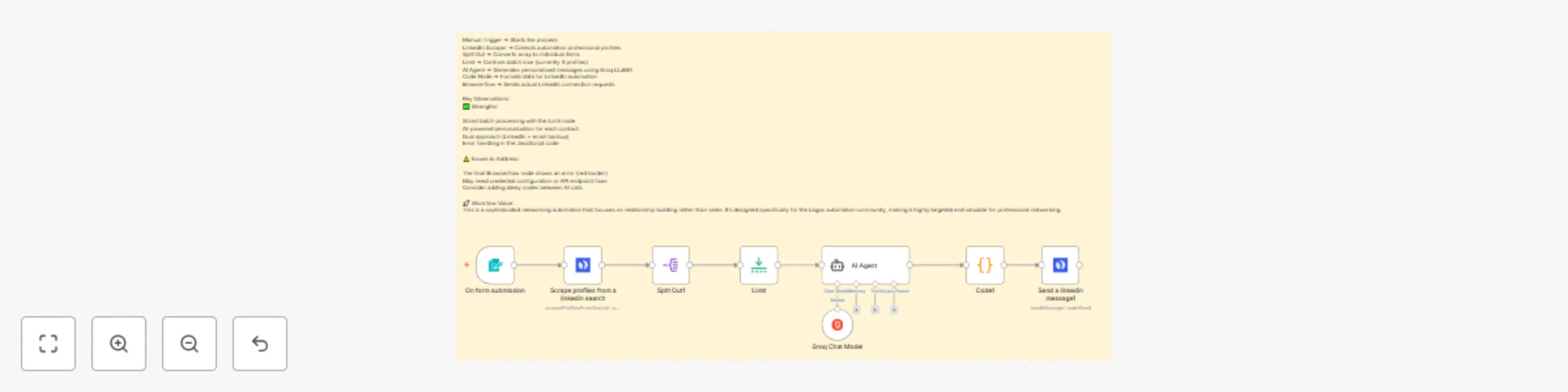
Trigger Node - Manual Start
📝 Note: "Manual trigger to start the LinkedIn scraping and outreach process.
This node initiates the workflow when you want to begin lead processing."
HTTP Request/Browserflow Node
📝 Note: "Scrapes LinkedIn profiles based on search criteria (e.g., automation specialists in Lagos).
Returns JSON array with profile data including names, URLs, taglines, locations, and summaries.
Uses scrapeProfilesFromSearch.linkedinSearch() function."
Split Out Node
📝 Note: "Converts the JSON array of profiles into individual items for processing.
Each profile becomes a separate execution path. Field to split: 'data'.
This enables personalized message generation for each contact."
Limit Node
📝 Note: "Controls batch size for processing (currently set to 3 items).
Prevents overwhelming the AI agent and helps with rate limiting.
Adjust max items based on your subscription limits and testing needs."
LangChain AI Agent Node
📝 Note: "Generates personalized LinkedIn and email outreach messages using profile data.
Uses Groq Chat Model (llama3-8b-8192) for cost-effective text generation.
Input: Individual profile data. Output: Structured JSON with personalized messages.
System prompt focuses on networking approach rather than sales."
JavaScript Code Node
📝 Note: "Processes AI-generated messages and formats data for LinkedIn automation.
Extracts connection message, profile URL, and adds automation parameters.
Includes error handling for malformed AI responses and random delay generation.
Prepares data structure compatible with Browserflow LinkedIn automation."
Browserflow/HTTP Node
📝 Note: "Automates LinkedIn connection requests with personalized messages.
Uses formatted data from Code1 node including target URL and message content.
Includes built-in delays and retry logic to avoid LinkedIn rate limiting.
⚠️ Currently shows error - check Browserflow configuration and credentials."
Flow Type: Sequential Processing with Batch Control Purpose: Automated LinkedIn networking outreach for automation professionals Target Audience: Lagos-based automation specialists and similar professionals
This sophisticated n8n workflow automates the entire process of discovering, analyzing, and reaching out to potential networking contacts in the automation industry. Designed specifically for automation agency owners and professionals looking to build meaningful connections within their local tech community.
🔄 Workflow Process:
Stage 1: Data Collection The workflow begins with a manual trigger that initiates a comprehensive LinkedIn profile scraping operation. Using advanced web scraping techniques, it searches for automation specialists, particularly focusing on the Lagos tech ecosystem. The scraping function targets professionals with expertise in tools like n8n, Make.com, AI automation, and workflow optimization.
Stage 2: Data Processing & Segmentation Once the profile data is collected, the Split Out node transforms the bulk JSON response into individual processing items. This crucial step enables personalized treatment of each contact. The Limit node provides batch control, allowing you to test with smaller groups (currently 3 profiles) before scaling to larger datasets.
Stage 3: AI-Powered Personalization The AI Agent represents the workflow's intelligence core, utilizing Groq's LLaMA model for cost-effective, high-quality text generation. Each profile receives a customized analysis that identifies:
The AI generates both LinkedIn connection messages and email alternatives, ensuring multiple touchpoint options. Messages focus on genuine networking value rather than sales pitches, emphasizing knowledge sharing, collaboration opportunities, and community building.
Stage 4: Message Optimization & Formatting The JavaScript Code node serves as the workflow's data orchestrator, transforming AI-generated content into automation-ready formats. It handles:
Stage 5: Automated Outreach Execution The final Browserflow integration automates the actual LinkedIn connection process. It navigates to each target profile, sends personalized connection requests, and implements intelligent delays to maintain LinkedIn compliance. Built-in error handling ensures workflow resilience even when individual requests fail.
🎖️ Key Features:
🎯 Use Cases:
⚡ Technical Specifications:
This workflow represents a sophisticated approach to professional networking automation, balancing efficiency with authentic relationship building. It's particularly valuable for automation professionals who understand the importance of genuine connections over mass outreach tactics.
This catalog entry is organized from the workflow JSON. The node-level section below shows the executable blocks available for review before importing the template.
| Workflow | Personalized LinkedIn network outreach with Groq AI & Browserflow automation |
|---|---|
| Complexity | intermediate |
| Nodes | 9 |
| Categories | Lead Nurturing, Multimodal AI |
| Author | ObisDev |
| Published | 18 Aug 2025 |
Use the JSON export at /data/workflows/7530/7530.json as the source template for this automation.
Open n8n, import the downloaded JSON, and review each node before activating the workflow.
Replace placeholder credentials, API keys, webhook URLs, account IDs, and environment-specific values with your own settings.
Run the workflow manually or in a staging workspace, inspect node output, and confirm downstream systems receive the expected data.
Enable the workflow only after testing, then monitor executions, errors, and rate limits during the first production runs.
Review imported nodes carefully before activation. This catalog entry is intended to help you inspect the workflow structure, understand required services, and find related templates faster.
Node names, credentials, schedules, webhook paths, and external service limits may need adjustment for your workspace.
This workflow contains community nodes that are only compatible with the self hosted version of n8n. LinkedIn Automation Outreach Workflow Documentation Inline Notes for Each Node 1. On form submis...
Review the workflow JSON, configure any required credentials in n8n, and test the automation in a safe workspace before using it in production.
Yes. Use the block-by-block analysis and the downloadable JSON to inspect each node, then adjust credentials, prompts, schedules, filters, or destinations for your Lead Nurturing, Multimodal AI use case.