O

ObisDev

3
Workflows

Workflows by ObisDev

Workflow preview: Personalized LinkedIn network outreach with Groq AI & Browserflow automation
Free intermediate

Personalized LinkedIn network outreach with Groq AI & Browserflow automation

*This workflow contains community nodes that are only compatible with the self-hosted version of n8n.* # LinkedIn Automation Outreach Workflow Documentation ## Inline Notes for Each Node ### 1. **On form submission** *Trigger Node - Manual Start* ``` 📝 Note: "Manual trigger to start the LinkedIn scraping and outreach process. This node initiates the workflow when you want to begin lead processing." ``` ### 2. **Scrape profiles from a linkedin search** *HTTP Request/Browserflow Node* ``` 📝 Note: "Scrapes LinkedIn profiles based on search criteria (e.g., automation specialists in Lagos). Returns JSON array with profile data including names, URLs, taglines, locations, and summaries. Uses scrapeProfilesFromSearch.linkedinSearch() function." ``` ### 3. **Split Out1** *Split Out Node* ``` 📝 Note: "Converts the JSON array of profiles into individual items for processing. Each profile becomes a separate execution path. Field to split: 'data'. This enables personalized message generation for each contact." ``` ### 4. **Limit** *Limit Node* ``` 📝 Note: "Controls batch size for processing (currently set to 3 items). Prevents overwhelming the AI agent and helps with rate limiting. Adjust max items based on your subscription limits and testing needs." ``` ### 5. **AI Agent** *LangChain AI Agent Node* ``` 📝 Note: "Generates personalized LinkedIn and email outreach messages using profile data. Uses Groq Chat Model (llama3-8b-8192) for cost-effective text generation. Input: Individual profile data. Output: Structured JSON with personalized messages. System prompt focuses on networking approach rather than sales." ``` ### 6. **Code1** *JavaScript Code Node* ``` 📝 Note: "Processes AI-generated messages and formats data for LinkedIn automation. Extracts connection message, profile URL, and adds automation parameters. Includes error handling for malformed AI responses and random delay generation. Prepares data structure compatible with Browserflow LinkedIn automation." ``` ### 7. **Send a linkedin message1** *Browserflow/HTTP Node* ``` 📝 Note: "Automates LinkedIn connection requests with personalized messages. Uses formatted data from Code1 node including target URL and message content. Includes built-in delays and retry logic to avoid LinkedIn rate limiting. ⚠️ Currently shows error - check Browserflow configuration and credentials." ``` ## Workflow Architecture Overview **Flow Type:** Sequential Processing with Batch Control **Purpose:** Automated LinkedIn networking outreach for automation professionals **Target Audience:** Lagos-based automation specialists and similar professionals ## Detailed Workflow Description ### 🎯 **LinkedIn Automation Outreach Workflow for Networking** This sophisticated n8n workflow automates the entire process of discovering, analyzing, and reaching out to potential networking contacts in the automation industry. Designed specifically for automation agency owners and professionals looking to build meaningful connections within their local tech community. **🔄 Workflow Process:** **Stage 1: Data Collection** The workflow begins with a manual trigger that initiates a comprehensive LinkedIn profile scraping operation. Using advanced web scraping techniques, it searches for automation specialists, particularly focusing on the Lagos tech ecosystem. The scraping function targets professionals with expertise in tools like n8n, Make.com, AI automation, and workflow optimization. **Stage 2: Data Processing & Segmentation** Once the profile data is collected, the Split Out node transforms the bulk JSON response into individual processing items. This crucial step enables personalized treatment of each contact. The Limit node provides batch control, allowing you to test with smaller groups (currently 3 profiles) before scaling to larger datasets. **Stage 3: AI-Powered Personalization** The AI Agent represents the workflow's intelligence core, utilizing Groq's LLaMA model for cost-effective, high-quality text generation. Each profile receives a customized analysis that identifies: - Specific technical expertise and tools - Geographic and industry connections - Potential collaboration opportunities - Shared professional interests The AI generates both LinkedIn connection messages and email alternatives, ensuring multiple touchpoint options. Messages focus on genuine networking value rather than sales pitches, emphasizing knowledge sharing, collaboration opportunities, and community building. **Stage 4: Message Optimization & Formatting** The JavaScript Code node serves as the workflow's data orchestrator, transforming AI-generated content into automation-ready formats. It handles: - Response validation and error recovery - LinkedIn-specific message formatting - Automation parameter injection (delays, retry logic) - Fallback email preparation - Metadata tracking for campaign analysis **Stage 5: Automated Outreach Execution** The final Browserflow integration automates the actual LinkedIn connection process. It navigates to each target profile, sends personalized connection requests, and implements intelligent delays to maintain LinkedIn compliance. Built-in error handling ensures workflow resilience even when individual requests fail. **🎖️ Key Features:** - **Intelligent Batch Processing**: Controlled processing prevents rate limiting - **Dual-Channel Approach**: LinkedIn + email backup ensures message delivery - **Geographic Targeting**: Lagos-focused networking for local community building - **AI-Driven Personalization**: Each message uniquely crafted based on profile analysis - **Error Resilience**: Comprehensive error handling maintains workflow stability - **Compliance-First Design**: Built-in delays and limits respect platform policies **🎯 Use Cases:** - Building local automation professional networks - Identifying potential collaboration partners - Market research on automation service providers - Community building for tech meetups and events - Knowledge sharing network development **⚡ Technical Specifications:** - **Model**: Groq LLaMA3-8B for cost-effective AI generation - **Processing Capacity**: 3-item batches (scalable) - **Message Types**: LinkedIn connections + email alternatives - **Automation Platform**: Browserflow for LinkedIn interaction - **Error Handling**: Multi-layer validation and recovery - **Personalization Depth**: 3-5 specific talking points per contact This workflow represents a sophisticated approach to professional networking automation, balancing efficiency with authentic relationship building. It's particularly valuable for automation professionals who understand the importance of genuine connections over mass outreach tactics.

O
ObisDev
Lead Nurturing
18 Aug 2025
626
0
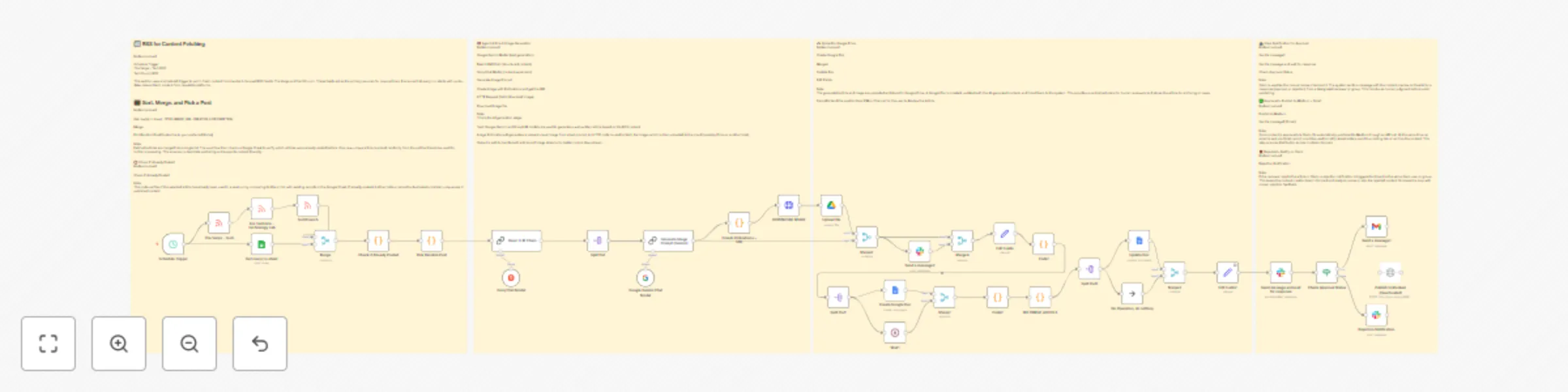
Workflow preview: Automate RSS to Medium publishing with Groq, Gemini & Slack approval system
Free advanced

Automate RSS to Medium publishing with Groq, Gemini & Slack approval system

# This n8n template demonstrates how to build a complete AI-powered content pipeline that pulls fresh news from RSS feeds, transforms it into engaging Medium articles. **Categories** * Content Creation * AI Automation * Publishing * Social Media **Share** Yes, this n8n workflow is straight FIRE for content creators who want to automate their entire publishing game! 🔥 This template creates a complete content pipeline that pulls fresh tech news from RSS feeds, transforms it into engaging Medium articles using AI, generates matching cover images, and handles the entire approval-to-publishing process through Slack integration. **Good to know** * Uses multiple AI models (Groq, Google Gemini) for content generation * Integrates with Medium publishing API for automated posting * Includes smart duplicate checking via Google Sheets * Generates professional cover images using Pollinations AI * Full Slack approval workflow with human oversight * Automatic storage and organization in Google Drive ## How it works **RSS Content Fetching** * Pulls fresh content from The Verge, TechCrunch, and Ars Technica RSS feeds on a 6-hour schedule * Smart filtering ensures only new, unposted articles are processed **AI Content Generation** * Groq and Google Gemini models transform RSS content into engaging Medium-style articles * Automatic image prompt generation creates relevant cover visuals * Pollinations AI generates professional marketing-style images **Smart Review & Approval** * Creates Google Doc with formatted article for easy review * Sends preview to Slack channel/DM for human approval * Waits for explicit approval before publishing **Multi-Platform Publishing** * Auto-publishes to Medium upon approval * Sends formatted content via Gmail * Stores everything in Google Drive for archiving * Updates Google Sheets to prevent duplicates **Rejection Handling** * Clean rejection notifications via Slack * No publishing if content doesn't meet standards ## Key Features That'll Blow Your Mind * **Zero-Duplicate Publishing**: Smart Google Sheets integration tracks all published content * **Human-in-the-Loop**: Slack approval system keeps quality control tight * **Full AI Pipeline**: From RSS parsing to image generation, everything's automated * **Multi-Source Content**: Aggregates from top tech news sources * **Professional Formatting**: Articles come out Medium-ready with proper structure * **Cloud Storage**: Everything gets archived in Google Drive automatically * **Email Distribution**: Auto-sends content to your mailing list ## How to use * Clone this workflow and connect your credentials * Set up your Google Sheets tracking document * Configure Slack notifications for your approval channel * Add your Medium API credentials for publishing * The schedule trigger runs every 6 hours, but you can adjust timing * Manual trigger available for testing and one-off runs ## Requirements * **Google Workspace**: Sheets, Docs, Drive, Gmail access * **Slack Workspace**: For approval notifications and review * **Groq API**: For AI content generation * **Google Gemini API**: For image prompt creation * **Medium API**: For automated publishing * **Pollinations**: Free AI image generation (no API key needed) ## Customizing this workflow This isn't just another automation—it's your new content creation superpower. Here's how to make it yours: * **Switch RSS Sources**: Replace tech feeds with your niche (finance, health, etc.) * **Modify AI Prompts**: Adjust the content generation style to match your brand voice * **Change Publishing Destinations**: Swap Medium for WordPress, Ghost, or other platforms * **Add More Approval Steps**: Include multiple reviewers or different approval criteria * **Customize Image Generation**: Modify prompts for different visual styles * **Schedule Flexibility**: Adjust timing from 6 hours to daily, weekly, whatever fits **Pro Tips:** * The workflow includes comprehensive error handling and logging * Sticky notes provide detailed documentation for each section * Modular design makes it easy to swap components * Built-in duplicate prevention saves you from embarrassing reposts This template is perfect for content creators, digital marketers, tech bloggers, and anyone who wants to scale their content game without losing quality control. It's like having a full content team working 24/7, but smarter and way more consistent. **Use cases that work incredibly well:** * Tech blog automation for agencies * News aggregation and commentary sites * Personal brand content scaling * Client content creation workflows * Multi-platform publishing systems

O
ObisDev
Content Creation
31 Jul 2025
528
0

Workflow preview: AI-powered WhatsApp chatbot with Venom Bot & Google Gemini (no official API)
Free advanced

AI-powered WhatsApp chatbot with Venom Bot & Google Gemini (no official API)

**Get Started ** Creator: @obisdev This workflow powers a fully automated WhatsApp chatbot using a self-hosted Venom Bot instead of the official WhatsApp Business API. It integrates Google Gemini AI to generate intelligent, conversational responses and optionally pulls factual information from a Google Docs-based knowledge base. Designed for small businesses and creators, the bot can maintain contextual memory across messages and act as a smart virtual assistant for sales, support, and lead generation. **Overview** This n8n workflow connects with a custom-hosted Venom Bot that simulates WhatsApp Web to send and receive messages. It uses a Webhook trigger to receive incoming messages, processes them with an AI Agent powered by Gemini, optionally pulls extra data from a Google Doc or Google Sheet, and sends a smart reply back through the Venom Bot. The workflow also includes a memory system to retain user context, making it capable of handling follow-up questions and dynamic conversations. **Who this workflow is for** Small Business Owners: Offer 24/7 customer service on WhatsApp without paying for Meta’s Business API. Freelancers & Developers: Build, test, and monetize intelligent bots without the approval process of WhatsApp’s API. Online Sellers & Creators: Handle FAQs, orders, and customer inquiries via WhatsApp on autopilot. Marketers: Deploy campaign bots that respond to DMs with personalized product suggestions or lead captures. Hackers & Builders: Experiment with unofficial APIs to control WhatsApp reliably without breaking TOS for small-scale use. **Tools Used** n8n: The automation platform managing flow, context, and decision logic. Venom Bot: A Node.js-based, self-hosted WhatsApp Web bot used to send/receive messages. Google Gemini: AI engine for generating context-aware replies. Google Docs (Optional): Acts as a structured knowledge base for business info or FAQs. Google Sheets (Optional): Feeds real-time or structured data into your AI responses. **How to Install** Import the Workflow: Download the .json and import it into your n8n instance. Set Up Venom Bot: Deploy Venom Bot (on VPS or local) and set it to send messages to your Webhook URL. Webhook Configuration: Update the Webhook node in n8n and set 'Respond' to "Using Respond to Webhook Node". Connect Google Gemini: Add your Gemini API key in n8n credentials. Set Up Google Docs (Optional): Link the document containing your knowledge base. Enable Conversational Memory: Use ={{ $("Process Message").first().json.from }} as the session ID. Check API Key Matching: Ensure the API_SECRET_KEY in Venom .env matches the authorization header in n8n. Customize Persona & Prompts: Update the AI Agent system message to fit your brand tone. Use Cases Customer service without WhatsApp Business API Smart lead generation bots E-commerce order responders AI-powered chatbot for DMs FAQ responder with knowledge base support Connect with Me Email: [email protected] Twitter/X: @obisdev GitHub: github.com/obisdev Visit: obisdev.vercel.app #n8n #whatsappautomation #venombot #chatbots #noapi #geminiapi #googleworkspace #aiassistant #nocode #vpsautomation #chatbotwithoutapi #automationtools #customerbot #salesautomation #googleintegration

O
ObisDev
Support Chatbot
7 Jul 2025
2065
0