Personalized LinkedIn connection requests with Apollo, GPT-4, Apify & PhantomBuster

Workflow preview

Workflow preview
100%
Personalized LinkedIn connection requests with Apollo, GPT-4, Apify & PhantomBuster preview
Open on n8n.io

Important notice

This workflow is provided as-is. Please review and test before using in production.

1. Workflow Overview

AI LinkedIn Outreach Automation with Apollo, OpenAI & PhantomBuster Categories: Sales Automation Lead Generation AI Personalization This workflow creates a complete LinkedIn outreach automation sys...

Best for

  • Lead Generation automation workflows
  • Multimodal AI automation workflows
  • intermediate n8n builders looking for reusable templates

Tools used

n8n-nodes-base.stickynote, n8n-nodes-base.formtrigger, n8n-nodes-base.httprequest, @n8n/n8n-nodes-langchain.openai, n8n-nodes-base.limit, n8n-nodes-base.googlesheets, n8n-nodes-base.aggregate

Source and attribution

This workflow is cataloged by N8N Workflows and links back to its original n8n.io source page by Nick Saraev.

Original n8n.io source

1.1 Workflow description

Title
Personalized LinkedIn connection requests with Apollo, GPT-4, Apify & PhantomBuster
Workflow name
Personalized LinkedIn connection requests with Apollo, GPT-4, Apify & PhantomBuster

AI LinkedIn Outreach Automation with Apollo, OpenAI & PhantomBuster Categories: Sales Automation Lead Generation AI Personalization

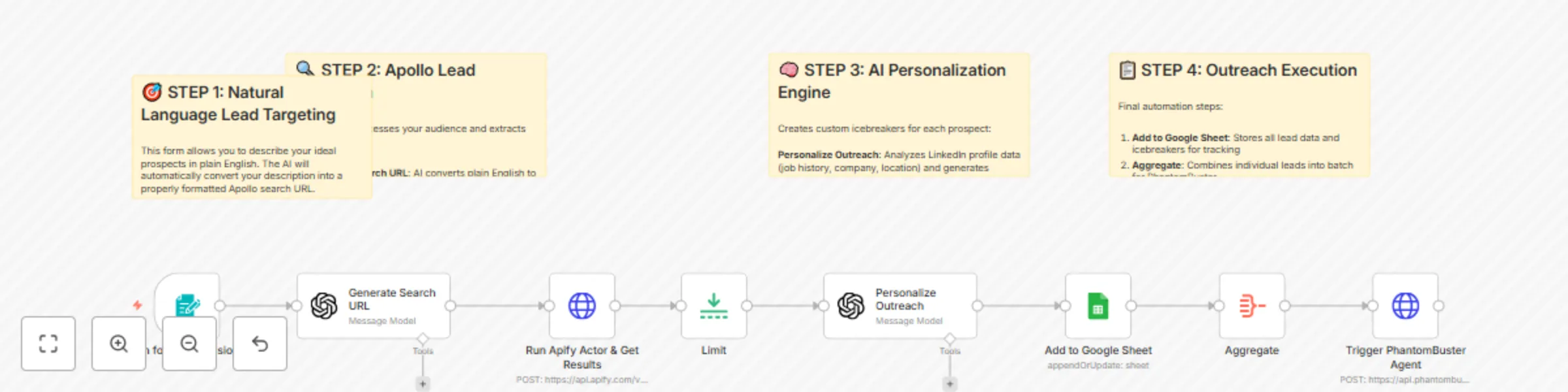
This workflow creates a complete LinkedIn outreach automation system that generates targeted lead lists from Apollo using natural language, enriches profiles with AI-personalized icebreakers, and automatically sends connection requests through PhantomBuster. Built by someone who's made over $1 million with AI automation, this system demonstrates the real-world approach to building profitable automation workflows.

Benefits

  • Natural Language Lead Targeting - Describe your ideal prospects in plain English and automatically generate Apollo search URLs
  • AI-Powered Personalization - Creates custom icebreakers based on LinkedIn profile data, employment history, and professional background
  • Complete Outreach Pipeline - From lead discovery to personalized connection requests, fully automated end-to-end
  • Smart Data Management - Automatically tracks all prospects in Google Sheets with deduplication and status tracking
  • Cost-Effective Scraping - Uses Apify to extract Apollo data without expensive subscription costs
  • Scalable Architecture - Processes hundreds of leads while respecting LinkedIn's connection limits

How It Works

  1. Natural Language Lead Generation:
  • Form input accepts audience descriptions in plain English
  • AI converts descriptions into properly formatted Apollo search URLs
  • Automatically includes location, company size, job titles, and keyword filters
  1. Apollo Data Extraction:
  • Uses Apify actor to scrape targeted lead lists from Apollo
  • Extracts LinkedIn URLs, email addresses, employment history, and profile data
  • Processes 500+ leads per run with detailed professional information
  1. AI Personalization Engine:
  • Analyzes LinkedIn profile data including job history and company information
  • Generates personalized icebreakers using proven connection request templates
  • Creates human-like messages that reference specific career details and achievements
  1. Google Sheets Integration:
  • Automatically stores all lead data in organized spreadsheet format
  • Tracks prospect information, contact details, and generated icebreakers
  • Provides easy data management and campaign tracking
  1. PhantomBuster Automation:
  • Connects to PhantomBuster API to trigger LinkedIn connection campaigns
  • Sends personalized connection requests with custom icebreakers
  • Respects LinkedIn's daily limits and mimics human behavior patterns

Business Use Cases

  • Sales Teams - Automate prospecting for B2B outreach campaigns
  • Agencies - Scale client acquisition through targeted LinkedIn outreach
  • Recruiters - Find and connect with qualified candidates efficiently
  • Entrepreneurs - Build professional networks in specific industries
  • Business Development - Generate qualified leads for partnership opportunities
  • Revenue Potential
  • This system can replace expensive LinkedIn outreach tools that cost $200-500/month. Users typically see:
  • 400% improvement in response rates through personalization
  • 10x faster lead generation compared to manual prospecting
  • Ability to process 500+ leads per hour vs. 10-20 manually

Difficulty Level: Intermediate Estimated Build Time: 1-2 hours Monthly Operating Cost: ~$50 (Apollo + PhantomBuster + AI APIs)

Watch My Complete 1-Hour Build Want to see exactly how I built this system from scratch? I walk through the entire development process live, including all the debugging, API integrations, and real-world testing that goes into building profitable automation systems. 🎥 See My Live Build Process: "Build This Automated AI LinkedIn DM System in 1 Hour (N8N)" This comprehensive tutorial shows my actual development approach - including the detours, problem-solving, and iterative testing that real automation building involves.

Required Google Sheets Setup Create a Google Sheet with these exact column headers:

Essential Lead Columns:

  • id - Unique prospect identifier
  • first_name - Contact's first name
  • last_name - Contact's last name
  • name - Full name
  • linkedin_url - LinkedIn profile URL
  • title - Current job title
  • email_status - Email verification status
  • photo_url - Profile photo URL
  • icebreaker - AI-generated personalized message

Setup Instructions:

  • Create Google Sheet with these headers in row 1
  • Connect Google Sheets OAuth in n8n
  • Update the document ID in the "Add to Google Sheet" node
  • PhantomBuster will read from this sheet for automated outreach

Set Up Steps

  1. Apollo & Apify Configuration:
  • Set up Apify account and obtain API credentials
  • Configure Apollo scraper actor with proper parameters
  • Test lead extraction with sample audience descriptions
  1. AI Personalization Setup:
  • Configure OpenAI API for natural language processing and personalization
  • Set up prompt templates for audience targeting and icebreaker generation
  • Test personalization quality with sample LinkedIn profiles
  1. Google Sheets Integration:
  • Create lead tracking spreadsheet with proper column structure
  • Configure Google Sheets API credentials and permissions
  • Set up data mapping for automatic lead storage
  1. PhantomBuster Connection:
  • Set up PhantomBuster account and LinkedIn connection
  • Configure LinkedIn auto-connect agent with custom message templates
  • Connect API for automated campaign triggering
  1. Form and Workflow Setup:
  • Configure form trigger for audience input collection
  • Set up data flow between all components
  • Add proper error handling and rate limiting
  1. Testing and Optimization:
  • Start with small batches (5-10 connections daily)
  • Monitor LinkedIn account health and response rates
  • Optimize icebreaker templates based on performance data

Important Compliance Notes

  • LinkedIn Limits: Respect 100 connection requests per week limit
  • Account Safety: Use PhantomBuster's human-like behavior patterns
  • Message Quality: Regularly update templates to avoid automation detection
  • Response Management: Monitor and respond to replies within 24 hours

Advanced Extensions

  • This system can be enhanced with:
  • Multi-channel Outreach: Add email sequences for comprehensive campaigns
  • A/B Testing: Test different icebreaker templates automatically
  • CRM Integration: Connect to Salesforce, HubSpot, or other sales systems
  • Response Tracking: Monitor reply rates and optimize messaging

Explore My Channel For more advanced automation systems that generate real business results, check out my YouTube channel where I share the exact strategies I've used to make over $1 million with AI automation.

1.2 Logical Blocks

This catalog entry is organized from the workflow JSON. The node-level section below shows the executable blocks available for review before importing the template.

2. Block-by-Block Analysis

Block 1 - Unnamed node

Type / Role
n8n-nodes-base.stickyNote - stickyNote
Config choices
Version 1

Block 2 - Unnamed node

Type / Role
n8n-nodes-base.stickyNote - stickyNote
Config choices
Version 1

Block 3 - Unnamed node

Type / Role
n8n-nodes-base.stickyNote - stickyNote
Config choices
Version 1

Block 4 - Unnamed node

Type / Role
n8n-nodes-base.stickyNote - stickyNote
Config choices
Version 1

Block 5 - On form submission

Type / Role
n8n-nodes-base.formTrigger - formTrigger
Config choices
Version 2.2

Block 6 - Run Apify Actor & Get Results

Type / Role
n8n-nodes-base.httpRequest - httpRequest
Config choices
Version 4.2

Block 7 - Generate Search URL

Type / Role
@n8n/n8n-nodes-langchain.openAi - openAi
Config choices
Version 1.6

Block 8 - Limit

Type / Role
n8n-nodes-base.limit - limit
Config choices
Version 1

Block 9 - Trigger PhantomBuster Agent

Type / Role
n8n-nodes-base.httpRequest - httpRequest
Config choices
Version 4.2

Block 10 - Add to Google Sheet

Type / Role
n8n-nodes-base.googleSheets - googleSheets
Config choices
Version 4.5

Block 11 - Personalize Outreach

Type / Role
@n8n/n8n-nodes-langchain.openAi - openAi
Config choices
Version 1.6

Block 12 - Aggregate

Type / Role
n8n-nodes-base.aggregate - aggregate
Config choices
Version 1

3. Summary Table

Workflow Personalized LinkedIn connection requests with Apollo, GPT-4, Apify & PhantomBuster
Complexity intermediate
Nodes 12
Categories Lead Generation, Multimodal AI
Author Nick Saraev
Published 08 Jun 2025

4. Reproducing the Workflow from Scratch

  1. 1. Download the workflow JSON

    Use the JSON export at /data/workflows/4803/4803.json as the source template for this automation.

  2. 2. Import the template into n8n

    Open n8n, import the downloaded JSON, and review each node before activating the workflow.

  3. 3. Configure credentials and variables

    Replace placeholder credentials, API keys, webhook URLs, account IDs, and environment-specific values with your own settings.

  4. 4. Test with sample data

    Run the workflow manually or in a staging workspace, inspect node output, and confirm downstream systems receive the expected data.

  5. 5. Activate and monitor

    Enable the workflow only after testing, then monitor executions, errors, and rate limits during the first production runs.

5. General Notes & Resources

Review imported nodes carefully before activation. This catalog entry is intended to help you inspect the workflow structure, understand required services, and find related templates faster.

Node names, credentials, schedules, webhook paths, and external service limits may need adjustment for your workspace.

Frequently asked questions

What does Personalized LinkedIn connection requests with Apollo, GPT-4, Apify & PhantomBuster do?

AI LinkedIn Outreach Automation with Apollo, OpenAI & PhantomBuster Categories: Sales Automation Lead Generation AI Personalization This workflow creates a complete LinkedIn outreach automation sys...

What do I need before importing this workflow?

Review the workflow JSON, configure any required credentials in n8n, and test the automation in a safe workspace before using it in production.

Can I customize this workflow?

Yes. Use the block-by-block analysis and the downloadable JSON to inspect each node, then adjust credentials, prompts, schedules, filters, or destinations for your Lead Generation, Multimodal AI use case.