Block 1 - Note1
- Type / Role
- n8n-nodes-base.stickyNote - stickyNote
- Config choices
- Version 1


 Early Deal
This workflow is provided as-is. Please review and test before using in production.
Description: Reignite cold leads automatically with this intelligent n8n automation template that integrates Zoho CRM, Azure OpenAI (GPT 4o mini), and Email. This workflow identifies leads that hav...
n8n-nodes-base.stickynote, n8n-nodes-base.scheduletrigger, n8n-nodes-base.function, n8n-nodes-base.if, n8n-nodes-base.set, n8n-nodes-base.emailsend, n8n-nodes-base.httprequest, @n8n/n8n-nodes-langchain.agent
This workflow is cataloged by N8N Workflows and links back to its original n8n.io source page by Rahul Joshi.
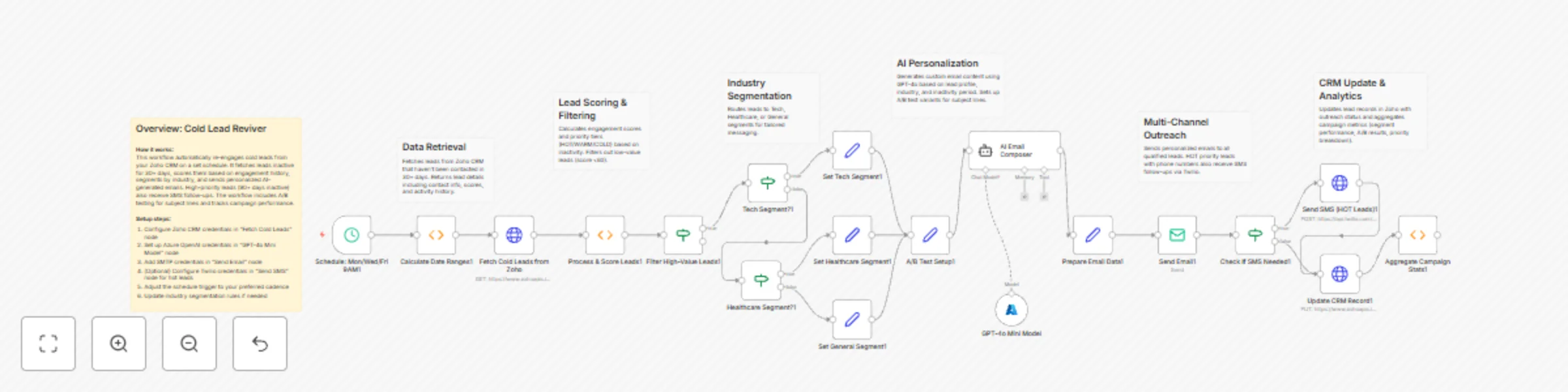
Original n8n.io sourceReignite cold leads automatically with this intelligent n8n automation template that integrates Zoho CRM, Azure OpenAI (GPT-4o-mini), and Email. This workflow identifies leads that haven’t been contacted in the last 30 days, generates personalized AI-written emails based on lead data, sends them directly, and updates the CRM—all without manual follow-up. Perfect for sales teams, marketing managers, and business development professionals who want to recover lost opportunities, boost engagement rates, and maintain an active sales pipeline with minimal effort.
⏰ Daily Trigger Automatically runs on a set schedule (daily or weekly) to check for inactive leads.
📅 Calculate 30 Days Ago Computes the exact date threshold (today − 30 days) to filter stale leads from Zoho CRM.
🔍 Fetch Cold Leads from Zoho Searches Zoho CRM for leads whose Last Activity occurred before the calculated date—returning only those needing re-engagement.
🤖 AI Email Generation Uses Azure OpenAI (GPT-4o-mini) to analyze each lead’s data and craft a personalized re-engagement email that reflects their previous interactions, interests, or stage in the funnel.
📧 Send Personalized Email Delivers the custom AI-generated email directly to each lead. Subject: “Let’s Reconnect!” Body: Tailored, human-like message written by AI.
✅ Update CRM Record After each email is sent, the workflow updates the lead in Zoho CRM—marking them as contacted, refreshing the Last Activity timestamp, and maintaining accurate engagement history.
✔️ Smart lead filtering based on inactivity window ✔️ AI-crafted, context-aware personalized emails ✔️ Seamless Zoho CRM integration for tracking and updates ✔️ Fully automated daily execution ✔️ Customizable for different CRMs or intervals
💡 Re-engage leads who’ve gone silent for 30+ days 📈 Improve conversion and response rates automatically 🤝 Maintain continuous pipeline nurturing 🔁 Save hours of manual email follow-up
• Zoho CRM API – for fetching and updating lead data • Azure OpenAI API (GPT-4o-mini) – for email personalization • SMTP / Email API – for sending re-engagement emails
✅ Automates your entire cold-lead revival process ✅ Saves manual outreach time for sales reps ✅ Increases lead conversion through personalized AI communication ✅ Keeps CRM data fresh and accurate
This catalog entry is organized from the workflow JSON. The node-level section below shows the executable blocks available for review before importing the template.
Showing the first 24 of 26 workflow blocks. Download the JSON for the full node graph.
| Workflow | Personalized cold lead re-engagement with Zoho CRM and GPT-4o-mini |
|---|---|
| Complexity | advanced |
| Nodes | 26 |
| Categories | Lead Nurturing, Multimodal AI |
| Author | Rahul Joshi |
| Published | 30 Oct 2025 |
Use the JSON export at /data/workflows/10328/10328.json as the source template for this automation.
Open n8n, import the downloaded JSON, and review each node before activating the workflow.
Replace placeholder credentials, API keys, webhook URLs, account IDs, and environment-specific values with your own settings.
Run the workflow manually or in a staging workspace, inspect node output, and confirm downstream systems receive the expected data.
Enable the workflow only after testing, then monitor executions, errors, and rate limits during the first production runs.
Review imported nodes carefully before activation. This catalog entry is intended to help you inspect the workflow structure, understand required services, and find related templates faster.
Node names, credentials, schedules, webhook paths, and external service limits may need adjustment for your workspace.
Description: Reignite cold leads automatically with this intelligent n8n automation template that integrates Zoho CRM, Azure OpenAI (GPT 4o mini), and Email. This workflow identifies leads that hav...
Review the workflow JSON, configure any required credentials in n8n, and test the automation in a safe workspace before using it in production.
Yes. Use the block-by-block analysis and the downloadable JSON to inspect each node, then adjust credentials, prompts, schedules, filters, or destinations for your Lead Nurturing, Multimodal AI use case.