Personalized AI assistant with voice support, email/calendar & web tools integration
Workflow preview


 Early Deal
DISCOUNT 20%

Important notice
This workflow is provided as-is. Please review and test before using in production.
Overview
✨ Intro This workflow shows how to go beyond a “plain” AI chatbot by:
🧠 Adding a Personality Layer — Link an extra LLM to inject a custom tone and style. Here, it’s Nova, a sassy, high-fashion assistant. You can swap in any personality without changing the main logic.
🎨 Custom Styling with CSS — Easily restyle the chatbot to match your brand or project theme.
Together, these make your bot smart, stylish, and uniquely yours.
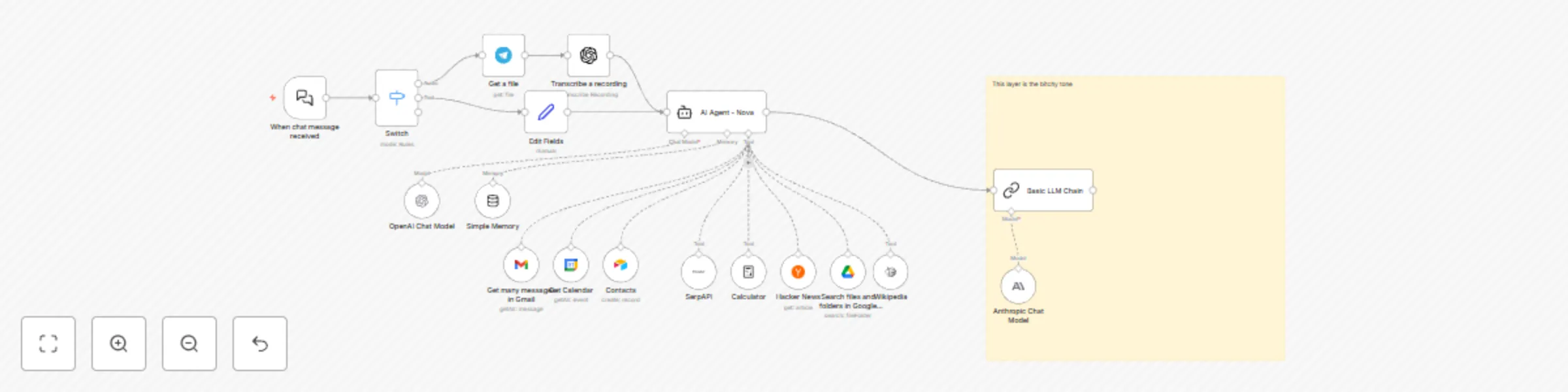
⚙️ How it Works 📥 Route Input
Chat trigger sends messages to a Switch.
If a Telegram video note exists → runs the audio path.
Otherwise → runs the text path.
🎤 Audio Path
Telegram Get a File → OpenAI Speech-to-Text → pass transcript to the agent.
💬 Text Path
Chat text is normalized and sent to the agent.
🛠 Agent Brain
Uses tools like Gmail 📧, Google Calendar 📅, Google Drive 📂, Airtable 📋, SerpAPI 🌐, Wikipedia 📚, Hacker News 📰, and Calculator ➗.
🧾 Memory
Keeps the last 20 messages for context-aware replies.
💅 Optional Personality Polish
An LLM Chain adds witty or cheeky tone on top of the agent’s response.
🛠 Setup Steps ⏱ Time Required
~10–15 minutes (+5 minutes for each Google/Airtable connection).
🔑 Connect Credentials
OpenAI (and/or Anthropic)
Telegram Bot
Gmail, Google Calendar, Google Drive
Airtable
SerpAPI
📌 Configure IDs
Set Airtable base/table.
Set Calendar email.
Adjust Drive search query defaults if needed.
🎙 Voice Optional
Disable Telegram + Transcribe nodes if you only want text chat.
🎭 Choose Tone
Edit Chat Trigger’s welcome text/CSS for custom look.
Or disable persona chain for neutral voice.
🚀 Publish
Activate workflow and share the chat URL.
💡 Detailed behavior notes are available as sticky notes inside the workflow.