Block 1 - Switch
- Type / Role
- n8n-nodes-base.switch - switch
- Config choices
- Version 3.2


 Early Deal
This workflow is provided as-is. Please review and test before using in production.
Intro This workflow shows how to go beyond a “plain” AI chatbot by: Adding a Personality Layer — Link an extra LLM to inject a custom tone and style. Here, it’s Nova, a sassy, high fashion ass...
n8n-nodes-base.switch, n8n-nodes-base.telegram, @n8n/n8n-nodes-langchain.openai, n8n-nodes-base.set, @n8n/n8n-nodes-langchain.lmchatopenai, @n8n/n8n-nodes-langchain.toolserpapi, n8n-nodes-base.airtabletool, @n8n/n8n-nodes-langchain.toolcalculator
This workflow is cataloged by N8N Workflows and links back to its original n8n.io source page by Carl Fung.
Original n8n.io source✨ Intro This workflow shows how to go beyond a “plain” AI chatbot by:
🧠 Adding a Personality Layer — Link an extra LLM to inject a custom tone and style. Here, it’s Nova, a sassy, high-fashion assistant. You can swap in any personality without changing the main logic.
🎨 Custom Styling with CSS — Easily restyle the chatbot to match your brand or project theme.
Together, these make your bot smart, stylish, and uniquely yours.
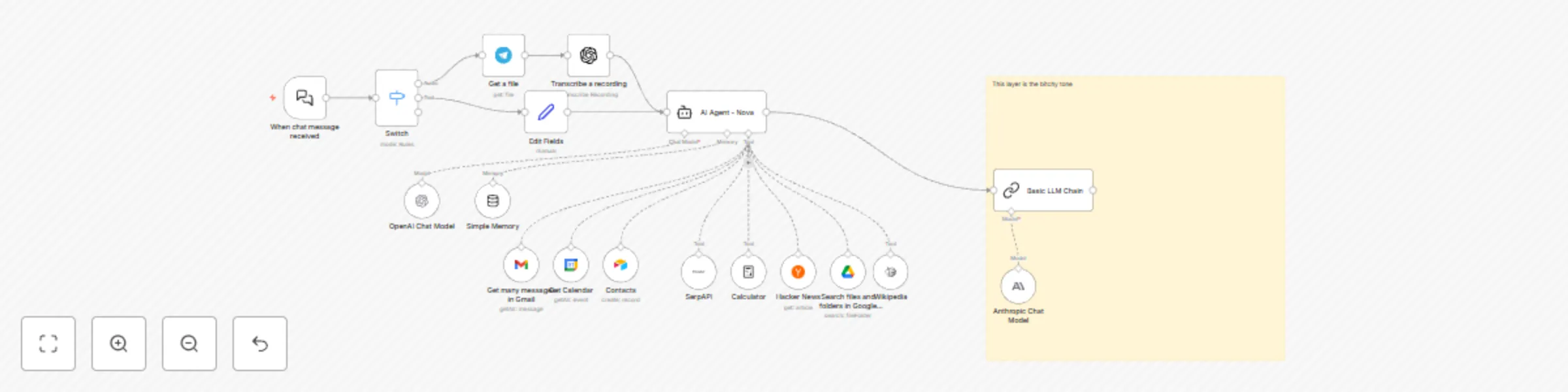
⚙️ How it Works 📥 Route Input
Chat trigger sends messages to a Switch.
If a Telegram video note exists → runs the audio path.
Otherwise → runs the text path.
🎤 Audio Path
Telegram Get a File → OpenAI Speech-to-Text → pass transcript to the agent.
💬 Text Path
Chat text is normalized and sent to the agent.
🛠 Agent Brain
Uses tools like Gmail 📧, Google Calendar 📅, Google Drive 📂, Airtable 📋, SerpAPI 🌐, Wikipedia 📚, Hacker News 📰, and Calculator ➗.
🧾 Memory
Keeps the last 20 messages for context-aware replies.
💅 Optional Personality Polish
An LLM Chain adds witty or cheeky tone on top of the agent’s response.
🛠 Setup Steps ⏱ Time Required
~10–15 minutes (+5 minutes for each Google/Airtable connection).
🔑 Connect Credentials
OpenAI (and/or Anthropic)
Telegram Bot
Gmail, Google Calendar, Google Drive
Airtable
SerpAPI
📌 Configure IDs
Set Airtable base/table.
Set Calendar email.
Adjust Drive search query defaults if needed.
🎙 Voice Optional
Disable Telegram + Transcribe nodes if you only want text chat.
🎭 Choose Tone
Edit Chat Trigger’s welcome text/CSS for custom look.
Or disable persona chain for neutral voice.
🚀 Publish
Activate workflow and share the chat URL.
💡 Detailed behavior notes are available as sticky notes inside the workflow.
This catalog entry is organized from the workflow JSON. The node-level section below shows the executable blocks available for review before importing the template.
| Workflow | Personalized AI assistant with voice support, email/calendar & web tools integration |
|---|---|
| Complexity | advanced |
| Nodes | 19 |
| Categories | Personal Productivity, Multimodal AI |
| Author | Carl Fung |
| Published | 10 Aug 2025 |
Use the JSON export at /data/workflows/7205/7205.json as the source template for this automation.
Open n8n, import the downloaded JSON, and review each node before activating the workflow.
Replace placeholder credentials, API keys, webhook URLs, account IDs, and environment-specific values with your own settings.
Run the workflow manually or in a staging workspace, inspect node output, and confirm downstream systems receive the expected data.
Enable the workflow only after testing, then monitor executions, errors, and rate limits during the first production runs.
Review imported nodes carefully before activation. This catalog entry is intended to help you inspect the workflow structure, understand required services, and find related templates faster.
Node names, credentials, schedules, webhook paths, and external service limits may need adjustment for your workspace.
Intro This workflow shows how to go beyond a “plain” AI chatbot by: Adding a Personality Layer — Link an extra LLM to inject a custom tone and style. Here, it’s Nova, a sassy, high fashion ass...
Review the workflow JSON, configure any required credentials in n8n, and test the automation in a safe workspace before using it in production.
Yes. Use the block-by-block analysis and the downloadable JSON to inspect each node, then adjust credentials, prompts, schedules, filters, or destinations for your Personal Productivity, Multimodal AI use case.