PDF invoice data extraction & tracking with Google Drive, Claude AI & Telegram
Workflow preview


 Early Deal
DISCOUNT 20%

Important notice
This workflow is provided as-is. Please review and test before using in production.
Overview
📥 Invoice Intake & Notification Workflow
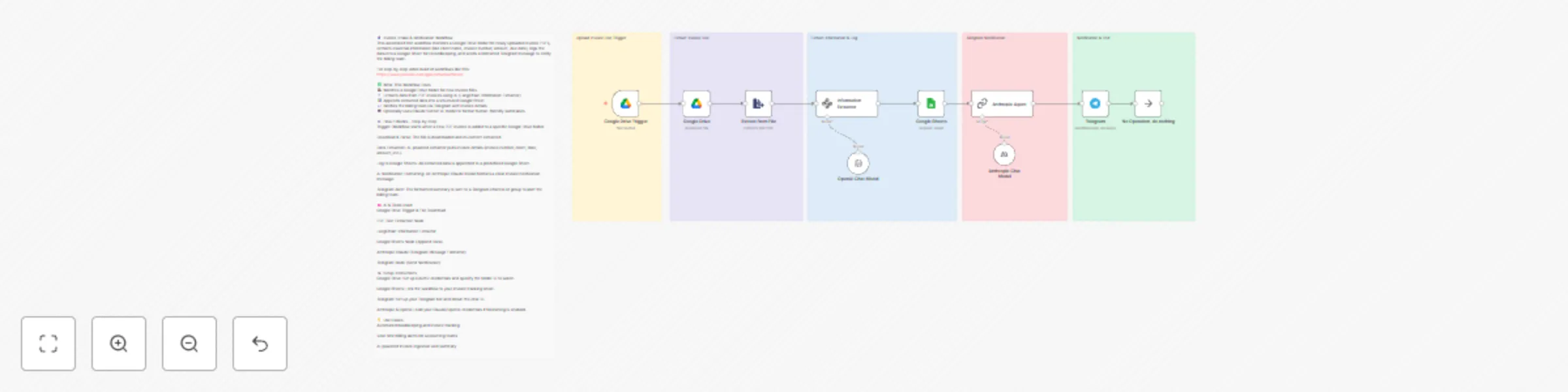
This automated n8n workflow monitors a Google Drive folder for newly uploaded invoice PDFs, extracts essential information (like client name, invoice number, amount, due date), logs the data into a Google Sheet for recordkeeping, and sends a formatted Telegram message to notify the billing team.
For step-by-step video build of workflows like this: https://www.youtube.com/@automatewithmarc
✅ What This Workflow Does 🕵️ Watches a Google Drive folder for new invoice files 📄 Extracts data from PDF invoices using AI (LangChain Information Extractor) 📊 Appends extracted data into a structured Google Sheet 💬 Notifies the billing team via Telegram with invoice details 🤖 Optionally uses Claude Sonnet AI model to format human-friendly summaries
⚙️ How It Works – Step-by-Step Trigger: Workflow starts when a new PDF invoice is added to a specific Google Drive folder.
Download & Parse: The file is downloaded and its content extracted.
Data Extraction: AI-powered extractor pulls invoice details (invoice number, client, date, amount, etc.).
Log to Google Sheets: All extracted data is appended to a predefined Google Sheet.
AI Notification Formatting: An Anthropic Claude model formats a clear invoice notification message.
Telegram Alert: The formatted summary is sent to a Telegram channel or group to alert the billing team.
🧠 AI & Tools Used Google Drive Trigger & File Download
PDF Text Extraction Node
LangChain Information Extractor
Google Sheets Node (Append Data)
Anthropic Claude (Telegram Message Formatter)
Telegram Node (Send Notification)
🛠️ Setup Instructions Google Drive: Set up OAuth2 credentials and specify the folder ID to watch.
Google Sheets: Link the workflow to your invoice tracking sheet.
Telegram: Set up your Telegram bot and obtain the chat ID.
Anthropic & OpenAI: Add your Claude/OpenAI credentials if formatting is enabled.
💡 Use Cases Automated bookkeeping and invoice tracking
Real-time billing alerts for accounting teams
AI-powered invoice ingestion and summary