Block 1 - Asset Upload Trigger
- Type / Role
- n8n-nodes-base.webhook - webhook
- Config choices
- Version 2


 Early Deal
This workflow is provided as-is. Please review and test before using in production.
Creative Asset Manager with ScrapeGraphAI Analysis and Brand Compliance Target Audience Creative directors and design managers Marketing teams managing brand assets Digital asset management (DAM...
n8n-nodes-base.webhook, n8n-nodes-scrapegraphai.scrapegraphai, n8n-nodes-base.code, n8n-nodes-base.googlesheets, n8n-nodes-base.stickynote
This workflow is cataloged by N8N Workflows and links back to its original n8n.io source page by vinci-king-01.
Original n8n.io sourceManaging creative assets manually is inefficient and error-prone, often leading to inconsistent branding, poor organization, and compliance issues. This template solves the challenge of automatically analyzing, organizing, and ensuring brand compliance for creative assets using AI-powered analysis and automated workflows.
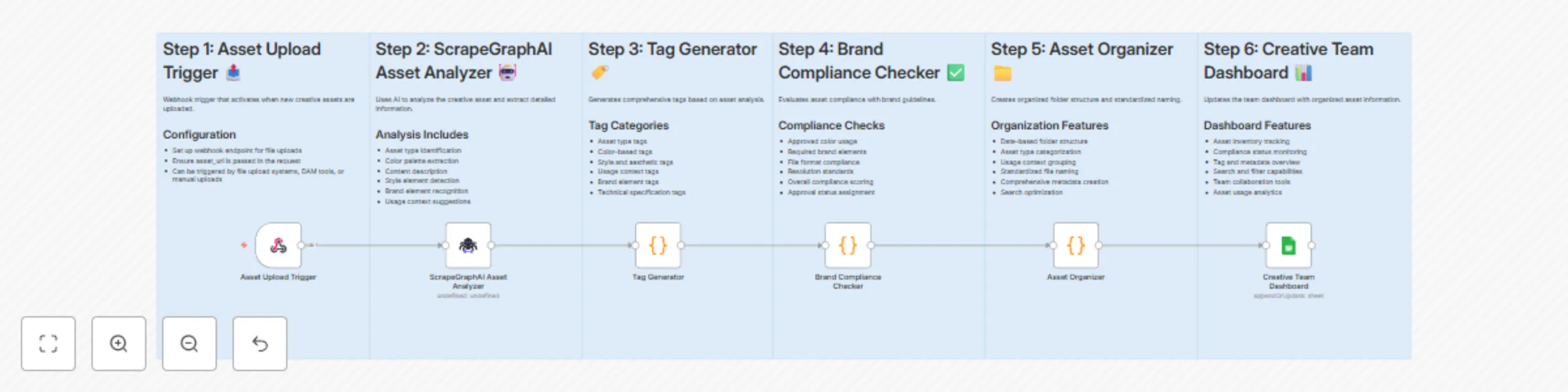
This workflow automatically processes uploaded creative assets using ScrapeGraphAI for intelligent analysis, generates comprehensive tags, checks brand compliance, organizes files systematically, and maintains a centralized dashboard for creative teams.
The template creates the following columns in your Google Sheets:
| Column | Data Type | Description | Example |
|---|---|---|---|
| asset_id | String | Unique asset identifier | "asset_1703123456789_abc123def" |
| name | String | Standardized filename | "image-social-media-2024-01-15T10-30-00.jpg" |
| path | String | Storage location path | "/creative-assets/2024/01/image/social-media" |
| asset_type | String | Type of creative asset | "image" |
| dimensions | String | Asset dimensions | "1920x1080" |
| file_format | String | File format | "jpg" |
| primary_colors | Array | Extracted color palette | ["#FF6B35", "#004E89"] |
| content_description | String | AI-generated content description | "Modern office workspace with laptop" |
| text_content | String | Any text visible in asset | "Welcome to our workspace" |
| style_elements | Array | Detected style characteristics | ["modern", "minimalist"] |
| generated_tags | Array | Comprehensive tag list | ["high-resolution", "brand-logo", "social-media"] |
| usage_context | String | Suggested usage context | "social-media" |
| brand_elements | Array | Detected brand elements | ["logo", "typography"] |
| compliance_score | Number | Brand compliance score (0-100) | 85 |
| compliance_status | String | Approval status | "approved-with-warnings" |
| compliance_issues | Array | List of compliance problems | ["Non-brand colors detected"] |
| upload_date | DateTime | Asset upload timestamp | "2024-01-15T10:30:00Z" |
| searchable_keywords | String | Search-optimized keywords | "image social-media modern brand-logo" |
Estimated setup time: 25-30 minutes
# Install required community nodes
npm install n8n-nodes-scrapegraphai
asset_url parameter is passed in webhook payloadCommon Issues:
Support Resources:
This catalog entry is organized from the workflow JSON. The node-level section below shows the executable blocks available for review before importing the template.
| Workflow | Organize & analyze creative assets with ScrapeGraphAI and Google Sheets dashboard |
|---|---|
| Complexity | intermediate |
| Nodes | 12 |
| Categories | File Management, AI Summarization |
| Author | vinci-king-01 |
| Published | 29 Jul 2025 |
Use the JSON export at /data/workflows/6640/6640.json as the source template for this automation.
Open n8n, import the downloaded JSON, and review each node before activating the workflow.
Replace placeholder credentials, API keys, webhook URLs, account IDs, and environment-specific values with your own settings.
Run the workflow manually or in a staging workspace, inspect node output, and confirm downstream systems receive the expected data.
Enable the workflow only after testing, then monitor executions, errors, and rate limits during the first production runs.
Review imported nodes carefully before activation. This catalog entry is intended to help you inspect the workflow structure, understand required services, and find related templates faster.
Node names, credentials, schedules, webhook paths, and external service limits may need adjustment for your workspace.
Creative Asset Manager with ScrapeGraphAI Analysis and Brand Compliance Target Audience Creative directors and design managers Marketing teams managing brand assets Digital asset management (DAM...
Review the workflow JSON, configure any required credentials in n8n, and test the automation in a safe workspace before using it in production.
Yes. Use the block-by-block analysis and the downloadable JSON to inspect each node, then adjust credentials, prompts, schedules, filters, or destinations for your File Management, AI Summarization use case.