Transform college admissions from an overwhelming manual process into an intelligent, efficient, and equitable system that analyzes essays, scores applicants holistically, and identifies top candidates—saving 40+ hours per week while improving decision quality.
🎯 What This Workflow Does
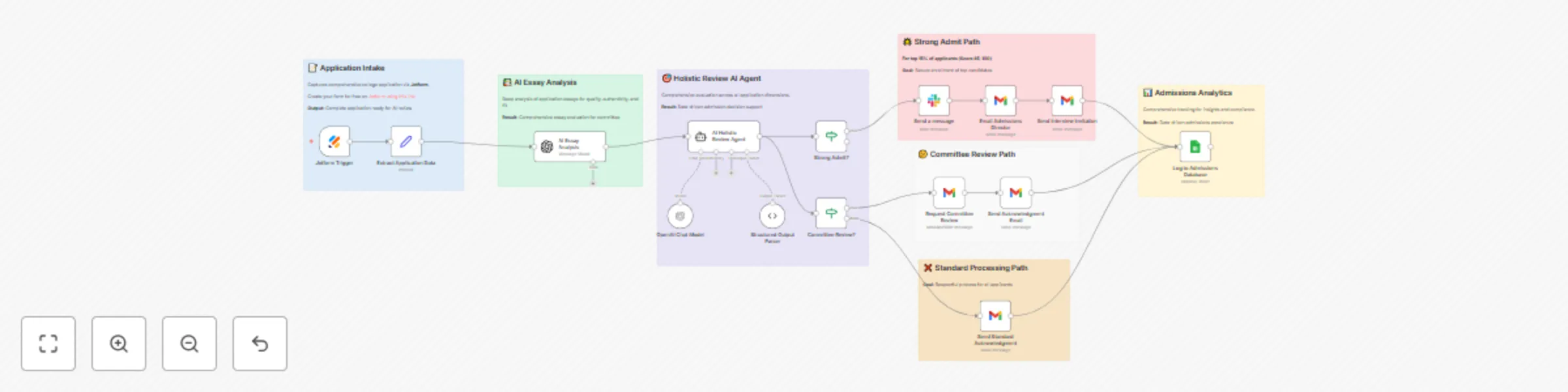
Automates comprehensive application review with AI-powered analysis:
- 📝 Application Intake - Captures complete college applications via Jotform
- 📚 AI Essay Analysis - Deep analysis of personal statements and supplemental essays for:
- Writing quality, authenticity, and voice
- AI-generated content detection
- Specificity and research quality
- Red flags (plagiarism, inconsistencies, generic writing)
- 🎯 Holistic Review AI - Evaluates applicants across five dimensions:
- Academic strength (GPA, test scores, rigor)
- Extracurricular profile (leadership, depth, impact)
- Personal qualities (character, resilience, maturity)
- Institutional fit (values alignment, contribution potential)
- Diversity contribution (unique perspectives, experiences)
- 🚦 Smart Routing - Automatically categorizes and routes applications:
- Strong Admit (85-100): Slack alert → Director email → Interview invitation → Fast-track
- Committee Review (65-84): Detailed analysis → Committee discussion → Human decision
- Standard Review (<65): Acknowledgment → Human verification → Standard timeline
- 📊 Comprehensive Analytics - All applications logged with scores, recommendations, and outcomes
✨ Key Features
AI Essay Analysis Engine
- Writing Quality Assessment: Grammar, vocabulary, structure, narrative coherence
- Authenticity Detection: Distinguishes genuine voice from AI-generated content (GPT detectors)
- Content Depth Evaluation: Self-awareness, insight, maturity, storytelling ability
- Specificity Scoring: Generic vs tailored "Why Us" essays with research depth
- Red Flag Identification: Plagiarism indicators, privilege blindness, inconsistencies, template writing
- Thematic Analysis: Core values, motivations, growth narratives, unique perspectives
Holistic Review Scoring (0-100 Scale)
- Academic Strength (35%): GPA in context, test scores, course rigor, intellectual curiosity
- Extracurricular Profile (25%): Quality over quantity, leadership impact, commitment depth
- Personal Qualities (20%): Character, resilience, empathy, authenticity, self-awareness
- Institutional Fit (15%): Values alignment, demonstrated interest, contribution potential
- Diversity Contribution (5%): Unique perspectives, life experiences, background diversity
Intelligent Candidate Classification
- Admit: Top 15% - clear admit, exceptional across multiple dimensions
- Strong Maybe: Top 15-30% - competitive, needs committee discussion
- Maybe: Top 30-50% - solid but not standout, waitlist consideration
- Deny: Below threshold - does not meet competitive standards (always human-verified)
Automated Workflows
- Priority Candidates: Immediate Slack alerts, director briefs, interview invitations
- Committee Cases: Detailed analysis packets, discussion points, voting workflows
- Standard Processing: Professional acknowledgments, timeline communications
- Interview Scheduling: Automated invitations with candidate-specific questions
💼 Perfect For
- Selective Colleges & Universities: 15-30% acceptance rates, holistic review processes
- Liberal Arts Colleges: Emphasis on essays, personal qualities, institutional fit
- Large Public Universities: Processing thousands of applications efficiently
- Graduate Programs: MBA, law, medical school admissions
- Scholarship Committees: Evaluating merit and need-based awards
- Honors Programs: Identifying top candidates for selective programs
- Private High Schools: Admissions teams with holistic processes
🎓 Admissions Impact
Efficiency & Productivity
- 40-50 hours saved per week on initial application review
- 70% faster essay evaluation with AI pre-analysis
- 3x more applications processed per reader
- Zero data entry - all information auto-extracted
- Consistent evaluation across thousands of applications
- Same-day turnaround for top candidate identification
Decision Quality Improvements
- Objective scoring reduces unconscious bias
- Consistent criteria applied to all applicants
- Essay authenticity checks catch AI-written applications
- Holistic view considers all dimensions equally
- Data-driven insights inform committee discussions
- Fast-track top talent before competitors
Equity & Fairness
- Standardized evaluation ensures fair treatment
- First-generation flagging provides context
- Socioeconomic consideration in holistic scoring
- Diverse perspectives valued in diversity score
- Bias detection in essay analysis
- Audit trail for compliance and review
Candidate Experience
- Instant acknowledgment of application receipt
- Professional communication at every stage
- Clear timelines and expectations
- Interview invitations for competitive candidates
- Respectful process for all applicants regardless of outcome
🔧 What You'll Need
Required Integrations
- Jotform - Application intake forms
Create your form for free on JotForm using this link
- OpenAI API - GPT-4o for analysis (~$0.15-0.25 per application)
- Gmail/Outlook - Applicant and staff communication (free)
- Google Sheets - Application database and analytics (free)
Optional Integrations
- Slack - Real-time alerts for strong candidates ($0-8/user/month)
- Google Calendar - Interview scheduling automation (free)
- Airtable - Advanced application tracking (alternative to Sheets)
- Applicant Portal Integration - Status updates via API
- CRM Systems - Slate, TargetX, Salesforce for higher ed
🚀 Setup Guide (3-4 Hours)
Step 1: Create Application Form (60 min)
Build comprehensive Jotform with sections:
Basic Information
- Full name, email, phone
- High school, graduation year
- Intended major
Academic Credentials
- GPA (weighted/unweighted, scale)
- SAT score (optional)
- ACT score (optional)
- Class rank (if available)
- Academic honors
Essays (Most Important!)
- Personal statement (650 words max)
- "Why Our College" essay (250-300 words)
- Supplemental prompts (program-specific)
Activities & Achievements
- Extracurricular activities (list with hours/week, years)
- Leadership positions (with descriptions)
- Honors and awards
- Community service hours
- Work experience
Additional Information
- First-generation college student (yes/no)
- Financial aid needed (yes/no)
- Optional: demographic information
- Optional: additional context
Step 2: Import n8n Workflow (15 min)
- Copy JSON from artifact
- n8n: Workflows → Import → Paste
- Includes all nodes + 7 detailed sticky notes
Step 3: Configure OpenAI API (20 min)
- Get API key: https://platform.openai.com/api-keys
- Add to both AI nodes (Essay Analysis + Holistic Review)
- Model:
gpt-4o (best for nuanced analysis)
- Temperature: 0.3 (consistency with creativity)
- Test with sample application
Cost: $0.15-0.25 per application (essay analysis + holistic review)
Step 4: Customize Institutional Context (45 min)
Edit AI prompts to reflect YOUR college:
In Holistic Review Prompt, Update:
- College name and type
- Acceptance rate
- Average admitted student profile (GPA, test scores)
- Institutional values and culture
- Academic programs and strengths
- What makes your college unique
- Desired student qualities
In Essay Analysis Prompt, Add:
- Specific programs to look for mentions of
- Faculty names applicants should reference
- Campus culture keywords
- Red flags specific to your institution
Step 5: Setup Email Communications (30 min)
- Connect Gmail/Outlook OAuth
- Update all recipient addresses:
- Customize email templates:
- Add college name, logo, branding
- Update contact information
- Adjust tone to match institutional voice
- Include decision release dates
- Add applicant portal links
Step 6: Configure Slack Alerts (15 min, Optional)
- Create channel:
#admissions-strong-candidates
- Add webhook URL or bot token
- Test with mock strong candidate
- Customize alert format and recipients
Step 7: Create Admissions Database (30 min)
Google Sheet with columns:


 Early Deal