Block 1 - Gmail Trigger
- Type / Role
- n8n-nodes-base.gmailTrigger - gmailTrigger
- Config choices
- Version 1.2


 Early Deal
This workflow is provided as-is. Please review and test before using in production.
AI Email Classifier Automate Email Classification, Prioritization, and Spam Detection Across Multiple Accounts Created by: Jayant Kumar (@jharilela) Powered by...
n8n-nodes-base.gmailtrigger, n8n-nodes-base.stickynote, n8n-nodes-base.merge, n8n-nodes-base.set, n8n-nodes-base.webhook, @n8n/n8n-nodes-langchain.agent, @n8n/n8n-nodes-langchain.lmchatopenai, n8n-nodes-base.googlesheetstool
This workflow is cataloged by N8N Workflows and links back to its original n8n.io source page by Jay Emp0.
Original n8n.io sourceAutomate Email Classification, Prioritization, and Spam Detection Across Multiple Accounts
Created by: Jayant Kumar (@jharilela)
🛠 Powered by: Gmail, Google Sheets, OpenAI, Discord, and n8n
Focus is Expensive. Managing multiple email inboxes every day—personal, business, partnerships, invoices. Logging into each, skimming through noise, flagging important stuff, and deleting spam started eating up hours of my week. I needed a system that helped me focus only on what matters without building an entire helpdesk dashboard.
I already live in Discord. It made sense to push my emails there—but in a fun, digestible, and actionable way. I built AI Email Classifier 📬 to summarize emails, detect spam, assign priority, and make everything skimmable with pictures and links.
And it works across multiple Gmail accounts.
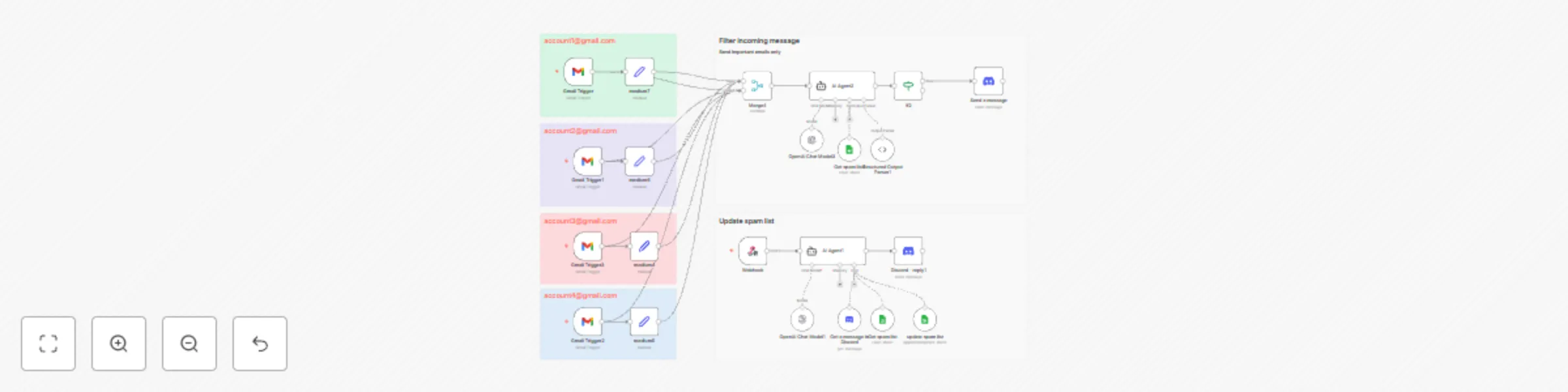
Here’s the high-level flow:
The system uses this sheet as live memory to label spam and legit senders:
╔════════════════════╦══════════════╦═════════════════╦══════════════╦════════════════╗
║       Email        ║    Domain    ║  Classification ║  Labelled By ║  Labelled Date ║
╠════════════════════╬══════════════╬═════════════════╬══════════════╬════════════════╣
║ [email protected] ║  badsite.com ║  Spam           ║  Jayant      ║  08/07/2025    ║
║ [email protected]    ║  trusted.com ║  Legit          ║  Jayant      ║  08/07/2025    ║
╚════════════════════╩══════════════╩═════════════════╩══════════════╩════════════════╝
This allows manual control to teach the AI which senders to trust or ignore. Every time I see something marked wrong, I just reply in Discord with "spam" or "legit" on that message thread. That triggers an update to the Sheet via AI parsing and n8n.
AI isn’t perfect.
Some spam emails are cleverly disguised. And some senders are contextually important only to you.
That’s why I kept a simple feedback loop:
"spam" or "legit" on any Discord email message. Or anything along that lineBecause Slack charges per seat and email feels lonely.
I run most of my operations inside Discord community chats, client rooms, bot alerts.
Instead of making a full email UI, I turned each email into a Discord card with a thumbnail, summary, and quick actions.
It’s fun. It’s visual. It doesn’t feel like work.
Email becomes more like a game feed.
n8n_discord_trigger_bot Clone the workflow JSON, set up your Gmail integrations, and install the n8n Discord Trigger Bot.
I made this workaround because i couldnt find a discord trigger on n8n.
Now I just scroll my Discord DMs and know what to reply to, and ignore everything else.Dont let Email spam your brain. Let your AI do the thinking.
This catalog entry is organized from the workflow JSON. The node-level section below shows the executable blocks available for review before importing the template.
Showing the first 24 of 28 workflow blocks. Download the JSON for the full node graph.
| Workflow | Multi-account email classifier with AI, Gmail, Discord & Google Sheets |
|---|---|
| Complexity | advanced |
| Nodes | 28 |
| Categories | Ticket Management, AI Summarization |
| Author | Jay Emp0 |
| Published | 08 Jul 2025 |
Use the JSON export at /data/workflows/5789/5789.json as the source template for this automation.
Open n8n, import the downloaded JSON, and review each node before activating the workflow.
Replace placeholder credentials, API keys, webhook URLs, account IDs, and environment-specific values with your own settings.
Run the workflow manually or in a staging workspace, inspect node output, and confirm downstream systems receive the expected data.
Enable the workflow only after testing, then monitor executions, errors, and rate limits during the first production runs.
Review imported nodes carefully before activation. This catalog entry is intended to help you inspect the workflow structure, understand required services, and find related templates faster.
Node names, credentials, schedules, webhook paths, and external service limits may need adjustment for your workspace.
AI Email Classifier Automate Email Classification, Prioritization, and Spam Detection Across Multiple Accounts Created by: Jayant Kumar (@jharilela) Powered by...
Review the workflow JSON, configure any required credentials in n8n, and test the automation in a safe workspace before using it in production.
Yes. Use the block-by-block analysis and the downloadable JSON to inspect each node, then adjust credentials, prompts, schedules, filters, or destinations for your Ticket Management, AI Summarization use case.