Jay Emp0
Workflows by Jay Emp0
Generate & publish SEO-optimized Shopify blog articles with Gemini & ChatGPT
# AI Powered Blog Automation for Shopify  ## Transform Your Shopify Store with Automated, AI Generated Blog Content **Stop struggling with content creation.** This n8n workflow automatically generates high quality, SEO optimized blog posts for your Shopify store every single day while you focus on growing your business. --- ## See It In Action: Real Results from Pink Matcha **[Visit Pink Matcha Blog](https://pinkmatcha.co/blogs/blog)** - A real Shopify store powered by this exact workflow.  ### Real Traffic, Real Results  - **50+ SEO optimized articles** published automatically - **Consistent daily content** without hiring writers - **Multiple categories** with targeted content - **Professional formatting** that converts visitors to customers --- ## What You're Getting ### ✅ Automated Content Generation - **AI creates unique articles** from curated industry sources - **SEO optimized** with proper headings, keywords, and meta descriptions - **800 to 1200 words per article** with actionable insights - **Plagiarism free** content that ranks in Google ### ✅ Multi Category Organization  - Fitness, Nutrition, Wellness, Personal Growth, or **YOUR niche** - Each category gets targeted, relevant content - Build authority across your entire product range - Cross sell opportunities through strategic content ### ✅ Direct Shopify Integration - **One click publishing** to your Shopify blog - Professional HTML formatting - Automatic categorization - SEO metadata included - Draft or publish modes ### ✅ Multi Blog Support - **Manage multiple blogs** within the same Shopify store - Create separate blogs for different product lines or audiences - Each blog can have its own RSS feeds and categories - Run workflows independently or simultaneously ### ✅ Smart Product Integration - **Automatically embed product links** within articles - AI intelligently references relevant products from your catalog - Include product cards, images, and CTAs - Drive traffic directly to product pages - Turn readers into buyers with strategic product placement  ### ✅ AI Generated Featured Images - **Automatically creates branded images** for every blog post - AI generates custom visuals that match your brand style - Include your logo or signature products in every image - Customizable style instructions for perfect brand consistency - No need for stock photos or graphic designers - Every article gets a unique, professional featured image ### ✅ Smart Content Intelligence - **MongoDB vector search** prevents duplicate topics - Sources content from trusted RSS feeds in your niche - Learns your brand voice - Maintains consistency across all articles --- ## 🔥 Game Changing Features ### Multiple Blogs, One Workflow  **Run multiple blogs within the same Shopify store:** - Create separate blogs for different product lines (e.g., Men's vs Women's, Premium vs Budget) - Target different audiences with customized content strategies - Each blog has its own RSS feeds, categories, and publishing schedule - Manage everything from a single n8n instance - Perfect for multi brand stores or diverse product catalogs **Example Use Cases:** - **Fashion Store**: Separate blogs for Men, Women, Kids, and Accessories - **Wellness Store**: Different blogs for Fitness, Nutrition, Mental Health, and Supplements - **Tech Store**: Blogs for Gadgets, Software Reviews, How To Guides, and Industry News ### Intelligent Product Integration  **AI automatically embeds your products within blog content:** - Analyzes article topics and matches relevant products from your catalog - Inserts product cards with images, descriptions, and "Buy Now" buttons - Creates contextual product mentions throughout the article - Links to product pages to drive direct sales - Customizable product placement rules **Turn Every Article Into a Sales Machine:** - Blog post about "Best Workout Routines" → Automatically includes your yoga mats, resistance bands, and protein powder - Article on "Winter Skincare Tips" → Embeds your moisturizers, serums, and face masks - Guide to "Home Office Setup" → Features your desk organizers, chairs, and lighting products ### AI Generated Featured Images with Brand Consistency  **Every article gets a unique, professionally designed featured image:** - AI generates custom images matching your brand aesthetic - Automatically includes your logo or signature product in each image - Configure your brand style once, AI applies it to all future images - Customizable image generation instructions for perfect consistency - Wide, natural looking scenes (no generic stock photo vibes) - No need for Canva, designers, or stock photo subscriptions **How It Works:** - Configure your **Branding Logo** (product image or logo URL) - Set your **Branding Style** ("Image should contain a girl holding this drink") - Define **Image Style** guidelines ("Wide, natural scene with no square framing") - AI automatically generates unique images for each article topic - Images are uploaded to Shopify and set as featured images **Example:** - Article: "5 Morning Rituals for Better Energy" - Generated Image: Wide, natural scene of a person holding Pink Matcha drink during sunrise, perfectly matching your brand aesthetic **No more spending hours on:** - Finding stock photos - Editing images in Canva - Ensuring brand consistency - Resizing for different platforms - Worrying about image licensing --- ## Why Store Owners Love This Workflow ### 💰 Save Thousands on Content Creation **Traditional Approach:** - Freelance writers: $100 to 300 per article - 30 articles/month = **$3,000 to 9,000/month** - Plus time for editing, SEO, uploading, formatting **With This Workflow:** - **$30 to 60/month** in API costs - Unlimited articles - Zero manual work - **Save $2,940 to 8,940 per month** ### ⏰ Reclaim Your Time **Before:** - 4 to 6 hours writing each article - 2 hours researching topics - 1 hour formatting and uploading - **7+ hours per article** **After:** - Click one button - AI generates, formats, and publishes - **0 hours of your time** ### 📈 Grow Your Organic Traffic  - Fresh content signals to Google you're active - More pages = more chances to rank - Long tail keywords across every article - Internal linking boosts your entire site ### 🎯 Perfect for E commerce - **Educational content** that supports your products - **How to guides** featuring your items - **Category pages** that drive purchase decisions - **Build trust** before customers buy --- ## Live Examples from Pink Matcha ### Fitness Content  ### Nutrition Content  ### Self Care Content  ### Personal Growth Content  **Every single one of these articles was generated automatically by this workflow.** --- ## Perfect For Every Shopify Store ### 🏋️ Health & Wellness Brands Generate workout tips, nutrition guides, supplement education, and wellness advice that positions your products as solutions. ### 👗 Fashion & Apparel Create style guides, trend reports, outfit inspiration, and care instructions that showcase your clothing line. ### 🏠 Home & Lifestyle Produce decorating tips, organization hacks, product care guides, and seasonal content that drives home goods sales. ### 💄 Beauty & Skincare Develop routine guides, ingredient education, application tutorials, and trend analysis that supports cosmetics sales. ### 🎮 Hobbies & Collectibles Write product reviews, how to guides, industry news, and collector tips that engage enthusiasts. ### 📱 Tech & Gadgets Generate setup guides, comparison articles, tech news, and troubleshooting content for electronics stores. --- ## What's Included in Your Purchase ### 4 Complete n8n Workflows 1. **Shopify Blog Automation** - The core automation engine 2. **Gemini Image Generator Tool** - AI powered featured image creation with brand consistency 3. **Web Search Tool** - Real time web research using OpenAI GPT 4O Search 4. **Link Validator Tool** - Ensures all URLs work before publishing ### Complete Documentation - **Step by step setup guide** ([Technical Setup.md](Technical%20Setup.md)) - **Video walkthrough** (coming soon) - **Google Sheets templates** for RSS feeds and categories - **Example configurations** for multiple niches ### Lifetime Access & Updates - All future workflow improvements - New features as they're released - Updated documentation - Priority email support --- ## How It Works (Simple 3 Step Process) ### Step 1: Configure Your RSS Feeds Add trusted content sources from your industry into a Google Sheet. The workflow monitors these for fresh content daily. ### Step 2: AI Generates Unique Articles Google Gemini reads source articles, understands your niche, and creates completely original blog posts optimized for SEO and your brand voice. ### Step 3: Auto Publish to Shopify Articles are automatically formatted, categorized, and published to your Shopify blog—no manual work required. **That's it.** Your blog grows on autopilot. --- ## Technical Specs (For the Curious) - **AI Content Engine**: Google Gemini for blog content generation - **AI Image Engine**: Google Gemini 3 Pro Image Preview (16:9 branded images) - **Web Search**: OpenAI GPT-4O SEARCH PREVIEW for real time research - **Vector Search**: MongoDB Atlas (prevents duplicate topics) - **Embeddings**: OpenAI text-embedding-3-small for semantic matching - **Platform**: n8n workflow automation - **Integration**: Native Shopify Admin API & OAuth2 - **Social**: Auto post to Twitter (optional) - **Scalability**: 1 to 10+ articles per day with custom featured images Full technical documentation included with purchase. --- ## Frequently Asked Questions **Q: Do I need coding skills?** A: No! Import the workflows, configure your credentials, and you're ready. Full setup guide included (~60 to 90 minutes). **Q: What are the monthly costs?** A: ~$30 to 60/month (Google Gemini API + OpenAI + MongoDB free tier + n8n self to hosted). Way cheaper than hiring writers. **Q: How many articles can it generate?** A: Unlimited. Run it daily for 30 to 90 articles/month, or adjust frequency to your needs. **Q: Will the content be unique?** A: 100% original. AI creates new content inspired by sources, never copies. Vector search prevents duplicate topics. **Q: Can I use this for my niche?** A: Yes! Works for ANY niche. Just configure your RSS feeds and categories. Tech, fashion, home, beauty, gaming—anything. **Q: Does it work with WordPress or other platforms?** A: This version is built for Shopify. The workflow can be adapted for WordPress, Ghost, Medium, or custom sites. **Q: How long are the articles?** A: Configurable. Default is 800 to 1200 words. Adjust AI prompts for shorter (500w) or longer (2000w+) content. **Q: Can I review articles before publishing?** A: Yes! Set to "draft" mode, review in Shopify, edit if needed, then publish manually. **Q: What languages does it support?** A: Google Gemini supports 100+ languages. Configure the AI prompts to generate content in your target language. **Q: What's your refund policy?** A: No refunds. Please review this page and the live examples before purchasing. --- ## Still Not Sure? See The Results  Visit **[pinkmatcha.co](https://pinkmatcha.co)** to see this workflow in action. Every article. Every category. All automated. Read the articles. Check the formatting. See the SEO optimization. Experience the quality. **Then imagine this running on YOUR Shopify store.** --- ## Questions? We're Here to Help 📧 Email: [[email protected]](mailto:[email protected]) 💬 Community: [Join our Skool](https://www.skool.com/aia-ai-automation-2762) 📚 Documentation: Comprehensive guides included 🎥 Videos: Setup tutorials (coming soon) --- ## About emp0 We build production ready n8n automation workflows used by hundreds of businesses worldwide. Our workflows save companies thousands of hours and tens of thousands of dollars every month. - 🛍️ Premium Workflows: [store.emp0.com](https://store.emp0.com) - 🆓 Free Workflows: [emp0.com/automation-workflows](https://emp0.com) - 🐦 Twitter: [@emp0_com](https://twitter.com/emp0_com) - 🎯 Live Example: [Pink Matcha Blog](https://pinkmatcha.co/blogs/blog) --- ## Don't Let Your Competitors Outrank You While you're manually writing one blog post per week, your competitors could be publishing daily with AI automation. **Every day you wait is another day without:** - Fresh SEO content ranking in Google - Educational articles converting visitors - Authority building thought leadership - Traffic flowing to your products **The solution is one click away.** --- *Powered by n8n • Google Gemini • OpenAI • MongoDB • Shopify*
Automate product Hunt lead generation with Apify and Google Sheets
# Product Hunt Scraper - Automated Lead Generation Workflow  ## Turn Product Hunt Launches Into Qualified Leads and Reach out Automatically **Stop manually searching Product Hunt for potential customers.** This n8n workflow automatically scrapes the latest products from Product Hunt every day, enriches them with contact details, and delivers organized lead lists straight to your Google Sheets. ### What You Get This powerful automation workflow delivers: - **Daily Lead Generation**: Automatically scrapes top 50 Product Hunt products every day at 9 AM - **Weekly Top Performers**: Every Monday, captures the top 100 products from the previous week (configurable) - **Rich Contact Data**: Extracts emails, Twitter handles, LinkedIn profiles, Discord usernames, phone numbers, and more - **Organized Google Sheets**: All leads exported to a structured spreadsheet with product details, maker info, and contact data - **Automated Outreach**: Optional email system to reach out to makers with personalized messages - **Fresh Leads Daily**: Never miss a new product launch or potential customer  --- ## Why This Workflow Is a Game Changer ### For Sales & Business Development Teams - **Build a targeted prospect list** of innovative companies launching new products - **Reach decision makers directly** with founder emails and social profiles - **Beat your competition** to newly launched products looking for partnerships or tools - **Scale your outreach** without hiring additional SDRs ### For SaaS Founders & Indie Hackers - **Find integration partners** by identifying products that complement yours - **Discover competitors** and track their launches in real time - **Connect with fellow makers** for collaboration opportunities - **Source beta testers** from engaged Product Hunt communities ### For Marketing & PR Agencies - **Identify potential clients** who just launched and need marketing support - **Build media lists** of active founders for outreach campaigns - **Track industry trends** and emerging products in your niche - **Automate lead qualification** by capturing product categories and descriptions ### For Investors & VCs - **Monitor emerging startups** launching on Product Hunt - **Track portfolio company launches** and engagement - **Discover investment opportunities** in specific categories - **Build deal flow** with minimal manual research --- ## Key Features ### Intelligent Data Extraction  The workflow captures comprehensive product data: - Product name, description, and tagline - Product categories and launch date - Upvotes and engagement metrics - Maker information with social profiles - Website URLs and demo links - Banner images and screenshots ### Multi Channel Contact Discovery  Advanced contact enrichment pulls: - **Primary email addresses** (founder emails, sales, feedback, hello) - **Secondary email addresses** for CC'ing multiple contacts - **Social media profiles**: Twitter, LinkedIn, Discord, Facebook, Instagram - **Communication channels**: YouTube, TikTok, Telegram, WhatsApp, Reddit - **Phone numbers** (when publicly available) - **Company domains** for additional research ### Automated Daily Operations - **Set and forget scheduling**: Runs automatically every morning at 9 AM - **Smart deduplication**: Removes duplicate entries to keep your data clean - **Error handling**: Continues processing even if individual products fail - **Webhook driven architecture**: Efficiently processes results as they're ready - **Batch processing**: Handles large datasets without overwhelming your system - **Gmail integration**: Professional email sending via Gmail API for better deliverability ### Automated Outreach System  The workflow includes a sophisticated Gmail powered email system that: - **Sends personalized outreach emails** to product makers with their product details - **CCs secondary email addresses** for better reach - **Professional HTML email templates** that are customizable to your brand - **Better deliverability** through Gmail API (not SMTP) - **Tracks delivery and engagement** through Gmail - **Free to use** - 500 emails/day (personal Gmail) or 2,000/day (Workspace) **Email Template Features:** - Dynamic product name and details - Reference to Product Hunt launch - Personalized value proposition - Clear call to action - Unsubscribe link for compliance - Your branding and contact info --- ## What's Included When you purchase this workflow, you get: - **Complete n8n workflow JSON file** ready to import - **Detailed technical setup guide** with step by step instructions - **Pre configured Apify actors** for Product Hunt scraping and contact enrichment - **Email templates** for outreach campaigns --- ## Real Results ### Cost Effective Lead Generation  Run this workflow for approximately **$65 to $95/month** and generate: - **1,900+ leads per month** (50 products/day × 30 days + weekly top 100) - **Cost per lead: ~$0.03 to 0.05** which is far cheaper than any lead database - **Fresh, verified contacts** that aren't available in purchased lists - **Zero manual work** after initial setup **Sign up for Apify**: Use our [affiliate link](https://www.apify.com/?fpr=99h7ds) or referral code **99h7ds** --- ## Technical Highlights - Built on **n8n** - the powerful open source automation platform - Uses **Apify** actors for reliable scraping at scale - **Google Sheets integration** for easy data access and sharing - **Gmail API integration** for professional email outreach - **Webhook based architecture** for real time processing - **Smart batching** to stay within API rate limits - **Modular design** making it easily customize which data points to collect - **Error recovery** built into every step - **Active testing data** pinned for easier debugging --- ## Requirements To run this workflow, you'll need: - [n8n instance](https://n8n.partnerlinks.io/emp0) (cloud or self hosted on [Railway](https://railway.com/deploy/Hx5aTY?referralCode=jay) or [Hostinger](https://www.hostinger.com/vps/n8n-hosting?REFERRALCODE=jayemp0)) - [Apify account](https://www.apify.com/?fpr=99h7ds) (use referral code: **99h7ds** - free tier available, paid recommended) - Google account (for Sheets, Drive and Email integration) Detailed setup instructions are provided in the [Technical Setup guide](https://github.com/Jharilela/n8n-workflows/blob/main/Product%20Hunt%20Lead%20Generator/Technical%20Setup.md). --- ## Comparison: DIY vs This Workflow | Task | Manual Process | With This Workflow | |------|---------------|-------------------| | Find daily products | 30 mins/day checking Product Hunt | Automatic | | Extract contact info | 5 mins per product × 50 = 4+ hours | Automatic | | Organize in spreadsheet | 30 mins/day | Automatic | | Send outreach emails | 3 mins per email × 50 = 2.5 hours | Automatic | | **Total time saved** | **7+ hours/day** | **0 hours** | | **Monthly cost** | Your time + assistant salary | **~$50/month** | --- ## Customization Options This workflow is fully customizable: - **Adjust scraping schedule**: Change from daily to twice daily or weekly - **Filter by category**: Only scrape products in specific categories (AI, Developer Tools, etc.) - **Modify top N products**: Increase/decrease the number of products scraped - **Custom email templates**: Edit the outreach message to match your brand - **Add email verification**: Integrate ZeroBounce or similar services - **Connect to your CRM**: Pipe leads directly to Salesforce, HubSpot, or Pipedrive - **Slack/Discord notifications**: Get alerted when new leads are found --- ## Support & Updates - **Lifetime updates**: Get all future improvements and bug fixes - **Email support**: Questions? We're here to help with setup, [Email Us](mailto:[email protected]) - **Community access**: Join our [Skool community](https://www.skool.com/aia-ai-automation-2762) with other users sharing tips and customizations - **Documentation**: Comprehensive guides covering every feature --- ## Get Started Today **Stop losing leads to competitors.** Start automatically capturing fresh Product Hunt leads every single day. → **[Purchase Workflow](https://0emp0.gumroad.com/l/product-hunt-lead-generator)** - One time payment, lifetime access → **[View Technical Setup Guide](https://github.com/Jharilela/n8n-workflows/blob/main/Product%20Hunt%20Lead%20Generator/Technical%20Setup.md)** - See what's involved → **[Join Community](https://www.skool.com/aia-ai-automation-2762)** - Connect with other users --- ## Frequently Asked Questions **Q: Do I need coding skills?** A: No! The workflow is pre built and ready to import. Basic n8n familiarity is helpful but not required. **Q: What are the ongoing costs?** A: Approximately $65 to $95/month total ($40-60 for [Apify](https://www.apify.com/?fpr=99h7ds) scraping services + $20 for [n8n cloud](https://n8n.partnerlinks.io/emp0), or $0 if you self host on [Railway](https://railway.com/deploy/Hx5aTY?referralCode=jay) or [Hostinger](https://www.hostinger.com/vps/n8n-hosting?REFERRALCODE=jayemp0)). **Q: Is this legal?** A: Yesm all data is publicly available on Product Hunt and product websites. Follow ethical outreach practices. **Q: Can I scrape more/fewer products?** A: Absolutely! The workflow is fully customizable. Adjust the "topNProducts" parameter in the config. **Q: What if emails bounce or accounts get banned?** A: The guide includes best practices for email deliverability and warnings about sending volume limits. **Q: Can I use this for specific product categories?** A: Yes! You can filter by category in the Apify scraper configuration. **Q: Does this work with Gmail?** A: Yes! The workflow now uses Gmail API by default for better deliverability and tracking. You can customize it for other providers by using the SMTP node --- **Ready to automate your lead generation?** Get the Product Hunt Scraper workflow today and start building your pipeline on autopilot.
Content Farming v4 - Blog Automation for Wordpress using ChatGPT 5 and Gemini
# AI Powered Blog Automation Workflow for WordPress and Twitter - v4 Revolution > Watch the Youtube Tutorial video [](https://www.youtube.com/watch?v=lCJVUkv9oZw) This is the most advanced AI-powered blog content generation and distribution workflow ever built for the n8n automation platform. Version 4 introduces groundbreaking improvements including GPT-5 model integration, 50-70% cost reduction, intelligent internal linking, automatic FAQ generation, and enterprise-grade content validation. It's designed for solo founders, creators, indie hackers, marketers, SEO consultants, or lean startup teams who want to dominate their niche with high-quality, search-optimized articles that drive traffic and conversions.  Running a blog is essential to drive traffic, build authority, and rank on Google, but it's time consuming and expensive to manage. This workflow turns your blog into a self-optimizing content engine that generates, enhances, validates, and publishes articles every day using a team of autonomous AI agents powered by the latest GPT-5 models. If you want to boost your site's visibility, improve your internal linking structure, and promote content across multiple channels like WordPress, Twitter, and Dev.to, this is the most powerful solution available. --- ## Important links - ✨ [V3 workflow on n8n](https://n8n.io/workflows/6734-ai-blog-automation-publish-hourly-seo-articles-to-wordpress-and-twitter-v3/) - Previous version - 📚 See [articles generated with V4](https://articles.emp0.com/tag/v4/) - **Live examples from this workflow** - 📊 [Google Sheets Configuration Template](https://docs.google.com/spreadsheets/d/13WpGs3XpKyu2Hamq2-5VsgAkfcozo2Lje0xCqWb921Y) - Copy and customize for your blog - 🛒 **V4 Available Now**: Contact us for pricing and access - 🔄 **V3 Upgrade Path**: Existing V3 customers get discounted V4 upgrade --- ## Before You Start To get the most out of this workflow, prepare the following: - **Copy the Google Sheets Template** - [Make a copy here](https://docs.google.com/spreadsheets/d/13WpGs3XpKyu2Hamq2-5VsgAkfcozo2Lje0xCqWb921Y) and fill in your: - Content categories with WordPress IDs - Brand customization data - Brand customization data - **Prepare your WordPress site** with existing content for internal linking (the more posts, the better) - **Set up Yoast SEO plugin** (optional but recommended for maximum SEO integration) - **Know your audience** - Developers? Founders? Investors? Enterprises? --- ## How It Works - **Step 1**: Topic Discovery \+ Web Search \+ Vectorization - **Step 2**: Topic Generation with Advanced Semantic Clustering - **Step 3**: Article Intelligence + Keyword Extraction - **Step 4**: Content Generation (Enhanced Multi-Agent Loop with Memory) - **Step 5**: Blog Title Optimization with CTR Scoring - **Step 6**: Yoast SEO Metadata Generation - **Step 7**: AI Image Generation with Gemini (Gemini node/API) - **Step 8**: WordPress Draft Creation with Internal Links - **Step 9**: Multi-Platform Distribution (Twitter, Dev.to) Read the [complete technical architecture and setup guide](https://github.com/Jharilela/n8n-workflows/blob/main/Content%20Generator%20V4/Technical%20Setup.md) --- ## Google Sheets Configuration (NEW in V4) V4 introduces centralized configuration via Google Sheets, making it easy to manage multiple blogs and customize your content strategy without editing the workflow. ### 📊 Configuration Template Structure [**Make a copy of the template here**](https://docs.google.com/spreadsheets/d/13WpGs3XpKyu2Hamq2-5VsgAkfcozo2Lje0xCqWb921Y) The template contains 2 sheets: #### Sheet 1: **category** Define your content pillars and map them to WordPress categories:  #### Sheet 2: **data** Customize your brand and workflow behavior:  #### Sheet 3: **rss feed** List out websites you would like to use as reference  ### Why Google Sheets? - ✅ **No workflow editing needed** - Update categories and brand settings without touching n8n - ✅ **Multi-site management** - One sheet per blog, easily switch between configurations - ✅ **Team collaboration** - Share with your content team for easy updates - ✅ **Version control** - Google Sheets tracks all changes automatically - ✅ **Centralized control** - Manage all content pillars from one place Clone the [Google Sheets Configuration Example](https://docs.google.com/spreadsheets/d/13WpGs3XpKyu2Hamq2-5VsgAkfcozo2Lje0xCqWb921Y) See [Technical Setup.md](https://github.com/Jharilela/n8n-workflows/blob/main/Content%20Generator%20V4/Technical%20Setup.md) for complete Google Sheets integration instructions. --- ## What's New in V4? Revolutionary Upgrades from V3 ### 1. GPT-5 Model Integration (MASSIVE Performance Boost) Version 4 leverages OpenAI's latest GPT-5 model family for unprecedented quality and efficiency: - **GPT-5-nano**: Ultra-fast reasoning for decision-making tasks - **GPT-5-mini**: Standard content generation with 3x speed improvement - **GPT-4.1-mini**: Title optimization and metadata - **GPT-4o**: Complex multi-step reasoning for content writing **Impact**: 40-50% faster execution, improved coherence, better SEO optimization ### 2. 50-70% Cost Reduction on Images - **V3**: Leonardo AI ($0.10-0.15 per image) - **V4**: Gemini Flash 2.5 Nano Banana ($0.03 per image) - **Bonus**: Brand mascot (cat-themed) images for higher engagement and memorability - **Quality**: Consistent professional quality with improved WordPress rendering (no more broken/weird images) **Savings**: $300-500 per month for high-volume blogs ### 3. Intelligent Internal Linking System **The Game-Changer for SEO:** V4 automatically fetches your existing WordPress posts and intelligently weaves internal links throughout your content: - Fetches posts with Yoast SEO metadata (`og_url`, `og_title`) - Content Writer Agent uses MongoDB Memory to track link usage - Maximum 3 inbound links per article (configurable) - Smart placement in relevant paragraphs - Memory prevents duplicate link usage across sections **Impact**: Dramatically improved site structure, better crawlability, higher page authority distribution ### 4. Automatic FAQ Schema Generation Every article includes a professionally styled FAQ section: - **5 targeted questions** based on search intent - **Custom HTML/CSS accordion** with black background and lime green accents - First FAQ item expanded by default - Optimized for Google Featured Snippets - Direct WordPress Custom HTML block compatibility **Impact**: 3-5x higher chance of featured snippet ranking, improved dwell time  ### 5. Advanced Link Validation System **Zero broken links, guaranteed:** - New "check link status" MCP tool validates every URL before insertion - Content Writer Agent instructed: "Test all the urls you want to add to the article is valid or not before writing. If it's not valid Replace it or Remove that link" - Automatic fallback to alternative sources - Explicit ban on placeholder URLs (example.com, placeholder.com) **Impact**: Perfect link hygiene, improved user experience, better SEO  ### 6. Dual Vector Database Architecture **Optimized for performance and cost:** - **V3**: Single collection for all data (expensive, slower) - **V4**: Separated architecture: - `news articles` - Full metadata storage - `news chunks` - Vectorized text for semantic search - Deduplication with SHA256 content fingerprints - Automatic cleanup operations - Improved query performance (50% faster) **Savings**: 40-60% storage cost reduction ### 7. Enhanced Agent System with Memory **9 Specialized AI Agents** (upgraded from 3): 1. **Topic Generation Agent** - Semantic clustering with GPT-5-mini 2. **Article Intelligence Agent** - Entity extraction, fact gathering 3. **Task Definition Agent** - Content structure planning 4. **Content Writer Agent** (GPT-4o) - Section generation with MCP tools: - Web Search (outbound links) - Image Generator (Gemini Flash 2.5 Nano Banana) - Chart Generator (QuickChart) - Link Validator - Think Tool (reasoning) - **Memory Tool** (tracks inbound link usage) 5. **Quality Check Agent** - SEO validation and scoring 6. **Blog Title Generator** - CTR-optimized titles 7. **Metadata Generator** - Yoast SEO integration 8. **Markdown to HTML Agent** - Content conversion 9. **Image Prompt Agent** - Featured image generation **Memory System**: MongoDB Chat Memory with 25-message context window ensures consistency across agent interactions ### 8. Direct Yoast SEO Integration - Automatic `yoast_description` and `yoast_keyword` injection - WordPress REST API PUT requests to update meta fields - Focus keyword optimization - Meta description targeting **Impact**: Seamless SEO workflow, no manual Yoast configuration needed ### 9. Brand Integration in Conclusions Every article includes your customized brand signature and call-to-action in the conclusion:  ### 10. Smarter Content Quality Rules - **Flesch Reading Ease**: 60+ (college reading level) - **Sentence length**: Under 20 words average - **Transition words**: 30% minimum - **Active voice**: Mandatory preference - **Paragraph length**: 3-5 sentences maximum - **Word count**: 1200 words (optimized from V3's 1500 for better engagement) - **Visual content**: Exactly 1 image + 1 table per article - **No back-to-back visuals**: Images/tables separated by text ### 11. Enhanced Slug and Title Optimization **Slug Generation**: - Must include main keyword - Maximum 5 words - Regex validated: `^[a-z0-9]+(?:-[a-z0-9]+)*$` **Title Optimization**: - Preference for question format ("How to...", "What are...") - Maximum 10 words - Scored on 4 metrics: - Emotional Impact (1-10) - Clarity & Relevance (1-10) - SEO Strength (1-10) - Clickability (1-10) - Highest average score wins --- ## What makes this flow unique? This isn't just automation. It's AI orchestration at scale. You get a full-scale, enterprise-grade content team simulated by multi-agent communication with persistent memory.  ### Multi-Agent Architecture with Memory Unlike simple AI workflows that use a single prompt, V4 uses **9 specialized agents** that collaborate through shared memory and JSON state: - **Task Manager** defines objectives and assigns sections - **Content Generator** (GPT-4o) equipped with 6 MCP tools - **Quality Control** validates SEO metrics, readability, and structure - **Memory System** ensures no duplicate links or repetitive content Each agent operates on specific content blocks, reducing token usage by 40% while improving output quality. ### MCP Tools for Professional Content The Content Writer Agent has access to enterprise-grade tools: **Web Search Tool** - Real-time internet search for factual support and outbound links **Image Generation** - Gemini Flash 2.5 Nano Banana (brand mascot cat images)  **Chart Generator** - QuickChart for data visualization **Table Generator** - Structured HTML tables **Link Validator** - Real-time URL health checking **Think Tool** - Allows agents to reason before acting **Memory Tool** - Tracks inbound link usage to prevent duplicates ### [Example Article Generated by V4](https://articles.emp0.com/tag/v4/) See the complete article structure with all V4 features in action:  --- ## Revenue Potential & Monetization Use Cases This workflow can generate substantial revenue if deployed strategically. ### 💸 Monetization Strategies - **Affiliate Blog Empire** Generate 10-20 long-form articles daily optimized for affiliate products, SaaS tools, or service reviews. With intelligent internal linking, each new article strengthens your entire site's authority. Insert CTAs and affiliate links to Amazon, Gumroad, Impact, or commission-based platforms. - **Lead Generation Machine** Target high-intent SEO keywords (e.g., "best CRM for freelancers", "how to automate Instagram"). V4's FAQ schema increases featured snippet chances by 3-5x. Capture emails via lead forms and nurture through ConvertKit or Substack—all automated. - **Agency/Client Work** White-label this workflow for SEO clients. Charge $500-2000/month per client for automated content generation. Your costs: ~$150/month. Profit margin: 70-90%. Scale to 10 clients = $5k-20k MRR. - **Niche Authority Sites** Build topical authority sites in lucrative niches (fintech, healthtech, SaaS, Web3). V4's internal linking builds a content web that Google rewards. Monetize via programmatic ads, sponsored content, or exits ($30-50k per site). ### 📈 Expected Traffic Results Based on V3 real-world data and V4 improvements: - **Daily traffic increase**: 30-50 visitors/day (50% improvement over V3) - **Monthly cost**: ~$150 (50% reduction from V3's $250) - **Content output**: 10-15 SEO-rich posts/day - **Time to first 1k monthly visitors**: 2-3 months - **Featured snippet chances**: 3-5x higher with FAQ schema  With V4's GPT-5 models, FAQ generation, internal linking, and link validation, expect **higher engagement, lower bounce rate, better SERP visibility**, and significantly improved conversion rates. --- ## Cost Comparison: V3 vs V4 ### V3 Monthly Costs - OpenAI API (GPT-4): ~$100 - Leonardo AI: ~$20 - MongoDB Atlas: Free (M0) - n8n hosting: ~$20 - **Total**: ~$140-150/month ### V4 Monthly Costs - OpenAI API (GPT-5 family): ~$60-80 (40% reduction) - Gemini Flash 2.5 Nano Banana: ~$10 (50% reduction) - MongoDB Atlas: Free (M0) - n8n hosting: ~$20 - **Total**: ~$90-110/month **V4 Savings**: $40-50/month (35% cost reduction) while producing higher quality content **ROI**: If generating 10 articles/day at market rate of $50/article = $15k/month value for $100/month cost --- ## Need Help or Customization? Need to customize this workflow for your niche? Or need help setting it up? We offer: - **Free Setup Support**: Email assistance for V4 purchasers - **Custom Integration**: Tailored modifications for your tech stack - **Enterprise Deployment**: Multi-site, white-label solutions - **Training & Consulting**: 1-on-1 workflow optimization sessions - ⭐ Read [Customer Reviews](https://0emp0.gumroad.com/l/content-farming-v3) (V3 reviews - V4 reviews coming soon) - ✍️ Write to us: [[email protected]](mailto:[email protected]) - ?? Join AI + Automation Discord: https://discord.gg/qg3qVfFchV --- ## Join the community - [Other free n8n workflows](https://n8n.io/creators/jay-emp0/) - [GitHub repository](https://github.com/Jharilela) - [Join AI + Automation Discord](https://discord.gg/qg3qVfFchV) - [Official website](https://emp0.com) --- ## Changelog: V3 to V4 Revolution ### What's Changed? - ✅ **Upgraded to GPT-5** - 40-50% cost reduction + 3x speed improvement + better reasoning across all agents - ✅ **Switched to Gemini Flash 2.5 Nano Banana** for image generation - 50-70% cheaper than Leonardo AI - ✅ **Google Sheets category tracking** - Centralized content pillar management for easier configuration across multiple sites - ✅ **Fixed weird and broken images** inside blog posts - improved rendering and WordPress compatibility - ✅ **Brand mascot images** (cat-themed) to make content more catchy and engaging - ✅ **Separated news vector database** into `news articles` and `news chunks` collections to reduce storage size by 40-60% - ✅ **Auto-delete news chunks** after article generation to keep storage costs minimal - ✅ **MongoDB chat history integration** - seamless agent coordination and memory for tracking inbound link usage - ✅ **WordPress data fetching** to automatically add intelligent inbound links (max 3 per article) - ✅ **Removed redundant content blocks** - cleaner article structure and better readability - ✅ **Direct Yoast SEO field integration** - sends `yoast_description` and `yoast_keyword` to WordPress via REST API - ✅ **Optimized quality check loops** - reduced iterations to increase accuracy and decrease token costs - ✅ **Link validator tool** - checks if links are broken before insertion, guaranteeing zero 404s - ✅ **Reduced scheduler nodes** - fewer execution counts for cheaper costs on n8n Cloud (optimized for cost efficiency) ### V3 Limitations (All Solved in V4) - ❌ No internal linking → weak site structure - ❌ Expensive Leonardo AI → high image costs - ❌ No FAQ sections → missed featured snippets - ❌ Basic GPT-4 models → slower, more expensive - ❌ No link validation → occasional broken links - ❌ Single vector collection → high storage costs - ❌ No memory system → inconsistent agent behavior - ❌ Generic image prompts → lower engagement - ❌ Broken/weird images → poor WordPress rendering - ❌ Manual category management → hard to scale - ❌ Redundant content blocks → bloated articles - ❌ Too many scheduler nodes → expensive n8n Cloud costs --- ## Comparison: V2 vs V3 vs V4 | Feature | V2 (Free) | V3 ($29) | V4 (Available Now) | |---------|-----------|----------|------------------| | AI Models | GPT-4 | GPT-4, GPT-4o | GPT-5, GPT-4.1, GPT-4o | | Word Count | 600-800 | 1500 | 1200 (optimized) | | Images | None | Leonardo AI | Gemini Flash 2.5 (50% cheaper) | | Tables/Charts | None | Yes | Yes | | Outbound Links | Limited | Yes | Yes (validated) | | Internal Links | None | None | Yes (intelligent) | | FAQ Section | None | None | Yes (schema optimized) | | Link Validation | None | None | Yes | | Memory System | None | None | Yes | | Yoast Integration | None | Basic | Advanced | | Vector DB | None | Single collection | Dual collection | | Monthly Cost | ~$20 | ~$150 | ~$100 | | Articles/Day | 5-10 | 10-15 | 10-15 | | SEO Quality | Basic | Advanced | Enterprise | | Featured Snippets | Low chance | Medium chance | 3-5x higher | --- ## Technical Requirements - **n8n instance** (Cloud or self-hosted on Railway/Hostinger) - For n8n Cloud, the standard plan ($20/month) is sufficient — V4 reduces scheduler nodes and execution frequency. - **OpenAI API** account with GPT-5 access - **MongoDB Atlas** account (free M0 tier sufficient to start) - **WordPress** site with REST API enabled with **Yoast SEO plugin** (optional but recommended) - **Google account** (for Google Sheets categories) - **Twitter Developer** account (for Twitter distribution) OPTIONAL - **Dev.to** account (for cross-posting) OPTIONAL See [Technical Setup.md](https://github.com/Jharilela/n8n-workflows/blob/main/Content%20Generator%20V4/Technical%20Setup.md) for complete installation guide.
Ebook to audiobook converter using MiniMax and FFmpeg
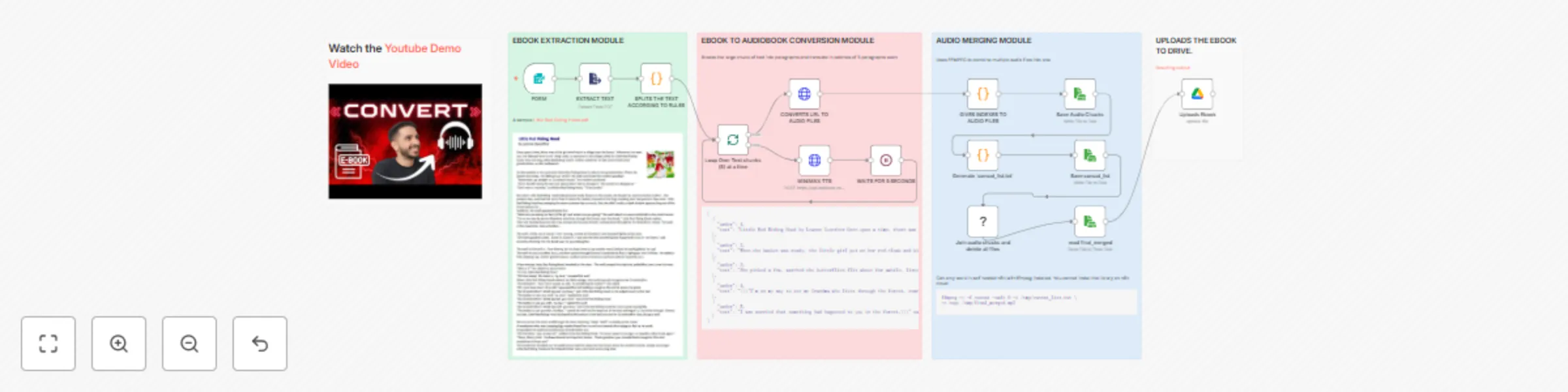
# Ebook to Audiobook Converter [](https://youtu.be/xKqkjXIPZoM) **[▶️ Watch Full Demo Video](https://youtu.be/xKqkjXIPZoM)** --- ## What It Does Turn any PDF ebook into a professional audiobook automatically. Upload a PDF, get an MP3 audiobook in your Google Drive. Perfect for listening to books, research papers, or documents on the go. **Example**: [Input PDF](https://www.laburnumps.vic.edu.au/uploaded_files/media/little_red_riding_hood.pdf) → [Output Audiobook](https://drive.google.com/file/d/12aVR2p-ZQ2DyqXCUgJPouzy-acoAB7WO/view?usp=sharing) ## Key Features - Upload PDF via web form → Get MP3 audiobook in Google Drive - Natural-sounding AI voices (MiniMax Speech-02-HD) - Automatic text extraction, chunking, and audio merging - Customizable voice, speed, and emotion settings - Processes long books in batches with smart rate limiting ## Perfect For - **Students**: Turn textbooks into study audiobooks - **Professionals**: Listen to reports and documents while commuting - **Content Creators**: Repurpose written content as audio - **Accessibility**: Make content accessible to visually impaired users ## Requirements | Component | Details | |-----------|---------| | **n8n** | Self-hosted ONLY (cannot run on n8n Cloud) | | **FFmpeg** | Must be installed in your n8n environment | | **Replicate API** | For MiniMax TTS ([Sign up here](https://replicate.com)) | | **Google Drive** | OAuth2 credentials + "Audiobook" folder | ⚠️ **Important**: This workflow **does NOT work on n8n Cloud** because FFmpeg installation is required. ## Quick Setup ### 1. Install FFmpeg **Docker users:** ```bash docker exec -it <n8n-container-name> /bin/bash apt-get update && apt-get install -y ffmpeg ``` **Native installation:** ```bash sudo apt-get install ffmpeg # Linux brew install ffmpeg # macOS ``` ### 2. Get API Keys - **Replicate**: Sign up at [replicate.com](https://replicate.com) and copy your API token - **Google Drive**: Set up OAuth2 in n8n and create an "Audiobook" folder in Drive ### 3. Import & Configure 1. Import `n8n.json` into your n8n instance 2. Replace the Replicate API token in the "MINIMAX TTS" node 3. Configure Google Drive credentials and select your "Audiobook" folder 4. Activate the workflow ## Cost Estimate | Component | Cost | |-----------|------| | **MiniMax TTS API** | ~$0.15 per 1000 characters (~$3-5 for average book) | | **Google Drive Storage** | Free (up to 15GB) | | **Processing Time** | ~1-2 minutes per 10 pages | ## How It Works  ``` PDF Upload → Extract Text → Split into Chunks → Convert to Speech (batches of 5) → Merge Audio Files (FFmpeg) → Upload to Google Drive ``` The workflow uses four main modules: 1. **Extraction**: PDF text extraction and intelligent chunking 2. **Conversion**: MiniMax TTS processes text in batches 3. **Merging**: FFmpeg combines all audio files seamlessly 4. **Upload**: Final audiobook saved to Google Drive ## Voice Settings (Customizable) ```json { "voice_id": "Friendly_Person", "emotion": "happy", "speed": 1, "pitch": 0 } ``` Available emotions: `happy`, `neutral`, `sad`, `angry`, `excited` ## Limitations - ⚠️ **Self-hosted n8n ONLY** (not compatible with n8n Cloud) - PDF files only (not EPUB, MOBI, or scanned images) - Large books (500+ pages) take longer to process - Requires FFmpeg installation (see setup above) ## Troubleshooting **FFmpeg not found?** - Docker: Run `docker exec -it <container> /bin/bash` then `apt-get install ffmpeg` - Native: Run `sudo apt-get install ffmpeg` (Linux) or `brew install ffmpeg` (macOS) **Rate limit errors?** - Increase wait time in the "WAITS FOR 5 SECONDS" node to 10-15 seconds **Google Drive upload fails?** - Make sure you created the "Audiobook" folder in your Google Drive - Reconfigure OAuth2 credentials in n8n --- Created by [emp0](https://emp0.com) | More workflows: [n8n Gallery](https://n8n.io/creators/jay-emp0/)
Generate MemeCoin Art with Gemini Flash & NanoBanana and Post to Twitter
# 🐱 MemeCoin Art Generator - using Gemini Flash NanoBanana & upload to Twitter > Watch the Youtube Tutorial video [](https://www.youtube.com/watch?v=q-R8lZZiFtQ) Automatically generates **memecoin art** and posts it to **Twitter (X)** powered by **Google Gemini**, **NanoBanana image generation**, and **n8n automation**. --- ## 🧩 Overview This workflow creates viral style memecoin images (like *Popcat*) and posts them directly to Twitter with a witty, Gen Z style tweet. It combines **text to image AI**, **scheduled triggers**, and **social publishing**, all in one seamless flow. **Workflow flow:** 1. Define your memecoin mascot (name, description, and base image URL). 2. Generate an AI image prompt and a meme tweet. 3. Feed the base mascot image into **Gemini Image Generation API**. 4. Render a futuristic memecoin artwork using **NanoBanana**. 5. Upload the final image and tweet automatically to Twitter. --- ## 🧠 Workflow Diagram  --- ## ⚙️ Key Components | Node | Function | |------|-----------| | **Schedule Trigger** | Runs automatically at chosen intervals to start meme generation. | | **Define Memecoin** | Defines mascot name, description, and base image URL. | | **AI Agent** | Generates tweet text and creative image prompt using Google Gemini. | | **Google Gemini Chat Model** | Provides trending topic context and meme phrasing. | | **Get Source Image** | Fetches the original mascot image (e.g., Popcat). | | **Convert Source Image to Base64** | Prepares image for AI based remixing. | | **Generate Image using NanoBanana** | Sends the prompt and base image to Gemini Image API for art generation. | | **Convert Base64 to PNG** | Converts the AI output to an image file. | | **Upload to Twitter** | Uploads generated image to Twitter via media upload API. | | **Create Tweet** | Publishes the tweet with attached image. | --- ## 🪄 How It Works 1️⃣ **Schedule Trigger** - starts the automation (e.g., hourly or daily). 2️⃣ **Define Memecoin** - stores your mascot metadata: ```yaml memecoin_name: popcat mascot_description: cat with open mouth mascot_image: https://i.pinimg.com/736x/9d/05/6b/9d056b5b97c0513a4fc9d9cd93304a05.jpg ``` 3️⃣ **AI Agent** - prompts Gemini to: - Write a short 100 character tweet in Gen Z slang. - Create an image generation prompt inspired by current meme trends. 4️⃣ **NanoBanana API** - applies your base image + AI prompt to create art. 5️⃣ **Upload & Tweet** - final image gets uploaded and posted automatically. --- ## 🧠 Example Output **Base Source Image:**  **Generated Image (AI remix):**  **Published Tweet:**  Example tweet text: > Popcat's about to go absolutely wild, gonna moon harder than my last test score! 🚀📈 We up! #Popcat #Memecoin --- ## 🧩 Setup Tutorial ### 1️⃣ Prerequisites | Tool | Purpose | |------|----------| | **n8n (Cloud or Self hosted)** | Workflow automation platform | | **Google Gemini API Key** | For generating tweet and image prompts | | **Twitter (X) API OAuth1 + OAuth2** | For uploading and posting tweets | --- ### 2️⃣ Import the Workflow 1. Download `memecoin art generator.json`. 2. In n8n, click **Import Workflow → From File**. 3. Set up and connect credentials: - Google Gemini API - Twitter OAuth 4. (Optional) Adjust **Schedule Trigger** frequency to your desired posting interval. --- ### 3️⃣ Customize Your MemeCoin In the **Define Memecoin** node, edit these fields to change your meme theme: ```javascript memecoin_name: "doggo" mascot_description: "shiba inu in astronaut suit" mascot_image: "https://example.com/shiba.jpg" ``` That’s it - next cycle will generate your new meme and post it. --- ### 4️⃣ API Notes - **Gemini Image Generation API Docs:** [https://ai.google.dev/gemini-api/docs/image-generation#gemini-image-editing](https://ai.google.dev/gemini-api/docs/image-generation#gemini-image-editing) - **API Key Portal:** [https://aistudio.google.com/api-keys](https://aistudio.google.com/api-keys)
Repurpose Reddit posts into AI tweets with Gemini and Google Sheets
Automatically turns trending Reddit posts into **punchy, first-person tweets** powered by **Google Gemini AI**, **Reddit**, and **Twitter API**, with Google Sheets logging. --- ## 🧩 Overview This workflow repurposes Reddit content into original tweets every few hours. It’s perfect for creators, marketers, or founders who want to **automate content inspiration** while keeping tweets sounding **human, edgy, and fresh**. **Core automation loop:** 1. Fetch trending Reddit posts from selected subreddits. 2. Use **Gemini AI** to write a short, first-person tweet. 3. Check your Google Sheet to avoid reusing the same Reddit post. 4. Publish to Twitter automatically. 5. Log tweet + Reddit reference in Google Sheets. --- ## 🧠 Workflow Diagram  --- ## 🪄 How It Works 1️⃣ **Every 2 hours** → the workflow triggers automatically. 2️⃣ It picks a subreddit (like `r/automation`, `r/n8n`, `r/SaaS`). 3️⃣ Gemini AI analyzes a rising Reddit post and writes a **fresh, short tweet**. 4️⃣ The system checks your **Google Sheet** to ensure it hasn’t used that Reddit post before. 5️⃣ Once validated, the tweet is **published via Twitter API** and **logged**. --- ## 🧠 Example Tweet Output  --- ## 📊 Logged Data (Google Sheets) Each tweet is automatically logged for version control and duplication checks. | Date | Subreddit | Post ID | Tweet Text | |------|------------|----------|-------------| | 08/10/2025 | n8n_ai_agents | 1o16ome | Just saw a wild n8n workflow on Reddit... | --- ## ⚙️ Key Components | Node | Function | |------|-----------| | **Schedule Trigger** | Runs every 2 hours to generate a new tweet. | | **Code (Randomly Decide Subreddit)** | Picks one subreddit randomly from your preset list. | | **Gemini Chat Model** | Generates tweet text in first person tone using custom prompt rules. | | **Reddit Tool** | Fetches top or rising posts from the chosen subreddit. | | **Google Sheets (read database)** | Keeps a record of already-used Reddit posts. | | **Structured Output Parser** | Ensures consistent tweet formatting (tweet text, subreddit, post ID). | | **Twitter Node** | Publishes the AI-generated tweet. | | **Append Row in Sheet** | Logs the tweet with date, subreddit, and post ID. | --- ## 🧩 Setup Tutorial ### 1️⃣ Prerequisites | Tool | Purpose | |------|----------| | **n8n Cloud or Self-Host** | Workflow execution | | **Google Gemini API Key** | For tweet generation | | **Reddit OAuth2 API** | To fetch posts | | **Twitter (X) API OAuth2** | To publish tweets | | **Google Sheets API** | For logging and duplication tracking | --- ### 2️⃣ Import the Workflow 1. Download `Reddit Twitter Automation.json`. 2. In n8n, click **Import Workflow → From File**. 3. Connect your credentials: - Gemini → `Gemini` - Reddit → `Reddit account` - Twitter → `X` - Google Sheets → `Gsheet` --- ### 3️⃣ Configure Google Sheet Your sheet must include these columns: | Column | Description | |--------|--------------| | `PAST TWEETS` | The tweet text | | `Date` | Auto-generated date | | `subreddit` | Reddit source | | `post_id` | Reddit post reference |  --- ### 4️⃣ Customize Subreddits In the **Code Node**, update this array to choose which subreddits to monitor: ```javascript const subreddits = [ "n8n", "microsaas", "SaaS", "automation", "n8n_ai_agents" ];
Automate Reddit replies with F5Bot alerts & GPT-5 personalized comments
# 🤖 Reddit Auto-Comment Assistant (AI-Driven Marketing Workflow) Automate how you reply to Reddit posts using **AI-generated, first-person comments** that sound human, follow subreddit rules, and (optionally) promote your own links or products. --- ## 🧩 Overview This workflow monitors Reddit mentions (via **F5Bot Gmail alerts**) and automatically: 1. Fetches the relevant Reddit post. 2. Checks the subreddit’s rules for self-promotion. 3. Generates a comment using GPT-5 style prompting (human-like tone, <255 chars). 4. Optionally promotes your chosen product from Google Sheets. 5. Posts the comment automatically It’s ideal for creators, marketers, or founders who want to grow awareness **organically and authentically** on Reddit — without sounding like a bot. --- ## 🧠 Workflow Diagram  --- ## 🚀 Key Features | Feature | Description | |----------|--------------| | **AI-Generated Reddit Replies** | Uses GPT-powered reasoning and prompt structure that mimics a senior marketing pro typing casually. | | **Rule-Aware Posting** | Reads subreddit rules and adapts tone — no promo where it’s not allowed. | | **Product Integration** | Pulls product name + URL from your Google Sheet automatically. | | **Full Automation Loop** | From Gmail → Gsheet → Reddit | | **Evaluation Metrics** | Logs tool usage, link presence, and formatting to ensure output quality. | --- ## 🧰 Setup Guide ### 1️⃣ Prerequisites | Tool | Purpose | |------|----------| | **n8n Cloud or Self-Host** | Workflow automation environment | | **OpenAI API key** | For comment generation | | **Reddit OAuth2 credentials** | To post comments | | **Google Sheets API** | To fetch and evaluate products | | **Gmail API** | To read F5Bot alerts | --- ### 2️⃣ Import the Workflow 1. Download `Reddit Assistant.json` 2. In n8n, click **Import Workflow → From File** 3. Paste your credentials in the corresponding nodes: - `Reddit account` - `Gmail account` - `Gsheet account` - `OpenAI API` --- ### 3️⃣ Connect Your Google Sheets You’ll need **two Google Sheets**: | Sheet | Purpose | Example Tab | |--------|----------|-------------| | **Product List** | Contains all your product names, URLs, goals, and CTAs | `promo` | | **Reddit Evaluations** | Logs AI performance metrics and tool usage | `reddit evaluations` |  --- ### 4️⃣ Set Up Gmail Trigger (F5Bot) 1. Subscribe to [F5Bot](https://f5bot.com) alerts for keywords like `"blog automation"` or your brand name.  2. Configure Gmail Trigger to only pull from sender: `[email protected]`.  --- ### 5️⃣ Configure AI Agent Prompt The built-in prompt follows a **GPT-5-style structured reasoning chain**: - Reads the Reddit post + rules. - Determines if promotion is allowed. - Fetches product data from Google Sheets. - Writes a short, human comment (<255 chars). - Avoids buzzwords and fake enthusiasm. --- ## 📊 Workflow Evaluations The workflow includes **automatic evaluation nodes** to track: | Metric | Description | |--------|--------------| | `contains link` | Checks if comment includes a URL | | `contains dash` | Detects format breaks | | `Tools Used` | Logs which AI tools were used in reasoning | | `executionTime` | Monitors average latency |  --- ## 💡 Why This Workflow Has Value | Value | Explanation | |--------|--------------| | **Saves time** | Automates Reddit marketing without manual engagement. | | **Feels human** | AI comments use a fast-typing, casual tone (e.g., “u,” “ur,” “idk”). | | **Follows rules** | Respects subreddits where promo is banned. | | **Data-driven** | Logs performance across 10 test cases for validation. | | **Monetizable** | Can promote Gumroad, YouTube, or SaaS products safely. | --- ## ⚙️ Example Use Case > “I used this automation to pull $1.4k by replying to Reddit posts about blog automation. > Each comment felt natural and directed users to my n8n workflow.” 
Automated content & promo tweet scheduler with Gemini AI and Google Sheets
# Twitter Automation (n8n Template) ## 🚀 What it does - Posts a **unique tweet every 2 hours** - **70% content tweets** (10 proven templates) - **30% promo tweets** pulled from Google Sheets - Logs past tweets to avoid **duplicates** --- ## ✅ Requirements - **n8n** - **Google Sheets** with 2 tabs: - `posts` → log of past tweets (`PAST TWEETS`, `Date`) - `promo` → promo source (`name`, `last_posted`, optional extra fields)  - **Twitter (X)** account with OAuth2 write access - **Gemini API key** (for text generation) --- ## ⚡ Results 1. Automated motivational posts  2. Automated promo posts  --- ## 🔄 How It Works 1. Triggers **every 2 hours** (optional: random delay up to 120 min). 2. Randomly selects **content (70%)** or **promo (30%)**. 3. **Content path:** checks `posts`, generates tweet, logs new one. 4. **Promo path:** picks row from `promo`, generates tweet, updates `last_posted`. 5. Posts to **Twitter** automatically. --- ## 🎯 Content Templates Transformation · Hook–List–Takeaway · Interesting Fact · Metaphor · Contrast · Motivation · Triad · Comparison · 80/20 Rule · Callout --- ## ⚙️ Customization | Setting | Where | Example | |---------|-------|---------| | Ads probability | Code node | Change `Math.random() < 0.3` → `0.2` for 20% | | Templates | Code node | Edit the `templates` array | | Cadence | Schedule Trigger | Cron or fixed hours | | Random delay | Time randomizer | Enable node (0–120 mins) | --- ## 🛠️ Troubleshooting | Issue | Fix | |-------|-----| | Repeated tweets | Ensure `posts` has column `PAST TWEETS` | | Not posting | Reconnect Twitter creds with write access | | Promo never used | Increase ads probability (e.g., `0.4`) |
Daily Postgres table backup to GitHub in CSV format
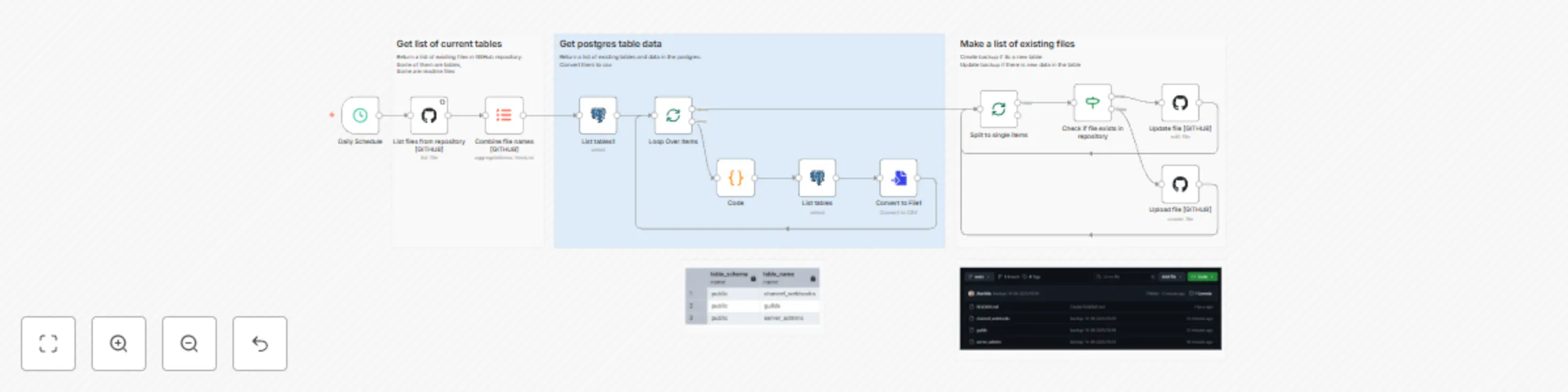
This workflow automatically backs up all public Postgres tables into a GitHub repository as CSV files every 24 hours. It ensures your database snapshots are always up to date updating existing files if data changes, or creating new backups for new tables. **How it works:** 1. **Schedule Trigger** – Runs daily to start the backup process. 2. **GitHub Integration** – Lists existing files in the target repo to avoid duplicates. 3. **Postgres Query** – Fetches all table names from the `public` schema. 4. **Data Extraction** – Selects all rows from each table. 5. **Convert to CSV** – Saves table data as CSV files. 6. **Conditional Upload** – - If the table already exists in GitHub → Update the file. - If new → Upload a new file. --- ### **Postgres Tables Preview**  --- ### **GitHub Backup Preview**  --- **Use case:** Perfect for developers, analysts, or data engineers who want **daily automated backups** of Postgres data without manual exports keeping both history and version control in GitHub. **Requirements:** - Postgres credentials with read access. - GitHub repository (OAuth2 connected in n8n).
Generate images with Replicate and Flux
MCP Tool — Replicate (Flux) Image Generator → WordPress/Twitter Generates images via **Replicate** Flux models and uploads to WordPress (and optionally Twitter/X). Built to act as an **MCP** module that other agents/workflows call for on-demand image creation. - Models configured in this workflow:\ `black-forest-labs/flux-schnell`, `black-forest-labs/flux-dev`, `black-forest-labs/flux-1.1-pro` - Switch rationale: **lower cost** 💰, **broader model choice** 🎯, **full control of parameters** ⚙️ - Leonardo API credits cannot be used in the **web UI** 🙅♂️; separate spend for API vs UI Links: - 📜 Prior Leonardo-based workflow: [https://n8n.io/workflows/6363-generate-and-upload-images-with-leonardo-ai-wordpress-and-twitter/](https://n8n.io/workflows/6363-generate-and-upload-images-with-leonardo-ai-wordpress-and-twitter/) - 📰 Blog automation consuming these images: [https://n8n.io/workflows/6734-ai-blog-automation-publish-hourly-seo-articles-to-wordpress-and-twitter-v3/](https://n8n.io/workflows/6734-ai-blog-automation-publish-hourly-seo-articles-to-wordpress-and-twitter-v3/) --- ## 📥 Inputs | Field | Type | Description | | ------ | ------ | --------------------------------- | | prompt | string | Text description for the image | | slug | string | Filename slug for WP media | | model | string | One of the configured Flux models | Example: ```json { "prompt":"Joker watching a Batman movie on his laptop", "slug":"joker-watching-batman", "model":"black-forest-labs/flux-dev" } ``` ## 📤 Output ```json { "public_image_url": "https://your-wp.com/wp-content/uploads/2025/08/img-joker-watching-batman.webp", "wordpress": {...}, "twitter": {...} } ``` --- ## 🔄 Flow 1. Trigger with `prompt`, `slug`, `model` 2. Build model payload (quality/steps/ratio/output format) 3. Call Replicate: `POST /v1/models/{model}/predictions` (Prefer: wait) 4. Download the generated image URL 5. Upload to WordPress (returns public URL) 6. Optional: upload to Twitter/X 7. Return URL + metadata --- ## 🤖 MCP Use at Scale (emp0.com) Operational pattern: I currently use this setup for my blog where i generate **~300 posts/month**, each with **4 images** (banner + 2 to 3 inline images) → **~1,000 images/month** produced by this MCP. 💡 **Hybrid Cost-Optimized Setup:** - **High-priority images** (banners, main visuals): Generated using **Flux Dev** on Leonardo for slightly better prompt adherence. - **Low-priority images** (inline blog visuals): Generated using **Flux Schnell** on Replicate for maximum cost efficiency. --- ## 💰 Pricing Comparison (per image) Leonardo per-image cost uses API Basic math: **$9 / 3,500 credits = $0.0025714 per credit**. - **Flux Schnell (Leonardo)** = 7 credits - **Flux Dev (Leonardo)** = 7 credits - **Flux 1.1 Pro equivalent in Leonardo** = **Leonardo Phoenix** based on my experience = 10 credits | Flux Model | Replicate | Leonardo API* | | ------------------------ | ------------------------- | ------------------------------- | | `flux-schnell` | **$0.0030** (=$3/1,000) | **$0.0180** (7 × $0.0025714) | | `flux-dev` | **$0.0250** | **$0.0180** (7 × $0.0025714) | | `flux-1.1-pro` / Phoenix | **$0.0400** | **$0.0257** (10 × $0.0025714) | **Replicate pricing:** [https://replicate.com/pricing](https://replicate.com/pricing)\ **Leonardo pricing:** [https://leonardo.ai/pricing/](https://leonardo.ai/pricing/)\ **Leonardo API usage:** [https://docs.leonardo.ai/docs/commonly-used-api-values](https://docs.leonardo.ai/docs/commonly-used-api-values) --- ## 📊 Monthly Cost Example (1,000 images/month) Mix: **300 ×`flux-dev` on Leonardo**, **700 ×`flux-schnell` on Replicate**. | Platform/Model | Images | Price per Image | Total | | ------------------------ | ------ | --------------- | ---------- | | Leonardo `flux-dev` | 300 | $0.0180 | **$5.40** | | Replicate `flux-schnell` | 700 | $0.0030 | **$2.10** | | **Total Monthly Spend** | 1000 | — | **$7.50** | 💵 **If using Leonardo for both:** - 300 × $0.0180 = $5.40 - 700 × $0.0180 = $12.60 - **Total = $18.00** **Savings:** $10.50/month (**≈58% lower**) with the hybrid setup. --- ## 📌 Notes - More Replicate models can be added in `Code1` node. - Parameters tuned for aspect ratio, inference steps, quality, guidance. - Leonardo credit model is API-only; credits are not spendable in Leonardo's web UI.
AI blog automation: Publish hourly SEO articles to WordPress & Twitter v3
## ==🔥 Upgrade to V4== We’ve released Version 4 of our AI Powered Blog Automation workflow. We heard your complains and made a complete redesign built for serious content creators. ChatGPT 5, Inbound Links, Verified Outbound Links,YOAST seo integration, Company profile, higher SEO ranking, banner images using companys mascot, FAQ sections and conclusions, 35% cost reduction, 📝 Read the [New Articles published by Content Farming v4](https://articles.emp0.com/tag/v4/) 🛒 View the [updated and improved v4 workflow](https://0emp0.gumroad.com/l/content-farming-v4) # AI Powered Blog Automation Workflow for Wordpress and Twitter - v3 ## Introduction [](https://www.youtube.com/watch?v=lg80KikzaLg) This is a fully automated AI powered blog content generation and distribution workflow built for the n8n automation platform. It's designed for solo founders, creators, indie hackers, marketers, SEO consultants, or lean startup teams who run multiple projects and want to consistently publish high quality, search optimized articles without relying on a human marketing team. [Buy Now for only $29](https://0emp0.gumroad.com/l/content-farming-v3) and get instant traffic to your blog / wordpress site  Running a blog is essential to drive traffic, build authority, and rank on Google, but it’s time consuming and expensive to manage. This workflow turns your blog into a living, breathing content engine that generates, enhances, and publishes articles every day using a team of autonomous AI agents. If you want to boost your site’s visibility and promote it across multiple channels like WordPress, Twitter, and Dev.to, this workflow is for you. [Checkout the articles generated with this workflow](https://articles.emp0.com/tag/v3/) --- ## Before You Start To get the most out of this workflow, prepare the following: - **Define your content pillars** e.g., AI, business, automation, developer tools, healthtech, etc. - **List your RSS or news sources** like TechCrunch, Wired, CNN Tech, The Verge, etc. - **Know your audience** Who are you trying to attract? Developers? Founders? Investors? Enterprises? --- ## How It Works - Step 1: Ingest Recent News via RSS + Vectorization - Step 2: Topic Generation with Semantic Clustering - Step 3: Research + Data Enrichment - Step 4: Content Generation (3 Agent Loop) - Step 5: Blog Title Optimization - Step 6: Metadata Generation - Step 7: Featured Image Generation - Step 8: WordPress Draft Creation - Step 9: Distribute to Twitter and Dev.to Read the [complete technical architecture and cost structure](https://github.com/Jharilela/n8n-workflows/blob/main/Content%20Generator%20V3/Technical%20Setup.md) --- ## What makes this flow unique ? This isn’t just automation. It’s AI workflow orchestration. You get a full scale, modular content team simulated by multi agent communication using the following architecture:  ### 3-Agent System - **Agent 1: Task Manager** - Defines objectives - Assigns sections and goals - **Agent 2: Content Generator** - Equipped with MCP plugins: - Web Search - Image Generator - Graph/Chart Generator - Section Optimizer - **Agent 3: Quality Control** - Checks SEO metrics, flow, clarity, link strategy - Gives detailed recommendations back to Agent 1 Each agent talks via shared JSON memory and only modifies content blocks relevant to their scope, reducing token usage and preserving structure. This modularity mimics how a marketing team operates. The agents operate in a looped chain of thought format using `n8n` loops and memory iterating until the article crosses an 80% quality threshold or max loop limit. ### MCP tools for visuals The article is generated in a loop involving: - Internet search to generate outbound links (via MCP tool)  - Image generation (Leonardo or DALL·E via MCP)  - Chart/graph generation (via QuickChart )  - Table generation (via AI agent and HTML blocks)  ## Revenue Potential & Monetization Use Cases This workflow can generate revenue if deployed strategically. ### 💸 Monetization Strategies - **Affiliate Blog Engine** Populate your WordPress with long form articles optimized for affiliate products, SaaS tools, or service reviews. Insert call-to-actions and outbound links to affiliate platforms like Amazon, Gumroad, or Impact. - **Lead Magnet Factory** Target SEO keywords for high-intent leads in your niche (e.g., “best CRM for freelancers”). Capture emails via lead forms in every article and nurture via outbound marketing. Drive subscribers into your Substack or ConvertKit funnel—without writing anything manually. - **Agency/Client Work** Use the workflow to generate blog content for your SEO clients or sell content automation as a service. Deliver consistent value at scale while reducing human cost. ### 📈 Traffic Results (v2 Example) - Daily traffic increase: ~10–30 visitors/day - Monthly cost: ~$21 for OpenAI tokens - Content output: 10 SEO-rich posts/day  With the v3 upgrade, including charts, images, and outbound links, expect **higher engagement, lower bounce rate**, and better SERP visibility. --- ## Need Help or Customization? Need to customize this workflow for your niche? Or need some help setting it up? Reach out to us and we can help ⭐ Read [Customer Reviews](https://0emp0.gumroad.com/l/content-farming-v3) and how they scaled their blog traffic using this workflow ✍️ Write to us via [Email: [email protected]]([email protected]) 💬 Chat with us: [Discord @jym.god](https://discord.com/users/jym.god) --- ## Join the community [Other free n8n workflows](https://n8n.io/creators/jay-emp0/) [Github repository](https://github.com/Jharilela) [Discord Community](https://discord.gg/vuDYfNwf) [Official website](https://emp0.com) --- ## Changelog: From v2 to v3 I have previously posted a free version of this content generator. You can find [FREE v2 on the n8n official website](https://n8n.io/workflows/5230-content-farming-ai-powered-blog-automation-for-wordpress/) Here is the visual difference of the content length and visual components  ### Problems with v2 - RSS links broke when source URLs changed → HTTP 404 - Target length 1500 words never met → hallucinations capped around 600–800 - Content lacked media → zero images/tables/graphs, was very boring to read - Low SEO score due to minimal outbound links and broken links - No content repurposing → missed visibility on Dev.to, Twitter for backlinking and gaining traffic - Single topic limitation → no support for multi pillar blogs ### v3 Upgrades 1. **Vector DB Integration** Store full text and embeddings. Enables multiple content pillar filtering and prevents broken links. Making it customizable per topic  2. **3-Agent AI Architecture** Task Manager → Content Writer → QC Loop - AI agents loop until threshold met - Dynamic sections - Visual generation tools built in - See architecture image  3. **Modular Content Blocks** Content is saved per section → you can modify one section without touching the rest. Saves tokens and cost.  4. **MCP Tools** (included) - Generate images. Find the tool [here](https://n8n.io/workflows/6363-generate-and-upload-images-with-leonardo-ai-wordpress-and-twitter/)  - Generate graphs. Find the tool [here](https://n8n.io/workflows/6361-ai-powered-chart-generation-from-web-data-with-gpt-4o-and-wordpress-upload/)  - Search web for factual support. Generate tables Improve outbound linking and reader engagement  5. **Improved Twitter Integration** - Media rich tweets - Auto hashtag generation - 10x better impressions than plain-text tweets [Checkout our Automated Twitter Account](https://x.com/Emp0_com)  6. **Dev.to Posting with Signature** [Example Dev.to article](https://dev.to/jay_all_day/unlocking-the-mystery-of-300-ai-chatbot-subscriptions-what-makes-them-worth-it-3lnj) ``` markdown ✍️ Written by Emp0.com 🧠 AI Workflows on GitHub: github.com/Jharilela 💬 Chat with us: Discord @jym.god ```
Generate & upload images with Leonardo AI, WordPress and Twitter
# Prompt-to-Image Generator & WordPress Uploader (n8n Workflow) This workflow generates high-quality AI images from text prompts using **Leonardo AI**, then automatically uploads the result to your WordPress media library and returns the final image URL. It functions as a **Modular Content Production (MCP) tool** - ideal for AI agents or workflows that need to dynamically generate and store visual assets on-demand. --- ## ⚙️ Features - 🧠 **AI-Powered Generation** Uses Leonardo AI to create 1472x832px images from any text prompt, with enhanced contrast and style UUID preset. - ☁️ **WordPress Media Upload** Uploads the image as an attachment to your connected WordPress site via REST API. - ☁️ **Twitter Media Upload** Uploads the image to twitter so that you can post the image later on to X.com using the media_id - 🔗 **Returns Final URL** Outputs the publicly accessible image URL for immediate use in websites, blogs, or social media posts. - 🔁 **Workflow-Callable (MCP Compatible)** Can be executed standalone or triggered by another workflow. Acts as an image-generation microservice for larger automation pipelines. --- ## 🧠 Use Cases ### For AI Agents (MCP) - Plug this into multi-agent systems as the "image generation module" - Generate blog thumbnails, product mockups, or illustrations - Return a clean `image_url` for content embedding or post-publishing ### For Marketers / Bloggers - Automate visual content creation for articles - Scale image generation for SEO blogs or landing pages - Supports media upload for twitter ### For Developers / Creators - Integrate with other n8n workflows - Pass prompt and slug as inputs from any external trigger (e.g., webhook, Discord, Airtable, etc.) --- ## 📥 Inputs | Field | Type | Description | |--------|--------|----------------------------------------| | prompt | string | Text prompt for image generation | | slug | string | Filename identifier (e.g. `hero-image`) | Example: ```json { "prompt": "A futuristic city skyline at night", "slug": "futuristic-city" } ``` ## 📤 Output ```json { "public_image_url" : "https://your.wordpress.com/img-id", "wordpress":{...obj}, "twitter":{...obj} } ``` ## 🔄 Workflow Summary 1. Receive Prompt & Slug Via manual trigger or parent workflow execution 2. Generate Image POST to Leonardo AI's API with the prompt and config 3. Wait & Poll Delays 1 minute, then fetches final image metadata 4. Download Image GET request to retrieve generated image 5. Upload to WordPress Uses WordPress REST API with proper headers 6. Upload to Twitter Uses Twitter Media Upload API to get the media id incase you want to post the image to twitter 7. Return Result Outputs a clean public_image_url JSON object along with wordpress and twitter media objects ## 🔐 Requirements - Leonardo AI account and API Key - WordPress site with API credentials (media write permission) - Twitter / x.com Oauth API (optional) - n8n instance (self-hosted or cloud) - This credential setup: - `httpHeaderAuth` for Leonardo headers - `httpBearerAuth` for Leonardo bearer token - `wordpressApi` for upload ## 🧩 Node Stack - `Execute Workflow Trigger` / `Manual Trigger` - `Code` (Input Parser) - `HTTP Request` → Leonardo image generation - `Wait` → 1 min delay - `HTTP Request` → Poll generation result - `HTTP Request` → Download image - `HTTP Request` → Upload to WordPress - `Code` → Return final image URL ## 🖼 Example Prompt ```json { "prompt": "Batman typing on a laptop", "slug": "batman-typing-on-a-laptop" } ``` Will return: ```bash { "public_image_url": "https://articles.emp0.com/wp-content/uploads/2025/07/img-batman-typing-on-a-laptop.jpg" } ``` ## 🧠 Integrate with AI Agents This workflow is MCP-compliant—plug it into: - Research-to-post pipelines - Blog generators - Carousel builders - Email visual asset creators Trigger it from any parent AI agent that needs to generate an image based on a given idea, post, or instruction.
Ai-powered chart generation from web data with GPT-4o and WordPress upload
# AI-Powered Chart Generation from Web Data This n8n workflow automates the process of: 1. **Scraping real-time data from the web** using GPT-4o with browsing capability 2. **Converting markdown tables into Chart.js-compatible JSON** 3. **Rendering the chart** using [QuickChart.io](https://quickchart.io) 4. **Uploading the resulting image** directly to your WordPress media library --- ## 🚀 Use Case Ideal for content creators, analysts, or automation engineers who need to: - Automate generation of visual reports - Create marketing-ready charts from live data - Streamline research-to-publish workflows --- ## 🧠 How It Works ### 1. Prompt Input Trigger the workflow manually or via another workflow with a `prompt` string, e.g.: Generate a graph of apple's market share in the mobile phone market in Q1 2025 --- ### 2. Web Search + Table Extraction The `Message a model` node uses GPT-4o with search to: - Perform a real-time query - Extract data into a markdown table - Return the raw table + citation URLs --- ### 3. Chart Generation via AI Agent The `Generate Chart AI Agent`: - Interprets the table - Picks an appropriate chart type (bar, line, doughnut, etc.) - Outputs valid Chart.js JSON using a strict schema --- ### 4. QuickChart API Integration The `Create QuickChart` node: - Sends the Chart.js config to QuickChart.io - Renders the chart into a PNG image --- ### 5. WordPress Image Upload The `Upload image` node: - Uploads the PNG to your WordPress media library using REST API - Uses proper headers for filename and content-type - Returns the media GUID and full image URL --- ## 🧩 Nodes Used - `Manual Trigger` or `Execute Workflow Trigger` - `OpenAI Chat Model` (GPT-4o) - `LangChain Agent` (Chart Generator) - `LangChain OutputParserStructured` - `HTTP Request` (QuickChart API + WordPress Upload) - `Code` (Final result formatting) --- ## 🗂 Output Format The final `Code` node returns: ```json { "research": { ...raw markdown table + citations... }, "graph_data": { ...Chart.js JSON... }, "graph_image": { ...WordPress upload metadata... }, "result_image_url": "https://your-wordpress.com/wp-content/uploads/...png" } ``` ## ⚙️ Requirements OpenAI credentials (GPT-4o or GPT-4o-mini) WordPress REST API credentials with media write access QuickChart.io (free tier works) n8n v1.25+ recommended ## 📌 Notes Chart style and format are determined dynamically based on your table structure and AI interpretation. Make sure your OpenAI and WordPress credentials are connected properly. Outputs are schema-validated to ensure reliable rendering. ## 🖼 Sample Output 
AI-powered multi-platform assistant with Google Suite, LinkedIn & Twitter
# 🤖 MCP Personal Assistant Workflow Description This workflow integrates multiple productivity tools into a single AI-powered assistant using n8n, acting as a centralized control hub to receive and execute tasks across Google Calendar, Gmail, Google Drive, LinkedIn, Twitter, and more. --- ## ✅ Key Capabilities - **AI Agent + Tool Use**: Built using n8n's AI Agent and MCP system, enabling intelligent multi-step reasoning. - **Tool Integration**: - Google Calendar: schedule, update, delete events - Gmail: search, draft, send emails - Google Drive: manage files and folders - LinkedIn & Twitter: post updates, send DMs - Utility tools: fetch date/time, search URLs - **Discord Input**: Accepts prompts via `n8n_discord_trigger_bot` [repo link](https://github.com/Jharilela/n8n_discord_trigger_bot) --- ## 🛠 Setup Instructions 1. **Timezone Configuration**: - Go to `Settings > Default Timezone` in n8n. - Set to your local timezone (e.g., `Asia/Jakarta`). - Ensure all `Date & Time` nodes explicitly use the same zone to avoid UTC-related bugs. 2. **Tool Authentication**: - Replace all OAuth credentials for: - Gmail - Google Drive - Google Calendar - Twitter - LinkedIn - Use your own accounts when copying this workflow. 3. **Platform Adaptability**: - While designed for Discord, you can replace the Discord trigger with any other chat or webhook service. - Example: Telegram, Slack, WhatsApp Webhook, n8n Form Trigger, etc. --- ## 📦 Strengths - Great for **document retrieval**, **email summarization**, **calendar scheduling**, and **social posting**. - Reduces the need for tab-switching across multiple platforms. - Tested with a comprehensive checklist across categories like: - Calendar - Gmail - Google Drive - Twitter - LinkedIn - Utility tools - Cross-tool actions (Refer to [discordGPT prompt checklist](https://n8n.io/workflows/XXXXXX) for prompt coverage.) --- ## ⚠️ Limitations - ❌ **Binary Uploads**: - AI agents & MCP server currently struggle with binary payloads. - Uploading files to Gmail, Google Drive, or LinkedIn may fail due to format serialization issues. - Binary operations (upload/post) are **under development** and will be fixed in future iterations. - ❌ **Date Bugs**: - If timezone settings are incorrect, event times may default to UTC, leading to misaligned calendar events. --- ## 🔬 Testing Use the provided prompt checklist for full coverage of: - ✅ Core feature flows - ✅ Edge cases (e.g., invalid dates, nonexistent users) - ✅ Cross-tool chains (e.g., Google Drive → Gmail → LinkedIn) --- ## ✅ MCP Assistant Test Prompt Checklist ### 📅 Google Calendar - [X] "Schedule a meeting with Alice tomorrow at 10am. and send an invite to [email protected]" - [X] "Create an event called 'Project Sync' on Friday at 3pm with Bob and Charlie." - [X] "Update the time of my call with James to next Monday at 2pm." - [X] "Delete my meeting with Marketing next Wednesday." - [x] "What is my schedule tommorow ? " ### 📧 Gmail - [x] "Show me unread emails from this week." - [x] "Search for emails with subject: invoice" - [X] "Reply to the latest email from [email protected] saying 'Thanks, noted!'" - [X] "Draft an email to [email protected] with subject 'Emp0 Fundraising' and draft the body of the email with an investment opportunity in Emp0, scrape this site https://Emp0.com to get to know more about emp0.com" - [X] "Send an email to [email protected] with subject 'Feature request' and cc [email protected]" - [ ] "Send an email to [email protected] , write about how you like their product and want to apply for a job there and attach my latest CV from Google Drivce" ### 🗂 Google Drive - [ ] "Upload the PDF you just sent me to my Google Drive." - [X] "Create a folder called 'July Reports' inside Emp0 shared drive." - [X] "Move the file named 'Q2_Review.pdf' to 'Reports/2024/Q2'." - [X] "Share the folder 'Investor Decks' with [email protected] as viewer." - [ ] "Download the file 'Wayne_Li_CV.pdf' and attach it in Discord." - [X] "Search for a file named 'Invoice May' in my Google Drive." ### 🖼 LinkedIn - [X] "Think of a random and inspiring quote. Post a text update on LinkedIn with the quote and end with a question so people will answer and increase engagement" - [ ] "Post this Google Drive image to LinkedIn with the caption: 'Team offsite snapshots!'" - [X] "Summarize the contents of this workflow and post it on linkedin with the original url https://n8n.io/workflows/5230-content-farming-ai-powered-blog-automation-for-wordpress/" ### 🐦 Twitter - [X] "Tweet: 'AI is eating operations. Fast.'" - [X] "Send a DM to @founderguy: 'Would love to connect on what you’re building.'" - [X] "Search Twitter for keyword: 'founder advice'" ### 🌐 Utilities - [X] "What time is it now?" - [ ] "Download this PDF: https://ontheline.trincoll.edu/images/bookdown/sample-local-pdf.pdf" - [X] "Search this URL and summarize important tech updates today: https://techcrunch.com/feed/" ### 📎 Discord Attachments - [ ] "Take the image I just uploaded and post it to LinkedIn." - [ ] "Get the file from my last message and upload it to Google Drive." ### 🧪 Edge Cases - [X] "Schedule a meeting on Feb 30." - [X] "Send a DM to @user_that_does_not_exist" - [ ] "Download a 50MB PDF and post it to LinkedIn" - [X] "Get the latest tweet from my timeline and email it to myself." ### 🔗 Cross-tool Flows - [ ] "Get the latest image from my Google Drive and post it on LinkedIn with the caption 'Another milestone hit!'" - [ ] "Find the latest PDF report in Google Drive and email it to [email protected]." - [ ] "Download an image from this link and upload it to my Google Drive: https://example.com/image.png" - [ ] "Get the most recent attachment from my inbox and upload it to Google Drive." --- Run each of these in isolated test cases. For cross-tool flows, verify binary serialization integrity. ## 🧠 Why Use This Workflow? This is an always-on personal assistant that can: - Process natural language input - Handle multi-step logic - Execute commands across 6+ platforms - Be extended with more tools and memory If you want to interact with all your work tools from a single prompt—this is your base to start. --- ## 📎 Repo & Credits - Discord bot trigger: [n8n_discord_trigger_bot](https://github.com/Jharilela/n8n_discord_trigger_bot) - Creator: [Jay (Emp₀)](https://twitter.com/jharilela)
Multi-account email classifier with AI, Gmail, Discord & Google Sheets
# AI Email Classifier 📬 Automate Email Classification, Prioritization, and Spam Detection Across Multiple Accounts Created by: Jayant Kumar ([@jharilela](https://github.com/Jharilela)) 🛠 Powered by: Gmail, Google Sheets, OpenAI, Discord, and n8n --- ## Sample Discord labelling as Spam  ## Sample Discord labelling as Legit  --- ## Why I Built This Focus is Expensive. Managing multiple email inboxes every day—personal, business, partnerships, invoices. Logging into each, skimming through noise, flagging important stuff, and deleting spam started eating up hours of my week. I needed a system that helped me **focus** only on what matters without building an entire helpdesk dashboard. I already live in Discord. It made sense to push my emails there—but in a fun, digestible, and actionable way. I built **AI Email Classifier 📬** to summarize emails, detect spam, assign priority, and make everything skimmable with pictures and links. And it works across **multiple Gmail accounts**. --- ## Key Features - ✅ Works with **multiple Gmail inboxes** - 🧠 Uses AI to **classify spam vs legit** - 🎯 Assigns **priority levels**: High / Medium / Low - 🗂 Appends everything to a **central Google Sheet** - 📸 Sends **visual summaries to Discord** (with image + action links) - 🛠 Powered by open-source: [n8n_discord_trigger_bot](https://github.com/Jharilela/n8n_discord_trigger_bot) --- ## How It Works Here’s the high-level flow: 1. New Email in any inbox triggers the worfklow to start 2. The AI Agent reads the raw content, subject, sender, Gmail labels. 3. It calls a **Google Sheet** that acts as our feedback memory: - Emails and domains manually marked as **spam** or **legit**. 4. AI classifies the incoming email using logic: - **Spam** if sender or domain is blacklisted, or content matches patterns like: _"promotions, phishing, ads, mass emails, cold offers"_ - **Priority** is assigned by: - **High**: deadlines, legal, payments, clients, CEO emails - **Medium**: team updates, meetings, project notifications - **Low**: newsletters, FYIs, casual threads 6. It produces a compact JSON output with: - Sender, recipient, subject, summary, priority, priority color, image URL, action URL 7. The message is formatted visually and posted back to Discord as an embed with: - Summary text - Actionable links - Priority color code - Thumbnail (if any) --- ## Google Sheet Training Table The system uses this sheet as live memory to label spam and legit senders: ``` ╔════════════════════╦══════════════╦═════════════════╦══════════════╦════════════════╗ ║ Email ║ Domain ║ Classification ║ Labelled By ║ Labelled Date ║ ╠════════════════════╬══════════════╬═════════════════╬══════════════╬════════════════╣ ║ [email protected] ║ badsite.com ║ Spam ║ Jayant ║ 08/07/2025 ║ ║ [email protected] ║ trusted.com ║ Legit ║ Jayant ║ 08/07/2025 ║ ╚════════════════════╩══════════════╩═════════════════╩══════════════╩════════════════╝ ``` This allows **manual control** to teach the AI which senders to trust or ignore. Every time I see something marked wrong, I just reply in Discord with `"spam"` or `"legit"` on that message thread. That triggers an update to the Sheet via AI parsing and n8n. --- ## Why Manual Input Still Matters AI isn’t perfect. Some spam emails are cleverly disguised. And some senders are contextually important only to *you*. That’s why I kept a simple feedback loop: - You tell the bot `"spam"` or `"legit"` on any Discord email message. Or anything along that line - The AI agent detects the intent and updates the Sheet. - The AI improves its judgment next time as it now **remembers** your preference --- ## Why Discord? Because Slack charges per seat and email feels lonely. I run most of my operations inside Discord community chats, client rooms, bot alerts. Instead of making a full email UI, I turned each email into a **Discord card with a thumbnail, summary, and quick actions**. It’s fun. It’s visual. It doesn’t feel like work. Email becomes more like a game feed. --- ## Tech Stack - Gmail → Discord via Gmail trigger node - Discord → n8n Webhook via [`n8n_discord_trigger_bot`](https://github.com/Jharilela/n8n_discord_trigger_bot) - OpenAI GPT-4o (classification + summarization) - Google Sheets (feedback memory) - Discord Node (embed output with JSON + images) --- ## Try It Yourself Clone the workflow JSON, set up your Gmail integrations, and install the [n8n Discord Trigger Bot](https://github.com/Jharilela/n8n_discord_trigger_bot). I made this workaround because i couldnt find a discord trigger on n8n. Now I just scroll my Discord DMs and know what to reply to, and ignore everything else.Dont let Email spam your brain. Let your AI do the thinking. ---
Discord daily digest for multiple Google Analytics accounts
# Overview Fetch Multiple Google Analytics GA4 metrics daily, post to Discord, update previous day’s entry as GA data finalizes over seven days.  ## Benefits - Automates daily traffic reporting - Maintains single message per day, avoids channel clutter - Provides near–real-time updates by editing prior messages ## Use Case - Teams tracking website performance via Discord (or any chat tool) without manual copy–paste. Marketing managers, community moderators, growth hackers. - If your manager asks you for daily marketing report every morning, you can now automate it ## Notes - google analytics node in n8n does not provide real time data. The node updates previous values for the next 7 days - discord node on n8n does not have features to update an exisiting message by message id. So we have used the discord api for this - most businesses use multiple google analytics properties across their digital platforms # Core Logic 1. Schedule trigger fires once a day. 2. Google Analytics node retrieves metrics for date ranges (past 7 days) 3. Aggregate node collates all records. 4. Discord node fetches the last 10 messages in the broadcast channel 5. Code node maps existing Discord messages by to the google analytics data using the date fields 5. For each GA record: 1. If no message exists → send new POST to the discord channel 2. If message exists and metrics changed, send an update patch to the existing discord message 8. Batch loops + wait nodes prevent rate-limit. # Setup Instructions 1. Import workflow JSON into n8n. 2. [Follow the n8n guide to Create Google Analytics OAuth2 credential](https://docs.n8n.io/integrations/builtin/app-nodes/n8n-nodes-base.googleanalytics) with access to all required GA accounts. 3. [Follow the n8n guide to Create Discord OAuth2 credential](https://docs.n8n.io/integrations/builtin/app-nodes/n8n-nodes-base.discord) for “Get Messages” operations. 4. [Follow the Discord guide to Create HTTP Header Auth credential](https://discord.com/developers/docs/reference) named “Discord-Bot” with header ``` Key: Authorization Value: Bot <your-bot-token> ``` 5. In the two Set nodes in the beginning of the flow, assign discord_channel_id and google_analytics_id.  1. Get your discord channel id by sending a text on your discord channel and then copy message link 2. Paste the text below and you will see your message link in the form of https://discord.com/channels/server_id/channel_id/message_id , you will want to get the channel_id which is the number in the middle  3. Find your google analytics id by going to google analytics dashboard, seeing the properties in the top right and copy paste that number to the flow  8. Adjust schedule trigger times to your preferred report hour. 9. Activate workflow. # Customization Replace Discord HTTP Request nodes with Slack, ClickUp, WhatsApp, Telegram integrations by swapping POST/PATCH endpoints and authentication.
Content farming - : AI-powered blog automation for WordPress
## ==🔥 Upgrade to V4== We’ve released Version 4 of our AI Powered Blog Automation workflow. We heard your complains and made a complete redesign built for serious content creators. ChatGPT 5, Inbound Links, Verified Outbound Links,YOAST seo integration, Company profile, higher SEO ranking, banner images using companys mascot, FAQ sections and conclusions, 35% cost reduction, 📝 Read the [New Articles published by Content Farming v4](https://articles.emp0.com/tag/v4/) 🛒 View the [updated and improved v4 workflow](https://0emp0.gumroad.com/l/content-farming-v4) # Content Farming V2 ## AI Powered Blog Automation for WordPress This workflow automatically generates and publishes 10 blog posts per day to a WordPress site. It collects tech-related news articles, filters and analyzes them for relevance, expands them with research, generates SEO-optimized long-form articles using AI, creates a matching image using Leonardo AI, and publishes them via the WordPress REST API. Every step is tracked and stored in MongoDB for reference and performance tracking. You can see the demo results for the AI based articles here: [Emp0 Articles](https://articles.emp0.com/tag/v2/)  ## How it works 1. A scheduler runs daily to fetch the latest news from RSS feeds including BBC, TechCrunch, Wired, MIT Tech Review, HackerNoon, and others. 2. The RSS data is normalized and filtered to include only articles published within the past 24 hours. 3. Each article is passed through an OpenAI-powered classifier to check for relevance to predefined user topics like AI, robotics, or tech policy. 4. Relevant articles are then aggregated, researched, and summarized with supporting sources and citations. 5. An AI agent generates five long-tail SEO blog title ideas, ranks them by uniqueness and performance score, and selects the top one. 6. A blog outline is created including H1 and H2 headers, keyword targeting, content structure, and featured snippet optimization. 7. A full-length article (1000 to 1500 words) is generated based on the outline, with analogies, citations, examples, and keyword density maintained. 8. SEO metadata is produced including meta title, description, image alt text, slug, and a readability audit. 9. An AI-generated image is created based on the blog theme using Leonardo AI, enhanced for emotional storytelling and visual consistency. 10. The blog article, metadata, and image are uploaded to WordPress as a draft, the image is attached, Yoast SEO metadata is set, and the article is published. All outputs including article versions, metadata, generation steps, and final blog URLs are stored in MongoDB to allow for future analytics and feedback. ## Requirements To run this project, you need accounts and API access for the following: | Tool | Purpose | Notes | |--------------|------------------------------------------------------------------|-----------------------------------------------------------------------| | OpenAI | Used for blog classification, generation, summarization, SEO | Around $0.20 per day, using GPT-4o-mini. Estimated monthly: $6 | | MongoDB | Stores data flexibly including drafts, titles, metadata, logs | Free tier on MongoDB Atlas offers 512 MB, enough for 64,000 articles | | Leonardo AI | Generates featured images for blog articles | $9 for 3500 credits, $5 monthly top-up needed for 300 images | | WordPress | Final publishing platform via REST API | Hosted on Hostinger for $15/year including domain | ## Setup Instructions 1. Import the provided JSON file into your n8n instance. 2. Configure these credentials in n8n: - OpenAI API key - MongoDB Atlas connection string - HTTP Header Auth for Leonardo AI - WordPress REST API credentials 3. Modify the classifier and prompt nodes to reflect your preferred content themes. 4. Adjust scheduler nodes if you want to change post frequency or publishing times. 5. Run the n8n instance continuously using Docker, PM2, or hosted automation platform. ## Cost Estimate | Component | Daily Usage | Monthly Cost Estimate | |---------------|------------------------------|------------------------| | OpenAI | 10 posts per day | ~$6 | | Leonardo AI | 10 images per day (15 credits each) | ~$14 (9 base + 5 top-up) | | MongoDB | Free up to 512 MB | $0 | | WordPress | Hosting and domain | ~$1.25 | | **Total** | | **~$21/month** | ## Observations and Learnings This system can scale daily article publishing with zero manual effort. However, current limitations include inconsistent blog length and occasional coherence issues. To address this, I plan to build a feedback loop within the workflow: - An SEO Commentator Agent will assess keyword strength, structure, and discoverability. - An Editor-in-Chief Agent will review tone, clarity, and narrative structure. - Both agents will loop back suggestions to the content generator, improving each draft until it meets human-level standards. The final goal is to consistently produce high-quality, readable, SEO-optimized content that is indistinguishable from human writing.