Monitor iOS App Store reviews & send email notifications automatically

Workflow preview

Workflow preview
100%
Monitor iOS App Store reviews & send email notifications automatically preview
Open on n8n.io

Important notice

This workflow is provided as-is. Please review and test before using in production.

1. Workflow Overview

iOS App Store Review Monitor & Notifier – Automated User Feedback Tracking This workflow runs on a scheduled basis (default: every 6 hours, customizable) and monitors new App Store reviews for your...

Best for

  • Social Media automation workflows
  • intermediate n8n builders looking for reusable templates

Tools used

n8n-nodes-base.scheduletrigger, n8n-nodes-base.code, n8n-nodes-base.if, n8n-nodes-base.set, n8n-nodes-base.httprequest, n8n-nodes-base.stickynote, n8n-nodes-base.gmail

Source and attribution

This workflow is cataloged by N8N Workflows and links back to its original n8n.io source page by WeblineIndia.

Original n8n.io source

1.1 Workflow description

Title
Monitor iOS App Store reviews & send email notifications automatically
Workflow name
Monitor iOS App Store reviews & send email notifications automatically

iOS App Store Review Monitor & Notifier – Automated User Feedback Tracking

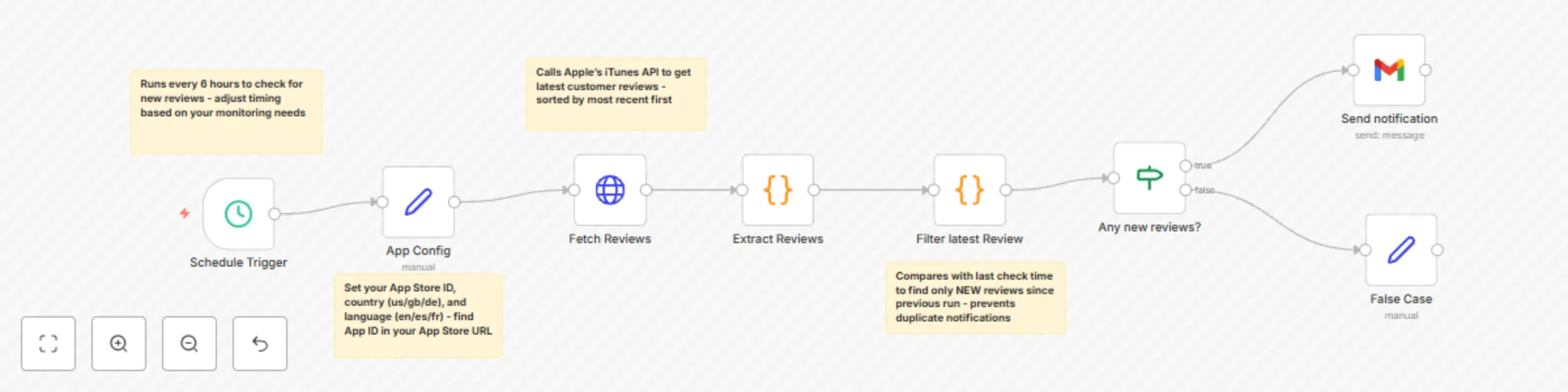
This workflow runs on a scheduled basis (default: every 6 hours, customizable) and monitors new App Store reviews for your iOS apps. It fetches reviews via Apple’s iTunes RSS API, filters only new reviews since the last run and sends real-time notifications to your team via email, Slack, Telegram or other channels.

Never miss important user feedback again.

Who’s it for

  • iOS developers tracking user sentiment and bug reports.
  • Product managers monitoring customer satisfaction and feature requests.
  • Customer support teams responding quickly to complaints and issues.
  • Marketing teams collecting testimonials and case studies from positive reviews.
  • DevOps teams automating review monitoring as part of release processes.

How it works

  • Schedule Trigger runs every 6 hours (cron configurable).
  • App Configuration: Define monitored apps with {appId, country, lang}.
  • Fetch Reviews: Call Apple’s iTunes RSS API for latest customer reviews.
  • Extract & Parse: Convert JSON into structured review data (rating, content, author, date, version).
  • Filter New Reviews: Compare with last run using timestamps → only new reviews pass.
  • Format Notifications: Build rich messages with review details.
  • Send Alerts: Deliver via Email, Slack, Telegram, Teams, etc.
  • Track State: Last check time to prevent duplicates.

How to set up

  1. Find your App Store ID

Go to your app’s App Store page.

Example URL: https://apps.apple.com/us/app/app-name/id123456789

The number after id is the App Store ID (123456789).

  1. Configure App Settings

In the App Config node set:

appId = App Store ID country = Country code (us, gb, de, etc.) lang = Language code (en, es, fr, etc.)

  1. Set Up Notifications

Choose your notification method:

Email: configure Gmail/SMTP credentials Slack: add Slack webhook URL Telegram: set up bot token + chat ID Teams: configure Teams webhook

  1. Customize Schedule

In the Schedule Trigger node:

Every 6 hours → 0 */6 * * * Daily at 9 AM → 0 9 * * * Every 2 hours → 0 */2 * * *

  1. Test the Workflow

Use a known App ID (e.g., WhatsApp: 310633997) for testing.

Run manually to verify notifications are formatted correctly.

Requirements

  • n8n (cloud or self-hosted) with HTTP Request + notification nodes.
  • App Store ID for each monitored app.
  • Notification credentials (Email, Slack, Telegram, etc.).
  • Internet access to query Apple’s iTunes API.

How to customize the workflow

  • Multiple Apps
  • Monitor multiple apps by extending config: [ {appId: "310633997", country: "us", lang: "en"}, {appId: "389801252", country: "gb", lang: "en"}, {appId: "544007664", country: "de", lang: "de"} ]
  • Notification Templates

Add-ons to level up

  • Sentiment Analysis: AI-based scoring per review.
  • Auto-Reply Integration: Respond via App Store Connect API.
  • Analytics Dashboard: Store in Sheets/Airtable for trends.
  • Competitor Monitoring: Track rival app reviews.
  • Translation: Auto-translate to English.
  • Escalation Rules: Different alerts by rating severity.

Common Troubleshooting

  • No reviews returned → app may not have recent reviews, try other country codes.
  • JSON parsing errors → check App Store ID validity.
  • Duplicate notifications → confirm time filtering works correctly.
  • API rate limits → Apple may throttle, add delays.
  • Missing metadata → some apps don’t return all fields.

Need Help?

If you’d like to customize this automation flow to suit your needs, write to our n8n automation team at WeblineIndia and we’ll adapt the template to your exact use case.

1.2 Logical Blocks

This catalog entry is organized from the workflow JSON. The node-level section below shows the executable blocks available for review before importing the template.

2. Block-by-Block Analysis

Block 1 - Schedule Trigger

Type / Role
n8n-nodes-base.scheduleTrigger - scheduleTrigger
Config choices
Version 1.2

Block 2 - Extract Reviews

Type / Role
n8n-nodes-base.code - code
Config choices
Version 2

Block 3 - Any new reviews?

Type / Role
n8n-nodes-base.if - if
Config choices
Version 2.2

Block 4 - App Config

Type / Role
n8n-nodes-base.set - set
Config choices
Version 3.4

Block 5 - Fetch Reviews

Type / Role
n8n-nodes-base.httpRequest - httpRequest
Config choices
Version 4.2

Block 6 - Filter latest Review

Type / Role
n8n-nodes-base.code - code
Config choices
Version 2

Block 7 - Sticky Note

Type / Role
n8n-nodes-base.stickyNote - stickyNote
Config choices
Version 1

Block 8 - Sticky Note1

Type / Role
n8n-nodes-base.stickyNote - stickyNote
Config choices
Version 1

Block 9 - Sticky Note2

Type / Role
n8n-nodes-base.stickyNote - stickyNote
Config choices
Version 1

Block 10 - Sticky Note3

Type / Role
n8n-nodes-base.stickyNote - stickyNote
Config choices
Version 1

Block 11 - Send notification

Type / Role
n8n-nodes-base.gmail - gmail
Config choices
Version 2.1

Block 12 - False Case

Type / Role
n8n-nodes-base.set - set
Config choices
Version 3.4

3. Summary Table

Workflow Monitor iOS App Store reviews & send email notifications automatically
Complexity intermediate
Nodes 12
Categories Social Media
Author WeblineIndia
Published 07 Oct 2025

4. Reproducing the Workflow from Scratch

  1. 1. Download the workflow JSON

    Use the JSON export at /data/workflows/9343/9343.json as the source template for this automation.

  2. 2. Import the template into n8n

    Open n8n, import the downloaded JSON, and review each node before activating the workflow.

  3. 3. Configure credentials and variables

    Replace placeholder credentials, API keys, webhook URLs, account IDs, and environment-specific values with your own settings.

  4. 4. Test with sample data

    Run the workflow manually or in a staging workspace, inspect node output, and confirm downstream systems receive the expected data.

  5. 5. Activate and monitor

    Enable the workflow only after testing, then monitor executions, errors, and rate limits during the first production runs.

5. General Notes & Resources

Review imported nodes carefully before activation. This catalog entry is intended to help you inspect the workflow structure, understand required services, and find related templates faster.

Node names, credentials, schedules, webhook paths, and external service limits may need adjustment for your workspace.

Frequently asked questions

What does Monitor iOS App Store reviews & send email notifications automatically do?

iOS App Store Review Monitor & Notifier – Automated User Feedback Tracking This workflow runs on a scheduled basis (default: every 6 hours, customizable) and monitors new App Store reviews for your...

What do I need before importing this workflow?

Review the workflow JSON, configure any required credentials in n8n, and test the automation in a safe workspace before using it in production.

Can I customize this workflow?

Yes. Use the block-by-block analysis and the downloadable JSON to inspect each node, then adjust credentials, prompts, schedules, filters, or destinations for your Social Media use case.