Monitor and report FAQ freshness from Notion to Google Sheets and Slack
Workflow preview


 Early Deal
DISCOUNT 20%

Important notice
This workflow is provided as-is. Please review and test before using in production.
Overview
Description
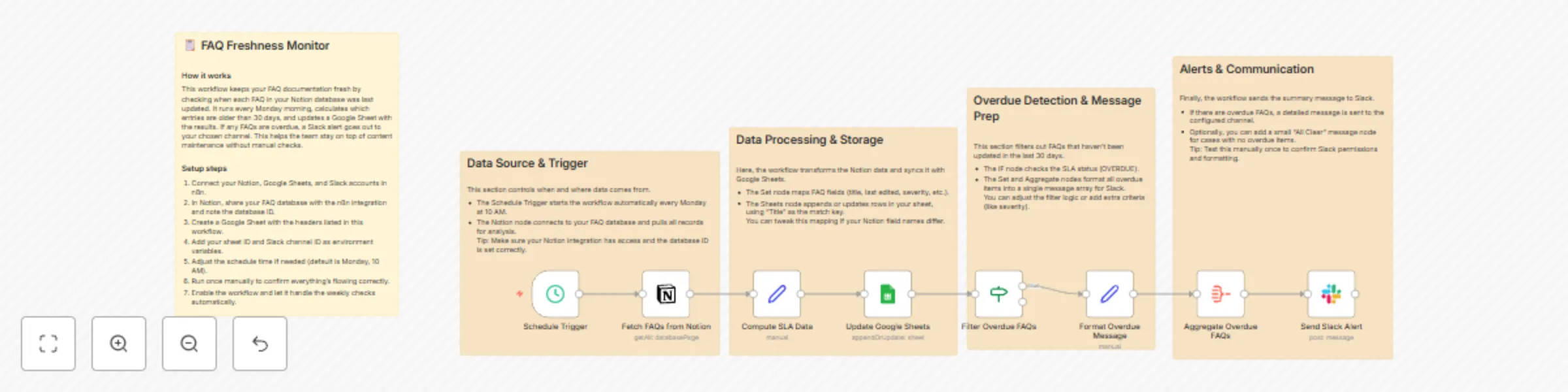
Keep your internal knowledge base fresh and reliable with this automated FAQ freshness monitoring system. 🧠📅 This workflow tracks FAQ update dates in Notion, calculates SLA compliance, logs results in Google Sheets, and sends Slack alerts for outdated items. Perfect for documentation teams ensuring content accuracy and operational visibility across platforms. 🚀💬
What This Template Does
1️⃣ Triggers every Monday at 10:00 AM to start freshness checks. ⏰ 2️⃣ Fetches FAQ entries from your Notion database. 📚 3️⃣ Computes SLA status based on the last edited date (30-day threshold). 📆 4️⃣ Updates a Google Sheet with current FAQ details and freshness status. 📊 5️⃣ Filters out overdue FAQs that need review. 🔍 6️⃣ Aggregates all overdue items into one report. 🧾 7️⃣ Sends a consolidated Slack alert with direct Notion links and priority tags. 💬
Key Benefits
✅ Maintains documentation freshness across systems. ✅ Reduces support friction from outdated FAQs. ✅ Centralizes visibility with Google Sheets reporting. ✅ Notifies your team in real time via Slack. ✅ Enables SLA-based documentation governance.
Features
- Weekly automated schedule (every Monday at 10 AM).
- Notion database integration for FAQ retrieval.
- SLA computation and overdue filtering logic.
- Google Sheets sync for audit logging.
- Slack notification for overdue FAQ alerts.
- Fully configurable thresholds and alerting logic.
Requirements
- Notion API credentials with database read access.
- Google Sheets OAuth2 credentials with edit access.
- Slack Bot Token with chat:write permission.
- Environment variables :
- NOTION_FAQ_DATABASE_ID
- GOOGLE_SHEET_FAQ_ID
- SLACK_FAQ_ALERT_CHANNEL_ID
Target Audience
Knowledge management and documentation teams 🧾 SaaS product teams maintaining FAQ accuracy 💡 Support operations and customer success teams 💬 QA and compliance teams monitoring SLA adherence 📅
Step-by-Step Setup Instructions
1️⃣ Connect Notion credentials and set your FAQ database ID. 2️⃣ Create a Google Sheet with required headers (Title, lastEdited, slaStatus, etc.). 3️⃣ Add your Slack credentials and specify the alert channel ID. 4️⃣ Configure the cron schedule (0 10 * * 1) for Monday 10:00 AM checks. 5️⃣ Run once manually to verify credentials and mappings. 6️⃣ Activate for ongoing weekly freshness monitoring. ✅