Block 1 - Sticky Note - Workflow Overview
- Type / Role
- n8n-nodes-base.stickyNote - stickyNote
- Config choices
- Version 1


 Early Deal
This workflow is provided as-is. Please review and test before using in production.
Description Keep your internal knowledge base fresh and reliable with this automated FAQ freshness monitoring system. This workflow tracks FAQ update dates in Notion, calculates SLA compliance...
n8n-nodes-base.stickynote, n8n-nodes-base.notion, n8n-nodes-base.set, n8n-nodes-base.googlesheets, n8n-nodes-base.if, n8n-nodes-base.aggregate, n8n-nodes-base.slack, n8n-nodes-base.scheduletrigger
This workflow is cataloged by N8N Workflows and links back to its original n8n.io source page by Rahul Joshi.
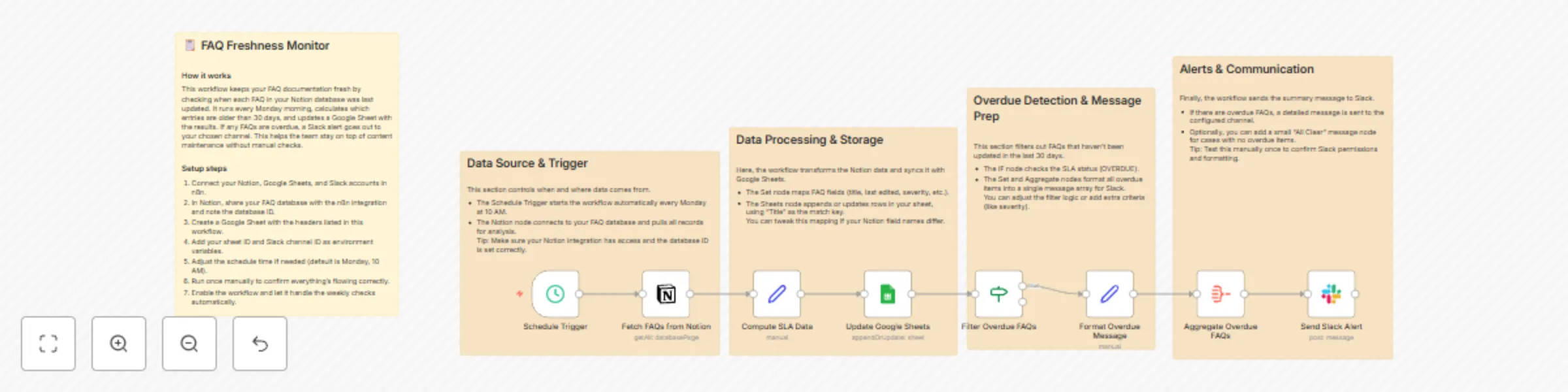
Original n8n.io sourceKeep your internal knowledge base fresh and reliable with this automated FAQ freshness monitoring system. 🧠📅 This workflow tracks FAQ update dates in Notion, calculates SLA compliance, logs results in Google Sheets, and sends Slack alerts for outdated items. Perfect for documentation teams ensuring content accuracy and operational visibility across platforms. 🚀💬
1️⃣ Triggers every Monday at 10:00 AM to start freshness checks. ⏰ 2️⃣ Fetches FAQ entries from your Notion database. 📚 3️⃣ Computes SLA status based on the last edited date (30-day threshold). 📆 4️⃣ Updates a Google Sheet with current FAQ details and freshness status. 📊 5️⃣ Filters out overdue FAQs that need review. 🔍 6️⃣ Aggregates all overdue items into one report. 🧾 7️⃣ Sends a consolidated Slack alert with direct Notion links and priority tags. 💬
✅ Maintains documentation freshness across systems. ✅ Reduces support friction from outdated FAQs. ✅ Centralizes visibility with Google Sheets reporting. ✅ Notifies your team in real time via Slack. ✅ Enables SLA-based documentation governance.
Knowledge management and documentation teams 🧾 SaaS product teams maintaining FAQ accuracy 💡 Support operations and customer success teams 💬 QA and compliance teams monitoring SLA adherence 📅
1️⃣ Connect Notion credentials and set your FAQ database ID. 2️⃣ Create a Google Sheet with required headers (Title, lastEdited, slaStatus, etc.). 3️⃣ Add your Slack credentials and specify the alert channel ID. 4️⃣ Configure the cron schedule (0 10 * * 1) for Monday 10:00 AM checks. 5️⃣ Run once manually to verify credentials and mappings. 6️⃣ Activate for ongoing weekly freshness monitoring. ✅
This catalog entry is organized from the workflow JSON. The node-level section below shows the executable blocks available for review before importing the template.
| Workflow | Monitor and report FAQ freshness from Notion to Google Sheets and Slack |
|---|---|
| Complexity | intermediate |
| Nodes | 13 |
| Categories | Document Extraction |
| Author | Rahul Joshi |
| Published | 06 Nov 2025 |
Use the JSON export at /data/workflows/10549/10549.json as the source template for this automation.
Open n8n, import the downloaded JSON, and review each node before activating the workflow.
Replace placeholder credentials, API keys, webhook URLs, account IDs, and environment-specific values with your own settings.
Run the workflow manually or in a staging workspace, inspect node output, and confirm downstream systems receive the expected data.
Enable the workflow only after testing, then monitor executions, errors, and rate limits during the first production runs.
Review imported nodes carefully before activation. This catalog entry is intended to help you inspect the workflow structure, understand required services, and find related templates faster.
Node names, credentials, schedules, webhook paths, and external service limits may need adjustment for your workspace.
Description Keep your internal knowledge base fresh and reliable with this automated FAQ freshness monitoring system. This workflow tracks FAQ update dates in Notion, calculates SLA compliance...
Review the workflow JSON, configure any required credentials in n8n, and test the automation in a safe workspace before using it in production.
Yes. Use the block-by-block analysis and the downloadable JSON to inspect each node, then adjust credentials, prompts, schedules, filters, or destinations for your Document Extraction use case.