Block 1 - Anthropic Chat Model1
- Type / Role
- @n8n/n8n-nodes-langchain.lmChatAnthropic - lmChatAnthropic
- Config choices
- Version 1.3


 Early Deal
This workflow is provided as-is. Please review and test before using in production.
This template enriches a lead list by analyzing each contact’s LinkedIn activity and auto generating a single personalized opening line for cold outreach. Drop a spreadsheet into a Google Drive fol...
@n8n/n8n-nodes-langchain.lmchatanthropic, n8n-nodes-base.stickynote, n8n-nodes-base.code, n8n-nodes-base.telegram, n8n-nodes-base.set, n8n-nodes-base.httprequest, @n8n/n8n-nodes-langchain.agent, n8n-nodes-base.splitinbatches
This workflow is cataloged by N8N Workflows and links back to its original n8n.io source page by Mariela Slavenova.
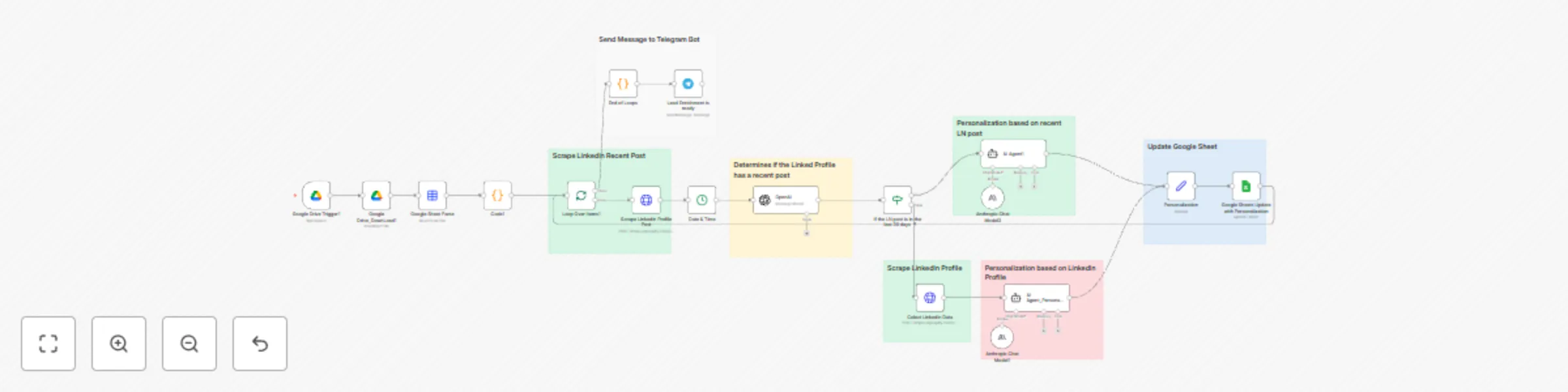
Original n8n.io sourceThis template enriches a lead list by analyzing each contact’s LinkedIn activity and auto-generating a single personalized opening line for cold outreach. Drop a spreadsheet into a Google Drive folder → the workflow parses rows, fetches LinkedIn content (recent post or profile), uses an LLM to craft a one-liner, writes the result back to Google Sheets, and sends a Telegram summary. ⸻
•	Works with two paths:
•	Recent post found → personalize from the latest LinkedIn post.
•	No recent post → personalize from profile fields (headline, about, current role).
•	Requires valid Apify credentials for LinkedIn scrapers and LLM keys (Anthropic and/or OpenAI).
•	Costs depend on the LLM(s) you choose and scraping usage.
•	Replace all placeholders like [put your token here] and [put your Telegram Bot Chat ID here] before running.
•	Respect the target platform’s terms of service when scraping LinkedIn data.
1.	**Trigger (Google Drive)** – Watches a specific folder for newly uploaded lead spreadsheets.
2.	**Download & Parse** – Downloads the file and converts it to structured items (first name, last name, company, LinkedIn URL, email, website).
3.	**Batch Loop** – Processes each row individually.
4.	**Fetch Activity** – Calls Apify LinkedIn Profile Posts (latest post) and records current date for recency checks.
5.	**Recency Check (LLM)** – An OpenAI node returns true/false for “post is from the current year.”
6.	**Branching**
•	If TRUE → AI Agent (Anthropic) crafts a single, natural reference line based on the recent post.
•	If FALSE → Apify LinkedIn Profile → AI Agent (Anthropic) crafts a one-liner from profile data (headline/about/current role).
7.	**Write Back (Google Sheets)** – Updates the original sheet by matching on email and writing the personalization field.
8.	**Notify (Telegram)** – Sends a brief completion summary with sheet name and link.
•	Google Drive & Google Sheets connections
•	Apify account + token for LinkedIn scrapers
•	LLM keys: Anthropic (Claude) and/or OpenAI (you can use one or both)
•	Telegram bot for notifications (bot token + chat ID)
1.	Connect credentials for Google, Apify, OpenAI/Anthropic, and Telegram.
2.	Set your folder in the Google Drive Trigger to the one where you’ll drop lead sheets.
3.	Map sheet columns to the expected headers (e.g., First Name, Last Name, Company Name for Emails, Person Linkedin Url, Email, Website).
4.	Replace placeholders ([put your token here], [put your Telegram Bot Chat ID here]) in the respective nodes.
5.	Upload a test spreadsheet to the watched folder and run once to validate the flow.
6.	Review results in your sheet (new personalization column) and check Telegram for the completion message.
1.	Connect credentials - Google Drive/Sheets, Apify, OpenAI and/or Anthropic, Telegram.
2.	Configure the Drive trigger - Select the folder where you’ll upload your lead sheets.
3.	Map columns - Ensure your sheet has: First Name, Last Name, Company Name for Emails, Person Linkedin Url, Email, Website.
4.	Replace placeholders - In HTTP nodes: Bearer [put your token here]. In Telegram node: [put your Telegram Bot Chat ID here]
5.	(Optional) Adjust the recency rule - Current logic checks for current-year posts; change the prompt if you prefer 30-day windows.
1.	Upload a test spreadsheet to the watched Drive folder.
2.	Execute the workflow once to validate.
3.	Open your Google Sheet to see the new personalization column populated.
4.	Check Telegram for the completion summary.
•	Data sources: Add company news, website content, or X/Twitter as fallback signals.
•	LLM choices: Use only Anthropic or only OpenAI; tweak temperature for tone.
•	Destinations: Write to a CRM (HubSpot/Salesforce/Airtable) instead of Sheets.
•	Notifications: Swap Telegram for Slack/Email/Discord.
•	Sales & SDR teams needing authentic, scalable personalization for cold outreach.
•	Lead gen agencies enriching spreadsheets with ready-to-use openers.
•	Marketing & growth teams improving reply rates by referencing real prospect activity.
•	LinkedIn scraping may be rate-limited or blocked; follow platform ToS and local laws.
•	Costs vary with scraping volume and LLM usage.
Contact me for consulting and support: LinkedIn
This catalog entry is organized from the workflow JSON. The node-level section below shows the executable blocks available for review before importing the template.
Showing the first 24 of 25 workflow blocks. Download the JSON for the full node graph.
| Workflow | LinkedIn lead personalization with Google Drive, Apify & AI |
|---|---|
| Complexity | advanced |
| Nodes | 25 |
| Categories | Lead Generation, AI Chatbot |
| Author | Mariela Slavenova |
| Published | 18 Sept 2025 |
Use the JSON export at /data/workflows/8706/8706.json as the source template for this automation.
Open n8n, import the downloaded JSON, and review each node before activating the workflow.
Replace placeholder credentials, API keys, webhook URLs, account IDs, and environment-specific values with your own settings.
Run the workflow manually or in a staging workspace, inspect node output, and confirm downstream systems receive the expected data.
Enable the workflow only after testing, then monitor executions, errors, and rate limits during the first production runs.
Review imported nodes carefully before activation. This catalog entry is intended to help you inspect the workflow structure, understand required services, and find related templates faster.
Node names, credentials, schedules, webhook paths, and external service limits may need adjustment for your workspace.
This template enriches a lead list by analyzing each contact’s LinkedIn activity and auto generating a single personalized opening line for cold outreach. Drop a spreadsheet into a Google Drive fol...
Review the workflow JSON, configure any required credentials in n8n, and test the automation in a safe workspace before using it in production.
Yes. Use the block-by-block analysis and the downloadable JSON to inspect each node, then adjust credentials, prompts, schedules, filters, or destinations for your Lead Generation, AI Chatbot use case.