LinkedIn lead generation with GPT-4o, Apify scraping, and automated outreach

Workflow preview

Workflow preview
100%
LinkedIn lead generation with GPT-4o, Apify scraping, and automated outreach preview
Open on n8n.io

Important notice

This workflow is provided as-is. Please review and test before using in production.

1. Workflow Overview

LinkedIn Lead Gen Flywheel – Apify → GPT 4o → Google Sheets → Phantombuster What this workflow does 1. Collect audience specs – simple web form asks for your ideal company profile. 2. Generate a...

Best for

  • Lead Generation automation workflows
  • Multimodal AI automation workflows
  • intermediate n8n builders looking for reusable templates

Tools used

n8n-nodes-base.aggregate, n8n-nodes-base.formtrigger, @n8n/n8n-nodes-langchain.openai, n8n-nodes-base.httprequest, n8n-nodes-base.googlesheets, n8n-nodes-base.stickynote

Source and attribution

This workflow is cataloged by N8N Workflows and links back to its original n8n.io source page by Basil Irfan.

Original n8n.io source

1.1 Workflow description

Title
LinkedIn lead generation with GPT-4o, Apify scraping, and automated outreach
Workflow name
LinkedIn lead generation with GPT-4o, Apify scraping, and automated outreach

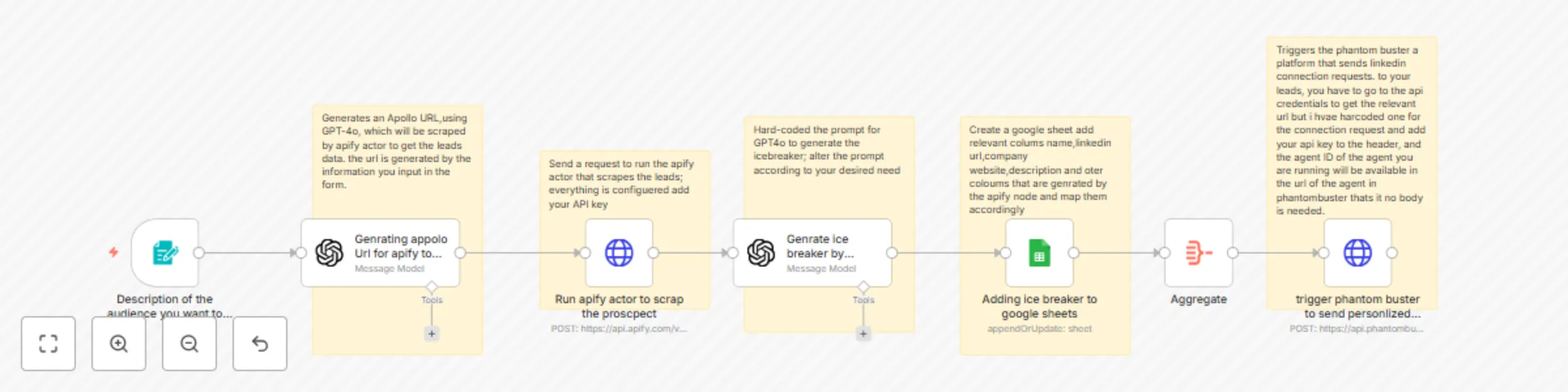
🚀 LinkedIn Lead-Gen Flywheel – Apify → GPT-4o → Google Sheets → Phantombuster

What this workflow does

  1. Collect audience specs – simple web-form asks for your ideal company profile.
  2. Generate a laser-targeted Apollo search URL with GPT-4o (no manual filtering).
  3. Scrape the matching leads via an Apify actor (returns clean JSON).
  4. Craft hyper-personalized icebreakers for each lead using GPT-4o (ultra-short, human-sounding).
  5. Log everything to Google Sheets – name, LinkedIn URL, company site, summary, and the icebreaker.
  6. (Optional) Auto-launch Phantombuster to fire off those connection requests at scale.

Why it matters

  • Zero grunt work: audience research, scraping, copy-writing, and outreach all run hands-free.
  • Punchy personalization: micro-icebreakers outperform canned intros, boosting accept rates.
  • Scales with you: flip a switch to go from 10 to 1 000+ connections/day.

Node rundown

Step Node Key Inputs Key Outputs
1 Form Trigger Audience description description_of_company
2 OpenAI (GPT-4o) Audience text SearchUrl
3 HTTP Request – Apify SearchUrl, APIFY_TOKEN Lead JSON
4 OpenAI (GPT-4o) Lead JSON Icebreaker
5 Google Sheets Lead + Icebreaker Row append/update
6 Aggregate Sheet rows Batched output
7 HTTP Request – Phantombuster PHANTOM_KEY, AGENT_ID Launch status

Prerequisites

  • OpenAI API key (GPT-4o access recommended)
  • Apify API token with access to actor id
  • Google Service Account creds shared with your target sheet
  • Phantombuster API key and Agent ID for your LinkedIn connector
  • Active Apollo account to open the generated search URL (only required for debugging)

Setup (5-minute sprint)

  1. Import the workflow into n8n.
  2. Add the required credentials in CredentialsOpenAI, Apify, Google Sheets, Phantombuster.
  3. Paste your Phantombuster Agent ID into the HTTP Request node URL.
  4. Publish the Form Trigger URL—this is where you (or your SDRs) describe the target audience.
  5. Hit Execute Workflow once to verify data flows end-to-end.

Customization tips

  • Titles & keywords: tweak the prompt in the first GPT-4o node to lock in different roles or industries.
  • Icebreaker style: adjust the second GPT-4o prompt to match your brand voice.
  • Data columns: map extra fields from Apify into Google Sheets as needed.
  • Skip outreach: disable the Phantombuster node if you only want the leads + icebreakers.

1.2 Logical Blocks

This catalog entry is organized from the workflow JSON. The node-level section below shows the executable blocks available for review before importing the template.

2. Block-by-Block Analysis

Block 1 - Aggregate

Type / Role
n8n-nodes-base.aggregate - aggregate
Config choices
Version 1

Block 2 - Description of the audience you want to scrap

Type / Role
n8n-nodes-base.formTrigger - formTrigger
Config choices
Version 2.2

Block 3 - Genrating appolo Url for apify to scrap

Type / Role
@n8n/n8n-nodes-langchain.openAi - openAi
Config choices
Version 1.8

Block 4 - Run apify actor to scrap the proscpect

Type / Role
n8n-nodes-base.httpRequest - httpRequest
Config choices
Version 4.2

Block 5 - Genrate ice breaker by scraping linkedin data

Type / Role
@n8n/n8n-nodes-langchain.openAi - openAi
Config choices
Version 1.8

Block 6 - Adding ice breaker to google sheets

Type / Role
n8n-nodes-base.googleSheets - googleSheets
Config choices
Version 4.6

Block 7 - trigger phantom buster to send personlized connection request

Type / Role
n8n-nodes-base.httpRequest - httpRequest
Config choices
Version 4.2

Block 8 - Sticky Note

Type / Role
n8n-nodes-base.stickyNote - stickyNote
Config choices
Version 1

Block 9 - Sticky Note1

Type / Role
n8n-nodes-base.stickyNote - stickyNote
Config choices
Version 1

Block 10 - Sticky Note2

Type / Role
n8n-nodes-base.stickyNote - stickyNote
Config choices
Version 1

Block 11 - Sticky Note3

Type / Role
n8n-nodes-base.stickyNote - stickyNote
Config choices
Version 1

Block 12 - Sticky Note4

Type / Role
n8n-nodes-base.stickyNote - stickyNote
Config choices
Version 1

3. Summary Table

Workflow LinkedIn lead generation with GPT-4o, Apify scraping, and automated outreach
Complexity intermediate
Nodes 12
Categories Lead Generation, Multimodal AI
Author Basil Irfan
Published 08 Aug 2025

4. Reproducing the Workflow from Scratch

  1. 1. Download the workflow JSON

    Use the JSON export at /data/workflows/7182/7182.json as the source template for this automation.

  2. 2. Import the template into n8n

    Open n8n, import the downloaded JSON, and review each node before activating the workflow.

  3. 3. Configure credentials and variables

    Replace placeholder credentials, API keys, webhook URLs, account IDs, and environment-specific values with your own settings.

  4. 4. Test with sample data

    Run the workflow manually or in a staging workspace, inspect node output, and confirm downstream systems receive the expected data.

  5. 5. Activate and monitor

    Enable the workflow only after testing, then monitor executions, errors, and rate limits during the first production runs.

5. General Notes & Resources

Review imported nodes carefully before activation. This catalog entry is intended to help you inspect the workflow structure, understand required services, and find related templates faster.

Node names, credentials, schedules, webhook paths, and external service limits may need adjustment for your workspace.

Frequently asked questions

What does LinkedIn lead generation with GPT-4o, Apify scraping, and automated outreach do?

LinkedIn Lead Gen Flywheel – Apify → GPT 4o → Google Sheets → Phantombuster What this workflow does 1. Collect audience specs – simple web form asks for your ideal company profile. 2. Generate a...

What do I need before importing this workflow?

Review the workflow JSON, configure any required credentials in n8n, and test the automation in a safe workspace before using it in production.

Can I customize this workflow?

Yes. Use the block-by-block analysis and the downloadable JSON to inspect each node, then adjust credentials, prompts, schedules, filters, or destinations for your Lead Generation, Multimodal AI use case.