B

Basil Irfan

4
Workflows

Workflows by Basil Irfan

Workflow preview: WhatsApp support bot with Google Drive RAG, GPT-4.1-mini and Cohere reranking
Free advanced

WhatsApp support bot with Google Drive RAG, GPT-4.1-mini and Cohere reranking

# WhatsApp RAG Agent (Text + Voice) with Weekly Google Drive Sync **One-line summary :** Answers WhatsApp in under 100 words, understands voice notes, and retrieves trusted answers from your Google Drive docs (RAG) kept fresh weekly. --- ## What this template does * **Reply to WhatsApp messages** in a polite, human tone with **≤100 words**. * **Understands text and voice notes**: auto-downloads audio and transcribes to text. * **Retrieves answers from your knowledge base (RAG)**: Google Drive docs → chunk → embed → store in Supabase → rerank with Cohere. * **Keeps short-term memory** across the conversation to avoid repetition. * **Weekly doc sync** from a selected Google Drive folder so non-technical staff can update content without touching n8n. --- ## Why it matters * **Zero busywork:** Update a Google Doc; the bot learns it on the next sync. * **Trustworthy answers:** Responses come from **your** vetted docs, not random web text. * **Voice-first friendly:** Handles the WhatsApp reality of “send a voice note.” * **Safer by design:** Guardrails—no pricing unless in KB, no pushy sales, no medical advice. --- ## Triggers * **WhatsApp Trigger:** Receives incoming messages (text or audio). * **Google Drive Trigger (weekly):** Detects new/updated files in the chosen folder for ingestion. --- ## App credentials required * **WhatsApp Business Cloud** (App ID, Token, Phone Number ID) * **OpenAI** (Chat + Embeddings) * **Cohere** (Rerank) * **Supabase** (SUPABASE_URL, ANON_KEY) * **Google Drive** (OAuth2) + target Folder ID --- ## Suggested environment variables ```bash WHATSAPP_APP_ID= WHATSAPP_TOKEN= WHATSAPP_PHONE_NUMBER_ID= OPENAI_API_KEY= COHERE_API_KEY= SUPABASE_URL= SUPABASE_ANON_KEY= GDRIVE_FOLDER_ID= RAG_TABLE_NAME="documents" # table to store vectors/metadata MAX_ANSWER_WORDS=100 # guardrail for concise replies ``` --- ## Architecture overview * **Answer-time lane (RAG Tool):** 1. Receive WhatsApp message → 2) Transcribe audio if present → 3) Maintain short-term memory → 4) Retrieve from Supabase vectors (topK) → 5) Rerank with Cohere → 6) Compose ≤100-word reply with sources → 7) Send on WhatsApp. * **Ingest lane (Weekly Sync):** A) Detect Drive file updates → B) Download & convert (Docs → text/plain) → C) Chunk (size/overlap) → D) Embed with OpenAI → E) Upsert to Supabase with metadata & hashes. --- ## How it works (node rundown) | # | Node | Key Inputs | Key Outputs | | -- | ------------------------------------------- | ------------------------------- | --------------------------------- | | 1 | **WhatsApp Trigger** | Incoming message | Raw WhatsApp payload | | 2 | **Switch** (Attachment presence/type) | Payload | Route: **Text** or **Audio** | | 3 | **HTTP Request** (Audio path) | `attachments[0].data_url` | Audio file | | 4 | **OpenAI – Translate/ASR** | Audio file | Transcribed text | | 5 | **Merge** | Text path + Audio path | Unified text message | | 6 | **Simple Memory** | Recent turns | Short-term context | | 7 | **OpenAI Chat Model** | Prompt + message + memory | Draft answer (tool calls allowed) | | 8 | **Supabase Vector Tool (retrieve-as-tool)** | Query text, `topK=10` | Candidate KB passages | | 9 | **Cohere Reranker** | Candidates | Re-ranked context | | 10 | **Send WhatsApp Message** | `to`, `body` | Reply sent | | 11 | **Google Drive Trigger (weekly)** | Folder ID, `fileUpdated` | Changed files | | 12 | **Set (File Id)** | id from trigger | File ref | | 13 | **Google Drive – Download File** | Id (Docs→txt) | Raw text | | 14 | **Character Text Splitter** | `chunkSize=2000`, `overlap=300` | Chunks | | 15 | **Default Data Loader** | Binary→Document | Clean docs | | 16 | **OpenAI Embeddings (ingest)** | Chunks | Vectors | | 17 | **Supabase Vector Store (insert)** | Table: `documents` | Upserted KB | **Notes** * The **KB Tool** is the combo of steps 8–9–7 at answer time (retrieve → rerank → answer). * The **Ingest lane** is steps 11–17 (weekly sync of your Drive folder). --- ## Setup (7‑minute sprint) 1. **Import the workflow** JSON. 2. **Connect credentials:** WhatsApp, OpenAI, Cohere, Supabase, Google Drive. 3. **Google Drive Trigger:** paste your **Folder ID**; keep `fileUpdated` event. 4. **Download File:** ensure Google Docs convert to **text/plain**. 5. **Supabase Vector Store (insert):** set table name to **`documents`** (or your schema). 6. **Character Text Splitter:** keep `chunkSize=2000`, `overlap=300` (balanced recall/latency). 7. **Retrieve-as-tool:** set `topK=10` and **enable reranker**. 8. **Send WhatsApp Message** mapping: * **Recipient**: `{{$("WhatsApp Trigger").item.json.messages[0].from}}` * **Body**: `{{$json.output}}` 9. **Test:** * Send a **text** and a **voice note** to your WhatsApp number → confirm concise answers. * Drop a Google Doc into the watched folder → verify it’s chunked/embedded on the next weekly poll (or run ingest nodes once manually). --- ## Prompt, tone & guardrails * **System prompt:** * Be polite, human, and concise (**≤ `MAX_ANSWER_WORDS`**). * Cite or reference **only** the KB content; if unknown, say so and offer to escalate. * **No prices** unless present in the KB. **No medical advice.** * **Temperature:** start at **0.2** for factual replies. * **Memory window:** keep a short rolling buffer (e.g., last 4–6 turns). --- ## Data model (minimum viable) Table **`documents`** (example columns): * `id` (uuid) * `source_url` (text) * `title` (text) * `chunk` (text) * `embedding` (vector/float[] depending on extension) * `chunk_hash` (text) * `updated_at` (timestamp) **Indexes** * Unique index on `chunk_hash` to dedupe * Index on `updated_at` for syncs --- ## Observability & ops * Log **question**, **selected chunk ids/hashes**, and **final response** to a DB/Sheet for QA. * Add a **low-confidence** route (score threshold) → Slack/Telegram escalation to a human. * Track **latency** and **token usage** to tune `topK` and chunk sizes. --- ## Customization * **Latency vs quality:** try `topK=6–8` and `chunkSize=1200` for speed. * **Languages:** ASR node can be swapped for native multilingual output. * **Escalation:** add channel handoff on low confidence or no KB hits. * **Sync cadence:** change Drive Trigger to **daily** if content updates frequently. --- ## Safety & compliance * **No medical advice.** If uncertain or clinical, ask to schedule a consult or refer to the right department. * **PII:** Don’t log full phone numbers in plaintext analytics; hash where possible. * **Prices & rates:** Only answer if present in the KB; otherwise hand off to front desk. --- ## Troubleshooting * **No reply sent:** Ensure **Send message** node reads `{{$json.output}}` (Agent’s response property). * **Audio path failing:** Confirm `attachments[0].data_url` exists and HTTP node fetches a valid file. * **KB not updating:** Manually execute the ingest lane; check rows in Supabase. * **Irrelevant answers:** Lower temperature to **0.2**, increase overlap to **400**, and verify Drive docs are clean and structured. --- ## Categories & tags * **Categories:** AI, Customer Support, Healthcare Ops, RAG, WhatsApp * **Tags:** WhatsApp, RAG, Google Drive, Supabase, OpenAI, Cohere, Voice Notes --- ## Pricing (rough, BYO keys) * **n8n:** self-host free; n8n.cloud billed by plan. * **OpenAI, Cohere:** usage-based by tokens/calls. * **Supabase:** free tier + usage; vector storage billed by size. * **WhatsApp Cloud:** Meta pricing per conversation. --- ## Nodes used in workflow **WhatsApp Trigger**, **Switch**, **HTTP Request**, **OpenAI (ASR + Chat + Embeddings)**, **Merge**, **Simple Memory**, **Supabase Vector Tool (retrieve)**, **Cohere Reranker**, **Google Drive Trigger**, **Set**, **Google Drive – Download**, **Character Text Splitter**, **Default Data Loader**.

B
Basil Irfan
Support Chatbot
28 Sep 2025
636
0
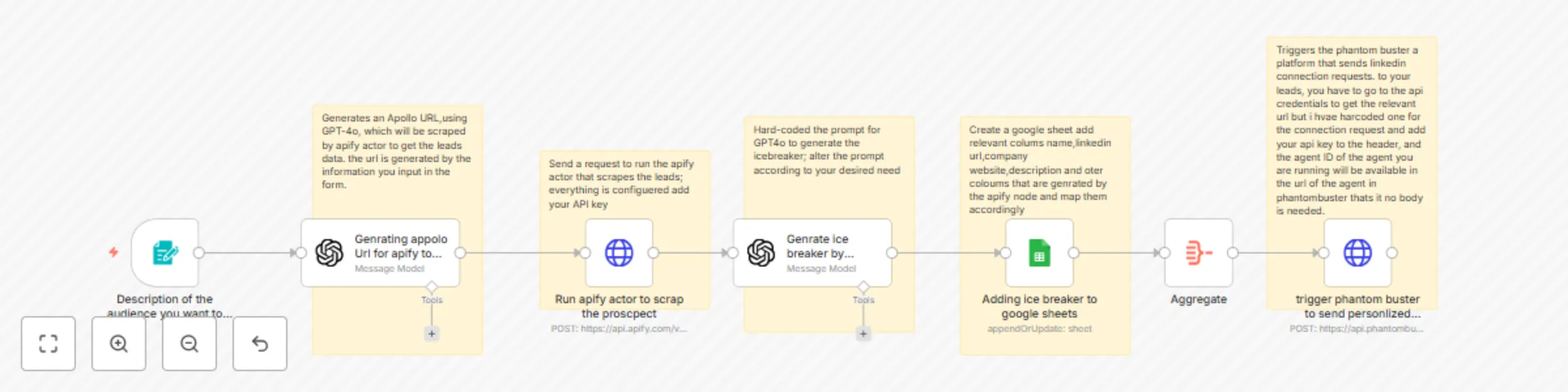
Workflow preview: LinkedIn lead generation with GPT-4o, Apify scraping, and automated outreach
Free intermediate

LinkedIn lead generation with GPT-4o, Apify scraping, and automated outreach

# 🚀 LinkedIn Lead-Gen Flywheel – Apify → GPT-4o → Google Sheets → Phantombuster ### What this workflow does 1. **Collect audience specs** – simple web-form asks for your ideal company profile. 2. **Generate a laser-targeted Apollo search URL** with GPT-4o (no manual filtering). 3. **Scrape the matching leads** via an Apify actor (returns clean JSON). 4. **Craft hyper-personalized icebreakers** for each lead using GPT-4o (ultra-short, human-sounding). 5. **Log everything to Google Sheets** – name, LinkedIn URL, company site, summary, and the icebreaker. 6. **(Optional) Auto-launch Phantombuster** to fire off those connection requests at scale. ### Why it matters - **Zero grunt work:** audience research, scraping, copy-writing, and outreach all run hands-free. - **Punchy personalization:** micro-icebreakers outperform canned intros, boosting accept rates. - **Scales with you:** flip a switch to go from 10 to 1 000+ connections/day. ### Node rundown | Step | Node | Key Inputs | Key Outputs | |------|------|-----------|-------------| | 1 | **Form Trigger** | Audience description | `description_of_company` | | 2 | **OpenAI (GPT-4o)** | Audience text | `SearchUrl` | | 3 | **HTTP Request – Apify** | `SearchUrl`, `APIFY_TOKEN` | Lead JSON | | 4 | **OpenAI (GPT-4o)** | Lead JSON | `Icebreaker` | | 5 | **Google Sheets** | Lead + Icebreaker | Row append/update | | 6 | **Aggregate** | Sheet rows | Batched output | | 7 | **HTTP Request – Phantombuster** | `PHANTOM_KEY`, `AGENT_ID` | Launch status | ### Prerequisites - **OpenAI API key** (GPT-4o access recommended) - **Apify API token** with access to actor id - **Google Service Account creds** shared with your target sheet - **Phantombuster API key** and Agent ID for your LinkedIn connector - Active **Apollo account** to open the generated search URL (only required for debugging) ### Setup (5-minute sprint) 1. Import the workflow into n8n. 2. Add the required credentials in *Credentials* → **OpenAI**, **Apify**, **Google Sheets**, **Phantombuster**. 3. Paste your Phantombuster **Agent ID** into the HTTP Request node URL. 4. Publish the Form Trigger URL—this is where you (or your SDRs) describe the target audience. 5. Hit **Execute Workflow** once to verify data flows end-to-end. ### Customization tips - **Titles & keywords:** tweak the prompt in the first GPT-4o node to lock in different roles or industries. - **Icebreaker style:** adjust the second GPT-4o prompt to match your brand voice. - **Data columns:** map extra fields from Apify into Google Sheets as needed. - **Skip outreach:** disable the Phantombuster node if you only want the leads + icebreakers.

B
Basil Irfan
Lead Generation
8 Aug 2025
1965
0

Workflow preview: Transform YouTube videos to social media content with Vizard AI and GPT-4.1
Free intermediate

Transform YouTube videos to social media content with Vizard AI and GPT-4.1

Transform YouTube Videos to Social Media Content with Vizard AI and GPT‑4.1 ## Overview This n8n template fetches new YouTube videos, enriches them with Vizard AI metadata, generates social‑media captions using GPT‑4.1, logs everything to Google Sheets, and notifies you by email. It’s a turnkey solution for content creators and marketers who need an end‑to‑end automated pipeline from video publishing to post scheduling. ## Setup Instructions 1. **Import the Template** * In n8n, click **Import from JSON**, paste this workflow, and save. 2. **Configure Credentials** * **Vizard AI**: Create an HTTP Request credential named `Vizard API` and set your `VIZARDAI_API_KEY`. * **OpenAI**: Add a new OpenAI credential for GPT‑4.1. * **Google Sheets**: Create a Google Sheets OAuth2 credential with read/write access or just sign in if your on cloud hosting * **Gmail**: Add a Gmail OAuth2 credential for email notifications or just sign in if you are on cloud hosting 4. **Adjust Limits** * In the **Limit Videos** node, set `maxItems` to control batch size. ## Google Sheets Column Structure | Column | Description | | ------------------ | ---------------------------------------------------- | | `videoId` | Unique YouTube video identifier | | `projectId` | Vizard AI project ID returned | | `videoUrl` | Original YouTube video URL | | `title` | Video title | | `transcript` | Transcribed text from Vizard AI | | `viralScore` | Vizard AI’s viral‑score metric | | `viralReason` | Explanation for viral score | | `generatedCaption` | GPT‑4.1–generated caption in JSON `{ "caption": ""}` | | `clipEditorUrl` | URL to Vizard’s clip editor | ## Workflow Steps 1. **Read YouTube RSS Feed** (`Read YouTube RSS Feed`) 2. **Limit Videos** (`Limit Videos to N`) 3. **Send to Vizard** (`Create Vizard Project` & `Retrieve Vizard Metadata`) 4. **Split Items for Processing** (`Iterate Each Video`) 5. **Generate Captions** (`Generate Social Media Captions`) 6. **Append Row in Sheet** (`Log to Google Sheets`) 7. **Send Notification** (`Email Summary`) ## Customization Tips * **Alternate Caption Styles**: Modify the AI prompt for tone, length, or brand voice. * **Localization**: Extend prompts for other languages. * **Notification Channels**: Swap Gmail for Slack, Teams, or SMS via webhook nodes.

B
Basil Irfan
Content Creation
24 Jul 2025
800
0

Workflow preview: Automate restaurant reservations with AI on WhatsApp and Google Sheets
Free advanced

Automate restaurant reservations with AI on WhatsApp and Google Sheets

Streamline restaurant reservations on WhatsApp ## Overview This n8n template automates table bookings via WhatsApp, letting users request, confirm, and manage reservations without manual intervention. It leverages AI to parse messages, apply group discounts, check availability, and send natural confirmations—all within a single, reusable workflow. ## Key Features * **AI‑powered parsing & responses**: Extracts guest name, date, time, and party size from free‑form WhatsApp messages and generates friendly confirmations.. * **Availability lookup**: Integrates with Google Sheets, Airtable, or MySQL to verify slot availability in real time. * **Automated reminders**: Optionally schedules follow‑up messages 24 hours before the booking. * **Modular design**: Swap triggers, storage, or messaging nodes to fit your infrastructure. ## How It Works 1. **Trigger**: Incoming WhatsApp message via WhatsApp Business Cloud API. 2. **Parse & Validate**: AI Function node extracts intent and guest details. 4. **Calculate Discount**: Custom Function node computes group discount. 5. **Compose Confirmation**: Open Ai text model generates a personalized response. 6. **Send Message**:Request node posts back to WhatsApp. 7. **Optional Reminder**: Wait node + HTTP Request for pre‑booking follow‑up. ## Requirements * WhatsApp Business Cloud API access * n8n Cloud or self‑hosted instance * Reservation datastore (Google Sheets, Airtable, MySQL) * Open ai key for AI text generation ## Customization Tips * **Menu Attachments**: Add media nodes to send PDFs or images. * **Alternate Slot Suggestions**: Use AI to propose new times if a slot is full. * **Upsell Offers**: Follow up with add‑on suggestions (e.g., wine pairings). * **Localization**: Extend prompts for multilingual support. ![Screenshot 20250724 161418.png](fileId:1853)

B
Basil Irfan
Support Chatbot
24 Jul 2025
4481
0