Invoice processor & validator with OCR, AI & Google Sheets
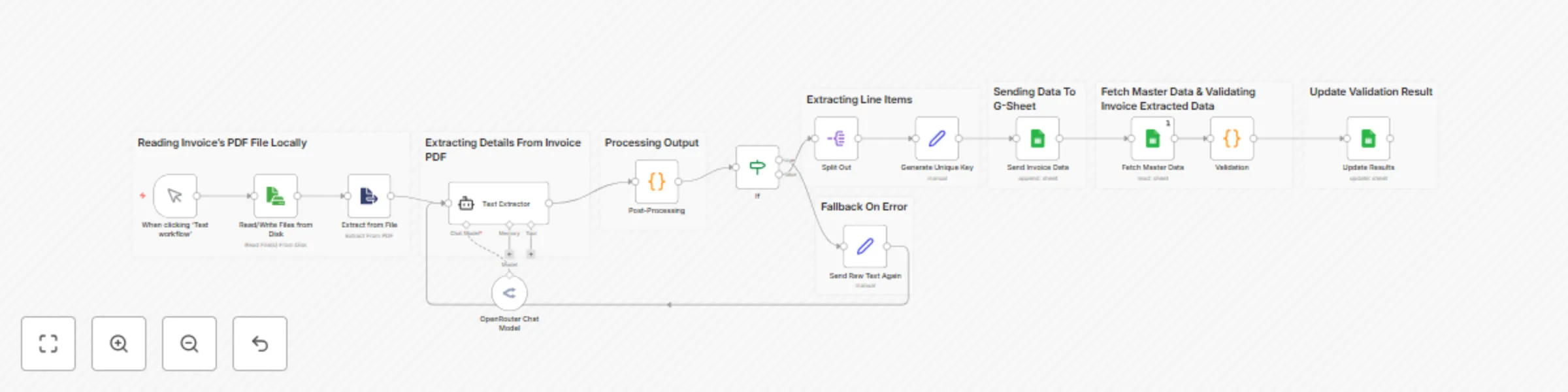
Workflow preview


 Early Deal
DISCOUNT 20%

Important notice
This workflow is provided as-is. Please review and test before using in production.
Overview
📝 Say goodbye to manual invoice checking!
This smart workflow automates your entire invoice processing pipeline using AI, OCR, and Google Sheets.
⚙️ What This Workflow Does:
📥 1. Reads an invoice PDF — Select a local PDF invoice from your machine.
🔍 2. Extracts raw text using OCR — Converts scanned or digital PDFs into readable text.
🧠 3. AI Agent processes the text — Transforms messy raw text into clean JSON using natural language understanding.
🧱 4. Structures and refines the JSON — Converts AI output into a structured, usable format.
🔄 5. Splits item-wise data — Extracts individual invoice line items with all details.
🆔 6. Generates unique keys — Creates a unique identifier for each item for tracking.
📊 7. Updates Google Sheet — Adds extracted items to your designated sheet automatically.
📂 8. Fetches master item data — Loads your internal product master to validate against.
✅ 9. Validates item name & cost — Compares extracted items with your official records to verify accuracy.
📌 10. Updates results per item — Marks each item as Valid or Invalid in the sheet based on matching.
💼 Use Case:
Perfect for businesses, freelancers, or operations teams who receive invoices and want to automate validation, detect billing errors, and log everything seamlessly in Google Sheets — all using the power of AI + n8n.
> 🔁 Fast. Accurate. Zero manual work.
#OCR #AI #Invoices #Automation.