D

Dhrumil Patel

4
Workflows

Workflows by Dhrumil Patel

Workflow preview: Invoice verification and validation with Gmail, Drive, Sheets and OCR AI
Free advanced

Invoice verification and validation with Gmail, Drive, Sheets and OCR AI

### 📝 **Description (Full, User-Centric & Sales-Driven):** Tired of manually verifying purchase order invoices every single day? This **plug-and-play n8n automation template** saves your accounts team hours of work by automatically downloading, storing, extracting, and validating invoice data against your master item sheet — all without human intervention. Perfect for **SMEs, startups, procurement teams, and accounts departments**, this automation handles **PO invoice verification** from **email to final validation** with 99% accuracy. --- ### 🚀 **What This Automation Does End-to-End:** **📥 Invoice Retrieval & Organization:** * Runs **Monday to Saturday, 8 hours/day** * Reads **invoices from specific vendor email(s)** (e.g., `[email protected]`) * Extracts the **invoice date from the email subject** * Automatically **creates month & day-wise folders** in Google Drive * Uploads each invoice PDF into its respective folder **🔍 AI + OCR Data Extraction & Validation:** * Uses **OCR** to extract item data (name, quantity, rate, HSN, etc.) from each invoice PDF * Converts messy PDF data into clean structured format using **AI Agent Model** * Stores the data into a dedicated Google Sheet: **"Store Invoice Data"** **✅ Invoice vs. Master Data Validation:** * Automatically fetches a second Google Sheet: **"Store Master Data"** * Compares each invoice item **line-by-line** with the master sheet: * Checks for **Item Code, Name, Price** mismatches * Calculates **price differences** and **total loss/gain per invoice** * Marks each line as **Matched / Mismatched** with notes **📬 Final Reporting:** * Sends an **automated summary email** once all invoices are processed * Alerts if any mismatches found, allowing for early intervention --- ### 📂 Example Output: Check how data is validated in real time: * 🔗 [Store Invoice Data Sheet](https://docs.google.com/spreadsheets/d/1QRHs6lRAZ95u9KirjUSqtdTYxfYfCH_N_Uh80O_gm1Q/edit?usp=sharing) * 🔗 [Store Master Data Sheet](https://docs.google.com/spreadsheets/d/1xRQ-WtNjNTGtkgNwnhjmXddDQq9n_gpXe5it2aBfZPI/edit?usp=sharing) --- ### 👥 Who Is This For? * Accounts & Finance Teams * Procurement Departments * Growing Startups with Vendors * ERP/Automation Enthusiasts * Anyone tired of **manually checking vendor bills** --- ### 📦 What You’ll Get: * Ready-to-import n8n workflow (JSON) * Setup Guide (PDF or Notion link) * Sample Google Sheet template * Email + Google Drive + OCR setup guide * AI Agent configuration tips * BONUS: Customization support (optional)

D
Dhrumil Patel
Invoice Processing
11 Jun 2025
573
0
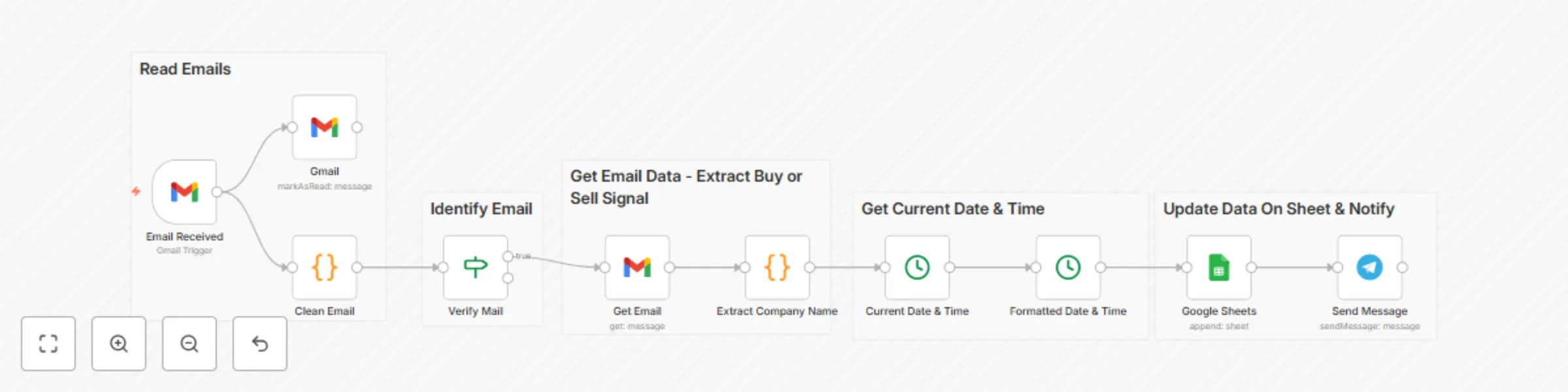
Workflow preview: TradingView signal extractor with Gmail, Google Sheets & Telegram notifications
Free advanced

TradingView signal extractor with Gmail, Google Sheets & Telegram notifications

Stay ahead in your **trading game** with this powerful **n8n automation** workflow. Designed for real-time efficiency, this setup continuously **scans your Gmail inbox** for trading alerts from **TradingView** and ensures **you never miss a signal.** Every minute, this workflow will: 📩 **Check Gmail** for new messages using a trigger. 🔍 **Identify** emails coming specifically from TradingView. 📊 **Extract** key trading signals like **BUY** or **SELL** along with the company name. 🕒 **Capture** the exact date and time of the alert. 📄 **Log** all extracted signals neatly into a **Google Sheet** for easy tracking and analysis. 📲 **Instantly notify you on Telegram** with a custom message so you can act fast. Perfect for **traders** who want an **automated assistant** to handle **alerts, record them for analysis,** and provide timely updates — **all without lifting a finger.**

D
Dhrumil Patel
Crypto Trading
23 May 2025
8917
0
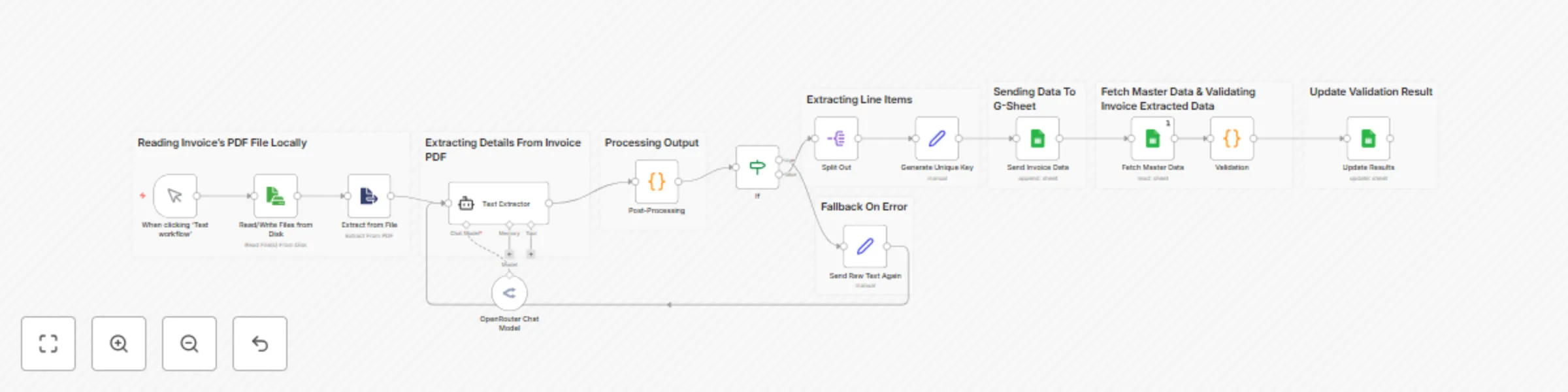
Workflow preview: Invoice processor & validator with OCR, AI & Google Sheets
Free advanced

Invoice processor & validator with OCR, AI & Google Sheets

### 📝 Say goodbye to manual invoice checking! **This smart workflow automates** your entire invoice processing pipeline using **AI**, **OCR**, and **Google Sheets**. --- ### ⚙️ **What This Workflow Does:** 📥 **1. Reads an invoice PDF** — Select a local PDF invoice from your machine. 🔍 **2. Extracts raw text using OCR** — Converts scanned or digital PDFs into readable text. 🧠 **3. AI Agent processes the text** — Transforms messy raw text into clean JSON using natural language understanding. 🧱 **4. Structures and refines the JSON** — Converts AI output into a structured, usable format. 🔄 **5. Splits item-wise data** — Extracts individual invoice line items with all details. 🆔 **6. Generates unique keys** — Creates a unique identifier for each item for tracking. 📊 **7. Updates Google Sheet** — Adds extracted items to your designated sheet automatically. 📂 **8. Fetches master item data** — Loads your internal product master to validate against. ✅ **9. Validates item name & cost** — Compares extracted items with your official records to verify accuracy. 📌 **10. Updates results per item** — Marks each item as **Valid** or **Invalid** in the sheet based on matching. --- ### 💼 **Use Case:** Perfect for businesses, freelancers, or operations teams who receive invoices and want to **automate validation**, **detect billing errors**, and **log everything seamlessly in Google Sheets** — all using the power of **AI + n8n**. > 🔁 Fast. Accurate. Zero manual work. --- `#OCR #AI #Invoices #Automation`.

D
Dhrumil Patel
Invoice Processing
21 May 2025
28132
0

Workflow preview: Route user requests to specialized agents with GPT-4o Mini
Free advanced

Route user requests to specialized agents with GPT-4o Mini

This **n8n workflow template** is designed to **route user input to specialized agents** (like a Reminder Agent, Email Agent, etc.) using a **structured output from a language model**. Here's a complete description of what it does and how each part works: --- ### 🔁 **Workflow Purpose:** This template receives a user's request via **Webhook**, processes it using an **LLM**, extracts structured data like the agent name and user query, and routes the input to the appropriate sub-workflow (agent) based on the specified agent type. --- ### 🧩 **Workflow Breakdown:** #### 1. **Webhook (Trigger)** * Node: `Webhook` * Purpose: Accepts a POST request from any frontend or API source. It contains the **raw user input**. --- #### 2. **GPT Model (LLM Inference)** * Node: `GPT 4o Mini` * Purpose: Interprets the user input and determines: * Which **agent** should handle it (e.g., "Reminder Agent", "Email Agent", etc.) * The **actual user request** (in structured format) --- #### 3. **Auto-Fixing Output Parser** * Node: `Auto-fixing Output Parser` * Purpose: Ensures that the output from the LLM matches the expected structure. If there's a mismatch, it automatically corrects it using a re-prompt. --- #### 4. **Structured Output Parser** * Node: `Structured Output Parser` * Purpose: Converts the language model's response into a **strict JSON structure** with keys like: * `"Agent Name"` * `"user input"` * `"sessionID"` --- #### 5. **Agent Router** * Node: `Switch ("Agent Route")` * Purpose: Based on `"Agent Name"`, it routes the input to one of the following sub-workflows: * 📅 `Reminder Agent` * 📧 `Email Agent` * 🧾 `Document Agent` * 🤝 `Meeting Agent` --- #### 6. **Sub-Workflow Call (Execute Workflow)** Each agent is implemented as a separate n8n workflow: * The input is forwarded to the selected agent. * For example, if `"Agent Name"` is `"Reminder Agent"`, the workflow `"Reminder Agent"` is called with `"user input"`. --- #### 7. **Webhook Response** * After the sub-agent workflow finishes, a `Respond to Webhook` node sends the output back as an HTTP response. --- ### ✅ **Key Features:** * Fully modular and extensible * LLM-driven routing using **OpenRouter GPT-4o** * Auto-corrects structured output errors * Clean separation of concerns (agent logic is decoupled in sub-workflows) * Easily add more agents by updating the switch logic --- ### 📦 **Use Case Examples:** * User says: “Remind me to call my mom tomorrow.” → Routed to **Reminder Agent** * User says: “Send an email to the HR team.” → Routed to **Email Agent** * User says: “Schedule a meeting with John next week.” → Routed to **Meeting Agent** ---

D
Dhrumil Patel
Personal Productivity
17 May 2025
782
0