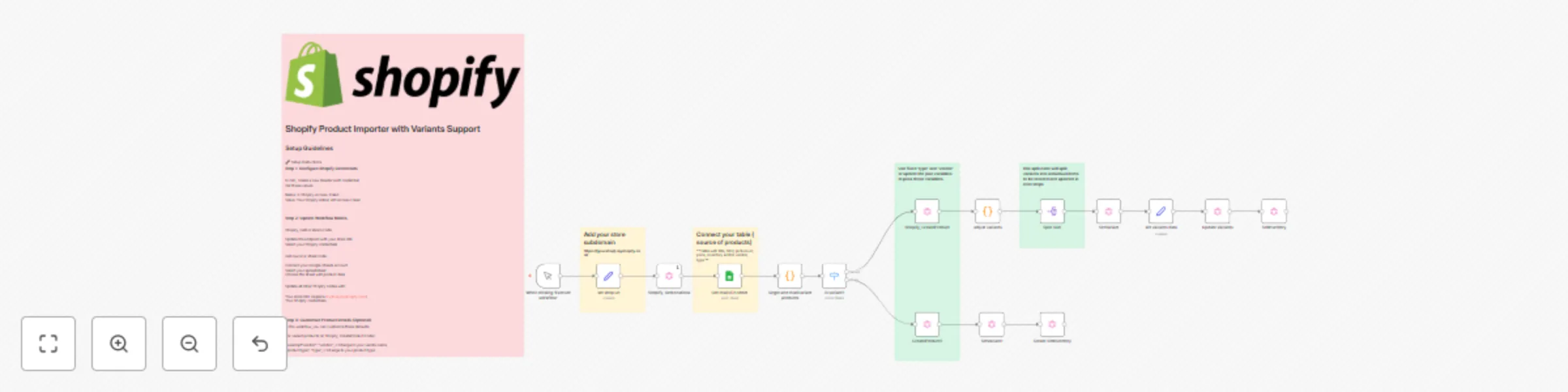
Import products from Google Sheets to Shopify with multi-variant support

Workflow preview

Workflow preview
100%
Import products from Google Sheets to Shopify with multi-variant support preview
Open on n8n.io

Important notice

This workflow is provided as-is. Please review and test before using in production.

1. Workflow Overview

Short Description (for listing) Import products from Google Sheets to Shopify with automatic handling of single products and multi variant products (sizes, colors, etc.). Includes SKU management, i...

Best for

  • Lead Generation automation workflows
  • advanced n8n builders looking for reusable templates

Tools used

n8n-nodes-base.manualtrigger, n8n-nodes-base.googlesheets, n8n-nodes-base.graphql, n8n-nodes-base.splitout, n8n-nodes-base.code, n8n-nodes-base.switch, n8n-nodes-base.stickynote, n8n-nodes-base.set

Source and attribution

This workflow is cataloged by N8N Workflows and links back to its original n8n.io source page by Muhammad Asadullah.

Original n8n.io source

1.1 Workflow description

Title
Import products from Google Sheets to Shopify with multi-variant support
Workflow name
Import products from Google Sheets to Shopify with multi-variant support

Short Description (for listing)

Import products from Google Sheets to Shopify with automatic handling of single products and multi-variant products (sizes, colors, etc.). Includes SKU management, inventory tracking, and image uploads via GraphQL API.

Category

  • E-commerce
  • Productivity
  • Data Import/Export

Full Description

Overview

This workflow automates the process of importing products from a Google Sheet into your Shopify store. It intelligently detects and handles both simple products and products with multiple variants (like different sizes or colors), creating them with proper SKU management, pricing, inventory levels, and images.

Key Features

  • Dual Product Support: Handles single products and multi-variant products automatically
  • Smart SKU Parsing: Automatically groups variants by parsing SKU format (e.g., 12345-SM, 12345-MD)
  • Inventory Management: Sets stock levels for each variant at your default location
  • Image Upload: Attaches product images from URLs
  • GraphQL API: Uses Shopify's modern GraphQL API for reliable product creation
  • Batch Processing: Process multiple products in one workflow run

Use Cases

  • Initial store setup with bulk product import
  • Regular inventory updates from spreadsheet
  • Migrating products from another platform
  • Managing seasonal product catalogs
  • Synchronizing products with external systems

Requirements

  1. Shopify store with Admin API access
  2. Google Sheets API credentials
  3. n8n version 1.0+
  4. Basic understanding of GraphQL (helpful but not required)

What You'll Need to Configure

  • Shopify Admin API token
  • Your Shopify store URL (in 'set store url' node)
  • Google Sheets connection
  • (Optional) Vendor name and product type defaults

Input Format

Your Google Sheet should contain columns:

  • Product Name
  • SKU (format: BASESKU-VARIANT for variants)
  • Size (or other variant option)
  • Price
  • On hand Inventory
  • Product Image (URL)

Products with the same name are automatically grouped as variants.

How It Works

  1. Reads product data from your Google Sheet
  2. Groups products by name and detects if they have variants
  3. Switches to appropriate creation path (single or variant)
  4. Creates product in Shopify with options and variants
  5. Updates each variant with SKU and pricing
  6. Sets inventory levels at your location
  7. Uploads product images

Technical Details

  • Uses Shopify GraphQL Admin API (2025-04)
  • Handles up to 100 variants per product
  • Processes variants individually for accurate data mapping
  • Includes error handling for missing data
  • Supports one inventory location per run

Common Modifications

  • Change vendor name and product type
  • Add more variant options (color, material, etc.)
  • Customize product status (draft vs active)
  • Modify inventory location selection
  • Add product descriptions

Perfect For

  • Shopify store owners managing large catalogs
  • E-commerce managers doing bulk imports
  • Agencies setting up client stores
  • Developers building automated product workflows

Difficulty: Intermediate
Estimated Setup Time: 15-30 minutes
Nodes Used: 16
External Services: Shopify, Google Sheets

1.2 Logical Blocks

This catalog entry is organized from the workflow JSON. The node-level section below shows the executable blocks available for review before importing the template.

2. Block-by-Block Analysis

Block 1 - When clicking ‘Execute workflow’

Type / Role
n8n-nodes-base.manualTrigger - manualTrigger
Config choices
Version 1

Block 2 - Get row(s) in sheet

Type / Role
n8n-nodes-base.googleSheets - googleSheets
Config choices
Version 4.7

Block 3 - Shopify, GetLocations

Type / Role
n8n-nodes-base.graphql - graphql
Config choices
Version 1.1

Block 4 - Shopify, CreateProduct

Type / Role
n8n-nodes-base.graphql - graphql
Config choices
Version 1.1

Block 5 - Split Out1

Type / Role
n8n-nodes-base.splitOut - splitOut
Config choices
Version 1

Block 6 - SetVariant

Type / Role
n8n-nodes-base.graphql - graphql
Config choices
Version 1.1

Block 7 - Update Variants

Type / Role
n8n-nodes-base.graphql - graphql
Config choices
Version 1.1

Block 8 - SetInventory

Type / Role
n8n-nodes-base.graphql - graphql
Config choices
Version 1.1

Block 9 - SetVariant1

Type / Role
n8n-nodes-base.graphql - graphql
Config choices
Version 1.1

Block 10 - CreateProduct2

Type / Role
n8n-nodes-base.graphql - graphql
Config choices
Version 1.1

Block 11 - Create SetInventory

Type / Role
n8n-nodes-base.graphql - graphql
Config choices
Version 1.1

Block 12 - single and multivariant products

Type / Role
n8n-nodes-base.code - code
Config choices
Version 2

Block 13 - is variant?

Type / Role
n8n-nodes-base.switch - switch
Config choices
Version 3.3

Block 14 - Sticky Note

Type / Role
n8n-nodes-base.stickyNote - stickyNote
Config choices
Version 1

Block 15 - set shop url

Type / Role
n8n-nodes-base.set - set
Config choices
Version 3.4

Block 16 - Sticky Note1

Type / Role
n8n-nodes-base.stickyNote - stickyNote
Config choices
Version 1

Block 17 - set variants data

Type / Role
n8n-nodes-base.set - set
Config choices
Version 3.4

Block 18 - Sticky Note2

Type / Role
n8n-nodes-base.stickyNote - stickyNote
Config choices
Version 1

Block 19 - Sticky Note3

Type / Role
n8n-nodes-base.stickyNote - stickyNote
Config choices
Version 1

Block 20 - adjust variants

Type / Role
n8n-nodes-base.code - code
Config choices
Version 2

Block 21 - Sticky Note4

Type / Role
n8n-nodes-base.stickyNote - stickyNote
Config choices
Version 1

3. Summary Table

Workflow Import products from Google Sheets to Shopify with multi-variant support
Complexity advanced
Nodes 21
Categories Lead Generation
Author Muhammad Asadullah
Published 17 Oct 2025

4. Reproducing the Workflow from Scratch

  1. 1. Download the workflow JSON

    Use the JSON export at /data/workflows/9833/9833.json as the source template for this automation.

  2. 2. Import the template into n8n

    Open n8n, import the downloaded JSON, and review each node before activating the workflow.

  3. 3. Configure credentials and variables

    Replace placeholder credentials, API keys, webhook URLs, account IDs, and environment-specific values with your own settings.

  4. 4. Test with sample data

    Run the workflow manually or in a staging workspace, inspect node output, and confirm downstream systems receive the expected data.

  5. 5. Activate and monitor

    Enable the workflow only after testing, then monitor executions, errors, and rate limits during the first production runs.

5. General Notes & Resources

Review imported nodes carefully before activation. This catalog entry is intended to help you inspect the workflow structure, understand required services, and find related templates faster.

Node names, credentials, schedules, webhook paths, and external service limits may need adjustment for your workspace.

Frequently asked questions

What does Import products from Google Sheets to Shopify with multi-variant support do?

Short Description (for listing) Import products from Google Sheets to Shopify with automatic handling of single products and multi variant products (sizes, colors, etc.). Includes SKU management, i...

What do I need before importing this workflow?

Review the workflow JSON, configure any required credentials in n8n, and test the automation in a safe workspace before using it in production.

Can I customize this workflow?

Yes. Use the block-by-block analysis and the downloadable JSON to inspect each node, then adjust credentials, prompts, schedules, filters, or destinations for your Lead Generation use case.