Google calendar MCP server for AI agent with dynamic scheduling
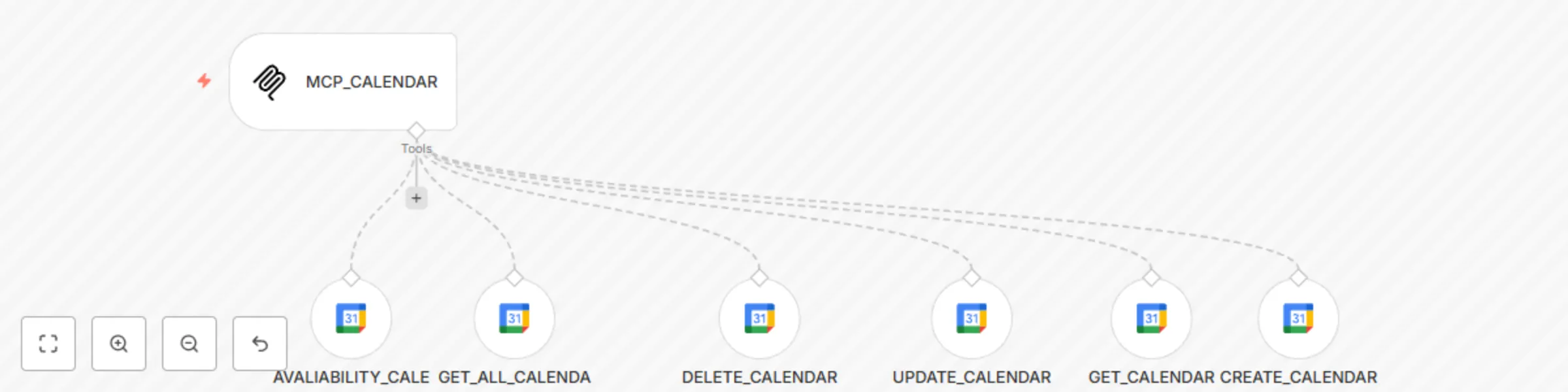
Workflow preview

$20/month : Unlimited workflows
2500 executions/month

THE #1 IN WEB SCRAPING
Scrape any website without limits
HOSTINGER  Early Deal
DISCOUNT 20% Try free
Early DealDISCOUNT 20%
Self-hosted n8n
Unlimited workflows - from $4.99/mo

#1 hub for scraping, AI & automation
6000+ actors - $5 credits/mo
Important notice
This workflow is provided as-is. Please review and test before using in production.
Overview
Google Calendar AI Agent with Dynamic Scheduling
Version: 1.0.0
n8n Version: 1.88.0+
Author: Koresolucoes
License: MIT
Description
An AI-powered workflow to automate Google Calendar operations using dynamic parameters and MCP (Model Control Plane) integration. Enables event creation, availability checks, updates, and deletions with timezone-aware scheduling [[1]][[2]][[8]].
Key Features:
- 📅 Full Calendar CRUD: Create, read, update, and delete events in Google Calendar.
- ⏰ Availability Checks: Verify time slots using
AVALIABILITY_CALENDARnode with timezone support (e.g.,America/Sao_Paulo). - 🤖 AI-Driven Parameters: Use
$fromAI()to inject dynamic values likeStart_Time,End_Time, andDescription[[3]][[4]]. - 🔗 MCP Integration: Connects to an MCP server for centralized AI agent control [[5]][[6]].
Use Cases
- Automated Scheduling: Book appointments based on AI-recommended time slots.
- Meeting Coordination: Sync calendar events with CRM/task management systems.
- Resource Management: Check room/equipment availability before event creation.
Instructions
1. Import Template
- Go to n8n > Templates > Import from File and upload this workflow.
2. Configure Credentials
- Add Google Calendar OAuth2 credentials under Settings > Credentials.
- Ensure the calendar ID matches your target (e.g.,
ODONTOLOGIAgroup calendar).
3. Set Up Dynamic Parameters
- Use
$fromAI('Parameter_Name')in nodes likeCREATE_CALENDARto inject AI-generated values (e.g., event descriptions).
4. Activate & Test
- Enable the workflow and send test requests to the webhook path
/mcp/:tool/calendar.
Tags
Google Calendar Automation MCP AI Agent Scheduling CRUD
Screenshots
License
This template is licensed under the MIT License.
Notes:
- Extend multi-tenancy by adding
:userIdto the webhook path (e.g.,/mcp/:userId/calendar) [[7]]. - For timezone accuracy, always specify
options.timezonein availability checks [[8]]. - Refer to n8n’s Google Calendar docs for advanced field mappings.