Luciano Gutierrez
Workflows by Luciano Gutierrez
Automated web browsing & extraction with Airtop and AI-prompted queries
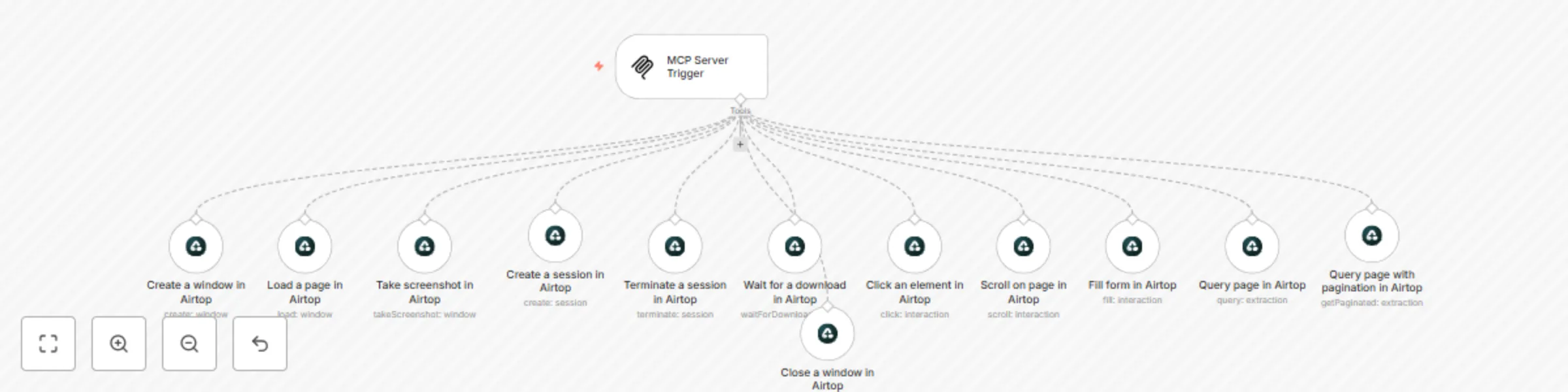
*This workflow contains community nodes that are only compatible with the self-hosted version of n8n.* # 🤖 Autonomous Web Interaction with Airtop (via MCP Trigger) This workflow uses **Airtop** to perform fully automated web interactions—triggered by an AI agent through the **native MCP Server Trigger** in n8n. > 💡 Perfect for browser automation, intelligent data extraction, and agent-based workflows. --- ## ✨ Features * ✅ Triggered via **native MCP Server** (no need for external LangChain services) * 🚀 Automates full browser sessions: open window, load page, scroll, click, fill forms * 🧠 Supports **AI-prompt-based extraction** from web content * 📷 Captures screenshots and **waits for downloads** when needed * 🧼 Cleans up with session and window termination * 🔄 Fully adaptable to agent-based automation flows --- ## 🧰 Workflow Breakdown 1. **Trigger**: Native MCP Server Trigger receives instructions 2. **Create Session & Window**: Starts browser automation in Airtop 3. **Load Web Page**: Loads target URL 4. **Page Interaction**: * Click elements * Scroll inside containers * Fill forms with dynamic data 5. **Extract Content**: * Query using prompts * Paginated extraction 6. **Wait & Capture**: * Waits for downloadable content * Takes a screenshot 7. **Cleanup**: * Closes windows and terminates session --- ## 📦 Requirements * ✅ **n8n 1.90+** with [MCP Server Trigger](https://docs.n8n.io/integrations/builtin/mcp/) * ✅ Active **Airtop account** with API credentials * ✅ Installed `Airtop Tool` node (n8n-nodes-base) * 🧠 External agent (optional) to send prompt/data to MCP endpoint --- ## 🔍 Use Cases * 🤖 Agents that browse and extract data from the web * 📝 Fill and submit forms from structured data * 🔎 Intelligent page querying using prompt-based automation * 🧪 Visual testing and screenshot capturing for QA workflows --- ## 🔧 Nodes Used * `MCP Server Trigger` (native) * `Airtop Tool`(native): * Session creation and termination * Window control (open, close, screenshot) * Interaction (click, scroll, fill) * Extraction (query, pagination) * Download waiters --- ## 🧠 AI-Automation Ready This workflow is designed to be controlled by external AI agents or orchestration tools. Combined with prompt-based querying and DOM control, it brings a human-like browsing experience into automated pipelines. --- ## 🔗 License Open-source under MIT. Commercial usage allowed with attribution. --- Let me know if you'd like to add: * 🧪 A **test mcp client** to validate triggers * 🌐 A **public link to the deployed workflow** * 📎 A **JSON download** for users to import directly
Automated Instagram comment replies using Gemini AI with context-aware responses
## Instagram Auto-Comment Responder with AI Agent Integration **Version:** 1.1.0 ‧ **n8n Version:** 1.88.0+ ‧ **License:** MIT A fully automated workflow for managing and responding to Instagram comments using AI agents. Designed to improve engagement and save time, this system listens for new Instagram comments, verifies and filters them, fetches relevant post data, processes valid messages with a natural language AI, and posts context-aware replies directly on the original post. --- ## Key Features - 💬 **AI-Driven Engagement**: Intelligent responses to comments via a GPT-powered agent. - ✅ **Webhook Verification**: Handles Instagram webhook handshake to ensure secure integration. - 📦 **Data Extraction**: Maps incoming payload fields (user ID, username, message text, media ID) for processing. - 🚫 **Self-Comment Filtering**: Automatically skips comments made by the account owner to prevent loops. - 📡 **Post Data Retrieval**: Fetches the media’s `id` and `caption` from the Graph API (v22.0) before generating a reply. - 🧠 **Natural Language Processing**: Uses a custom system prompt to maintain brand tone and context. - 🔁 **Automated Replies**: Posts the AI-generated message back to the comment thread using Instagram’s API. - 🧩 **Modular Architecture**: Clear separation of steps via sticky notes and dedicated HTTP Request and Agent nodes. ## Use Cases - **Social Media Automation**: Keep followers engaged 24/7 with instant, relevant replies. - **Community Building**: Maintain a consistent voice and tone across all interactions. - **Brand Reputation Management**: Ensure no valid comment goes unanswered. - **AI Customer Support**: Triage simple questions and direct followers to resources or support. ## Technical Implementation 1. **Webhook Verification** - Node: **Webhook** + **Respond to Webhook** - Echoes `hub.challenge` to confirm subscription and secure incoming events. 2. **Data Extraction** - Node: **Set** - Maps payload fields into structured variables: `conta.id`, `usuario.id`, `usuario.name`, `usuario.message.id`, `usuario.message.text`, `usuario.media.id`, `endpoint`. 3. **User Validation** - Node: **Filter** - Skips processing if `conta.id` equals `usuario.id` (self-comments). 4. **Post Data Retrieval** - Node: **HTTP Request (Get post data)** - GET `https://graph.instagram.com/v22.0/{{ $json.usuario.media.id }}?fields=id,caption&access_token={{ credentials }}` - Captures the media’s caption for richer context in replies. 5. **AI Response Generation** - Nodes: **AI Agent** + **OpenRouter Chat Model** - Uses a detailed system prompt with: - Profile persona (expert in AI & automations, friendly tone). - Input data (username, comment text, post caption). - Filtering logic (spam, praise, questions, vague comments). - Returns either the reply text or `[IGNORE]` for irrelevant content. 6. **Posting the Reply** - Node: **HTTP Request (Post comment)** - POST `{{ $json.endpoint }}/{{ $json.usuario.message.id }}/replies` with `message={{ $json.output }}` - Sends the AI answer back under the original comment. --- ## Instructions for Setup 1. **Import Workflow** In **n8n > Workflows > Import from File**, upload the provided `.json` template. 2. **Configure Credentials** - **Instagram Graph API** (Header Auth or FacebookGraphApi) with `instagram_basic`, `instagram_manage_comments` scopes. - **OpenRouter/OpenAI API** key for AI agent. 3. **Customize System Prompt** - Edit the AI Agent’s prompt to adjust brand tone, language (Brazilian Portuguese), length, or emoji usage. 4. **Test & Activate** - Publish a test comment on an Instagram post. - Verify each node’s execution, ensuring the webhook, filter, data extraction, HTTP requests, and AI Agent respond as expected. 5. **Extend & Monitor** - Add sentiment analysis or lead capture nodes as needed. - Monitor execution logs for errors or rate-limit events. --- ## Tags Social Media • Instagram Automation • Webhook Verification • AI Agent • HTTP Request • Auto Reply • Community Management
Multi-Agent AI Clinic Management with WhatsApp, Telegram, and Google Calendar
# Healthcare Clinic Assistant with WhatsApp and Telegram Integration **Version:** 1.1.0 **n8n Version:** 1.88.0+ **License:** MIT --- ## 📋 Description A **comprehensive and modular automation workflow** designed for healthcare clinics. It manages patient communication, appointment scheduling, confirmations, rescheduling, internal tasks, and media processing by integrating **WhatsApp**, **Telegram**, **Google Calendar**, and **Google Tasks**, combined with **AI-powered agents** for maximum efficiency. This system guarantees proactive communication with patients, streamlined internal clinic management, and consistent data synchronization across platforms. --- ## 🌟 Key Features - 🤖 **AI-Powered Specialized Agents**: Distinct agents handle WhatsApp patient support, appointment confirmations, and internal rescheduling tasks. - 📱 **Omnichannel Communication**: Handles patient interactions via WhatsApp and staff commands via Telegram. - 📅 **Google Calendar Appointment Management**: Full synchronization for creating, updating, canceling, and confirming appointments. - 📋 **Task Management with Google Tasks**: Manages shopping lists and administrative tasks efficiently through staff Telegram requests. - 🔔 **Automated Appointment Reminders**: Daily-triggered system proactively sends WhatsApp confirmations to patients for next-day appointments. - 🖼️ **Intelligent Media Processing**: Transcribes audios, extracts text from images, and processes documents using OpenAI and OpenRouter AI models. - 🛡️ **Escalation to Human Support**: Automatically detects sensitive or urgent cases and escalates them to a human agent when needed. --- ## 🏥 Use Cases - **Patient Communication:** Respond to inquiries, schedule, reschedule, and confirm appointments seamlessly via WhatsApp. - **Internal Clinic Operations:** Allow staff to modify appointments or add shopping list reminders directly from Telegram. - **Appointment Confirmation System:** Automatically contacts patients one day prior to appointments for confirmation or rescheduling. - **Task and Reminder Management:** Keeps clinic operations organized through automatic task management with Google Tasks. --- ## 🛠️ Technical Implementation ### WhatsApp Patient Interaction Flow - **Webhook Reception:** Incoming WhatsApp messages captured via Evolution API webhook. - **Message Classification:** Intelligent routing of messages based on content type (text, image, audio, document). - **Media Content Processing:** - **Audios:** Download, convert, and transcribe via OpenAI Whisper. - **Images:** Analyze and extract text/descriptions with OpenAI Vision model. - **Patient Request Handling:** Specialized WhatsApp assistant responds appropriately using AI prompts. - **Outbound Message Formatting:** Ensures messages comply with WhatsApp format standards. - **Message Delivery:** Sends responses back via Evolution API. ### Telegram Staff Management Flow - **Telegram Webhook Reception:** Captures messages from authorized staff accounts. - **Internal Assistant Processing:** - **Appointment Rescheduling:** Identifies and updates appointments through MCP Google Calendar. - **Task Creation:** Adds new entries to the clinic's shopping list using Google Tasks. - **Notifications and Confirmations:** Sends confirmations back to staff through Telegram. ### Appointment Reminder System - **Daily Trigger Activation:** Fires every weekday at 08:00 AM. - **Calendar Scraping:** Lists next day's appointments from Google Calendar. - **Patient Contact:** Sends WhatsApp confirmation messages for each appointment. - **Response Management:** Redirects confirmation or rescheduling replies to appropriate agents. --- ## ⚙️ Setup Instructions 1. **Import the Workflow** n8n → Workflows → Import from File → Upload this JSON file. 2. **Configure Credentials** - Evolution API (WhatsApp Communication) - Telegram Bot API (Staff Communication) - Google Calendar OAuth2 (Appointment Management) - Google Tasks OAuth2 (Task Management) - OpenAI and OpenRouter APIs (AI Agents) - PostgreSQL Database (Chat Memory) 3. **Set Sensitive Variables** - Replace placeholder values: - `{sua instância aqui}` → Evolution API instance name - `{número_whatsapp}` → WhatsApp numbers - `{url_do_servidor}` → Server URLs - `{a sua apikey aqui}` → API keys - `{seu_calendario}` → Google Calendar ID 4. **Customize AI Prompts** - Adjust system prompts to fit your clinic’s tone, service style, and patient communication guidelines. - Set clinic operating hours, escalation rules, and cancellation procedures in AI prompts. 5. **Activate and Test** - Simulate patient messages via WhatsApp. - Test Telegram commands from staff members. - Validate daily appointment reminders using the scheduled trigger. --- ## 🏷️ Tags `Healthcare` `Clinic Management` `WhatsApp Integration` `Telegram Bot` `Appointment Scheduling` `Google Calendar` `Google Tasks` `AI Agents` `n8n Automation` --- ## 📚 Technical Notes - PostgreSQL is used for persistent chat memory across sessions. - Multiple AI Models Used: - **OpenAI GPT-4.1-nano** - **OpenAI GPT-4.1-mini** - **Google Gemini 2.0 and 2.5** - Full media content processing supported (audio, image, text). - Compliant escalation workflows ensure patient safety and proper handoff to human staff when necessary. - All sensitive patient data are securely stored inside calendar event descriptions for easy retrieval by agents. --- ## 📜 License This workflow is provided under the **MIT License**. Feel free to adapt and customize it for your clinic’s specific needs.
Create & Publish Instagram Carousel Posts with GPT-4.1-mini, Imgur & Graph API
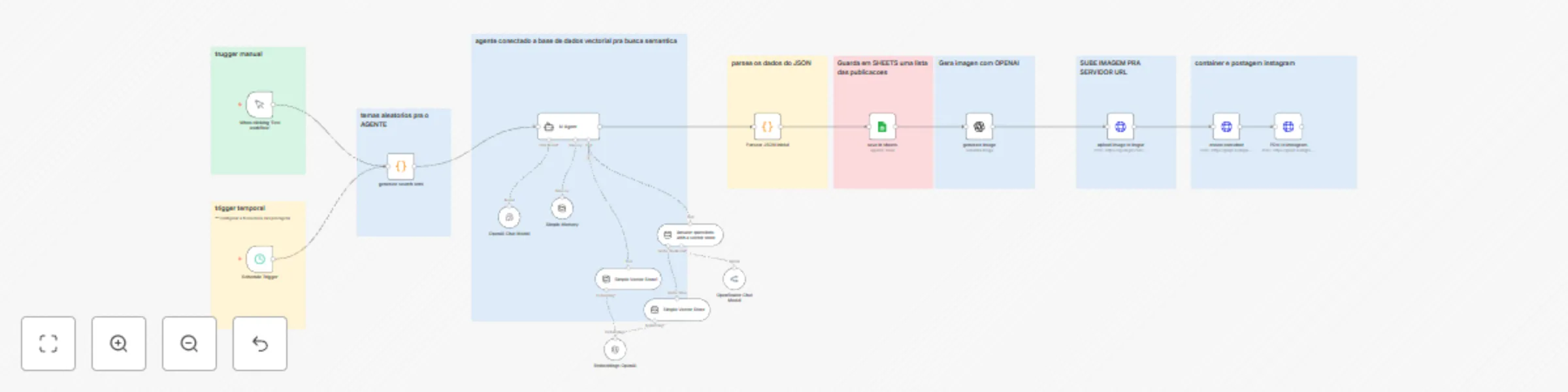
# Create & Publish Instagram Carousel Posts with GPT-4.1-mini, Imgur & Graph API **Version**: 2.0.0 **n8n Version**: 1.88.0+ **Author**: Unknown **License**: MIT ### Description An intelligent and modular workflow that **automatically generates**, **manages**, and **publishes** Instagram **carousel** posts, using AI for both content and images. It includes semantic memory to ensure uniqueness across posts and a scalable architecture for brand growth. ### Key Features * 🤖 **Advanced AI Carousel Content**: Generates unique multi-slide post content—titles, captions, hashtags, and strategic CTAs for each card in the carousel. * 🎨 **Automated Image Generation**: Creates high-quality visuals for every slide using OpenAI's DALL·E API. * 🧠 **Semantic Memory Search**: Checks each theme against a local vector database using OpenAI Embeddings to avoid content repetition. * 📊 **Publication Database**: Logs all generated carousel posts into Google Sheets for tracking, analytics, and audits. * 📱 **Instagram Direct Publishing**: Publishes carousel media and captions automatically through the Instagram Graph API. * 🗓️ **Scheduled & Manual Runs**: Trigger manually or schedule every 12 hours. * 🔐 **Secure Credential Management**: Uses n8n credential fields—no hardcoded API keys or tokens. * 🚀 **Flexible Prompting System**: Dynamically adapts style templates for different brands and industries. ### Use Cases 1. **E‑commerce Launches**: Showcase product features across multiple slides with tailored benefits and CTAs. 2. **Fitness & Wellness Tips**: Educate followers with step-by-step workouts or nutrition advice in a carousel format. 3. **Educational Infographics**: Present multi-part tutorials, stats, or course highlights. 4. **SaaS Feature Demos**: Demonstrate software workflows or new features slide by slide. 5. **Event Announcements**: Build excitement for webinars, conferences, or local meetups. ### Customization Examples * **Retail/E‑commerce**: Adjust the **Theme Generator Code Node** to include product category, price point, and seasonal focus as vector inputs. * **Health & Fitness**: Tweak the **AI Prompt Templates** to match your brand voice—e.g., friendly coach tone with bullet‑pointed workout steps. * **Education/Training**: Modify the **Semantic Memory Embeddings Node** thresholds to deepen topic variety across tutorial series. * **Tech/SaaS**: Customize the **Image Hosting HTTP Request Node** to use your company’s CDN instead of Imgur by swapping the endpoint and credential field. ### Workflow Overview #### 1. Theme Generation (Generate Theme Code Node) * Combines random vectors (topic starter + focus + benefit) to create unique carousel themes. #### 2. Content Creation (AI Agent Code Node) * Sends themed prompts to OpenAI, generating slide-by-slide titles, captions, and CTAs in structured JSON. #### 3. Semantic Memory Check (OpenAI Embeddings Node) * Runs embeddings against past themes stored in a Postgres vector database (pgvector) to ensure novelty. * If similarity > threshold, regenerates theme. #### 4. JSON Validation (Parse & Validate Code Node) * Parses AI response, validates JSON schema, and handles errors gracefully to prevent workflow failures. #### 5. Content Storage (Google Sheets Node) * Writes carousel metadata (titles, captions, hashtags, slide count, scheduled date) to a Google Sheets spreadsheet. #### 6. Image Generation (DALL·E Image Generation Node) * Generates one graphic per slide at 1024×1024 resolution. #### 7. Image Hosting (Imgur Upload HTTP Request Node) * Uses an HTTP Request node with Imgur credential field to upload each image and retrieve public URLs. #### 8. Instagram Publishing (Instagram Graph API Nodes) * **Create Media Containers**: Sends batch media creation request. * **Publish Carousel**: Publishes the carousel using the list of container IDs and caption. #### 9. Scheduling & Triggers * **Manual Trigger**: For testing and one‑off posts. * **Cron Trigger**: Scheduled trigger every 12 hours (configurable). ### Security All sensitive values (OpenAI API key, Imgur Client ID/Secret, Instagram Access Token, Google Sheets OAuth2) must be stored in n8n’s **Credentials** panel. **Do not** hardcode keys or tokens in HTTP Request or Code nodes. Instead, reference credential fields: * In HTTP Request nodes: select the corresponding credential under **Authentication**. * In Code nodes: access `this.getCredentials('openAI')`, `this.getCredentials('imgur')`, etc. ### Instructions 1. **Import the Workflow**: In n8n, go to **Workflows > Import from File** and upload the JSON. 2. **Configure Credentials**: * OpenAI API – set up in **Credentials > OpenAI API**. * Google Sheets OAuth2 – set up in **Credentials > Google Sheets OAuth2**. * Imgur – set up in **Credentials > Imgur**. * Instagram Graph API – set up in **Credentials > Instagram Graph API**. 3. **Set Placeholders**: * Google Sheets Document ID * Instagram User ID 4. **Customize Prompts & Vectors**: Tweak Code node inputs and prompt templates as needed. 5. **Test & Activate**: Run a manual trigger, verify outputs, then enable the cron schedule. ### Tags `Social Media` `Instagram Carousel` `AI Content Generation` `OpenAI` `n8n` `Marketing Automation` `Vector Search` `Content Scheduling` ### Technical Notes * Uses pgvector in Postgres for efficient semantic similarity. * Supports extensible platforms—duplicate the publishing steps to add LinkedIn or Facebook. * Error handling ensures invalid JSON never reaches the publishing nodes. ### License This workflow is released under the MIT License.
Google calendar MCP server for AI agent with dynamic scheduling
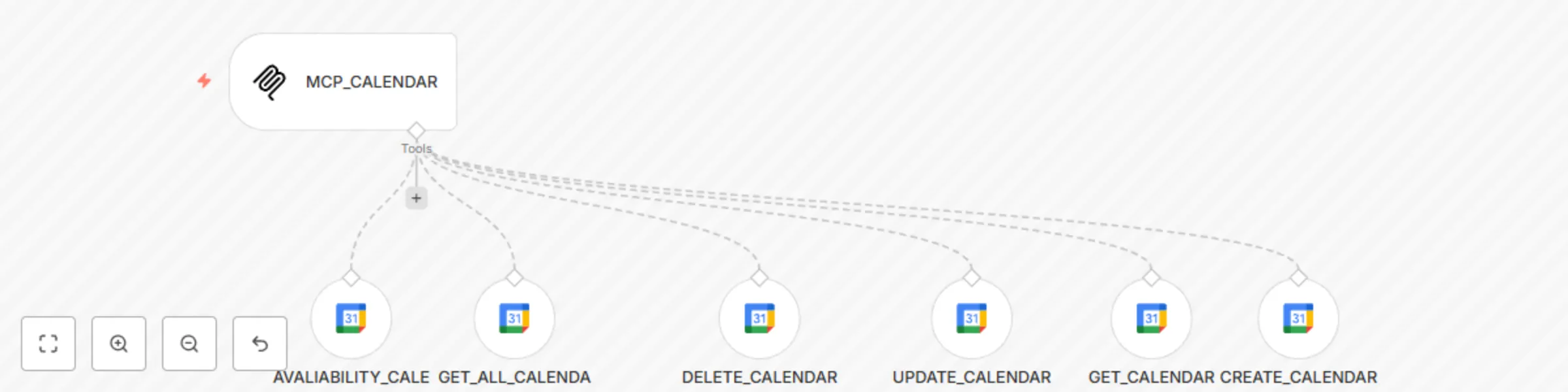
# Google Calendar AI Agent with Dynamic Scheduling **Version**: 1.0.0 **n8n Version**: 1.88.0+ **Author**: Koresolucoes **License**: MIT --- ## Description An AI-powered workflow to automate Google Calendar operations using **dynamic parameters** and **MCP (Model Control Plane)** integration. Enables event creation, availability checks, updates, and deletions with timezone-aware scheduling [[1]][[2]][[8]]. **Key Features**: - 📅 **Full Calendar CRUD**: Create, read, update, and delete events in Google Calendar. - ⏰ **Availability Checks**: Verify time slots using `AVALIABILITY_CALENDAR` node with timezone support (e.g., `America/Sao_Paulo`). - 🤖 **AI-Driven Parameters**: Use `$fromAI()` to inject dynamic values like `Start_Time`, `End_Time`, and `Description` [[3]][[4]]. - 🔗 **MCP Integration**: Connects to an MCP server for centralized AI agent control [[5]][[6]]. --- ## Use Cases 1. **Automated Scheduling**: Book appointments based on AI-recommended time slots. 2. **Meeting Coordination**: Sync calendar events with CRM/task management systems. 3. **Resource Management**: Check room/equipment availability before event creation. --- ## Instructions ### 1. Import Template - Go to **n8n > Templates > Import from File** and upload this workflow. ### 2. Configure Credentials - Add **Google Calendar OAuth2** credentials under **Settings > Credentials**. - Ensure the calendar ID matches your target (e.g., `ODONTOLOGIA` group calendar). ### 3. Set Up Dynamic Parameters - Use `$fromAI('Parameter_Name')` in nodes like `CREATE_CALENDAR` to inject AI-generated values (e.g., event descriptions). ### 4. Activate & Test - Enable the workflow and send test requests to the webhook path `/mcp/:tool/calendar`. --- ## Tags `Google Calendar` `Automation` `MCP` `AI Agent` `Scheduling` `CRUD` --- ## Screenshots  --- ## License This template is licensed under the MIT License. --- ### Notes: - Extend multi-tenancy by adding `:userId` to the webhook path (e.g., `/mcp/:userId/calendar`) [[7]]. - For timezone accuracy, always specify `options.timezone` in availability checks [[8]]. - Refer to [n8n’s Google Calendar docs](https://docs.n8n.io/) for advanced field mappings.
MCP Supabase server for AI agent with RAG & multi-tenant CRUD
# Supabase AI Agent with RAG & Multi-Tenant CRUD **Version**: 1.0.0 **n8n Version**: 1.88.0+ **Author**: Koresolucoes **License**: MIT --- ## Description A stateful AI agent workflow powered by **Supabase** and **Retrieval-Augmented Generation (RAG)**. Enables persistent memory, dynamic CRUD operations, and multi-tenant data isolation for AI-driven applications like customer support, task orchestration, and knowledge management. **Key Features**: - 🧠 **RAG Integration**: Leverages OpenAI embeddings and Supabase vector search for context-aware responses. - 🗃️ **Full CRUD**: Manage `agent_messages`, `agent_tasks`, `agent_status`, and `agent_knowledge` in real time. - 📤 **Multi-Tenant Ready**: Supports per-user/organization data isolation via dynamic table names and webhooks. - 🔒 **Secure**: Role-based access control via Supabase Row Level Security (RLS). --- ## Use Cases 1. **Customer Support Chatbots**: Persist conversation history and resolve queries using institutional knowledge. 2. **Automated Task Management**: Track and update task statuses dynamically. 3. **Knowledge Repositories**: Store and retrieve domain-specific information for AI agents. --- ## Instructions ### 1. Import Template - Go to **n8n > Templates > Import from File** and upload this workflow. ### 2. Configure Credentials - Add your **Supabase** and **OpenAI** API keys under **Settings > Credentials**. ### 3. Set Up Multi-Tenancy (Optional) - **Dynamic Webhook Path**: Replace the default webhook path with `/mcp/tool/supabase/:userId` to enable per-user routing. - **Table Names**: Use a **Set Node** to dynamically generate table names (e.g., `agent_messages_{{userId}}`). ### 4. Activate & Test - Enable the workflow and send test requests to the webhook URL. --- ## Tags `AI Agent` `RAG` `Supabase` `CRUD` `Multi-Tenant` `OpenAI` `Automation` --- ## Screenshots   --- ## License This template is licensed under the MIT License.
AI-powered Gmail MCP server
# 🤖 AI-Powered Gmail MCP Server for n8n ### Description This n8n workflow template leverages an external AI Model Control Plane (MCP) Server to automate various Gmail tasks, such as composing emails, replying to threads, and handling follow-ups using dynamically generated content. It uses the native n8n Gmail nodes available from v1.88.0 onwards. ### Who is this template for? Ideal for **developers**, **automation engineers**, and **power users** using self-hosted n8n (v1.88.0+) who want to integrate artificial intelligence directly into their email workflows via a dedicated MCP Server for enhanced control and customization over AI interactions. ### What problem does this workflow solve? * ⚙️ **Reduces Manual Effort:** Decreases the work involved in writing, sending, and following up on emails in Gmail. * ✅ **Consistency and Quality:** Ensures standardized, professional responses free from typos by leveraging controlled AI prompts. * 🔄 **Complete Automation:** Automates the entire email cycle: from the initial send, through waiting for a reply, to sending automated follow-ups based on AI logic. ### Workflow Overview This template provides a structured approach to integrating Gmail with an MCP Server: * 📡 **MCP Trigger (“MCP_GMAIL”):** An n8n Webhook node that receives HTTP calls from your MCP Server. It standardizes the inputs (like recipient, subject, AI prompt) for all subsequent Gmail nodes. *(You will need to configure your MCP Server to call this webhook URL).* * 📤 **SEND_EMAIL (Gmail Node v2.1):** Sends new messages. The email body (`message` field) is typically populated by content generated from an AI prompt processed by your MCP server and passed via the trigger. * 🔄 **REPLY_EMAIL (Gmail Node v2.1):** Automatically replies to existing conversations (threads). It uses AI-generated content (via MCP) to formulate the reply based on the thread context. Requires `Message ID` and/or `Thread ID`. * 📥 **GET_EMAIL (Gmail Node v2.1):** Fetches data for a specific message (using `Message ID`) for analysis, processing, or archiving. Useful for retrieving context before replying. * ⏳ **SEND_AND_WAIT (Gmail Node v2.1):** Sends an email and pauses the workflow execution until a reply is received in that specific conversation (thread). This is crucial for building automated follow-up sequences. It then outputs data from the reply message. * **Note:** All Gmail nodes in this template use the native n8n **Gmail Tool**, integrated since v1.88.0. No additional installation of community nodes is required. See the [official n8n documentation](https://docs.n8n.io/) for more details on node configuration.* ### Prerequisites Ensure you have the following before importing: * 🚀 A self-hosted n8n instance running version **1.88.0** or higher. * ☁️ A Google Cloud project with the **Gmail API** correctly enabled. * 🔑 **Gmail OAuth2 credentials** configured in your n8n instance. Navigate to `Settings` > `Credentials` > `New` > `Google` > `Gmail (OAuth2 API)` to set this up if you haven't already. * 🧠 Access to your **MCP Server** and an **API Key** (or other authentication method) required to interact with it via HTTP requests. ### How to Import and Configure Follow these steps to get the template running: 1. In your n8n interface, navigate to **Templates** → **Import from URL**. 2. Paste the JSON link provided for this workflow template. 3. Configure the necessary credentials within n8n under `Credentials`: * **Gmail OAuth2:** Select the Google OAuth2 credential you previously configured that has access to the desired Gmail account. * **MCP API Key:** You'll likely need to configure credentials for interacting with your MCP Server. This might involve setting up a `Header Auth` credential in n8n with your MCP API Key, or configuring the HTTP Request node within the workflow directly, depending on your MCP's authentication scheme. Link this credential where needed (e.g., in the Trigger node if MCP calls n8n with auth, or in HTTP Request nodes if n8n calls MCP). 4. **Activate the Workflow:** Ensure the workflow toggle is set to "Active" in the top right corner. 5. **Webhook URL:** Copy the Webhook URL from the "MCP_GMAIL" Trigger node (Test or Production URL as needed) and configure your MCP Server to send requests to this URL. 6. **Recommendation:** * Rename the nodes with clear, descriptive names relevant to your specific use case (e.g., `✨ Generate Sales Email Body via MCP`, `📥 Fetch Customer Replies`). * Utilize the workflow notes (sticky notes on the canvas) to document specific logic, prompt details, or configuration choices for future reference. ### Customization & Technical Guidance Tailor the workflow to your specific needs: * 🔍 **Search Filters:** In nodes that fetch emails (like `GET_EMAIL` or if you add a `Gmail - Get Many` node), refine the search using the `Search` field (standard Gmail search operators) or filter by `Label Names` to process specific emails (e.g., unread from a specific sender, emails with a certain label). * ✍️ **AI Fine-Tuning (Prompt Engineering):** The core of the AI integration happens in the prompts sent to your MCP Server. Modify these prompts (often constructed within function nodes or directly in the trigger input expected from MCP) in the `message` or `body` fields passed to the send/reply nodes. Adjust prompts to control: * **Tone & Style:** Formal, informal, empathetic, technical, etc. * **Content & Format:** Request bullet points, summaries, specific data extraction. * **Dynamic Variables:** Inject data from previous n8n nodes (e.g., customer name, order details, previous email content) into the prompt for context-aware generation. Example: ``"Reply to the following email thread [{{ $json.thread_content }}] addressing the customer {{ $json.customer_name }} about their query..."`` * 🔗 **Post-Response Actions:** Extend the workflow after key actions, especially the `SEND_AND_WAIT` node. Add nodes to: * Log results to a database (`MySQL`, `PostgreSQL`, `Airtable`). * Update CRM records (`HubSpot`, `Salesforce`). * Send notifications (`Slack`, `Discord`, `Telegram`). * Trigger other n8n workflows. * 🛡️ **Error Handling:** Implement robust error handling. Connect the red output pins (error output) of critical nodes (like Gmail nodes or HTTP Requests to MCP) to an `Error Trigger` node. From there, you can: * Log detailed error information to a monitoring tool or spreadsheet. * Send failure notifications. * Implement retry logic (using loops or specific retry settings on nodes). * Route to alternative paths or fallback workflows.