Generate weekly grocery lists in Notion with automated email notifications
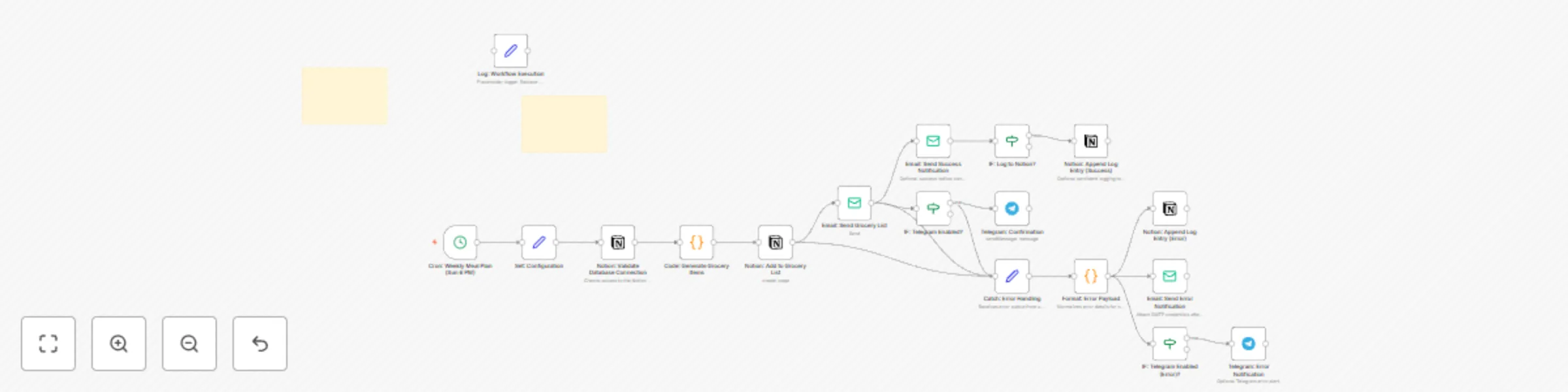
Workflow preview

$20/month : Unlimited workflows
2500 executions/month

THE #1 IN WEB SCRAPING
Scrape any website without limits
HOSTINGER  Early Deal
DISCOUNT 20% Try free
Early DealDISCOUNT 20%
Self-hosted n8n
Unlimited workflows - from $4.99/mo

#1 hub for scraping, AI & automation
6000+ actors - $5 credits/mo
Important notice
This workflow is provided as-is. Please review and test before using in production.
Overview
Who’s it for
Busy homemakers, creators, and anyone who wants a simple, no-cost way to plan weekly meals and get a ready-to-shop grocery list—without extra apps.
What it does
Runs on a weekly Cron schedule, generates a grocery list, creates rows in your Notion database (Ingredient, Quantity, Status), and emails the list (optional Telegram confirmation). It includes a Notion connection check, detailed error notifications (email and optional Telegram), a success email with timestamp, and optional persistent logging to a Notion “Logs” database.
Requirements
- Notion account + integration connected to your database
- SMTP credentials for the Email node
- (Optional) Telegram bot and chat ID for alerts
- (Optional) Notion log database if you want persistent logs
How to set up
- Import the workflow and open Set: Configuration to fill:
fromEmail,emailTo,notifyEmail,notionDb,telegramChatId- (Optional)
logToNotion(true/false),notionLogDb
- In Notion, create a DB with properties:
- Ingredient (Title), Quantity (Rich text), Status (Select: “To Buy”)
- Attach your Notion and SMTP credentials (and Telegram if used).
- Run once to test, then set Cron to your preferred weekly time.
How to customize
- Edit the recipe/grocery items in the Code node.
- Change the Cron schedule (test with “Every minute,” then revert to weekly).
- Enable Telegram alerts, and/or turn on Notion logging for audit trails.