Block 1 - Webhook
- Type / Role
- n8n-nodes-base.webhook - webhook
- Config choices
- Version 2.1


 Early Deal
This workflow is provided as-is. Please review and test before using in production.
AI Powered Verified Job Offer Letter Generator Description Creating job offer letters manually is time consuming, error prone, and difficult to scale. This AI powered workflow automates the enti...
n8n-nodes-base.webhook, n8n-nodes-verifiemail.verifiemail, n8n-nodes-base.if, n8n-nodes-base.set, @n8n/n8n-nodes-langchain.openai, n8n-nodes-base.slack, n8n-nodes-base.gmail, n8n-nodes-htmlcsstopdf.htmlcsstopdf
This workflow is cataloged by N8N Workflows and links back to its original n8n.io source page by Jitesh Dugar.
Original n8n.io sourceCreating job offer letters manually is time-consuming, error-prone, and difficult to scale. This AI-powered workflow automates the entire job offer letter process — from validating candidate emails to generating and delivering professional PDF offer letters.
This intelligent workflow eliminates repetitive drafting, reduces human errors, and ensures offer letters are sent only to verified email addresses, helping HR teams move faster while maintaining professionalism and accuracy.
Transforms manual offer letter creation into a seamless, automated HR process:
📝 Capture Candidate & Job Details – Receives candidate name, email, job role, salary, joining date, and company details via webhook or form.
📧 Email Verification – Validates the candidate’s email address before sending any communication to prevent delivery errors.
🧠 AI-Powered Offer Letter Generation – Uses AI to generate a clear, professional, and structured job offer letter.
📄 HTML Offer Letter Formatting – Converts the AI-generated content into a clean and readable HTML layout.
📑 PDF Generation – Automatically converts the offer letter into a professional PDF document.
📧 Offer Letter Delivery – Sends the PDF offer letter directly to the verified candidate email.
🗂️ Document Storage – Saves a copy of the offer letter for internal records and future reference.
🔁 Confirmation Response – Returns a success response confirming completion.
🤖 AI Offer Letter Writing – Generates professional, ready-to-send offer letters automatically.
📧 Email Verification Built-In – Ensures offer letters are only sent to valid email addresses.
📑 PDF Generation – Creates clean, official-looking offer letters.
⚙️ End-to-End Automation – No manual drafting, formatting, or sending required.
📂 Centralized Record Keeping – Keeps copies of all generated offer letters.
🔄 Flexible Triggering – Can be triggered from HR systems, forms, or internal tools.
🏢 HR & Recruitment Teams – Automate offer letter creation and delivery.
🚀 Startups & Growing Companies – Send professional offer letters without extra admin work.
🏫 Staffing & Hiring Agencies – Generate offer letters quickly for multiple candidates.
💻 Remote & Distributed Teams – Ensure consistent communication across locations.
🧠 Operations Teams – Maintain accurate records and reduce manual errors.
🌐 Webhook Trigger – Receives candidate and job details.
🤖 OpenAI – Generates offer letter content.
📧 VerifyEmail – Validates candidate email addresses.
📄 HTMLCSS to PDF – Converts HTML into PDF offer letters.
📧 Gmail – Sends the offer letter email.
☁️ Google Drive (optional) – Stores generated offer letters.
🎨 Brand Customization – Add company logo, colors, and formatting to offer letters.
🧾 HR System Integration – Connect with ATS or HR tools for automatic triggering.
🌍 Multilingual Offer Letters – Generate offer letters in different languages.
🔐 Approval Step – Add internal approval before sending offer letters.
📊 Audit Logging – Store offer letter data in Google Sheets or databases.
📎 Additional Attachments – Include policies or onboarding documents with the offer letter.
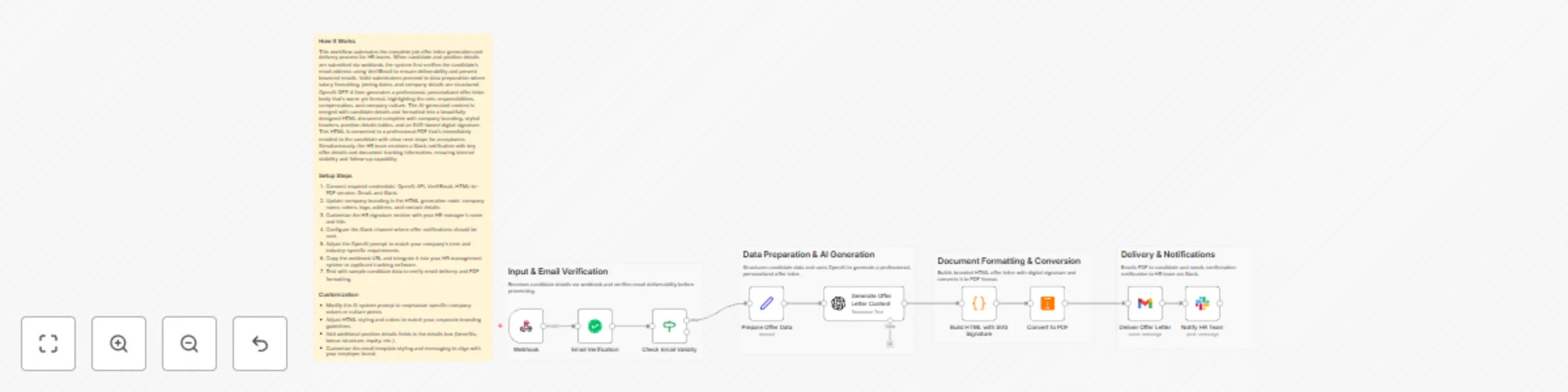
1️⃣ Import the workflow template into your n8n workspace 2️⃣ Connect credentials for OpenAI, VerifyEmail, Gmail, and HTMLCSS to PDF 3️⃣ Send test candidate data to the webhook 4️⃣ Review the generated PDF offer letter 5️⃣ Activate the workflow and start sending offer letters automatically
1️⃣ Offer Letter Tone – Adjust AI prompt for formal or friendly tone. 2️⃣ Company Branding – Customize HTML layout and styling. 3️⃣ Email Content – Modify subject line and email message. 4️⃣ PDF Layout – Adjust spacing, fonts, and structure. 5️⃣ Storage Location – Change where offer letters are saved. 6️⃣ Validation Rules – Extend email or input checks.
⚡ Faster Hiring Process – Generate offer letters in minutes.
🤖 Consistent Quality – Every offer letter follows a professional format.
📧 Error-Free Delivery – Verified emails reduce failed communication.
🗂️ Organized Records – All offer letters stored automatically.
🏢 Professional Candidate Experience – Clean, official documents every time.
📝 Candidate & Job Details ↓ 📧 Email Verification ↓ 🧠 AI Offer Letter Generation ↓ 📄 HTML Formatting ↓ 📑 PDF Conversion ↓ 📧 Email Delivery ↓ 🔁 Confirmation Response
Import this template today and let AI handle offer letter creation, verification, and delivery — so your team can focus on hiring the right talent faster. ✨
This catalog entry is organized from the workflow JSON. The node-level section below shows the executable blocks available for review before importing the template.
| Workflow | Generate verified job offer letters with OpenAI, Gmail and Slack |
|---|---|
| Complexity | intermediate |
| Nodes | 14 |
| Categories | HR, Multimodal AI |
| Author | Jitesh Dugar |
| Published | 12 Dec 2025 |
Use the JSON export at /data/workflows/11732/11732.json as the source template for this automation.
Open n8n, import the downloaded JSON, and review each node before activating the workflow.
Replace placeholder credentials, API keys, webhook URLs, account IDs, and environment-specific values with your own settings.
Run the workflow manually or in a staging workspace, inspect node output, and confirm downstream systems receive the expected data.
Enable the workflow only after testing, then monitor executions, errors, and rate limits during the first production runs.
Review imported nodes carefully before activation. This catalog entry is intended to help you inspect the workflow structure, understand required services, and find related templates faster.
Node names, credentials, schedules, webhook paths, and external service limits may need adjustment for your workspace.
AI Powered Verified Job Offer Letter Generator Description Creating job offer letters manually is time consuming, error prone, and difficult to scale. This AI powered workflow automates the enti...
Review the workflow JSON, configure any required credentials in n8n, and test the automation in a safe workspace before using it in production.
Yes. Use the block-by-block analysis and the downloadable JSON to inspect each node, then adjust credentials, prompts, schedules, filters, or destinations for your HR, Multimodal AI use case.