Generate sales emails based on business events with Explorium MCP & Claude

Workflow preview

Workflow preview
100%
Generate sales emails based on business events with Explorium MCP & Claude preview
Open on n8n.io

Important notice

This workflow is provided as-is. Please review and test before using in production.

1. Workflow Overview

Explorium Event Triggered Outreach This n8n and agent based workflow automates outbound prospecting by monitoring Explorium event data (e.g. product launches, new office opening, new investment and...

Best for

  • Lead Nurturing automation workflows
  • Multimodal AI automation workflows
  • advanced n8n builders looking for reusable templates

Tools used

@n8n/n8n-nodes-langchain.lmchatanthropic, n8n-nodes-base.splitinbatches, @n8n/n8n-nodes-langchain.agent, n8n-nodes-base.stickynote, @n8n/n8n-nodes-langchain.mcpclienttool, n8n-nodes-base.webhook, n8n-nodes-base.httprequest, n8n-nodes-base.if

Source and attribution

This workflow is cataloged by N8N Workflows and links back to its original n8n.io source page by explorium.

Original n8n.io source

1.1 Workflow description

Title
Generate sales emails based on business events with Explorium MCP & Claude
Workflow name
Generate sales emails based on business events with Explorium MCP & Claude

Explorium Event-Triggered Outreach

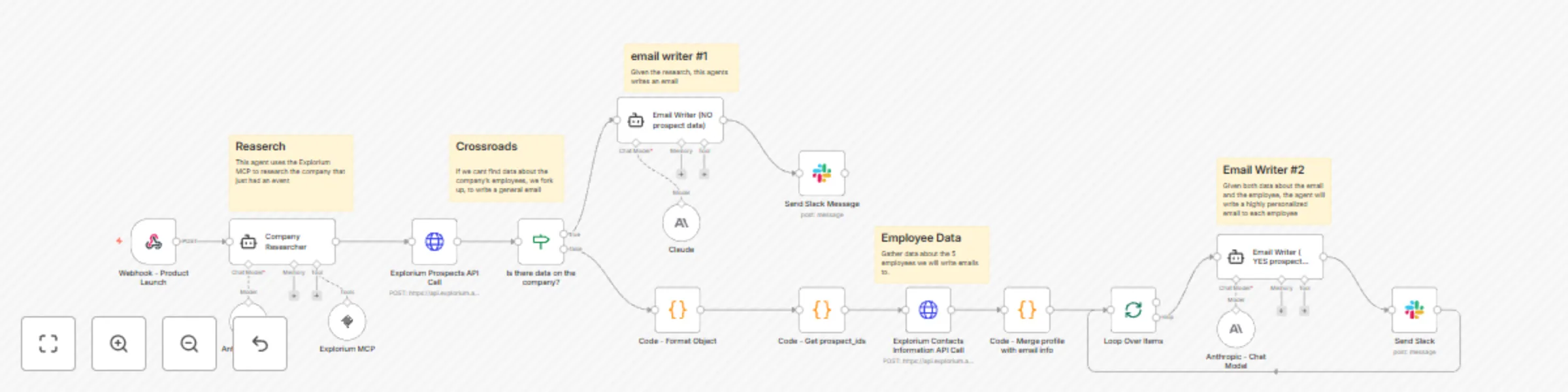
This n8n and agent-based workflow automates outbound prospecting by monitoring Explorium event data (e.g. product launches, new office opening, new investment and more), researching companies, identifying key contacts, and generating tailored sales emails leveraging the Explorium MCP server.

Template

Workflow Overview

Node 1: Webhook Trigger

Purpose: Listens for real-time product launch events pushed from Explorium's webhook system.

How it works:

  • Explorium sends HTTP POST requests containing event data
  • The webhook payload includes company name, business ID, domain, product name, and event type
  • Pay attention: Product launch is just one example. You can easily enroll to many more meaningful events. to learn about events and how to enroll to events, visit the events documentation.

Node 2: Company Research Agent

Agent Type: Tools Agent

Purpose: Enrich company data after an event occurs.

How it works:

  • Uses Explorium MCP via the MCP Client tool to gather additional company data
  • Uses Anthropic Claude (Chat Model) to process and interpret company information for downstream personalization

Node 3: Employee Data Retrieval

Purpose: Retrieve prospect-level data for targeting.

How it works:

  • Uses HTTP Request node to call Explorium's fetch_prospects endpoint
  • Filters prospects by:
    • Company business_id
    • Departments: Product, R&D, etc...
    • Seniority levels: owner, cxo, vp, director, senior, manager, partner, etc...
    • Pay Attention: Follow our fetch prospect documentation for the full list of filter and best practice.
  • Limits results to top 5 relevant employees
  • Code nodes handle:
    • Filtering logic
    • Cleaning API response
    • Formatting data for downstream agents

Node 4: Conditional Branch - Prospect Data Check

If Node: Checks whether prospect data was successfully retrieved

Logic:

  • If prospects found → personalized emails per person
  • If no prospects → fallback to company-level general email

Node 5A: Email Writer #1 (No Prospect Data)

Agent Type: Tools Agent

Purpose: Write generic outbound email using only company-level research and event info.

Powered by: Anthropic Chat Model

Node 5B: Loop Over Prospects → Email Writer #2 (Personalized)

Agent Type: Tools Agent

Purpose: Write highly personalized email for each identified employee.

How it works:

  • Loops through each individual prospect
  • Passes company research + employee data to LLM agent
  • Generates customized emails referencing:
    • Prospect's title & department
    • Product launch
    • Role-relevant Explorium value proposition

Node 6: Slack Notifications

Purpose: Posts completed emails to internal Slack channel for review or testing before final deployment.

Future State: Can be swapped with an email sequencing platform in production.

Setup Requirements

Explorium API Access

  • MCP Client credentials for company enrichment and prospect fetching
  • Registered webhook for event listening

Get explorium api key

n8n Configuration

  • Secure environment variables for API keys & webhook secret
  • Code nodes configured for JSON transformation, filtering & signature validation

Customization Options

Personalization Logic

  • Update LLM prompt instructions to reflect ICP priorities
  • Modify email templates based on role, department, or tenure logic
  • Adjust fallback behavior when prospect data is unavailable

API Request Tuning

  • Adjust page_size for number of prospects retrieved
  • Fine-tune seniority and department filters to match evolving targeting

Future Expansion

  • Swap Slack notifications for outbound email automation
  • Integrate call task assignment directly into CRM
  • Introduce engagement scoring feedback loop (opens, clicks, replies)

Troubleshooting Tips

  • Validate webhook signature matching to prevent unauthorized requests
  • Ensure correct business_id is passed to prospect fetching endpoint
  • Confirm business enrichment returns sufficient data for company researcher agents
  • Review agent LLM responses for correct output structure and parsing consistency

1.2 Logical Blocks

This catalog entry is organized from the workflow JSON. The node-level section below shows the executable blocks available for review before importing the template.

2. Block-by-Block Analysis

Block 1 - Anthropic Chat Model

Type / Role
@n8n/n8n-nodes-langchain.lmChatAnthropic - lmChatAnthropic
Config choices
Version 1.3

Block 2 - Loop Over Items

Type / Role
n8n-nodes-base.splitInBatches - splitInBatches
Config choices
Version 3

Block 3 - Company Researcher

Type / Role
@n8n/n8n-nodes-langchain.agent - agent
Config choices
Version 1.9

Block 4 - Email Writer ( YES prospect data)

Type / Role
@n8n/n8n-nodes-langchain.agent - agent
Config choices
Version 1.9

Block 5 - Email Writer (NO prospect data)

Type / Role
@n8n/n8n-nodes-langchain.agent - agent
Config choices
Version 1.9

Block 6 - Sticky Note

Type / Role
n8n-nodes-base.stickyNote - stickyNote
Config choices
Version 1

Block 7 - Sticky Note1

Type / Role
n8n-nodes-base.stickyNote - stickyNote
Config choices
Version 1

Block 8 - Sticky Note2

Type / Role
n8n-nodes-base.stickyNote - stickyNote
Config choices
Version 1

Block 9 - Sticky Note3

Type / Role
n8n-nodes-base.stickyNote - stickyNote
Config choices
Version 1

Block 10 - Sticky Note4

Type / Role
n8n-nodes-base.stickyNote - stickyNote
Config choices
Version 1

Block 11 - Explorium MCP

Type / Role
@n8n/n8n-nodes-langchain.mcpClientTool - mcpClientTool
Config choices
Version 1

Block 12 - Webhook - Product Launch

Type / Role
n8n-nodes-base.webhook - webhook
Config choices
Version 2

Block 13 - Explorium Prospects API Call

Type / Role
n8n-nodes-base.httpRequest - httpRequest
Config choices
Version 4.2

Block 14 - Is there data on the company?

Type / Role
n8n-nodes-base.if - if
Config choices
Version 2.2

Block 15 - Claude

Type / Role
@n8n/n8n-nodes-langchain.lmChatAnthropic - lmChatAnthropic
Config choices
Version 1.3

Block 16 - Code - Format Object

Type / Role
n8n-nodes-base.code - code
Config choices
Version 2

Block 17 - Code - Get prospect_ids

Type / Role
n8n-nodes-base.code - code
Config choices
Version 2

Block 18 - Send Slack Message

Type / Role
n8n-nodes-base.slack - slack
Config choices
Version 2.3

Block 19 - Explorium Contacts Information API Call

Type / Role
n8n-nodes-base.httpRequest - httpRequest
Config choices
Version 4.2

Block 20 - Code - Merge profile with email info

Type / Role
n8n-nodes-base.code - code
Config choices
Version 2

Block 21 - Anthropic - Chat Model

Type / Role
@n8n/n8n-nodes-langchain.lmChatAnthropic - lmChatAnthropic
Config choices
Version 1.3

Block 22 - Send Slack

Type / Role
n8n-nodes-base.slack - slack
Config choices
Version 2.3

3. Summary Table

Workflow Generate sales emails based on business events with Explorium MCP & Claude
Complexity advanced
Nodes 22
Categories Lead Nurturing, Multimodal AI
Author explorium
Published 10 Jun 2025

4. Reproducing the Workflow from Scratch

  1. 1. Download the workflow JSON

    Use the JSON export at /data/workflows/4841/4841.json as the source template for this automation.

  2. 2. Import the template into n8n

    Open n8n, import the downloaded JSON, and review each node before activating the workflow.

  3. 3. Configure credentials and variables

    Replace placeholder credentials, API keys, webhook URLs, account IDs, and environment-specific values with your own settings.

  4. 4. Test with sample data

    Run the workflow manually or in a staging workspace, inspect node output, and confirm downstream systems receive the expected data.

  5. 5. Activate and monitor

    Enable the workflow only after testing, then monitor executions, errors, and rate limits during the first production runs.

5. General Notes & Resources

Review imported nodes carefully before activation. This catalog entry is intended to help you inspect the workflow structure, understand required services, and find related templates faster.

Node names, credentials, schedules, webhook paths, and external service limits may need adjustment for your workspace.

Frequently asked questions

What does Generate sales emails based on business events with Explorium MCP & Claude do?

Explorium Event Triggered Outreach This n8n and agent based workflow automates outbound prospecting by monitoring Explorium event data (e.g. product launches, new office opening, new investment and...

What do I need before importing this workflow?

Review the workflow JSON, configure any required credentials in n8n, and test the automation in a safe workspace before using it in production.

Can I customize this workflow?

Yes. Use the block-by-block analysis and the downloadable JSON to inspect each node, then adjust credentials, prompts, schedules, filters, or destinations for your Lead Nurturing, Multimodal AI use case.