Block 1 - GraphQL
- Type / Role
- n8n-nodes-base.graphql - graphql
- Config choices
- Version 1.1


 Early Deal
This workflow is provided as-is. Please review and test before using in production.
Automatically Generate AI Follow Up Messages from Fireflies Transcripts This workflow automates creating personalized follow up messages for your clients based on meeting transcripts fetched from F...
n8n-nodes-base.graphql, n8n-nodes-base.set, @n8n/n8n-nodes-langchain.agent, @n8n/n8n-nodes-langchain.lmchatgooglegemini, n8n-nodes-base.googledrive, n8n-nodes-base.stickynote, n8n-nodes-base.googlecalendartrigger, n8n-nodes-base.filter
This workflow is cataloged by N8N Workflows and links back to its original n8n.io source page by Websensepro.
Original n8n.io sourceAutomatically Generate AI Follow-Up Messages from Fireflies Transcripts
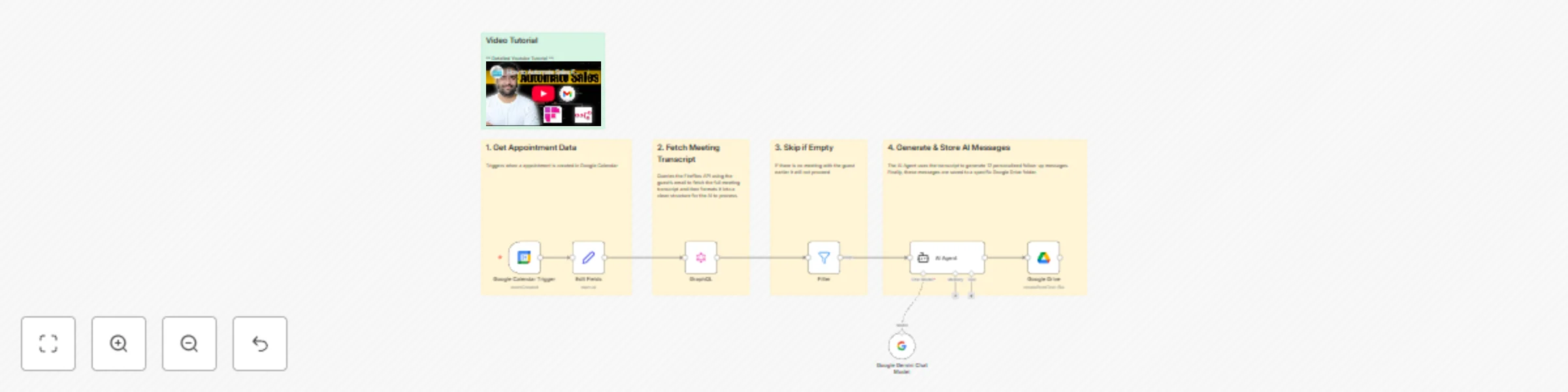
This workflow automates creating personalized follow-up messages for your clients based on meeting transcripts fetched from Fireflies. It ensures the right guest information is captured, the transcript is processed by AI, and the output is stored neatly in Google Drive.
What it Does
Use Cases
Customization
Troubleshooting
Requirements
How to Set Up
Connect Credentials: In Google Calendar Node, GraphQL, AI Agent, and Google Drive nodes, select your credentials for Google Calendar, Fireflies, Google Gemini, and Google Drive.
Set Guest Details Extraction: Verify the Edit Fields node extracts all required fields (first name, last name, email, appointment times, status).
Update GraphQL Query: Ensure the query correctly fetches transcripts by guest email. Adjust if your Fireflies workspace uses different fields.
Customize AI Prompt: Update AI Agent with the exact instructions for message generation (number of messages, tone, context, platform).
Configure Google Drive Storage: Select the proper folder to save messages, ideally using guest name as file name for easy reference.
Activate Workflow: Save and activate the workflow.
Video Tutorial: Step by step video instructions present here for beginners https://youtu.be/5t9xXCz4DzM
This catalog entry is organized from the workflow JSON. The node-level section below shows the executable blocks available for review before importing the template.
| Workflow | Generate personalized sales follow-ups from Fireflies transcripts with Gemini & Google Drive |
|---|---|
| Complexity | intermediate |
| Nodes | 12 |
| Categories | Lead Nurturing, AI Summarization |
| Author | Websensepro |
| Published | 17 Nov 2025 |
Use the JSON export at /data/workflows/10926/10926.json as the source template for this automation.
Open n8n, import the downloaded JSON, and review each node before activating the workflow.
Replace placeholder credentials, API keys, webhook URLs, account IDs, and environment-specific values with your own settings.
Run the workflow manually or in a staging workspace, inspect node output, and confirm downstream systems receive the expected data.
Enable the workflow only after testing, then monitor executions, errors, and rate limits during the first production runs.
Review imported nodes carefully before activation. This catalog entry is intended to help you inspect the workflow structure, understand required services, and find related templates faster.
Node names, credentials, schedules, webhook paths, and external service limits may need adjustment for your workspace.
Automatically Generate AI Follow Up Messages from Fireflies Transcripts This workflow automates creating personalized follow up messages for your clients based on meeting transcripts fetched from F...
Review the workflow JSON, configure any required credentials in n8n, and test the automation in a safe workspace before using it in production.
Yes. Use the block-by-block analysis and the downloadable JSON to inspect each node, then adjust credentials, prompts, schedules, filters, or destinations for your Lead Nurturing, AI Summarization use case.