Block 1 - Deal Stage Webhook Trigger
- Type / Role
- n8n-nodes-base.webhook - webhook
- Config choices
- Version 2.1


 Early Deal
This workflow is provided as-is. Please review and test before using in production.
AI Powered Deal Content Recommendation and Personalization (Zoho CRM + OpenAI + Gmail + n8n) This workflow automates personalized content recommendations for Zoho CRM deals by analyzing deal detail...
n8n-nodes-base.webhook, n8n-nodes-base.zohocrm, n8n-nodes-base.code, n8n-nodes-base.set, n8n-nodes-base.httprequest, n8n-nodes-base.merge, @n8n/n8n-nodes-langchain.openai, n8n-nodes-base.gmail
This workflow is cataloged by N8N Workflows and links back to its original n8n.io source page by WeblineIndia.
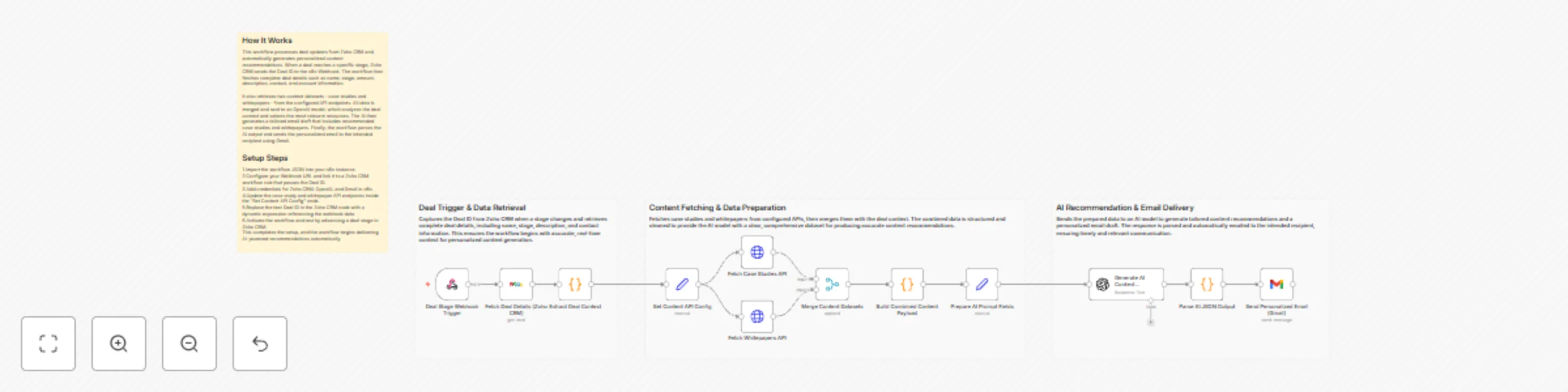
Original n8n.io sourceThis workflow automates personalized content recommendations for Zoho CRM deals by analyzing deal details, fetching relevant case studies and whitepapers and generating an AI-crafted email tailored to each prospect. It triggers when Zoho CRM sends a Deal ID to the n8n Webhook, processes contextual data, generates recommendations and emails the results automatically.
This workflow enables intelligent content automation by bridging Zoho CRM deal activity with AI-driven contextual recommendations. When a deal advances to a specific stage, Zoho CRM sends its Deal ID to the n8n Webhook. The workflow retrieves the complete deal details — including stage, amount, description, contact and account information — and uses them to determine the prospect’s needs.
It then fetches two content datasets (case studies and whitepapers) from configured API endpoints. The combined dataset is structured and passed to an OpenAI model that analyzes the deal’s industry, pain points and stage to select the most relevant content. The AI generates an email draft featuring these recommendations, which is parsed and automatically delivered via Gmail.
This eliminates manual research, speeds up sales follow-ups and ensures prospects receive focused and valuable resources at the right time.
Add or remove fields inside the “Extract Deal Context” node based on your CRM schema.
Update URLs or switch to internal CMS, Airtable or Google Sheets.
Modify tone, selection logic or output formatting in the OpenAI node prompt.
Replace Gmail with Outlook, Zoho Mail, SMTP or Slack notifications.
Add rule-based filtering before sending data to AI—for example, industry, region or deal size.
Industry-Specific Nurturing Automatically send the best content based on a deal’s industry.
ROI-Focused Prospects Provide ROI-driven case studies when deal description includes keywords like “cost”, “budget” or “ROI.”
Accelerated Qualification Deliver targeted materials during the qualification stage to increase deal momentum.
Sales Playbook Automation Map deal stages to recommended content without manual intervention.
Dynamic Content Libraries Allow marketing teams to update content sources without touching the workflow.
| Issue | Possible Cause | Solution |
|---|---|---|
| Workflow not triggering | Zoho CRM not calling Webhook | Re-check Webhook URL in Zoho CRM |
| Deal data missing | Wrong field sent by Webhook | Ensure Zoho sends the correct Deal ID |
| AI returns no JSON | Incorrect prompt format | Ensure prompt instructs AI to respond with JSON |
| Email not sent | Gmail credential expired | Reconnect Gmail OAuth |
| Case study or whitepaper list empty | API URL incorrect or offline | Verify API endpoints in configuration node |
| Merge node missing inputs | One API failed | Check HTTP request nodes |
If you need assistance customizing this workflow, enhancing recommendation logic, integrating additional systems or building similar automation solutions, WeblineIndia is here to help. Our expert n8n workflow automation developers can extend this workflow with scoring models, personalization engines, CRM integrations and advanced AI features.
This catalog entry is organized from the workflow JSON. The node-level section below shows the executable blocks available for review before importing the template.
| Workflow | Generate personalized deal content recommendations with Zoho CRM, GPT-4o-mini & Gmail |
|---|---|
| Complexity | advanced |
| Nodes | 16 |
| Categories | Lead Nurturing, AI RAG |
| Author | WeblineIndia |
| Published | 11 Dec 2025 |
Use the JSON export at /data/workflows/11689/11689.json as the source template for this automation.
Open n8n, import the downloaded JSON, and review each node before activating the workflow.
Replace placeholder credentials, API keys, webhook URLs, account IDs, and environment-specific values with your own settings.
Run the workflow manually or in a staging workspace, inspect node output, and confirm downstream systems receive the expected data.
Enable the workflow only after testing, then monitor executions, errors, and rate limits during the first production runs.
Review imported nodes carefully before activation. This catalog entry is intended to help you inspect the workflow structure, understand required services, and find related templates faster.
Node names, credentials, schedules, webhook paths, and external service limits may need adjustment for your workspace.
AI Powered Deal Content Recommendation and Personalization (Zoho CRM + OpenAI + Gmail + n8n) This workflow automates personalized content recommendations for Zoho CRM deals by analyzing deal detail...
Review the workflow JSON, configure any required credentials in n8n, and test the automation in a safe workspace before using it in production.
Yes. Use the block-by-block analysis and the downloadable JSON to inspect each node, then adjust credentials, prompts, schedules, filters, or destinations for your Lead Nurturing, AI RAG use case.