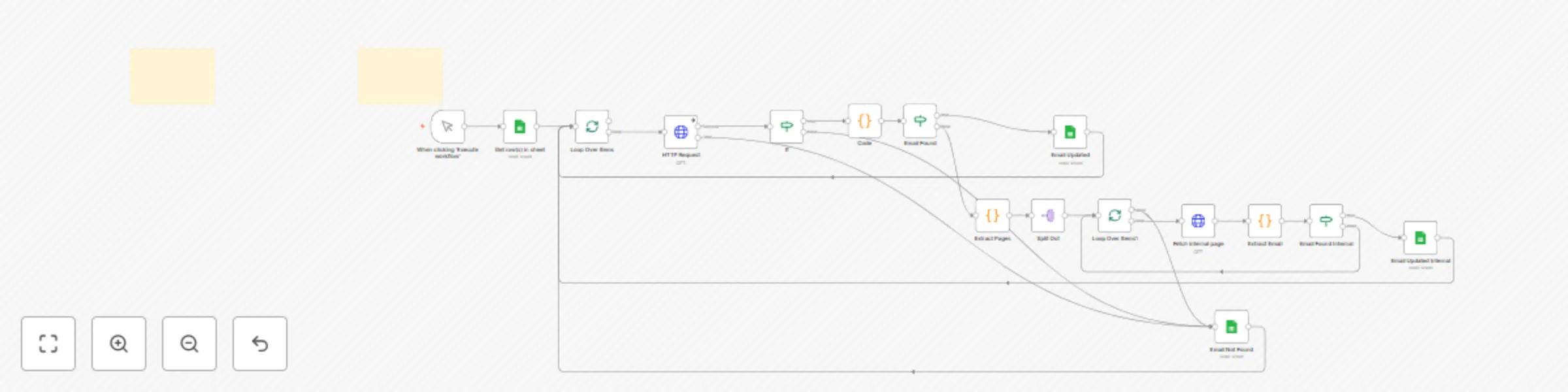
Generate leads from Google Maps with email

Workflow preview

Workflow preview
100%
Generate leads from Google Maps with email preview
Open on n8n.io

Important notice

This workflow is provided as-is. Please review and test before using in production.

1. Workflow Overview

Google Maps Lead Generation and Email Scraper Categories: Lead Generation, Web Scraping, Business Automation This workflow creates a completely free Google Maps email scraping system that extracts ...

Best for

  • Lead Generation automation workflows
  • Multimodal AI automation workflows
  • advanced n8n builders looking for reusable templates

Tools used

n8n-nodes-base.manualtrigger, n8n-nodes-base.googlesheets, n8n-nodes-base.splitinbatches, n8n-nodes-base.code, n8n-nodes-base.httprequest, n8n-nodes-base.splitout, n8n-nodes-base.if, n8n-nodes-base.stickynote

Source and attribution

This workflow is cataloged by N8N Workflows and links back to its original n8n.io source page by Zain Khan.

Original n8n.io source

1.1 Workflow description

Title
Generate leads from Google Maps with email
Workflow name
Generate leads from Google Maps with email

Google Maps Lead Generation and Email Scraper

Categories: Lead Generation, Web Scraping, Business Automation

This workflow creates a completely free Google Maps email scraping system that extracts unlimited business emails without requiring expensive third-party APIs. Built entirely in N8N using simple HTTP requests and JavaScript, this system can generate thousands of targeted leads for any industry or location while operating at 99% free cost structure.


Benefits

  • Zero API Costs - Operates entirely through free Google Maps scraping without expensive third-party services
  • Unlimited Lead Generation - Extract emails from thousands of Google Maps listings across any industry
  • Geographic Targeting - Search by specific cities, regions, or business types for precise lead targeting
  • Built-in Data Cleaning - Automatic duplicate removal, filtering, and data validation
  • Scalable Processing - Handle hundreds of businesses per search with intelligent rate limiting

How It Works

  1. Lead Ingestion: I have given a free browser extension to scrape leads from Google Maps and import them directly into a Google Sheet.
    1. Business Name
    2. Business Phone Number
    3. Business Emails (From Step 3)
    4. Rating
    5. Reviews Count
    6. Industry
    7. Address
    8. Website
    9. Google Map Link
  2. Website Crawling: The n8n workflow reads the leads from your sheet and automatically crawls each website to find all internal pages.
  3. Email Extraction: For each page, the workflow intelligently scrapes for email addresses, filtering out image files and other non-relevant data.
  4. Enrich and Update:
    • If an email is found, the workflow updates the corresponding row in your Google Sheet with the new email address.
    • If no email is found after crawling the main page and all sub-pages, it marks the lead as "Not Found" so you can easily track your progress.

Requirements

  • n8n: A self-hosted or cloud instance of n8n.
  • Google Sheets: A Google account with a designated spreadsheet for your Google Maps leads.
  • Browser Extension: A free Google Maps scraping extension to get your initial lead data into the Google Sheet.

How to Use

  1. Set up your spreadsheet: Use the browser extension to scrape leads from Google Maps and populate your Google Sheet. Make sure the sheet has a column named "Website" and a column named "Processed for Email" (with an initial value of "Pending").
  2. Configure the workflow: Import this n8n workflow JSON into your n8n instance and connect your Google Sheets credentials.
  3. Run the workflow: Click the "Execute workflow" button to start the process. The workflow will automatically begin crawling websites and enriching your lead list with emails.

Business Use Cases

  • Local Service Providers - Find competitors and potential partners in specific geographic areas
  • B2B Sales Teams - Generate targeted prospect lists for cold outreach campaigns
  • Marketing Agencies - Build industry-specific lead databases for client campaigns
  • Real Estate Professionals - Identify businesses in target neighborhoods for commercial opportunities
  • Franchise Development - Research potential markets and existing competition
  • Market Research - Analyze business density and contact information across regions

Revenue Potential

This system transforms lead generation economics:

  • $0 per lead vs. $2-5 per lead from paid databases
  • Process 1,000+ leads daily without hitting API limits
  • Sell as a service for $500-2,000 per industry/location
  • Perfect for agencies offering lead generation to local businesses
  • Difficulty Level: Intermediate
  • Estimated Setup Time: 30 min Monthly Operating Cost: $0 (completely free)

Advanced Optimizations we have

Scale the system with:

  • Multi-Page Scraping: Extract URLs from homepages, then scrape contact pages for more emails
  • Proxy Integration: Add residential proxies for unlimited scraping without rate limits

1.2 Logical Blocks

This catalog entry is organized from the workflow JSON. The node-level section below shows the executable blocks available for review before importing the template.

2. Block-by-Block Analysis

Block 1 - When clicking ‘Execute workflow’

Type / Role
n8n-nodes-base.manualTrigger - manualTrigger
Config choices
Version 1

Block 2 - Get row(s) in sheet

Type / Role
n8n-nodes-base.googleSheets - googleSheets
Config choices
Version 4.6

Block 3 - Loop Over Items

Type / Role
n8n-nodes-base.splitInBatches - splitInBatches
Config choices
Version 3

Block 4 - Code

Type / Role
n8n-nodes-base.code - code
Config choices
Version 2

Block 5 - HTTP Request

Type / Role
n8n-nodes-base.httpRequest - httpRequest
Config choices
Version 4.2

Block 6 - Extract Pages

Type / Role
n8n-nodes-base.code - code
Config choices
Version 2

Block 7 - Split Out

Type / Role
n8n-nodes-base.splitOut - splitOut
Config choices
Version 1

Block 8 - Loop Over Items1

Type / Role
n8n-nodes-base.splitInBatches - splitInBatches
Config choices
Version 3

Block 9 - Fetch internal page

Type / Role
n8n-nodes-base.httpRequest - httpRequest
Config choices
Version 4.2

Block 10 - Extract Email

Type / Role
n8n-nodes-base.code - code
Config choices
Version 2

Block 11 - Email Found Internal

Type / Role
n8n-nodes-base.if - if
Config choices
Version 2.2

Block 12 - Email Found

Type / Role
n8n-nodes-base.if - if
Config choices
Version 2.2

Block 13 - Email Updated

Type / Role
n8n-nodes-base.googleSheets - googleSheets
Config choices
Version 4.6

Block 14 - Email Updated Internal

Type / Role
n8n-nodes-base.googleSheets - googleSheets
Config choices
Version 4.6

Block 15 - Email Not Found

Type / Role
n8n-nodes-base.googleSheets - googleSheets
Config choices
Version 4.6

Block 16 - If

Type / Role
n8n-nodes-base.if - if
Config choices
Version 2.2

Block 17 - Sticky Note

Type / Role
n8n-nodes-base.stickyNote - stickyNote
Config choices
Version 1

Block 18 - Sticky Note1

Type / Role
n8n-nodes-base.stickyNote - stickyNote
Config choices
Version 1

3. Summary Table

Workflow Generate leads from Google Maps with email
Complexity advanced
Nodes 18
Categories Lead Generation, Multimodal AI
Author Zain Khan
Published 14 Aug 2025

4. Reproducing the Workflow from Scratch

  1. 1. Download the workflow JSON

    Use the JSON export at /data/workflows/7406/7406.json as the source template for this automation.

  2. 2. Import the template into n8n

    Open n8n, import the downloaded JSON, and review each node before activating the workflow.

  3. 3. Configure credentials and variables

    Replace placeholder credentials, API keys, webhook URLs, account IDs, and environment-specific values with your own settings.

  4. 4. Test with sample data

    Run the workflow manually or in a staging workspace, inspect node output, and confirm downstream systems receive the expected data.

  5. 5. Activate and monitor

    Enable the workflow only after testing, then monitor executions, errors, and rate limits during the first production runs.

5. General Notes & Resources

Review imported nodes carefully before activation. This catalog entry is intended to help you inspect the workflow structure, understand required services, and find related templates faster.

Node names, credentials, schedules, webhook paths, and external service limits may need adjustment for your workspace.

Frequently asked questions

What does Generate leads from Google Maps with email do?

Google Maps Lead Generation and Email Scraper Categories: Lead Generation, Web Scraping, Business Automation This workflow creates a completely free Google Maps email scraping system that extracts ...

What do I need before importing this workflow?

Review the workflow JSON, configure any required credentials in n8n, and test the automation in a safe workspace before using it in production.

Can I customize this workflow?

Yes. Use the block-by-block analysis and the downloadable JSON to inspect each node, then adjust credentials, prompts, schedules, filters, or destinations for your Lead Generation, Multimodal AI use case.