Generate HR offer letters and contracts with GPT-4.1-mini and Google Docs

Workflow preview

Workflow preview
100%
Generate HR offer letters and contracts with GPT-4.1-mini and Google Docs preview
Open on n8n.io

1. Workflow Overview

Description An intelligent AI powered workflow that automates HR document creation for new hires. Upload candidate documents via form, and the system extracts details, auto calculates joining dates...

Best for

  • HR automation workflows
  • Multimodal AI automation workflows
  • intermediate n8n builders looking for reusable templates

Tools used

n8n-nodes-base.stickynote, n8n-nodes-base.googledocs, @n8n/n8n-nodes-langchain.lmchatopenai, @n8n/n8n-nodes-langchain.agent, n8n-nodes-base.set, n8n-nodes-base.if, n8n-nodes-base.aggregate, n8n-nodes-base.extractfromfile

Source and attribution

This workflow is cataloged by N8N Workflows and links back to its original n8n.io source page by isaWOW.

Original n8n.io source

1.1 Workflow description

Title
Generate HR offer letters and contracts with GPT-4.1-mini and Google Docs
Workflow name
Generate HR offer letters and contracts with GPT-4.1-mini and Google Docs

Description

An intelligent AI-powered workflow that automates HR document creation for new hires. Upload candidate documents via form, and the system extracts details, auto-calculates joining dates, fills professional templates using GPT-4, and saves the final Offer Letter or Employment Contract directly to Google Docs—all in seconds.


What this workflow does

This automation handles your complete HR onboarding document pipeline:

  • Form-based submission: HR fills a simple form with candidate's Identity card, Resume, Job Role, Salary, and document type selection
  • Smart data extraction: Automatically extracts candidate name from uploaded Resume PDF and calculates joining date (1st of next month)
  • Template selection: Routes to Offer Letter or Employment Contract template based on HR's selection
  • AI-powered filling: Uses OpenAI GPT-4.1-mini to intelligently fill all placeholders while preserving exact formatting, line breaks, and emojis
  • Google Docs output: Saves the final professional document directly to Google Docs, ready to send to the candidate

Setup requirements

Tools you'll need:

  • Active n8n instance (self-hosted or n8n Cloud)
  • Google Docs with OAuth access
  • OpenAI API key (GPT-4.1-mini access)
  • PDF documents: Candidate's Identity card and Resume

Estimated setup time: 15–20 minutes


Step-by-step setup

1. Connect Google Docs

  • In n8n: Credentials → Add credential → Google Docs OAuth2 API
  • Complete OAuth authentication
  • Open "Save Document to Google Docs" node
  • Create a new Google Doc or use an existing template document
  • Copy the document URL and paste it in the documentURL field

2. Add OpenAI API credentials

  • Get API key: https://platform.openai.com/api-keys
  • In n8n: Credentials → Add credential → OpenAI API
  • Paste your API key
  • Open "OpenAI GPT-4.1 Mini Model" node
  • Select your OpenAI credential
  • Ensure model is set to gpt-4.1-mini

3. Customize document templates

The workflow includes two pre-built templates. You can customize them:

Offer Letter Template:

  • Open "Load Offer Letter Template" node
  • Edit the template_offer value
  • Available placeholders: [Candidate Name], [Job Role], [Department/Team Name], [Company Name], [Joining Date], [Salary Details], [Work Location], [Reporting Manager/Team Lead], [Probation Period]

Employment Contract Template:

  • Open "Load Contract Template" node
  • Edit the template_contract value
  • Uses the same placeholders with additional terms and conditions sections

Important: Keep all placeholders in square brackets [Placeholder Name] exactly as shown. The AI will replace them automatically.

4. Configure form fields (optional)

  • Open "Receive Candidate Details via Form" node
  • Default fields: Identity card (file), Resume (file), Job Role (text), Salary Details (number), Type (dropdown)
  • Add optional fields if needed: Department Name, Work Location, Reporting Manager, Probation Period
  • Copy the Form URL from the node settings
  • Share this URL with your HR team

5. Test the workflow

  • Open the Form URL in your browser
  • Upload sample Identity card and Resume PDFs
  • Fill Job Role: "Software Developer"
  • Enter Salary Details: 50000
  • Select Type: "Offer Letter"
  • Submit the form
  • Check your Google Docs—the filled document should appear automatically
  • Verify all placeholders are replaced correctly

6. Activate the workflow

  • Toggle the workflow to Active at the top
  • The form will now accept submissions 24/7
  • Each submission generates a new document in Google Docs

How it works

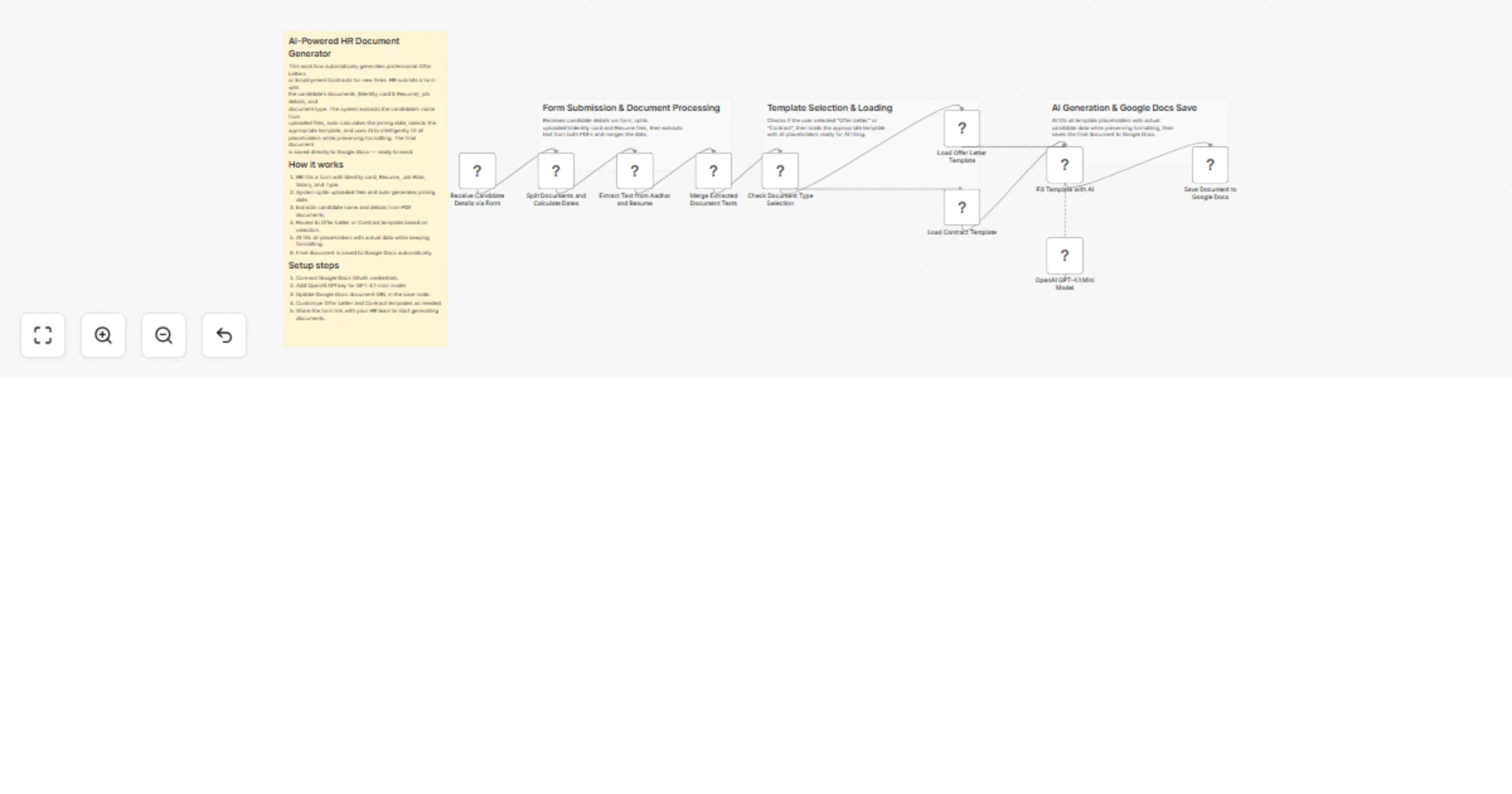
1. Form submission

HR opens the form link and uploads candidate documents (Identity card + Resume as PDFs), enters job details, and selects document type (Offer Letter or Contract).

2. Document processing

The workflow splits uploaded files into separate items and auto-generates two dates:

  • Form Date: Current submission date
  • Joining Date: Automatically set to the 1st of next month

3. Text extraction

Extracts text from both PDF documents using n8n's built-in Extract From File node. The candidate's name is typically pulled from the Resume.

4. Data aggregation

Combines extracted text from both documents into a single data item for processing.

5. Template routing

Checks the selected document type:

  • If "Offer Letter" → loads the Offer Letter template
  • If "Contract" → loads the Employment Contract template

6. AI template filling

The AI Agent receives:

  • The selected template with placeholders
  • All form data (Job Role, Salary, etc.)
  • Extracted candidate name from Resume
  • Auto-calculated joining date

GPT-4.1-mini fills every placeholder with actual data while strictly preserving:

  • Line breaks and paragraph spacing
  • Emojis and special characters
  • Bold/italic formatting markers
  • Email, phone, and web links

7. Google Docs save

The final filled document is inserted into your Google Docs document. Each submission appends a new document, so you can maintain a running archive or clear the doc periodically.


Key features

Zero manual typing: Extract candidate name automatically from Resume PDF—no copy-paste needed

Smart date calculation: Joining date auto-set to 1st of next month based on submission date

Dual document types: Choose between simple Offer Letter or detailed Employment Contract with terms

AI preserves formatting: GPT-4.1-mini maintains exact line breaks, emojis, and structure from templates

Google Docs integration: Documents saved directly—no downloads, conversions, or file juggling

Customizable templates: Edit both templates to match your company's tone, policies, and branding

Form-based workflow: Share one URL with HR team—no n8n access needed for daily use


Troubleshooting

Google Docs not saving

  • Re-authenticate OAuth credentials: Go to Credentials → Google Docs OAuth2 API → Reconnect
  • Check document URL: Ensure the documentURL field contains a valid Google Docs link (not a Sheets link)
  • Verify permissions: Make sure the connected Google account has edit access to the document

Candidate name not extracting correctly

  • Resume format issue: The workflow expects candidate name in the Resume PDF text. If your Resume format is unusual, you may need to adjust the extraction logic.
  • Check extraction node: Open "Extract Text from Identity card and Resume" node → Test execution → Verify text output
  • Manual override: Add a "Candidate Name" field to the form if automatic extraction fails

AI not filling placeholders

  • Check API key: Verify OpenAI API key is active and has credits at https://platform.openai.com/usage
  • Placeholder mismatch: Ensure template placeholders exactly match the format [Placeholder Name] with square brackets
  • Test AI node: Click "Fill Template with AI" → Execute node → Check output for errors

Joining date incorrect

  • Timezone issue: The date calculation uses server timezone. Verify your n8n instance timezone settings.
  • Custom date needed: If you want a different joining date logic (e.g., 15 days from submission), edit the "Split Documents and Calculate Dates" code node.

Form not accepting file uploads

  • File size limit: Default n8n form limit is 16MB. Compress PDFs if larger.
  • File type validation: Ensure uploaded files are PDFs, not images or other formats.
  • Browser issue: Try a different browser (Chrome recommended for file uploads).

Use cases

HR teams at growing companies: Onboard 5-10 new hires per week without spending hours on document preparation. Generate consistent, professional documents in seconds.

Recruitment agencies: Send offer letters to multiple candidates daily. Maintain brand consistency while scaling operations without adding admin staff.

Startups and small businesses: Automate HR paperwork from day one. Focus on candidate experience instead of document formatting.

Remote-first companies: Enable distributed HR teams to generate documents without shared drives or email chains. Single form link, instant output.

Consulting firms: Create client-specific employment contracts with custom templates. Switch between contract types based on project requirements.


Expected results

  • Time savings: 15-20 minutes saved per document (from 20 min manual → 2 min automated)
  • Output quality: Professional, error-free documents with consistent formatting every time
  • Scalability: Process 50+ candidates per week without additional HR headcount
  • Error reduction: Eliminate typos and placeholder mistakes common in manual copy-paste workflows
  • Faster hiring: Send offer letters within 5 minutes of candidate approval

Workflow customization

Add more form fields

Open "Receive Candidate Details via Form" node and add custom fields:

  • Department Name (dropdown with your teams)
  • Work Location (dropdown: Remote, Office, Hybrid)
  • Reporting Manager (text input)
  • Probation Period (number input)
  • Start Date (date picker for custom joining dates)

These values automatically populate in templates if placeholders are added.

Create additional templates

Duplicate one of the "Load Template" nodes and create:

  • Internship Offer Letters
  • Part-time Contract
  • Freelancer Agreement
  • Probation Extension Letter

Add a corresponding option in the form Type dropdown.

Send documents via email

Add an Email node after "Save Document to Google Docs":

  • Attach the Google Docs link
  • Send to candidate email (add email field to form)
  • CC HR manager automatically

Multi-language support

Create template variations in different languages. Add a "Language" dropdown to the form and route to appropriate template.


Support

Need help or custom development?

📧 Email: [email protected] 🌐 Website: https://isawow.com/

1.2 Logical Blocks

This catalog entry is organized from the workflow JSON. The node-level section below shows the executable blocks available for review before importing the template.

2. Block-by-Block Analysis

Block 1 - Sticky Note3

Type / Role
n8n-nodes-base.stickyNote - stickyNote
Config choices
Version 1

Block 2 - Sticky Note2

Type / Role
n8n-nodes-base.stickyNote - stickyNote
Config choices
Version 1

Block 3 - Sticky Note1

Type / Role
n8n-nodes-base.stickyNote - stickyNote
Config choices
Version 1

Block 4 - Sticky Note

Type / Role
n8n-nodes-base.stickyNote - stickyNote
Config choices
Version 1

Block 5 - Save Document to Google Docs

Type / Role
n8n-nodes-base.googleDocs - googleDocs
Config choices
Version 2

Block 6 - OpenAI GPT-4.1 Mini Model

Type / Role
@n8n/n8n-nodes-langchain.lmChatOpenAi - lmChatOpenAi
Config choices
Version 1.2

Block 7 - Fill Template with AI

Type / Role
@n8n/n8n-nodes-langchain.agent - agent
Config choices
Version 2.2

Block 8 - Load Contract Template

Type / Role
n8n-nodes-base.set - set
Config choices
Version 3.4

Block 9 - Load Offer Letter Template

Type / Role
n8n-nodes-base.set - set
Config choices
Version 3.4

Block 10 - Check Document Type Selection

Type / Role
n8n-nodes-base.if - if
Config choices
Version 2.2

Block 11 - Merge Extracted Document Texts

Type / Role
n8n-nodes-base.aggregate - aggregate
Config choices
Version 1

Block 12 - Extract Text from Aadhar and Resume

Type / Role
n8n-nodes-base.extractFromFile - extractFromFile
Config choices
Version 1

Block 13 - Split Documents and Calculate Dates

Type / Role
n8n-nodes-base.code - code
Config choices
Version 2

Block 14 - Receive Candidate Details via Form

Type / Role
n8n-nodes-base.formTrigger - formTrigger
Config choices
Version 2.3

3. Summary Table

Workflow Generate HR offer letters and contracts with GPT-4.1-mini and Google Docs
Complexity intermediate
Nodes 14
Categories HR, Multimodal AI
Author isaWOW
Published 06 Feb 2026

4. Reproducing the Workflow from Scratch

  1. 1. Download the workflow JSON

    Use the JSON export at /data/workflows/13241/13241.json as the source template for this automation.

  2. 2. Import the template into n8n

    Open n8n, import the downloaded JSON, and review each node before activating the workflow.

  3. 3. Configure credentials and variables

    Replace placeholder credentials, API keys, webhook URLs, account IDs, and environment-specific values with your own settings.

  4. 4. Test with sample data

    Run the workflow manually or in a staging workspace, inspect node output, and confirm downstream systems receive the expected data.

  5. 5. Activate and monitor

    Enable the workflow only after testing, then monitor executions, errors, and rate limits during the first production runs.

5. General Notes & Resources

Review imported nodes carefully before activation. This catalog entry is intended to help you inspect the workflow structure, understand required services, and find related templates faster.

Node names, credentials, schedules, webhook paths, and external service limits may need adjustment for your workspace.

Frequently asked questions

What does Generate HR offer letters and contracts with GPT-4.1-mini and Google Docs do?

Description An intelligent AI powered workflow that automates HR document creation for new hires. Upload candidate documents via form, and the system extracts details, auto calculates joining dates...

What do I need before importing this workflow?

Review the workflow JSON, configure any required credentials in n8n, and test the automation in a safe workspace before using it in production.

Can I customize this workflow?

Yes. Use the block-by-block analysis and the downloadable JSON to inspect each node, then adjust credentials, prompts, schedules, filters, or destinations for your HR, Multimodal AI use case.