Generate B2B lead opportunities from websites with Brightdata & OpenRouter AI

Workflow preview

Workflow preview
100%
Generate B2B lead opportunities from websites with Brightdata & OpenRouter AI preview
Open on n8n.io

Important notice

This workflow is provided as-is. Please review and test before using in production.

1. Workflow Overview

This workflow is designed for B2B professionals to automatically identify and summarize business opportunities from a company's website. By leveraging [Bright Data's](https://get.brightdata.com/uns...

Best for

  • Lead Generation automation workflows
  • AI RAG automation workflows
  • advanced n8n builders looking for reusable templates

Tools used

n8n-nodes-base.set, n8n-nodes-base.code, @brightdata/n8n-nodes-brightdata.brightdata, @n8n/n8n-nodes-langchain.lmchatopenrouter, @n8n/n8n-nodes-langchain.outputparserstructured, n8n-nodes-base.html, @n8n/n8n-nodes-langchain.chattrigger, n8n-nodes-base.stickynote

Source and attribution

This workflow is cataloged by N8N Workflows and links back to its original n8n.io source page by phil.

Original n8n.io source

1.1 Workflow description

Title
Generate B2B lead opportunities from websites with Brightdata & OpenRouter AI
Workflow name
Generate B2B lead opportunities from websites with Brightdata & OpenRouter AI

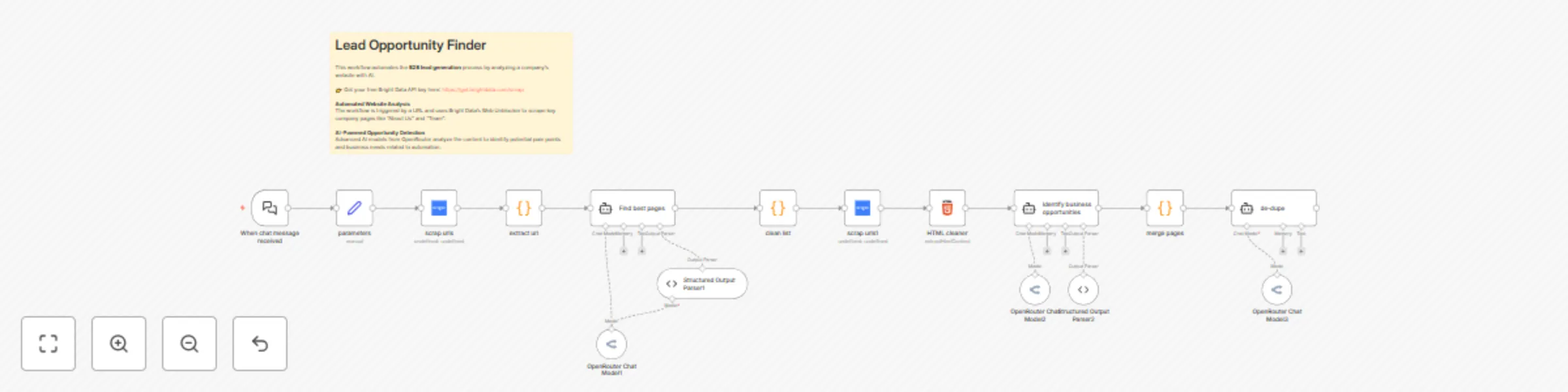
This workflow is designed for B2B professionals to automatically identify and summarize business opportunities from a company's website.

By leveraging Bright Data's Web Unblocker and advanced AI models from OpenRouter, it scrapes relevant company pages ("About Us", "Team", "Contact"), analyzes the content for potential pain points and needs, and synthesizes a concise, actionable report.

The final output is formatted for direct use in documents, making it an ideal tool for sales, marketing, and business development teams to prepare for prospecting calls or personalize outreach.


Who's it for

This template is ideal for:

  • B2B Sales Teams: Quickly find and qualify leads by identifying specific business needs before a cold call.
  • Marketing Agencies: Develop personalized content and value propositions based on a prospect's public website information.
  • Business Development Professionals: Efficiently research potential partners or clients and discover collaboration opportunities.
  • Entrepreneurs: Gain a competitive edge by understanding a competitor's strategy or a potential client's operations.

How it works

  1. The workflow is triggered by a chat message, typically a URL from an n8n chat application.
  2. It uses Bright Data to scrape the website's sitemap and extract all anchor links from the homepage.
  3. An AI agent analyzes the extracted URLs to filter for pages relevant to company information (e.g., "about-us," "team," "contact").
  4. The workflow then scrapes the content of these specific pages.
  5. A second AI agent summarizes the content of each page, looking for business opportunities related to AI-powered automation.
  6. The summaries are merged and a final AI agent synthesizes them into a single, cohesive report, formatted for easy reading in a Google Doc.

How to set up

  1. Bright Data Credentials: Sign up for a Bright Data account and create a Web Unblocker zone. In n8n, create new Bright Data API credentials and copy your API key.
  2. OpenRouter Credentials: Create an account on OpenRouter and get your API key. In n8n, create new OpenRouter API credentials and paste your key.
  3. Chat Trigger Node: Configure the "When chat message received" node. Copy the production webhook URL to integrate with your preferred chat platform.

Requirements

  • An active n8n instance.
  • A Bright Data account with a Web Unblocker zone.
  • An OpenRouter account with API access.

How to customize this workflow

  • AI Prompting: Edit the "systemMessage" parameters in the "AI Agent", "AI Agent1", and "AI Agent2" nodes to change the focus of the opportunity analysis. For example, modify the prompts to search for specific technologies, industry jargon, or different types of business challenges.
  • Model Selection: The workflow uses openai/o4-mini and openai/gpt-5. You can change these to other models available on OpenRouter by editing the model parameter in the OpenRouter Chat Model nodes.
  • Scraping Logic: The extract url node uses a regular expression to find <a> tags. This can be modified or replaced with an HTML Extraction node to target different elements or content on a website.
  • Output Format: The final output is designed for Google Docs. You can modify the last "AI Agent2" node's prompt to generate the output in a different format, such as a simple JSON object or a markdown list.

Phil | Inforeole

🇫🇷 Contactez nous pour automatiser vos processus

1.2 Logical Blocks

This catalog entry is organized from the workflow JSON. The node-level section below shows the executable blocks available for review before importing the template.

2. Block-by-Block Analysis

Block 1 - parameters

Type / Role
n8n-nodes-base.set - set
Config choices
Version 3.4

Block 2 - extract url

Type / Role
n8n-nodes-base.code - code
Config choices
Version 2

Block 3 - scrap urls

Type / Role
@brightdata/n8n-nodes-brightdata.brightData - brightData
Config choices
Version 1

Block 4 - OpenRouter Chat Model1

Type / Role
@n8n/n8n-nodes-langchain.lmChatOpenRouter - lmChatOpenRouter
Config choices
Version 1

Block 5 - Structured Output Parser1

Type / Role
@n8n/n8n-nodes-langchain.outputParserStructured - outputParserStructured
Config choices
Version 1.3

Block 6 - scrap urls1

Type / Role
@brightdata/n8n-nodes-brightdata.brightData - brightData
Config choices
Version 1

Block 7 - HTML cleaner

Type / Role
n8n-nodes-base.html - html
Config choices
Version 1.2

Block 8 - OpenRouter Chat Model2

Type / Role
@n8n/n8n-nodes-langchain.lmChatOpenRouter - lmChatOpenRouter
Config choices
Version 1

Block 9 - Structured Output Parser2

Type / Role
@n8n/n8n-nodes-langchain.outputParserStructured - outputParserStructured
Config choices
Version 1.3

Block 10 - OpenRouter Chat Model3

Type / Role
@n8n/n8n-nodes-langchain.lmChatOpenRouter - lmChatOpenRouter
Config choices
Version 1

Block 11 - merge pages

Type / Role
n8n-nodes-base.code - code
Config choices
Version 2

Block 12 - clean list

Type / Role
n8n-nodes-base.code - code
Config choices
Version 2

Block 13 - When chat message received

Type / Role
@n8n/n8n-nodes-langchain.chatTrigger - chatTrigger
Config choices
Version 1.3

Block 14 - Sticky Note

Type / Role
n8n-nodes-base.stickyNote - stickyNote
Config choices
Version 1

Block 15 - Find best pages

Type / Role
@n8n/n8n-nodes-langchain.agent - agent
Config choices
Version 2.2

Block 16 - Identify business opportunities

Type / Role
@n8n/n8n-nodes-langchain.agent - agent
Config choices
Version 2.2

Block 17 - de-dupe

Type / Role
@n8n/n8n-nodes-langchain.agent - agent
Config choices
Version 2.2

3. Summary Table

Workflow Generate B2B lead opportunities from websites with Brightdata & OpenRouter AI
Complexity advanced
Nodes 17
Categories Lead Generation, AI RAG
Author phil
Published 31 Aug 2025

4. Reproducing the Workflow from Scratch

  1. 1. Download the workflow JSON

    Use the JSON export at /data/workflows/8076/8076.json as the source template for this automation.

  2. 2. Import the template into n8n

    Open n8n, import the downloaded JSON, and review each node before activating the workflow.

  3. 3. Configure credentials and variables

    Replace placeholder credentials, API keys, webhook URLs, account IDs, and environment-specific values with your own settings.

  4. 4. Test with sample data

    Run the workflow manually or in a staging workspace, inspect node output, and confirm downstream systems receive the expected data.

  5. 5. Activate and monitor

    Enable the workflow only after testing, then monitor executions, errors, and rate limits during the first production runs.

5. General Notes & Resources

Review imported nodes carefully before activation. This catalog entry is intended to help you inspect the workflow structure, understand required services, and find related templates faster.

Node names, credentials, schedules, webhook paths, and external service limits may need adjustment for your workspace.

Frequently asked questions

What does Generate B2B lead opportunities from websites with Brightdata & OpenRouter AI do?

This workflow is designed for B2B professionals to automatically identify and summarize business opportunities from a company's website. By leveraging [Bright Data's](https://get.brightdata.com/uns...

What do I need before importing this workflow?

Review the workflow JSON, configure any required credentials in n8n, and test the automation in a safe workspace before using it in production.

Can I customize this workflow?

Yes. Use the block-by-block analysis and the downloadable JSON to inspect each node, then adjust credentials, prompts, schedules, filters, or destinations for your Lead Generation, AI RAG use case.