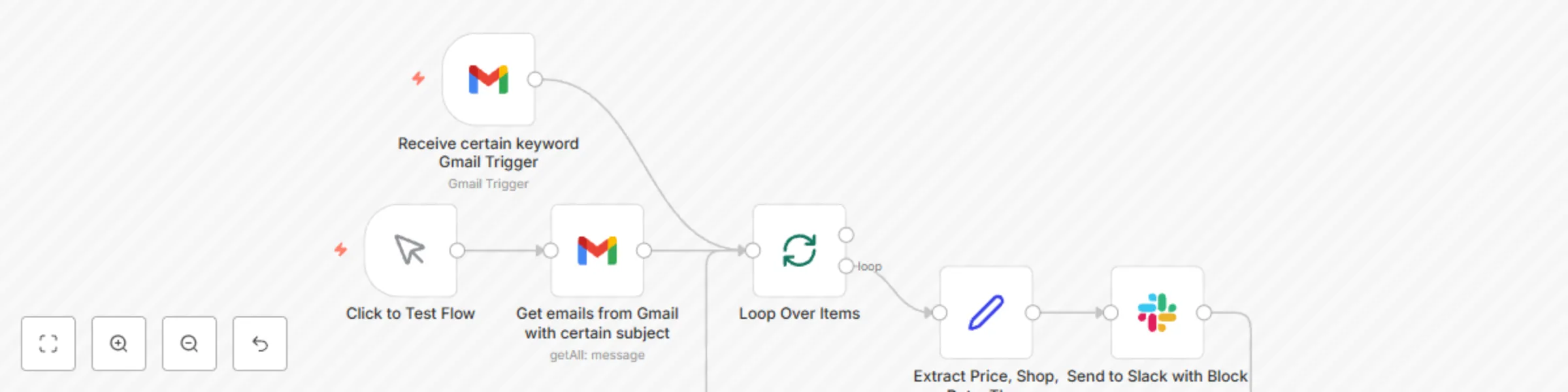
Food delivery notifications and easy expense tracking

Workflow preview

Workflow preview
100%
Food delivery notifications and easy expense tracking preview
Open on n8n.io

Important notice

This workflow is provided as-is. Please review and test before using in production.

1. Workflow Overview

Workflow Description This workflow automates the process of retrieving emails from a food delivery platform, extracting key order details, and sending notifications to a Slack channel. Additionally...

Best for

  • Invoice Processing automation workflows
  • intermediate n8n builders looking for reusable templates

Tools used

n8n-nodes-base.splitinbatches, n8n-nodes-base.manualtrigger, n8n-nodes-base.gmail, n8n-nodes-base.gmailtrigger, n8n-nodes-base.set, n8n-nodes-base.slack

Source and attribution

This workflow is cataloged by N8N Workflows and links back to its original n8n.io source page by darrell_tw.

Original n8n.io source

1.1 Workflow description

Title
Food delivery notifications and easy expense tracking
Workflow name
Food delivery notifications and easy expense tracking

Workflow Description

This workflow automates the process of retrieving emails from a food delivery platform, extracting key order details, and sending notifications to a Slack channel. Additionally, the Slack message includes a Moze accounting app URL scheme link for quick expense tracking.


Key Features

  1. Manual Trigger: Allows the workflow to be executed manually for immediate testing.
  2. Gmail Integration: Retrieves emails containing specific keywords in the subject line (e.g., "透過 Uber Eats 系統送出的訂單"). (You can adjust the keywords to fit your language.)
  3. Data Extraction: Parses the email content to extract key details such as:
    • Order price
    • Shop name
    • Order date and time
  4. Slack Notification: Sends a notification to a specified Slack channel using a structured block format, including a link to record the expense in the Moze accounting app.

Node Configurations

1. Manual Trigger

  • Purpose: Starts the workflow manually for testing or immediate execution.
  • Configuration: No setup needed.

2. Gmail Trigger

  • Purpose: Automatically polls Gmail for new emails matching specific subject keywords.
  • Configuration:
    • Filters:
      • q: subject:透過 Uber Eats 系統送出的訂單 (You can adjust the keywords to fit your language.)
    • Polling Frequency: Every hour at 30 minutes past the hour.
    • Credentials: Linked Gmail account.

3. Extract Price, Shop, Date, Time

  • Purpose: Extracts key information from the email content using regular expressions.
  • Extracted Data:
    • price: Order price (e.g., $200).
    • shop: Shop name (e.g., "店名").
    • date: Order date (e.g., 2024.01.01).
    • time: Order time converted to 24-hour format (e.g., 14:30).

4. Slack Notification

  • Purpose: Sends a formatted message to a Slack channel with extracted order details.
  • Message Content:
    • Text:
      Ubereat 訂餐資訊:
      商家: {{ shop }}
      金額: {{ price }}
      日期: {{ date }}
      
    • Moze App Link: Includes a clickable button in the Slack message with a pre-filled Moze app URL scheme:
      moze3://expense?amount={{ price }}&account=信用卡&subcategory=外送&store={{ shop }}&date={{ date }}&time={{ time }}&project=生活開銷
      
    • Channel: Slack channel ID associated with food delivery notifications.

Additional Notes

  • Customization: Adjust the email subject filter (subject) to match other types of food delivery platforms or services.
  • Error Handling: Ensure regular expressions for data extraction match the email format. Test with sample emails before deployment.
  • Moze URL Scheme Reference: Learn more about Moze app URL schemes for customization by visiting the Moze Documentation.

This workflow is ideal for automating expense tracking and centralizing notifications for food delivery orders, streamlining personal or team expense management.


Image: UberEat Gmail with order information

Slack text with button

Click the button will call moze url scheme


工作流程描述

此工作流程自動化從外送平台獲取郵件,提取關鍵訂單詳細資訊,並將通知發送到指定的 Slack 頻道。此外,Slack 消息中包含一個 Moze 記帳 App URL Scheme 的連結,方便快速記帳。


主要功能

  1. Manual Trigger:允許手動執行工作流程,方便測試。
  2. Gmail Integration:從 Gmail 中提取包含特定關鍵字(例如:「透過 Uber Eats 系統送出的訂單」)的郵件。
  3. 資料提取:解析郵件內容,提取以下關鍵資訊:
    • 訂單金額
    • 商家名稱
    • 訂單日期與時間
  4. Slack 通知:將結構化的通知發送到指定的 Slack 頻道,並包含一個連結供用戶快速記帳。

節點設定

1. Manual Trigger

  • 用途:手動啟動工作流程以進行測試或即時執行。
  • 設定:無需額外設定。

2. Gmail Trigger

  • 用途:自動檢查 Gmail 中是否有符合特定主題關鍵字的新郵件。
  • 設定
    • 篩選條件
      • q: subject:透過 Uber Eats 系統送出的訂單
    • 檢查頻率:每小時的 30 分。
    • 憑證:已連結的 Gmail 帳號。

3. Extract Price, Shop, Date, Time

  • 用途:使用正則表達式從郵件內容中提取關鍵資訊。
  • 提取的資料
    • price:訂單金額(例如:$200)。
    • shop:商家名稱(例如:「店名」)。
    • date:訂單日期(例如:2024.01.01)。
    • time:訂單時間(24 小時制,例如:14:30)。

4. Slack 通知

  • 用途:將訂單詳細資訊以格式化消息發送到 Slack。
  • 消息內容
    • 文字
      Ubereat 訂餐資訊:
      商家: {{ shop }}
      金額: {{ price }}
      日期: {{ date }}
      
    • Moze App 連結:Slack 消息中包含一個可點擊按鈕,預填 Moze App URL Scheme:
      moze3://expense?amount={{ price }}&account=信用卡&subcategory=外送&store={{ shop }}&date={{ date }}&time={{ time }}&project=生活開銷
      
    • 頻道:與外送通知相關的 Slack 頻道。

補充說明

  • 自訂化:可調整郵件主題篩選條件(subject),以匹配其他外送平台或服務。
  • 錯誤處理:確保正則表達式匹配郵件格式。在部署前使用樣本郵件進行測試。
  • Moze URL Scheme 參考:了解更多關於 Moze App URL Scheme 的客製化資訊,請參閱 Moze 官方文件

此工作流程適合自動化費用記帳以及集中管理外送訂單通知,提升個人或團隊的費用管理效率。

1.2 Logical Blocks

This catalog entry is organized from the workflow JSON. The node-level section below shows the executable blocks available for review before importing the template.

2. Block-by-Block Analysis

Block 1 - Loop Over Items

Type / Role
n8n-nodes-base.splitInBatches - splitInBatches
Config choices
Version 3

Block 2 - Click to Test Flow

Type / Role
n8n-nodes-base.manualTrigger - manualTrigger
Config choices
Version 1

Block 3 - Get emails from Gmail with certain subject

Type / Role
n8n-nodes-base.gmail - gmail
Config choices
Version 2.1

Block 4 - Receive certain keyword Gmail Trigger

Type / Role
n8n-nodes-base.gmailTrigger - gmailTrigger
Config choices
Version 1.2

Block 5 - Extract Price, Shop, Date, TIme

Type / Role
n8n-nodes-base.set - set
Config choices
Version 3.4

Block 6 - Send to Slack with Block

Type / Role
n8n-nodes-base.slack - slack
Config choices
Version 2.3

3. Summary Table

Workflow Food delivery notifications and easy expense tracking
Complexity intermediate
Nodes 6
Categories Invoice Processing
Author darrell_tw
Published 08 Jan 2025

4. Reproducing the Workflow from Scratch

  1. 1. Download the workflow JSON

    Use the JSON export at /data/workflows/2707/2707.json as the source template for this automation.

  2. 2. Import the template into n8n

    Open n8n, import the downloaded JSON, and review each node before activating the workflow.

  3. 3. Configure credentials and variables

    Replace placeholder credentials, API keys, webhook URLs, account IDs, and environment-specific values with your own settings.

  4. 4. Test with sample data

    Run the workflow manually or in a staging workspace, inspect node output, and confirm downstream systems receive the expected data.

  5. 5. Activate and monitor

    Enable the workflow only after testing, then monitor executions, errors, and rate limits during the first production runs.

5. General Notes & Resources

Review imported nodes carefully before activation. This catalog entry is intended to help you inspect the workflow structure, understand required services, and find related templates faster.

Node names, credentials, schedules, webhook paths, and external service limits may need adjustment for your workspace.

Frequently asked questions

What does Food delivery notifications and easy expense tracking do?

Workflow Description This workflow automates the process of retrieving emails from a food delivery platform, extracting key order details, and sending notifications to a Slack channel. Additionally...

What do I need before importing this workflow?

Review the workflow JSON, configure any required credentials in n8n, and test the automation in a safe workspace before using it in production.

Can I customize this workflow?

Yes. Use the block-by-block analysis and the downloadable JSON to inspect each node, then adjust credentials, prompts, schedules, filters, or destinations for your Invoice Processing use case.