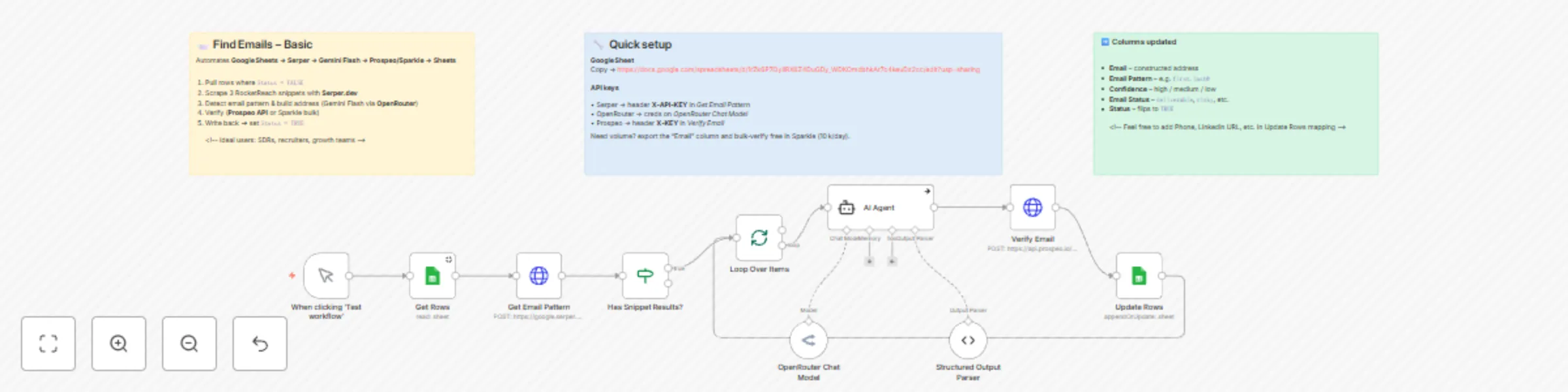
Block 1 - When clicking ‘Test workflow’
- Type / Role
- n8n-nodes-base.manualTrigger - manualTrigger
- Config choices
- Version 1


 Early Deal
This workflow is provided as-is. Please review and test before using in production.
Who is this template for? Growth teams, SDRs, recruiters, or anyone who routinely hunts for hard‑to‑find business emails and would rather spend time reaching out than guessing formats. What problem...
n8n-nodes-base.manualtrigger, n8n-nodes-base.googlesheets, @n8n/n8n-nodes-langchain.agent, @n8n/n8n-nodes-langchain.lmchatopenrouter, @n8n/n8n-nodes-langchain.outputparserstructured, n8n-nodes-base.httprequest, n8n-nodes-base.splitinbatches, n8n-nodes-base.if
This workflow is cataloged by N8N Workflows and links back to its original n8n.io source page by Naveen Choudhary.
Original n8n.io sourceGrowth teams, SDRs, recruiters, or anyone who routinely hunts for hard‑to‑find business emails and would rather spend time reaching out than guessing formats.
Manually piecing together email patterns, cross‑checking them in a verifier, and updating a tracking sheet is slow and error‑prone. This template automates the entire loop—research, guess, verify, and log—so you hit Start and watch rows fill up with ready‑to‑send addresses.
Status = FALSE.Status to TRUE.| Service | Free allowance | How this template uses it |
|---|---|---|
| Serper.dev | 2,500 searches/mo | Scrapes three public email snippets per domain to learn the pattern |
| Sparkle.io | 10,000 bulk verifications/day | Manual upload‑download option—perfect to clean your first 2.5k emails at zero cost |
| Prospeo | 75 API calls/mo | Built‑in if you prefer fully automated verification |
Quick Sparkle workflow:
| Tool | Purpose | Link |
|---|---|---|
| Prospeo – API‑ready email verification Special offer: 20 % free credits for the first 3 months on any plan using this link! |
Real‑time, single‑call mailbox validation | prospeo.io |
| Sparkle.io – high‑volume bulk verifier (manual upload) | Free daily quota of 10 000 verifications | app.sparkle.io/sign‑up |
| OpenRouter – API gateway for Gemini Flash & other LLMs | One key unlocks multiple frontier models | openrouter.ai |
| Serper.dev – Google Search API | 2 500 searches/month on the free tier | serper.dev |
Add the relevant keys or signup details from these links, drop them into the matching n8n credentials, and you’re all set to enrich your first 2 500 contacts at zero cost. Happy building!
This catalog entry is organized from the workflow JSON. The node-level section below shows the executable blocks available for review before importing the template.
| Workflow | Find & verify business emails automatically with OpenRouter, Serper & Prospeo |
|---|---|
| Complexity | intermediate |
| Nodes | 13 |
| Categories | Lead Generation, AI Summarization |
| Author | Naveen Choudhary |
| Published | 01 May 2025 |
Use the JSON export at /data/workflows/3817/3817.json as the source template for this automation.
Open n8n, import the downloaded JSON, and review each node before activating the workflow.
Replace placeholder credentials, API keys, webhook URLs, account IDs, and environment-specific values with your own settings.
Run the workflow manually or in a staging workspace, inspect node output, and confirm downstream systems receive the expected data.
Enable the workflow only after testing, then monitor executions, errors, and rate limits during the first production runs.
Review imported nodes carefully before activation. This catalog entry is intended to help you inspect the workflow structure, understand required services, and find related templates faster.
Node names, credentials, schedules, webhook paths, and external service limits may need adjustment for your workspace.
Who is this template for? Growth teams, SDRs, recruiters, or anyone who routinely hunts for hard‑to‑find business emails and would rather spend time reaching out than guessing formats. What problem...
Review the workflow JSON, configure any required credentials in n8n, and test the automation in a safe workspace before using it in production.
Yes. Use the block-by-block analysis and the downloadable JSON to inspect each node, then adjust credentials, prompts, schedules, filters, or destinations for your Lead Generation, AI Summarization use case.