Block 1 - Get Company Info
- Type / Role
- n8n-nodes-base.httpRequest - httpRequest
- Config choices
- Version 4.2


 Early Deal
This workflow is provided as-is. Please review and test before using in production.
Search LinkedIn Companies, Score Them with AI, and Add to Google Sheets CRM Who is this for? This template is designed for sales teams, business development reps, and marketers who need a reliable,...
n8n-nodes-base.httprequest, n8n-nodes-base.if, n8n-nodes-base.set, n8n-nodes-base.splitout, n8n-nodes-base.googlesheets, @n8n/n8n-nodes-langchain.openai, n8n-nodes-base.stickynote, n8n-nodes-base.wait
This workflow is cataloged by N8N Workflows and links back to its original n8n.io source page by Ghulam Ahmad.
Original n8n.io sourceThis template is designed for sales teams, business development reps, and marketers who need a reliable, automated way to build targeted prospect lists. It’s especially useful for agencies, consultants, and B2B companies that want to identify, qualify, and prioritize high-value leads.
Researching companies on LinkedIn, evaluating whether they fit your ideal customer profile, and manually updating your CRM can be slow, inconsistent, and labor-intensive. This workflow replaces that entire process with a fully automated system that finds, qualifies, and organizes leads for you.
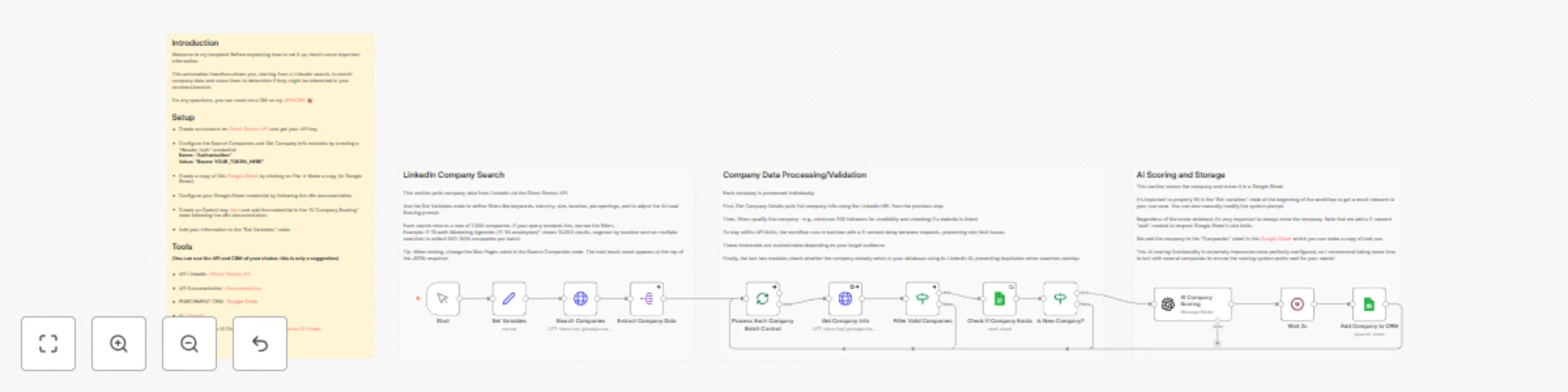
The workflow searches LinkedIn for companies based on your chosen filters, gathers in-depth company details, applies qualification rules, uses AI to score how well each company matches your ICP, and then adds them to your Google Sheets CRM while automatically preventing duplicates.
Create a Ghost Genius API account and generate your API key
Add your API credentials to the HTTP Request nodes
Make a copy of the included Google Sheets template
Set up Google Sheets and OpenAI credentials as described in the n8n documentation
Customize the Set Variables node to define your audience and AI scoring parameters
Update your search filters to target specific industries, regions, or company sizes
Change the follower count threshold to match your qualification rules
Modify the AI scoring prompt to better reflect your product or service
Add notifications (email, Slack, etc.) to alert you when high-scoring leads are found
This catalog entry is organized from the workflow JSON. The node-level section below shows the executable blocks available for review before importing the template.
| Workflow | Find & score LinkedIn leads with GPT-4 AI and export to Google Sheets CRM |
|---|---|
| Complexity | advanced |
| Nodes | 16 |
| Categories | Lead Generation, AI Summarization |
| Author | Ghulam Ahmad |
| Published | 24 Nov 2025 |
Use the JSON export at /data/workflows/11189/11189.json as the source template for this automation.
Open n8n, import the downloaded JSON, and review each node before activating the workflow.
Replace placeholder credentials, API keys, webhook URLs, account IDs, and environment-specific values with your own settings.
Run the workflow manually or in a staging workspace, inspect node output, and confirm downstream systems receive the expected data.
Enable the workflow only after testing, then monitor executions, errors, and rate limits during the first production runs.
Review imported nodes carefully before activation. This catalog entry is intended to help you inspect the workflow structure, understand required services, and find related templates faster.
Node names, credentials, schedules, webhook paths, and external service limits may need adjustment for your workspace.
Search LinkedIn Companies, Score Them with AI, and Add to Google Sheets CRM Who is this for? This template is designed for sales teams, business development reps, and marketers who need a reliable,...
Review the workflow JSON, configure any required credentials in n8n, and test the automation in a safe workspace before using it in production.
Yes. Use the block-by-block analysis and the downloadable JSON to inspect each node, then adjust credentials, prompts, schedules, filters, or destinations for your Lead Generation, AI Summarization use case.