Filter TikTok real estate videos for couples with AI, Apify and Google Sheets
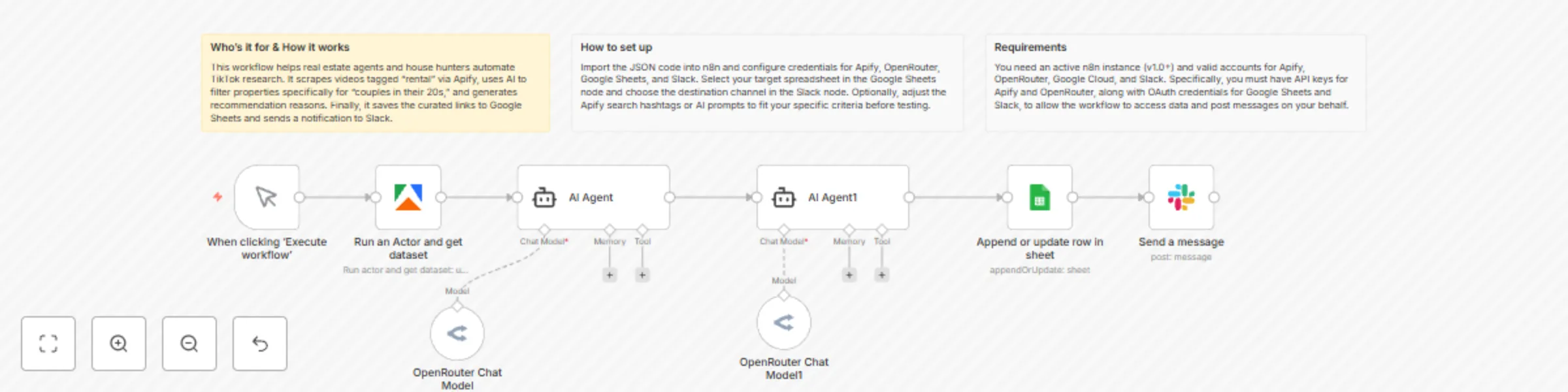
Workflow preview

$20/month : Unlimited workflows
2500 executions/month

THE #1 IN WEB SCRAPING
Scrape any website without limits
HOSTINGER  Early Deal
DISCOUNT 20% Try free
Early DealDISCOUNT 20%
Self-hosted n8n
Unlimited workflows - from $4.99/mo

#1 hub for scraping, AI & automation
6000+ actors - $5 credits/mo
Important notice
This workflow is provided as-is. Please review and test before using in production.
Overview
Automated TikTok Real Estate Research for Couples
This workflow automates the process of finding real estate (rental) videos on TikTok, filtering them for a specific target audience (couples in their 20s), generating an explanation of why they are recommended, and saving the results to Google Sheets and Slack.
Who’s it for
- Real Estate Agents & Marketers: To research trending rental properties and video styles popular on social media.
- Content Curators: To automatically gather and summarize niche content from TikTok.
- House Hunters: To automate the search for "rental" videos tailored to couples.
How it works / What it does
- Trigger: The workflow starts manually (on click).
- Scrape TikTok: It connects to Apify to run a "TikTok Scraper". It searches for videos with the hashtag
賃貸(Rental) and retrieves metadata. - Filter & Extract (AI Agent 1): An AI Agent (using OpenRouter) analyzes the retrieved video data to select properties suitable for "couples in their 20s" and outputs the video URL.
- Generate Insights (AI Agent 2): A second AI Agent reviews the URL/content and generates a specific reason why this property is recommended for the target audience, formatting the output with the URL and explanation.
- Save to Database: The final text (URL + Reason) is appended to a Google Sheet.
- Notify Team: The same recommendation text is sent to a specific Slack channel to alert the user.
Requirements
- n8n: Version 1.0 or later.
- Apify Account: You need an API token and access to the
clockworks/tiktok-scraperactor. - OpenRouter Account: An API Key to use Large Language Models (LLMs) for the AI Agents.
- Google Cloud Platform: A project with the Google Sheets API enabled and OAuth credentials.
- Slack Workspace: Permission to add apps/bots to a channel.
How to set up
- Import the Workflow: Copy the JSON code and paste it into your n8n editor.
- Configure Credentials:
- Apify: Create a new credential in n8n using your Apify API Token.
- OpenRouter: Create a new credential using your OpenRouter API Key.
- Google Sheets: Connect your Google account via OAuth2.
- Slack: Connect your Slack account via OAuth2.
- Configure Nodes:
- Google Sheets Node: Select your specific Spreadsheet and Sheet from the dropdown lists (replace the placeholders
YOUR_SPREADSHEET_IDetc. if they don't update automatically). - Slack Node: Select the Channel where you want to receive notifications (replace
YOUR_CHANNEL_ID).
- Google Sheets Node: Select your specific Spreadsheet and Sheet from the dropdown lists (replace the placeholders
- Test: Click "Execute Workflow" to run a test.
How to customize the workflow
- Change the Search Topic: Open the Apify node and change the
hashtagsvalue in the "Custom Body" JSON (e.g., change"賃貸"to"DIY"or"Travel"). - Adjust the Persona: Open the AI Agent nodes and modify the
textprompt. You can change the target audience from "20s couples" to "students" or "families." - Increase Volume: In the Apify node, increase the
resultsPerPageormaxProfilesPerQueryto process more videos at once (note: this will consume more API credits). - Change Output Format: Modify the Google Sheets node to map specific fields (like Video Title, Author, Likes) into separate columns instead of just one raw output string.