Block 1 - OpenAI Chat Model
- Type / Role
- @n8n/n8n-nodes-langchain.lmChatOpenAi - lmChatOpenAi
- Config choices
- Version 1


 Early Deal
This workflow is provided as-is. Please review and test before using in production.
With this workflow you can extract data from resume documents uploaded via a Telegram bot. Workflow transform readable content of PDF resume into structured data, using AI nodes and returns PDF wit...
@n8n/n8n-nodes-langchain.lmchatopenai, n8n-nodes-base.code, @n8n/n8n-nodes-langchain.outputparserautofixing, @n8n/n8n-nodes-langchain.outputparserstructured, n8n-nodes-base.telegramtrigger, n8n-nodes-base.if, n8n-nodes-base.noop, n8n-nodes-base.telegram
This workflow is cataloged by N8N Workflows and links back to its original n8n.io source page by Oskar.
Original n8n.io sourceWith this workflow you can extract data from resume documents uploaded via a Telegram bot. Workflow transform readable content of PDF resume into structured data, using AI nodes and returns PDF with formatted, plain HTML.
You can modify this workflow to perform other actions with structured data (e.g. insert it into database or create other, well-formatted documents).
Functionality of this workflow was presented during the n8n community call on March 7, 2024 - recording of presentation available here.
⚠️ Workflow made for demo purposes. If you want to use it in real life, please make sure necessary measures for personal data protection are set.
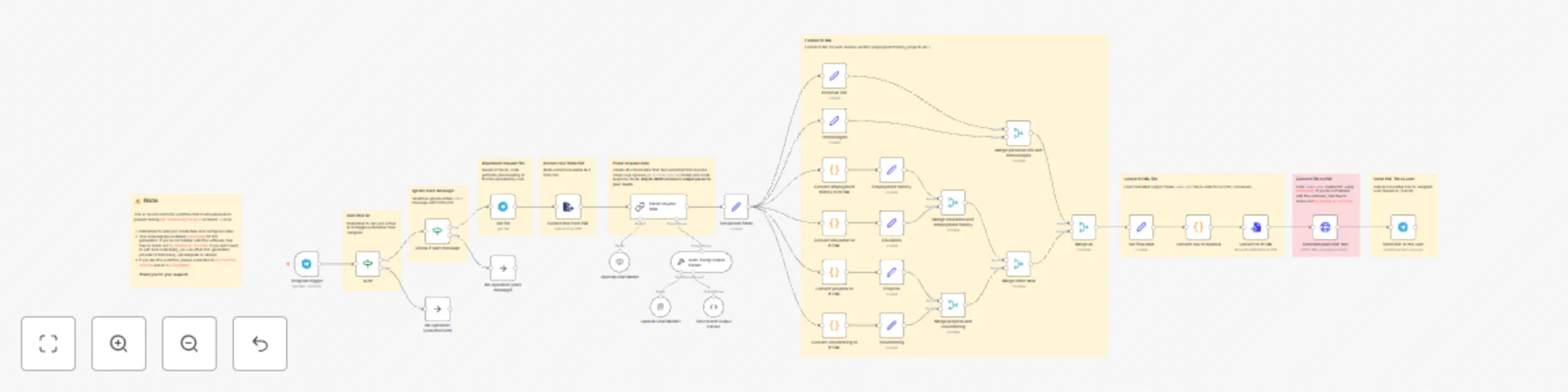
User uploads readable PDF resume document into Telegram bot. After authentication based on chat ID parameter, workflow extracts text from the PDF and transfers it into AI chain with connected sub-nodes: OpenAI Chat Model and Structured Output (JSON) Parser.
Then, each extracted section (employment history, projects etc.) is formatted into desired HTML structure. Finally, the document is converted into new, structured PDF using Gotenberg.
💡 This workflow requires installed Gotenberg. If you are not familiar with this software, please have a look on my YouTube tutorial. You can also replace call to Gotenberg with other PDF generation service (such as PDFMonkey or ApiTemplate).
If you like this workflow, please subscribe to my YouTube channel and/or my newsletter.
This catalog entry is organized from the workflow JSON. The node-level section below shows the executable blocks available for review before importing the template.
Showing the first 24 of 43 workflow blocks. Download the JSON for the full node graph.
| Workflow | Extract data from resume and create PDF with Gotenberg |
|---|---|
| Complexity | advanced |
| Nodes | 43 |
| Categories | HR, AI Summarization |
| Author | Oskar |
| Published | 13 Mar 2024 |
Use the JSON export at /data/workflows/2170/2170.json as the source template for this automation.
Open n8n, import the downloaded JSON, and review each node before activating the workflow.
Replace placeholder credentials, API keys, webhook URLs, account IDs, and environment-specific values with your own settings.
Run the workflow manually or in a staging workspace, inspect node output, and confirm downstream systems receive the expected data.
Enable the workflow only after testing, then monitor executions, errors, and rate limits during the first production runs.
Review imported nodes carefully before activation. This catalog entry is intended to help you inspect the workflow structure, understand required services, and find related templates faster.
Node names, credentials, schedules, webhook paths, and external service limits may need adjustment for your workspace.
With this workflow you can extract data from resume documents uploaded via a Telegram bot. Workflow transform readable content of PDF resume into structured data, using AI nodes and returns PDF wit...
Review the workflow JSON, configure any required credentials in n8n, and test the automation in a safe workspace before using it in production.
Yes. Use the block-by-block analysis and the downloadable JSON to inspect each node, then adjust credentials, prompts, schedules, filters, or destinations for your HR, AI Summarization use case.