Extract and save invoice data from Google Drive to Sheets with Dumpling AI
Workflow preview

$20/month : Unlimited workflows
2500 executions/month

THE #1 IN WEB SCRAPING
Scrape any website without limits
HOSTINGER  Early Deal
DISCOUNT 20% Try free
Early DealDISCOUNT 20%
Self-hosted n8n
Unlimited workflows - from $4.99/mo

#1 hub for scraping, AI & automation
6000+ actors - $5 credits/mo
Important notice
This workflow is provided as-is. Please review and test before using in production.
Overview
Who is this for?
This workflow is perfect for operations teams, accountants, e-commerce businesses, or finance managers who regularly process digital invoices and need to automate data extraction and record-keeping.
What problem is this workflow solving?
Manually reading invoice PDFs, extracting relevant data, and entering it into spreadsheets is time-consuming and error-prone. This workflow automates that process—watching a Google Drive folder, extracting structured invoice data using Dumpling AI, and saving the results into Google Sheets.
What this workflow does
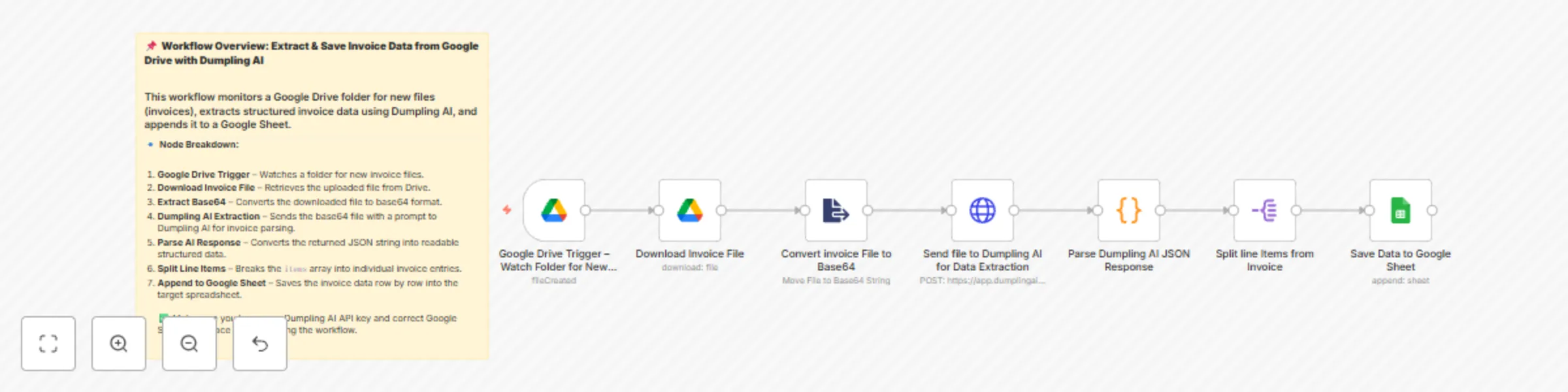
- Watches a specific Google Drive folder for new invoices.
- Downloads the uploaded invoice file.
- Converts the file into a Base64 format.
- Sends the file to Dumpling AI’s
extract-documentendpoint with a detailed parsing prompt. - Parses Dumpling AI’s JSON response using a Code node.
- Splits the
itemsarray into individual rows using the Split Out node. - Appends each invoice item to a preformatted Google Sheet along with the full header metadata (order number, PO, addresses, etc.).
Setup
Google Drive Setup
- Create or select a folder in Google Drive and place the folder ID in the trigger node.
- Make sure your n8n Google Drive credentials are authorized for access.
Google Sheets
- Create a Google Sheet with the following headers:
Order number,Document Date,Po_number,Sold to name,Sold to address,Ship to name,Ship to address,Model,Description,Quantity,Unity price,Total price - Paste the Sheet ID and sheet name (
Sheet1) into the Google Sheets node.
- Create a Google Sheet with the following headers:
Dumpling AI
- Sign up at Dumpling AI
- Go to your account settings and generate your API key.
- Paste this key into the HTTP header of the Dumpling AI request node.
- The endpoint used is:
https://app.dumplingai.com/api/v1/extract-document
Prompt (already included)
- This prompt extracts: order number, document date, PO number, shipping/billing details, and detailed line items (model, quantity, unit price, total).
How to customize this workflow to your needs
- Adjust the Google Sheet fields to fit your invoice structure.
- Modify the Dumpling AI prompt if your invoices have additional or different data points.
- Add filtering logic if you want to handle different invoice types differently.
- Replace Google Sheets with Airtable or a database if preferred.
- Use a different trigger like an email attachment if invoices come via email.