Y

Yang

47
Workflows

Workflows by Yang

Workflow preview: Telegram bot: extract & store TikTok and LinkedIn data to Google Sheets with Dumpling AI
Free advanced

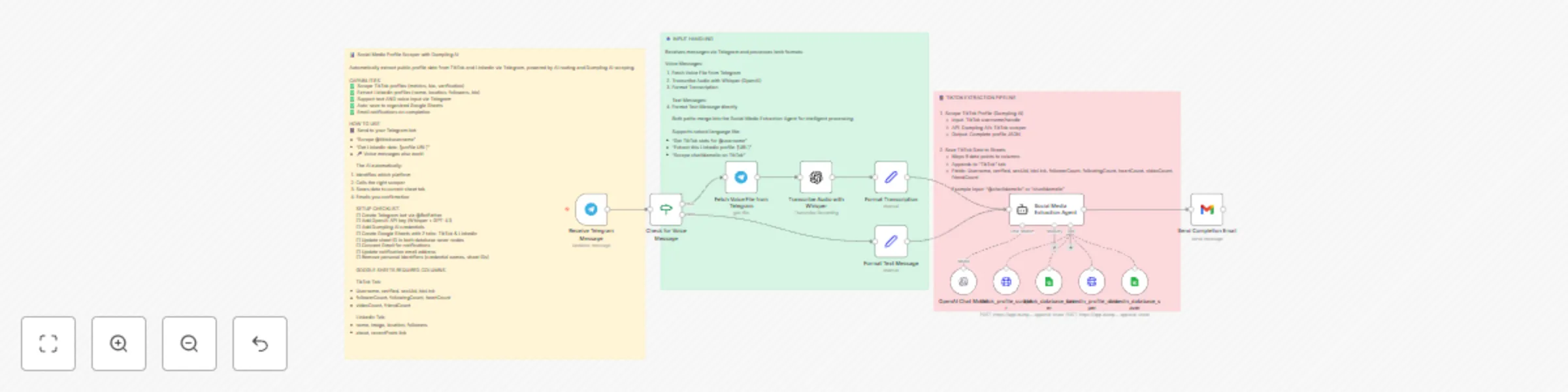
Telegram bot: extract & store TikTok and LinkedIn data to Google Sheets with Dumpling AI

### Who's it for This workflow is perfect for marketers, social media managers, recruiters, sales teams, and researchers who need to collect and organize public profile data from TikTok and LinkedIn. Whether you're building influencer databases, enriching CRM data, conducting competitor research, or gathering prospect information, this workflow automates the entire data extraction and storage process. ### What it does This AI-powered Telegram bot automatically scrapes public profile data from TikTok and LinkedIn, then saves it directly to Google Sheets. Simply send a TikTok username or LinkedIn profile URL via text or voice message, and the workflow handles everything: **For TikTok profiles:** - Username and verification status - Follower, following, and friend counts - Total hearts (likes) and video count - Bio link and secure user ID **For LinkedIn profiles:** - Full name and profile picture - Location and follower count - Bio/about section - Recent posts activity link All data is automatically organized into separate Google Sheets tabs for easy reference and analysis. You receive an email notification when extraction is complete. ### How it works The workflow uses an AI Agent as an intelligent router that determines which platform to scrape based on your input. Here's the flow: 1. **Input Processing:** Send a message via Telegram (text or voice) 2. **Voice Transcription:** If you send a voice note, OpenAI Whisper transcribes it to text 3. **AI Routing:** The agent identifies whether it's TikTok or LinkedIn 4. **Profile Scraping:** Calls Dumpling AI's specialized scraper for that platform 5. **Data Extraction:** Parses the profile metrics and details 6. **Database Storage:** Saves all data to the appropriate Google Sheets tab 7. **Confirmation:** Sends an email notification when complete The AI agent ensures proper tool pairing - it always scrapes first, then saves, preventing partial data or errors. ### Setup Requirements **Accounts & Credentials Needed:** - Telegram Bot Token (create via @BotFather) - OpenAI API Key (for voice transcription and AI routing) - Dumpling AI API Key (for profile scraping) - Google Sheets OAuth2 credentials - Gmail OAuth2 credentials (for notifications) **Google Sheets Structure:** Create a spreadsheet with two tabs: **TikTok Tab - Columns:** - Username - verified - secUid - bioLink - followerCount - followingCount - heartCount - videoCount - friendCount **LinkedIn Tab - Columns:** - name - image - location - followers - about - recentPosts link ### How to set up **Step 1: Create Telegram Bot** 1. Open Telegram and message @BotFather 2. Use `/newbot` command and follow prompts 3. Save your bot token for later **Step 2: Configure Credentials** 1. Add Telegram bot token to "Receive Telegram Message" node 2. Add OpenAI API key to "OpenAI Chat Model" and "Transcribe Audio" nodes 3. Add Dumpling AI credentials as HTTP Header Auth 4. Connect Google Sheets OAuth2 5. Connect Gmail OAuth2 **Step 3: Set Up Google Sheets** 1. Create a new Google Spreadsheet 2. Create two tabs: "TikTok" and "LinkedIn" 3. Add column headers as specified above 4. Copy the spreadsheet ID from the URL **Step 4: Update Workflow** 1. Replace Google Sheets document ID in both database saver nodes 2. Update email address in "Send Completion Email" node 3. Remove personal credential names ("Nneka") **Step 5: Test the Workflow** 1. Activate the workflow 2. Message your bot with: "Scrape TikTok profile: @charlidamelio" 3. Or try: "Extract this LinkedIn: https://www.linkedin.com/in/example" 4. Check your Google Sheets for the data ### How to customize **Add More Social Platforms:** Create new scraper/saver tool pairs for Instagram, Twitter/X, or YouTube by: - Adding new HTTP Request Tool nodes for scraping - Adding corresponding Google Sheets Tool nodes - Updating the AI Agent's system prompt with new protocols **Enhance Voice Input:** - Add language detection for multilingual voice notes - Implement speaker identification for team usage - Add voice response capability **Advanced Data Enrichment:** - Chain multiple profile lookups for followers - Add sentiment analysis on bios and recent posts - Implement automatic categorization/tagging **Notification Improvements:** - Send results directly to Telegram instead of email - Add Slack notifications for team collaboration - Create detailed extraction reports with statistics **Batch Processing:** - Modify to accept CSV files with multiple profiles - Add rate limiting to avoid API throttling - Implement queue system for large-scale scraping

Y
Yang
Market Research
6 Dec 2025
99
0
Workflow preview: Turn TikTok comments into AI avatar videos with Dumpling AI, GPT-4 & Captions.ai
Free advanced

Turn TikTok comments into AI avatar videos with Dumpling AI, GPT-4 & Captions.ai

## Who’s it for This template is perfect for TikTok creators, content marketers, and social media teams who want to turn viral comments into engaging short-form videos without manually scripting, recording, or editing. If you want to keep up with trends and consistently publish high-quality avatar videos, this workflow automates the entire process from comment selection to enhanced final video. --- ## What it does The workflow takes TikTok video URLs and their top comments from a Data Table, extracts the transcript using **Dumpling AI**, and uses **GPT-4** to write a natural and engaging TikTok script inspired by the comment. It then generates a full AI avatar video through **Captions.ai**, enhances it with subtitles and B-roll using **Submagic**, and finally saves all video details into **Airtable** for tracking. Here’s what happens step by step: 1. Pulls TikTok videos and their top comments from a Data Table 2. Sends video URLs to **Dumpling AI** to retrieve transcripts 3. Feeds both transcript and comment into **GPT-4** to generate a conversational TikTok script 4. Cleans and formats the script using JavaScript 5. Sends the script to **Captions.ai** to produce an AI avatar video 6. Checks video status and retries if needed 7. Enhances the final video with **Submagic** for captions and effects 8. Receives the enhanced video via webhook and logs details into **Airtable** --- ## How it works 1. **Schedule Trigger**: Runs automatically at set intervals to start the workflow 2. **Data Table**: Retrieves TikTok video URLs and associated comments 3. **Dumpling AI**: Extracts transcripts from the video URLs 4. **GPT-4**: Generates a compelling TikTok script based on the comment 5. **JavaScript Node**: Cleans up script formatting for a smooth avatar generation 6. **Captions.ai**: Creates an AI avatar video from the cleaned script 7. **Wait & Check**: Monitors video creation status and retries if necessary 8. **Submagic**: Enhances the video with captions, zooms, and B-roll effects 9. **Webhook & Airtable**: Receives final video data and saves URL and ID for future use --- ## Requirements - ✅ **Dumpling AI API key** stored as HTTP header credentials - ✅ **OpenAI GPT-4 credentials** - ✅ **Captions.ai API credentials** - ✅ **Submagic API credentials** - ✅ **Airtable base** with fields for `Video URL` and `Caption Video ID` - ✅ A properly structured Data Table containing TikTok `Keywords` or video URLs --- ## How to customize - Adjust the GPT-4 system prompt to shape the tone, style, or format of the TikTok script - Change the avatar or creator settings in Captions.ai to match your brand personality - Modify Submagic settings to control subtitle styling or B-roll effects - Integrate approval steps before final video generation if needed - Extend the workflow to auto-publish videos to TikTok or store them in cloud drives --- > This workflow lets you transform TikTok comments into engaging AI avatar videos with captions and edits, completely on autopilot. It’s a powerful way to scale content output and stay ahead of trends without manual scripting or filming.

Y
Yang
Content Creation
4 Oct 2025
292
0
Workflow preview: Research & generate blog posts from keywords with Dumpling AI and GPT-4 to WordPress
Free intermediate

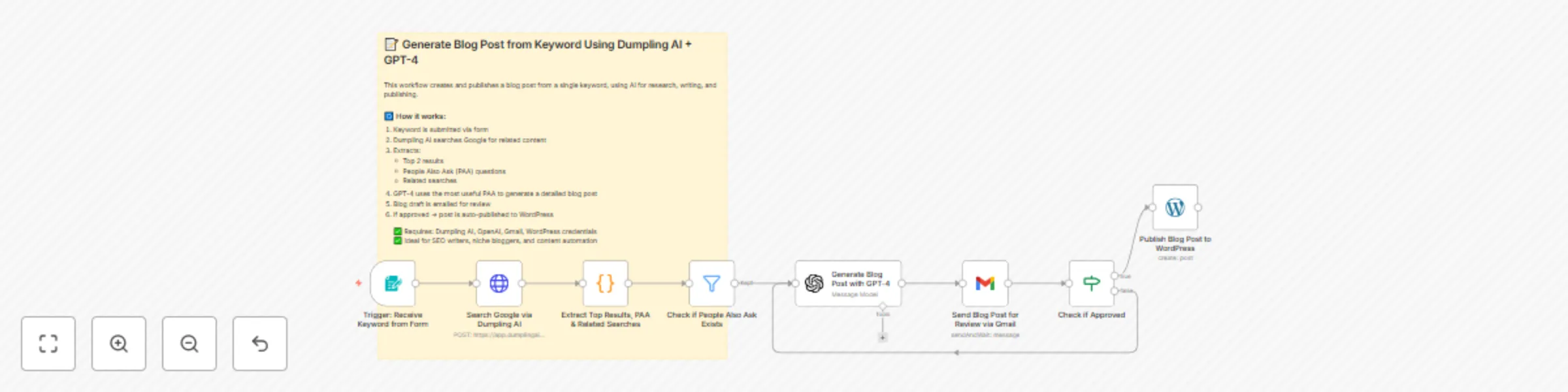
Research & generate blog posts from keywords with Dumpling AI and GPT-4 to WordPress

## Who’s it for This template is perfect for SEO writers, niche bloggers, and content marketers who want to generate high-quality blog posts from a single keyword without spending hours on research and writing. If you often find yourself stuck at the research stage or manually drafting blog content, this workflow automates the entire process from topic discovery to publication. --- ## What it does The workflow takes a **keyword**, performs a Google search using **Dumpling AI**, analyzes the top-ranking pages and People Also Ask (PAA) questions, and then uses **GPT-4** to generate a detailed blog post based on the most valuable question. The blog draft is sent for approval via email, and once approved, it’s automatically published to **WordPress**. Here’s what happens step by step: 1. Receives a keyword through a simple form 2. Uses **Dumpling AI** to perform a Google search and extract: - Top 2 organic search results - People Also Ask (PAA) questions and answers - Top related searches 3. Filters for insightful PAA questions 4. Sends the data to **GPT-4** to generate a blog post in JSON format 5. Emails the draft blog post for manual review and approval 6. If approved, publishes the post automatically to WordPress --- ## How it works 1. **Form Trigger**: Captures the keyword input 2. **Dumpling AI**: Searches Google and extracts SEO data including top results, PAA, and related searches 3. **Code Node**: Processes the raw search data into a structured format for GPT-4 4. **Filter Node**: Checks if PAA questions are available 5. **GPT-4**: Chooses a strong PAA question and writes the blog post 6. **Gmail**: Sends the draft blog post to your inbox for review 7. **Approval Node**: Waits for manual approval 8. **WordPress**: Publishes the approved post automatically --- ## Requirements - ✅ **Dumpling AI API key** stored securely as credentials - ✅ **OpenAI GPT-4 credentials** - ✅ **Gmail account** with OAuth2 connected to n8n - ✅ **WordPress account** with API credentials configured --- ## How to customize - Edit the GPT-4 prompt to control the blog structure, tone, or style - Add extra filters to select specific types of PAA questions (e.g., how-to, guides) - Change the review recipient email in the Gmail node - Add additional formatting or SEO optimization steps before publishing - Integrate with Notion, Airtable, or Slack to log or notify team members after publication --- > This workflow turns a single keyword into a fully researched, GPT-4 generated, and auto-published blog post — helping you scale content creation efficiently while maintaining quality.

Y
Yang
Content Creation
4 Oct 2025
686
0
Workflow preview: Find TikTok video questions from keywords using Dumpling AI + GPT-4
Free advanced

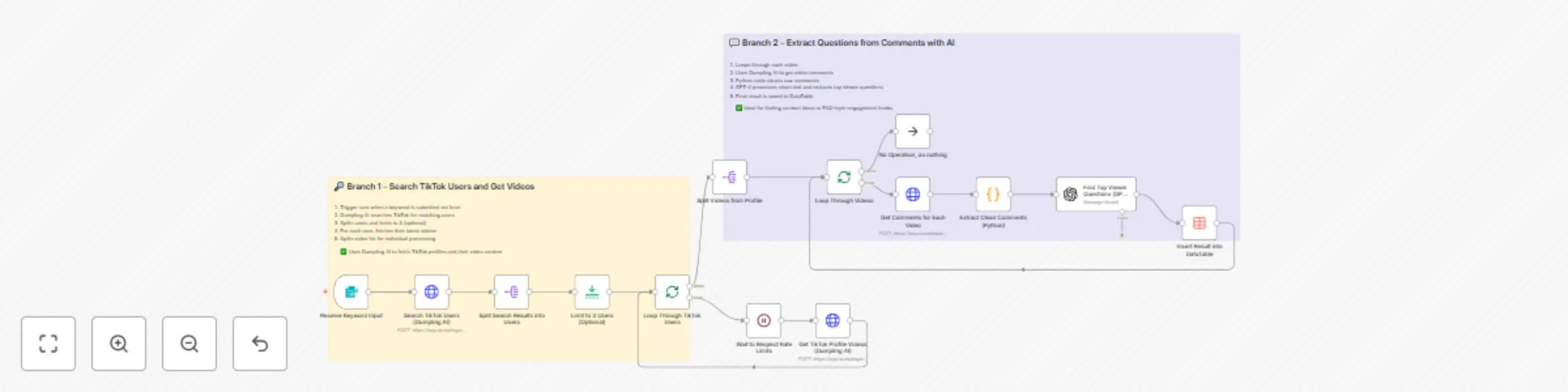
Find TikTok video questions from keywords using Dumpling AI + GPT-4

## Who’s it for This template is perfect for content creators, social media strategists, and marketing teams who want to uncover trending questions directly from real TikTok audiences. If you spend hours scrolling through videos to find content ideas or audience pain points, this workflow automates the entire research process and delivers clean, ready-to-use insights in minutes. --- ## What it does The workflow takes a **keyword**, searches TikTok for matching creator profiles, retrieves their latest videos, extracts viewer comments, and uses **GPT-4** to identify the most frequently asked questions. These questions can be used to inspire new content, shape engagement strategies, or create FAQ-style videos that directly address what your audience is curious about. Here’s what happens step by step: 1. Accepts a keyword from a form trigger 2. Uses **Dumpling AI** to search TikTok for relevant profiles 3. Fetches the most recent videos from each profile 4. Extracts and cleans comments using a Python script 5. Sends cleaned comments to **GPT-4** to find recurring audience questions 6. Saves the top questions and video links into a Data Table for easy review --- ## How it works 1. **Form Trigger**: Collects the keyword input from the user 2. **Dumpling AI**: Searches TikTok to find relevant creators based on the keyword 3. **Video Retrieval**: Gets recent videos from the discovered profiles 4. **Comments Extraction**: Gathers and cleans all video comments using Python 5. **GPT-4**: Analyzes the cleaned text to extract top audience questions 6. **Data Table**: Stores the results for easy access and content planning --- ## Requirements - ✅ **Dumpling AI API key** stored as credentials - ✅ **OpenAI GPT-4 credentials** - ✅ **Python** node enabled in n8n - ✅ A Data Table in n8n to store questions and related video details --- ## How to customize - Adjust the GPT prompt to refine the tone or format of the extracted questions - Add filters to target specific types of TikTok profiles or content niches - Integrate the output with your content calendar or idea tracking tool - Set up scheduled runs to build a constantly updating library of audience questions - Extend the workflow to analyze TikTok hashtags or trends alongside comments --- > This workflow turns TikTok keyword searches into structured audience insights, helping you quickly discover real questions your audience is asking—perfect for fueling content strategies, campaigns, and engagement.

Y
Yang
Market Research
4 Oct 2025
251
0
Workflow preview: Auto-generate Instagram, Facebook & LinkedIn posts from YouTube videos with GPT-4o & Dumpling AI
Free advanced

Auto-generate Instagram, Facebook & LinkedIn posts from YouTube videos with GPT-4o & Dumpling AI

## Who’s it for This template is perfect for content marketers, social media managers, and creators who want to repurpose YouTube videos into platform-specific posts without manual work. If you spend hours brainstorming captions, resizing content, or creating images for different platforms, this workflow automates the entire process from video selection to ready-to-publish posts. --- ## What it does The workflow takes a topic from a Google Sheet, finds the most relevant and recent YouTube video using Dumpling AI and GPT-4o, then automatically generates unique posts for **Instagram**, **Facebook**, and **LinkedIn**. Each post comes with a tailored **AI-generated image**, and all content is saved back into a Google Sheet for easy scheduling and review. Here’s what happens step by step: 1. Picks an unsearched topic from Google Sheets 2. Searches YouTube via **Dumpling AI** and sorts videos 3. Uses **GPT-4o** to select the most relevant video 4. Extracts the video transcript using Dumpling AI 5. Generates three platform-specific posts using **GPT-4o** 6. Creates matching images for each post using **Dumpling AI** image generation 7. Saves the final Instagram, Facebook, and LinkedIn posts into a Google Sheet 8. Marks the topic as processed so it won’t repeat --- ## How it works 1. **Scheduled Trigger**: Starts the workflow automatically on a set schedule 2. **Google Sheets**: Retrieves one unprocessed topic from the YouTube Topics sheet 3. **Dumpling AI**: Finds and filters YouTube videos matching the topic 4. **GPT-4o**: Chooses the best video and turns the transcript into three unique posts 5. **Dumpling AI (Image)**: Generates platform-specific visuals for each post 6. **Google Sheets**: Saves all posts and images to the Social Media Post sheet for publishing --- ## Requirements - ✅ **Dumpling AI API key** stored as credentials - ✅ **OpenAI GPT-4 credentials** - ✅ **Google Sheets** connection with the following sheets: - **YouTube Topics** with columns `Youtube Topics` and `Searched?` - **Social Media Post** with columns `platform`, `Content`, `Image` --- ## How to customize - Adjust the GPT prompt to match your brand voice or content style - Add or remove platforms depending on your posting strategy - Change the schedule trigger frequency to fit your content calendar - Integrate with scheduling tools like Buffer or Hootsuite for auto-publishing - Add review or approval steps before posts are finalized --- > This workflow helps you transform a single YouTube video into three polished, platform-ready posts with matching visuals, in minutes—not hours.

Y
Yang
Content Creation
1 Oct 2025
708
0
Workflow preview: LinkedIn to Gmail: generate cold emails with Dumpling AI, GPT-4 & Dropcontact
Free intermediate

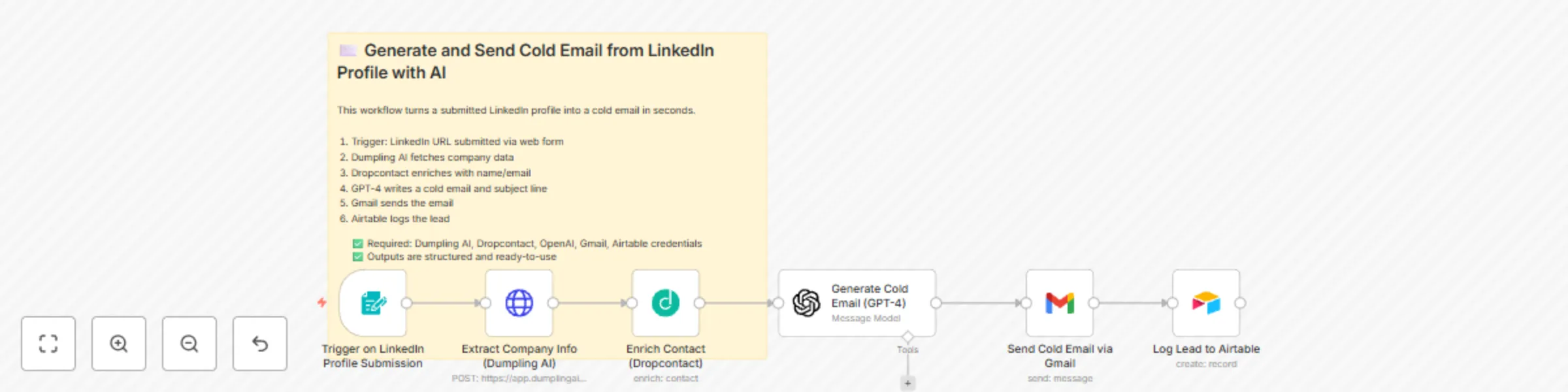
LinkedIn to Gmail: generate cold emails with Dumpling AI, GPT-4 & Dropcontact

## Who’s it for This template is perfect for digital agencies, SDRs, lead generators, or outreach teams that want to automatically convert LinkedIn company profiles into high-quality cold emails. If you spend too much time researching and writing outreach messages, this workflow does all the heavy lifting for you. --- ## What it does Once a LinkedIn company profile URL is submitted via a web form, the workflow: 1. Scrapes detailed company data using **Dumpling AI** 2. Enriches the contact (email, name, country) using **Dropcontact** 3. Sends company data and contact info to **GPT-4**, which generates: - A personalized subject line (max 8 words) - A short HTML cold email (4–6 sentences) 4. Sends the cold email via **Gmail** 5. Logs the lead details to **Airtable** for tracking All AI-generated content follows strict formatting and tone guidelines, ensuring it's professional, human, and clean. --- ## How it works 1. **Form Trigger**: Collects the LinkedIn URL 2. **Dumpling AI**: Extracts company name, description, size, location, website, etc. 3. **Dropcontact**: Finds the contact's email and name based on enriched company details 4. **GPT-4**: Writes a structured cold email and subject line in JSON format 5. **Gmail**: Sends the personalized email to a fixed recipient 6. **Airtable**: Logs the lead into a specified base/table for follow-up --- ## Requirements - ✅ **Dumpling AI API key** (stored in HTTP header credentials) - ✅ **Dropcontact API key** - ✅ **OpenAI GPT-4 credentials** - ✅ **Gmail account** (OAuth2) - ✅ **Airtable** base & table set up with at least these fields: - `Name` - `LinkedIn Company URL` - `People` - `website` --- ## How to customize - Modify the GPT prompt to reflect your brand tone or service offering - Replace Gmail with Slack, Outlook, or another communication tool - Add a “review and approve” step before sending emails - Add logic to avoid duplicates (e.g., check Airtable first) --- > This workflow lets you go from LinkedIn profile to inbox-ready cold email in less than a minute—with full AI support.

Y
Yang
Lead Nurturing
1 Oct 2025
174
0
Workflow preview: Qualify TikTok influencers from username with Dumpling AI + GPT-4
Free intermediate

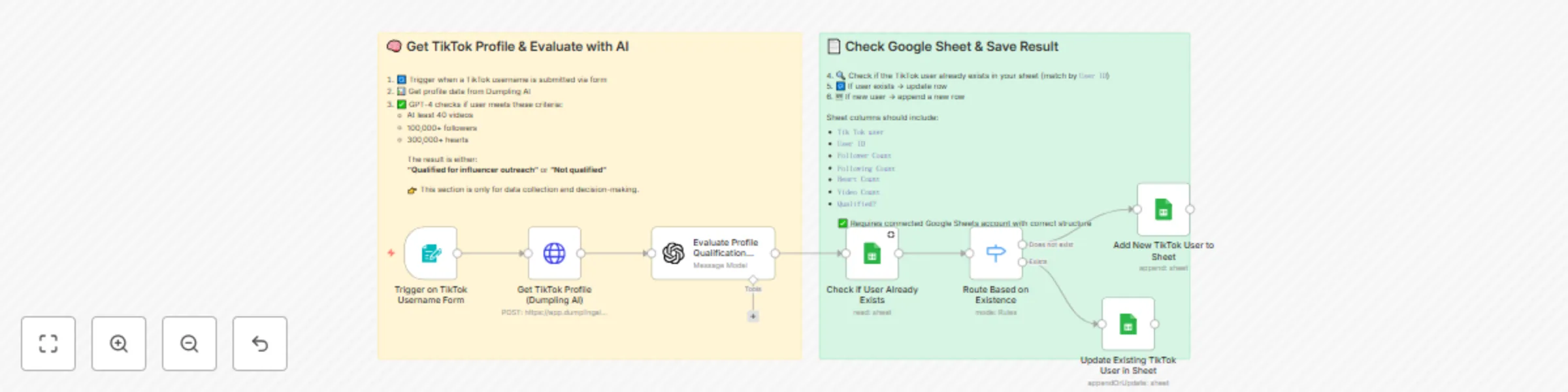
Qualify TikTok influencers from username with Dumpling AI + GPT-4

## Who’s it for This workflow is for marketers, influencer agencies, or outreach teams who want to quickly check if a TikTok user meets certain criteria before adding them to an influencer list. No manual profile checking—just drop in a username, and the system does the rest. --- ## What it does This workflow takes a TikTok username submitted via form, fetches the user’s profile using **Dumpling AI**, then evaluates the user using **GPT-4** to decide if they qualify for influencer outreach based on predefined rules: - 40+ videos - 100,000+ followers - 300,000+ total likes It then checks Google Sheets: - If the user **does not exist**, it **adds a new row** - If the user **already exists**, it **updates the row** --- ## How it works 1. **Form Trigger**: Collects TikTok username 2. **Dumpling AI**: Pulls TikTok profile (username, ID, followers, videos, likes, etc.) 3. **GPT-4**: Checks if the user meets outreach criteria 4. **Google Sheets**: - Checks if user already exists - Updates or appends user data + qualification status --- ## Requirements - ✅ Dumpling AI API key (HTTP Header Auth) - ✅ OpenAI API key (GPT-4) - ✅ Google Sheets integration with the following columns: - `Tik Tok user` - `User ID` - `Follower Count` - `Following Count` - `Heart Count` - `Video Count` - `Qualified?` --- ## How to customize - Change the qualification logic in the GPT-4 prompt - Add additional TikTok data (bio, profile pic, location, etc.) - Send a notification if the user is qualified - Push the qualified leads to Airtable, Notion, or your CRM --- > This workflow gives you a plug-and-play tool to qualify TikTok influencers instantly using AI—without leaving your browser or spreadsheet.

Y
Yang
Lead Generation
1 Oct 2025
138
0
Workflow preview: Generate YouTube content ideas from video analysis with Dumpling AI and GPT-4o
Free intermediate

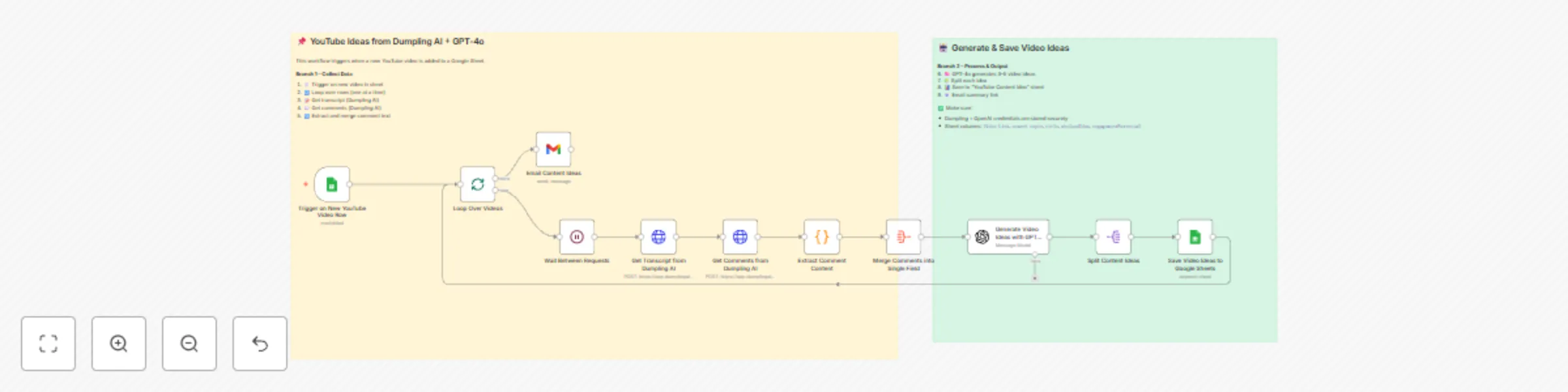
Generate YouTube content ideas from video analysis with Dumpling AI and GPT-4o

## Who's it for This template is perfect for YouTube creators, content marketers, and social media managers who want to turn existing videos into fresh, high-performing content ideas—automatically. It’s ideal if you want to save time brainstorming and focus on publishing videos that your audience actually wants. --- ## What it does This workflow watches a Google Sheet for new YouTube video links. For each new video, it fetches the transcript and top comments using **Dumpling AI**, then sends that data along with the original search topic to **GPT-4o**. GPT-4o returns 3–5 new content ideas based on: - What was discussed in the video - What people are searching for - What viewers are saying in the comments Each idea is saved to another Google Sheet and also sent to your email. --- ## How it works 1. **Trigger**: Watches for new rows in the "YouTube Finds" sheet 2. **Transcript & Comments**: Sends video URL to Dumpling AI to fetch transcript and comments 3. **Merge & Format**: Cleans and aggregates comments into one input 4. **AI Prompting**: GPT-4o analyzes transcript, topic, and comments to suggest ideas 5. **Output**: Splits and saves the results to a "YouTube Content Idea" sheet and emails them --- ## Requirements - 🧠 **OpenAI API Key** stored securely in credentials - 🤖 **Dumpling AI API Key** stored as HTTP header credentials - 📄 **Google Sheets** with the following setup: **Input Sheet ("YouTube Finds")** - `Video Link` - `search topic` **Output Sheet ("YouTube Content Idea")** - `title` - `whyGoodIdea` - `engagementPotential` --- ## How to customize You can: - Change the number of ideas returned by GPT-4o - Adjust the AI prompt to reflect your niche (e.g. education, tech, travel) - Add an approval step before sending the email - Extend it to post ideas directly into Trello, Notion, or Airtable --- > This workflow gives you an automated content strategist working 24/7—turning every YouTube upload into a launching pad for future content.

Y
Yang
Content Creation
20 Sep 2025
729
0
Workflow preview: Extract top products from any website with Dumpling AI and GPT-4o
Free intermediate

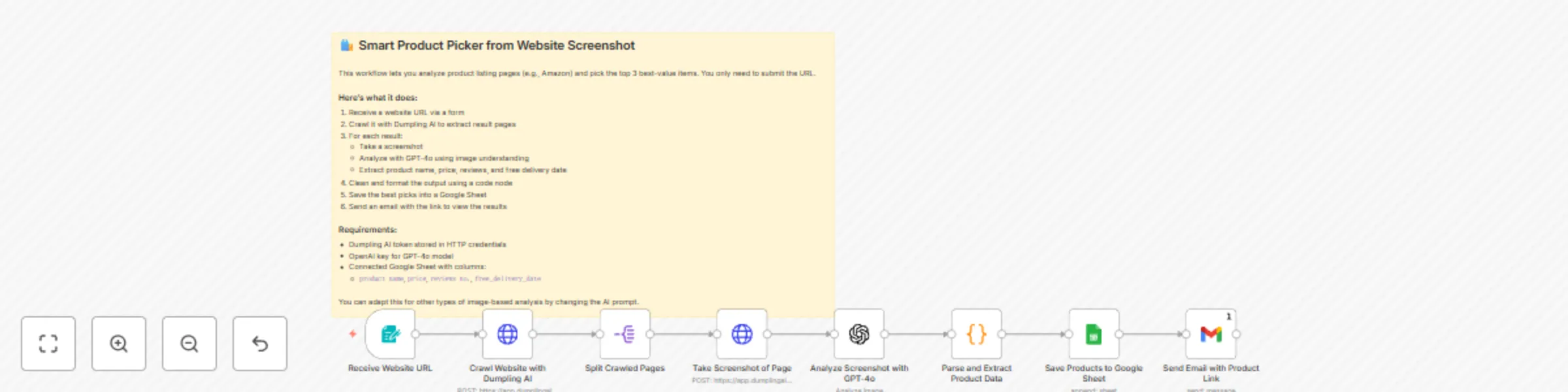
Extract top products from any website with Dumpling AI and GPT-4o

### 🛍️ Pick Best-Value Products from Any Website Using Dumpling AI, GPT-4o, and Google Sheets ### Who’s it for This workflow is for eCommerce researchers, affiliate marketers, and anyone who needs to compare product listings across sites like Amazon. It’s perfect for quickly identifying top product picks based on delivery speed, free shipping, and price. ### What it does Just submit a product listing URL. The workflow will crawl it using Dumpling AI, take screenshots of the pages, and pass them to GPT-4o to extract up to 3 best-value picks. It analyzes screenshots visually—no HTML scraping needed. Each result includes: - product name - price - review count - free delivery date (if available) ### How it works - 📝 Receives a URL through a web form - 🧠 Uses Dumpling AI to crawl the website - 📸 Takes screenshots of each product listing - 🔍 GPT-4o analyzes each image to pick top products - 🔧 A code node parses and flattens the output - 📊 Google Sheets stores the result - 📧 Sends the spreadsheet link via email ### Requirements - **Dumpling AI token** - **OpenAI key** (GPT-4o) - **Google Sheet** with columns: `product name`, `price`, `reviews no.`, `free_delivery_date` > You can customize the AI prompt to extract other visual insights (e.g., ratings, specs).

Y
Yang
Market Research
14 Sep 2025
381
0
Workflow preview: Turn text into cinematic videos using GPT-4, Dumpling FLUX.1 Pro, and Veo 3
Free advanced

Turn text into cinematic videos using GPT-4, Dumpling FLUX.1 Pro, and Veo 3

## 🧾 What this workflow does This automation transforms a short text idea into a cinematic video by chaining together three powerful AI services: GPT-4.1 for scene creation, Dumpling AI’s FLUX.1 Pro model for visual generation, and KIE API (Veo 3) for cinematic video creation. The system fully automates the journey from raw concept to video output, returning the final video URL. --- ## 👤 Who is this for - Content creators who want to test visual ideas quickly - Agencies creating moodboards, ad scenes, or pitch visuals - Solo marketers or founders without video editing skills - AI automation builders creating content tools --- ## ⚙️ How to set up ### ✅ Requirements - **OpenAI GPT-4.1 API key** - **Dumpling AI (FLUX.1 Pro model)** API token - **KIE API** account with access to the **Veo 3 endpoint** - Optional: Tool to store or share the final video link (e.g., Google Sheets, Slack) --- ### 🔧 Setup steps 1. **Start with a text idea** Example: “A lion running through misty mountains at sunrise.” 2. **GPT-4.1 Node:** - Expands the idea into two parts: - **Cinematic Prompt:** Describes the atmosphere, emotion, and camera movement. - **Image Prompt:** A vivid single-frame visual to generate the base image. 3. **Dumpling AI Node (FLUX.1 Pro):** - Takes the image prompt and returns a cinematic-style image. - You can customize dimensions, steps, seed, and guidance level. 4. **KIE API Node (Veo 3):** - Sends both the cinematic prompt and image to the Veo 3 model. - The model returns a **video URL** (e.g., 3–6 seconds cinematic footage). 5. **Final Output:** - The video URL is returned by the HTTP node. - You can connect this to Airtable, Slack, Telegram, or Google Sheets to log the result or share with your team. --- ## 🧠 How it works - You input a text idea - GPT-4.1 turns it into both a detailed cinematic prompt and a base image prompt - Dumpling AI generates the image - KIE API’s Veo 3 turns it into a cinematic video - The final video URL is returned for download or embedding --- ## 💡 Customization Ideas - Add a **Telegram bot** to trigger this workflow with an idea via message - Route video links to a **Notion database** or **content calendar** - Add a **loop with rating logic** to regenerate low-rated videos - Use **Google Drive** to auto-save videos in brand folders - Automate **weekly video ideation** for social media using a prompt list --- This workflow helps you turn raw imagination into cinematic motion using AI. From social content to storyboarding, you can generate compelling visuals in minutes — no design or video background needed.

Y
Yang
Content Creation
14 Sep 2025
516
0
Workflow preview: Create LinkedIn content from Telegram voice/text using Whisper, GPT-4 & Dumpling AI
Free advanced

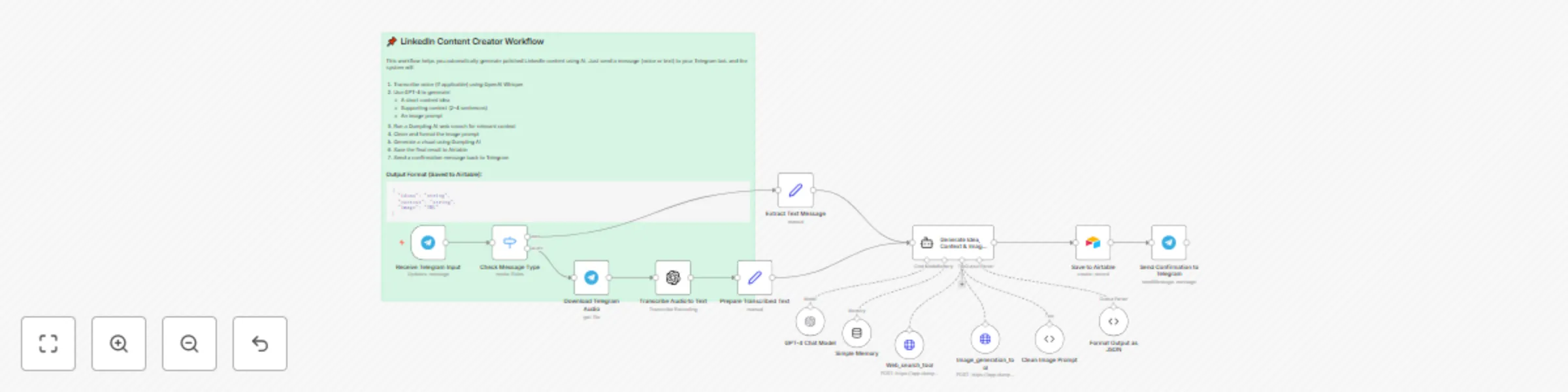
Create LinkedIn content from Telegram voice/text using Whisper, GPT-4 & Dumpling AI

## 🧾 What this workflow does This automation turns a **Telegram voice or text message** into a high-quality LinkedIn post using OpenAI’s Whisper, Dumpling AI and GPT-4, and then repurposes that same message into a content idea with visual inspiration using Dumpling AI. All outputs are saved to Airtable for review, approval, and scheduling. --- ## 👤 Who is this for - Founders or creators sharing ideas while walking or multitasking - Content teams turning voice memos into carousel content - Personal brands posting on LinkedIn with minimal manual work - Virtual assistants or SMMs handling voice-driven content tasks --- ## ⚙️ How to set up ### ✅ Requirements You’ll need active accounts for: - Telegram Bot (via n8n’s Telegram Trigger node) - OpenAI (for Whisper and GPT-4) - Dumpling AI (to search Google and create Image) - Airtable (to log your posts) In Airtable, create a table with the following fields: - `Ideas` (Single line text) - `Context` (Long text) - `Image URL` (URL) --- ### 🔧 Setup steps 1. **Set up your Telegram bot** - Use BotFather to create a bot and get your token - Add the bot to a private group or channel 2. **Connect all credentials in n8n** - Telegram Trigger (Bot Token) - OpenAI (for Whisper + GPT-4) - Dumpling AI (HTTP Auth) - Airtable (OAuth or Personal Token) 3. **Update node parameters** - In the Telegram Trigger node, specify your bot and listening chat - In the HTTP node for Dumpling AI, add your API key via header - In Airtable nodes, map to your base and table correctly 4. **Optional prompt customization** - In the GPT-4 node, you can update the prompt for tone, formatting, or CTA style 5. **Optional**: Adjust the Dumpling AI prompt to suit your niche (e.g., health, tech, finance). --- ## 🧠 How it works 1. The Telegram bot receives a voice message. 2. Whisper transcribes the voice into clean text. 3. GPT-4 formats the text into a polished LinkedIn post. 4. Dumpling AI: - Generates a short-form **content idea** from the transcript. - Creates a branded **image prompt** and renders a matching image. 5. The full set of outputs (text, idea, image) is saved to Airtable. 6. You can now review and schedule the post manually or via another automation. --- ## 🛠️ Customization ideas - Swap Telegram for WhatsApp or voice memos via Google Drive - Add moderation or approval steps before saving to Airtable - Send the LinkedIn post directly to Buffer or Hootsuite for auto-posting - Generate post captions or hashtags using GPT-4 before publishing - Extend the workflow to auto-create carousel slides from the content idea --- This workflow makes it easy to share your voice with your audience — literally. Whether you're walking, thinking out loud, or sending team updates, this automation turns your spoken ideas into professional content, ready to post or polish.

Y
Yang
Content Creation
14 Sep 2025
203
0
Workflow preview: Crawl website blog content and save to Google Sheets with Dumpling AI
Free intermediate

Crawl website blog content and save to Google Sheets with Dumpling AI

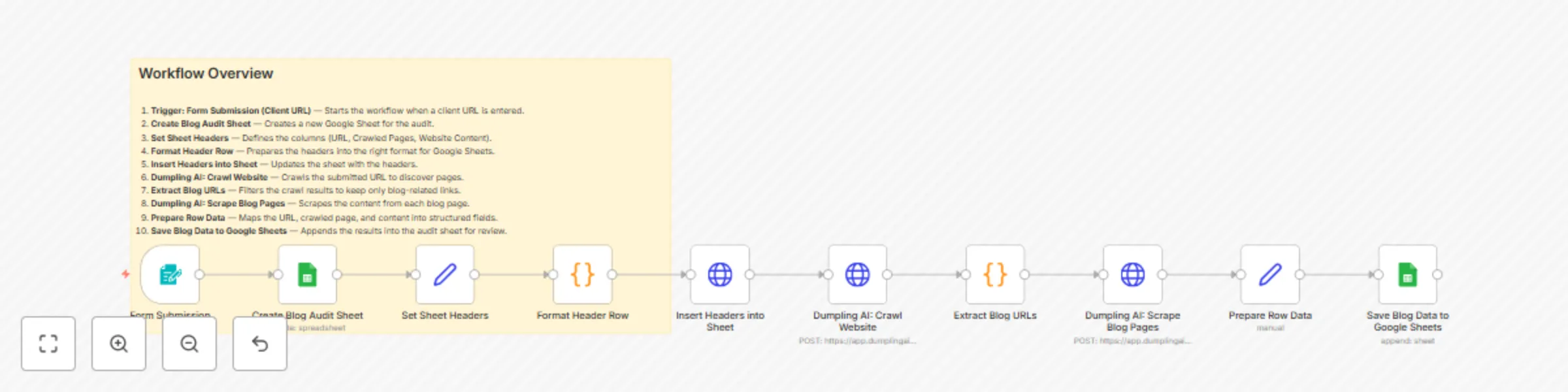
### Who is this for? This workflow is perfect for content strategists, SEO specialists, marketing agencies, and virtual assistants who need to quickly audit and collect blog content from client websites into a structured Google Sheet without doing manual crawling and copy-pasting. --- ### What problem is this workflow solving? Manually visiting a website, finding blog posts, and copying content into a spreadsheet is time-consuming and prone to errors. This workflow automates the process: it crawls a website, filters only blog-related pages, scrapes the article content, and stores everything neatly in Google Sheets for easy analysis and content strategy planning. --- ### What this workflow does The workflow starts when a client submits their website URL through a form. A Google Sheet is automatically created and headers are added for organizing the audit. Dumpling AI then crawls the website to discover all available pages, while the automation filters out only blog-related URLs. Each blog page is scraped for content, and the structured results (URL, crawled page, and website content) are appended row by row into the Google Sheet. --- ### Nodes Overview 1. Form Trigger – `Form Submission (Client URL)` Captures the client’s website URL to start the workflow. 2. Google Sheets – `Create Blog Audit Sheet` Creates a new Google Sheet with a title based on the submitted URL. 3. Set – `Set Sheet Headers` Defines the headers: `Url`, `Crawled_pages`, `website_content`. 4. Code – `Format Header Row` Formats the headers properly before sending them to the sheet. 5. HTTP Request – `Insert Headers into Sheet` Updates the Google Sheet with the prepared header row. 6. HTTP Request – `Dumpling AI: Crawl Website` Crawls the submitted URL to discover internal pages. 7. Code – `Extract Blog URLs` Filters the crawl results and keeps only URLs that match common blog patterns (e.g., `/blog/`, `/articles/`, `/posts/`). 8. HTTP Request – `Dumpling AI: Scrape Blog Pages` Scrapes the text content from each filtered blog page. 9. Set – `Prepare Row Data` Maps the URL, blog page link, and scraped content into structured fields. 10. Google Sheets – `Save Blog Data to Google Sheets` Appends the structured data into the audit sheet row by row. --- ### 📝 Notes - Set up Dumpling AI and generate your API key from: [Dumpling AI](https://www.dumplingai.com/) - Google Sheets must be connected with write permissions enabled. - You can change the crawl depth or limit (currently set to 10 pages) in the `Dumpling AI: Crawl Website` node. - The `Extract Blog URLs` node uses regex patterns to detect blog content. You can customize these patterns to match your website’s URL structure.

Y
Yang
Market Research
3 Sep 2025
664
0
Workflow preview: Automate blog creation from keywords with Dumpling AI, OpenAI, and Google Docs
Free advanced

Automate blog creation from keywords with Dumpling AI, OpenAI, and Google Docs

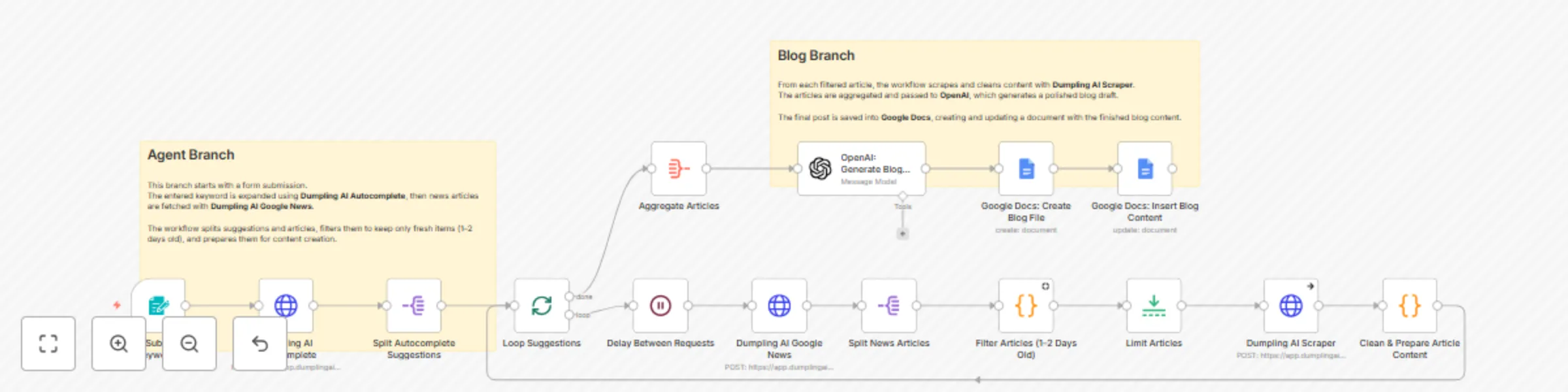
### Who is this for? This workflow is perfect for content marketers, bloggers, SEO professionals, and virtual assistants who need to transform keyword research into complete blog posts without spending hours writing and formatting. --- ### What problem is this workflow solving? Writing a blog post from scratch requires research, summarizing content, and structuring it into a polished article. This workflow automates that process by taking a single keyword, fetching related news articles, cleaning the data, and generating a professional blog draft automatically in Google Docs. --- ### What this workflow does The workflow begins when a keyword is submitted through a form. It expands the keyword into trending suggestions using Dumpling AI Autocomplete, then fetches recent news articles with Dumpling AI Google News. Articles are filtered to only include those published within the last 1–2 days, then scraped and cleaned for quality text. The aggregated content is sent to OpenAI, which generates a polished blog draft with a clear title. Finally, the draft is saved directly into Google Docs for easy editing and publishing. --- ### Nodes Overview 1. Form Trigger – `Form Submission (Keywords)` Starts the workflow when a keyword is submitted through a form. 2. HTTP Request – `Dumpling AI Autocomplete` Expands the keyword into multiple trending search suggestions. 3. Split Out – `Split Autocomplete Suggestions` Breaks the list of autocomplete suggestions into individual items for processing. 4. Loop – `Loop Suggestions` Iterates through each suggestion to process articles separately. 5. Wait – `Delay Between Requests` Adds a pause to avoid sending too many requests at once. 6. HTTP Request – `Dumpling AI Google News` Fetches recent news articles for each suggestion. 7. Split Out – `Split News Articles` Splits the returned news results into individual articles. 8. Code – `Filter Articles (1–2 Days Old)` Keeps only articles that are between 1 and 2 days old for fresh content. 9. Limit – `Limit Articles` Restricts the workflow to the top 2 articles for each suggestion. 10. HTTP Request – `Dumpling AI Scraper` Scrapes and cleans the full text content from the article URLs. 11. Code – `Clean & Prepare Article Content` Removes clutter like links, images, and unrelated sections to ensure clean input. 12. Aggregate – `Aggregate Articles` Combines the cleaned article content into one dataset. 13. OpenAI – `Generate Blog Draft` Uses OpenAI to create a polished blog post draft and title in Markdown format. 14. Google Docs – `Create Blog File` Creates a new Google Doc with the generated blog title. 15. Google Docs – `Insert Blog Content` Inserts the full blog draft into the created document. --- ### 📝 Notes - Set up Dumpling AI and generate your API key from: [Dumpling AI](https://www.dumplingai.com/) - OpenAI must be connected with an active API key for blog generation. - Google Docs must be connected with write permissions to create and update blog posts. - You can adjust the article filter (currently set to 1–2 days old) in the code node depending on your needs.

Y
Yang
Content Creation
3 Sep 2025
291
0
Workflow preview: Generate email newsletters from Telegram keywords with Dumpling AI and GPT
Free advanced

Generate email newsletters from Telegram keywords with Dumpling AI and GPT

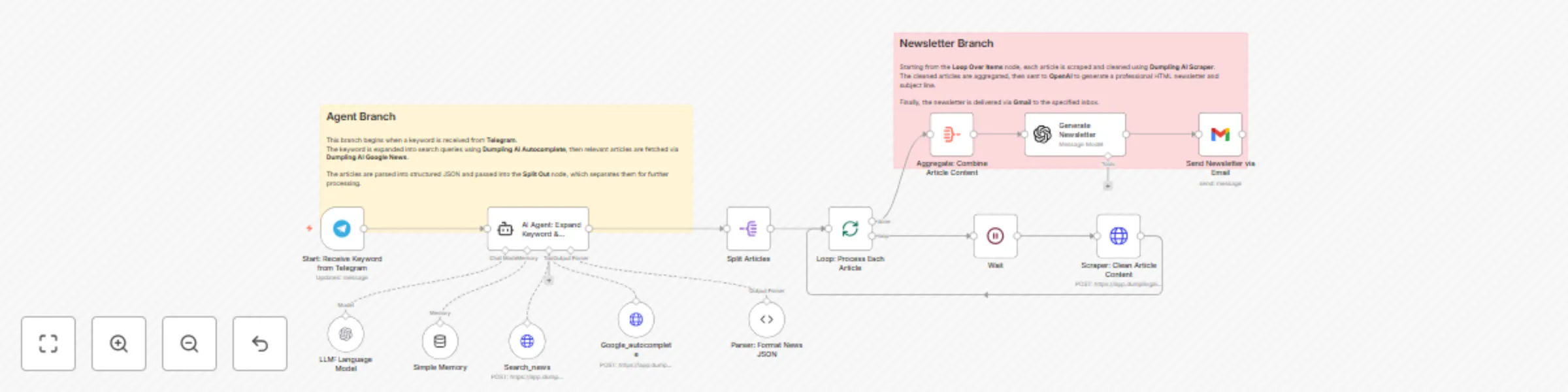
### Who is this for? This workflow is perfect for content creators, newsletter publishers, digital marketers, and virtual assistants who need a quick way to generate professional newsletters from trending news without manually curating and formatting articles. --- ### What problem is this workflow solving? Manually searching for news, summarizing articles, formatting them into a newsletter, and sending them by email is time-consuming and inconsistent. This workflow automates the process end-to-end: from capturing a keyword in Telegram to sending a ready-to-publish HTML newsletter by Gmail. --- ### What this workflow does The workflow begins when a keyword is received from Telegram. The keyword is expanded into trending suggestions using Dumpling AI Autocomplete, then passed to Dumpling AI Google News to fetch recent articles. The results are structured, split, and scraped for clean content. The combined content is sent to OpenAI to generate a professional HTML newsletter and subject line, which is finally delivered to a chosen inbox via Gmail. --- ### Nodes Overview 1. Telegram Trigger – `Start: Receive Keyword` Listens for a keyword sent from Telegram to initiate the workflow. 2. HTTP Request – `Google Autocomplete via Dumpling AI` Expands the keyword into trending search suggestions. 3. HTTP Request – `Search Google News via Dumpling AI` Fetches recent news articles related to the autocomplete suggestions. 4. Parser and Split Nodes – `Process Articles` Formats results into structured JSON and splits them into individual articles. 5. HTTP Request – `Scraper via Dumpling AI` Scrapes and cleans each article to extract high-quality text. 6. Aggregate – `Combine Article Content` Merges all cleaned articles into a single dataset for newsletter generation. 7. OpenAI – `Generate Newsletter` Produces a ready-to-use HTML newsletter and subject line. 8. Gmail – `Send Newsletter` Delivers the completed newsletter to the specified inbox. --- ### 📝 Notes - You must connect Dumpling AI and OpenAI accounts with valid API keys before running. - The Telegram trigger can be configured for private or group chats depending on your use case. - Ensure Gmail is properly connected with send permissions enabled.

Y
Yang
Social Media
3 Sep 2025
173
0
Workflow preview: Scrape product info from website URLs in Google Sheets using Dumpling AI
Free intermediate

Scrape product info from website URLs in Google Sheets using Dumpling AI

## 📄 What this workflow does This workflow automatically scrapes product information from any website URL entered into a Google Sheet and stores the extracted product details into another sheet. It uses Dumpling AI to extract product data such as name, price, description, and reviews. --- ## 👤 Who is this for This is ideal for: - Lead generation specialists capturing product info from prospect websites - eCommerce researchers collecting data on competitor product listings - Sales teams building enriched product databases from lead URLs - Anyone who needs to automate product scraping from multiple websites --- ## ✅ Requirements - A **Google Sheet** with a column labeled `Website` where URLs will be added - A second sheet (e.g., `product details`) where extracted data will be saved - **Dumpling AI** API access to perform the extraction - Connected **Google Sheets** credentials in n8n --- ## ⚙️ How to set up 1. Replace the Google Sheet and tab IDs in the workflow with your own. 2. Make sure your source sheet includes a `Website` column. 3. Connect your Dumpling AI and Google Sheets credentials. 4. Make sure the output sheet has the following headers: - `productName` - `price` - `productDescription` *(The workflow supports `review`, but it’s optional.)* 5. Activate the workflow to start processing new rows. --- ## 🔁 How it works (Workflow Steps) 1. **Watch New Website URL in Google Sheets**: Triggers when a new row is added with a website URL. 2. **Extract Product Info with Dumpling AI**: Sends the URL to Dumpling AI’s extract endpoint using a defined schema for product details. 3. **Split Extracted Products**: Separates multiple products into individual items if the page contains more than one. 4. **Append Product Info to Google Sheets**: Adds the structured results to the specified product details sheet. --- ## 🛠️ Customization Ideas - Add a column to store the original source URL alongside each product - Use OpenAI to generate short SEO summaries for each product - Add filters to ignore pages without valid product details - Send Slack or email notifications when new products are added to the sheet

Y
Yang
Market Research
4 Aug 2025
1246
0
Workflow preview: Capture and store website screenshots from Google Sheets to Drive using Dumpling AI
Free intermediate

Capture and store website screenshots from Google Sheets to Drive using Dumpling AI

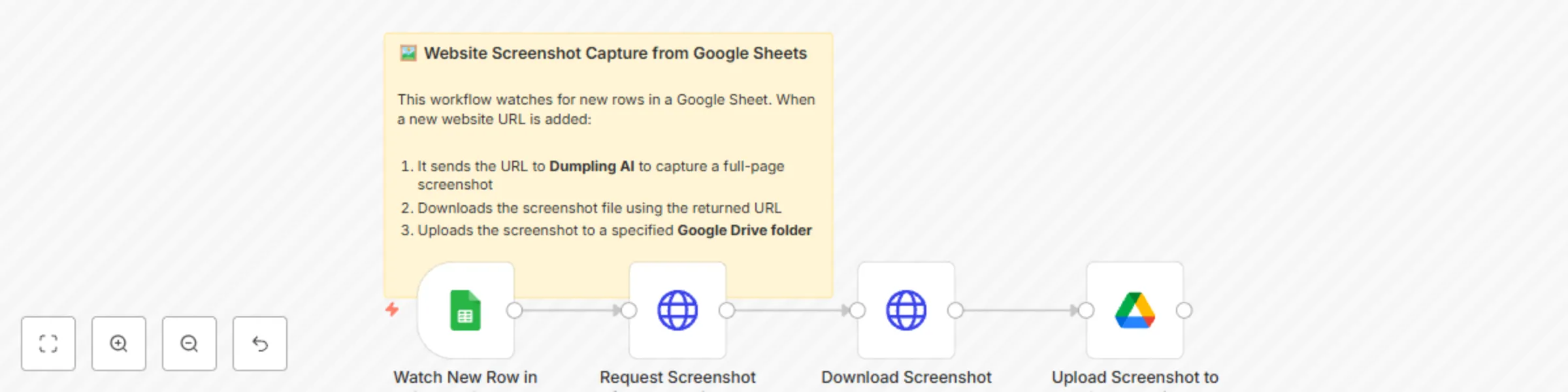
## 📄 What this workflow does This workflow captures a full-page screenshot of any website added to a Google Sheet and automatically uploads the screenshot to a designated Google Drive folder. It uses Dumpling AI’s screenshot API to generate the image and manages file storage through Google Drive. --- ## 👤 Who is this for This is ideal for: - Marketers and outreach teams capturing snapshots of client or lead websites - Lead generation specialists tracking landing page visuals - Researchers or analysts who need to archive website visuals from URLs - Anyone looking to automate website screenshot collection at scale --- ## ✅ Requirements - A **Google Sheet** with a column labeled `Website` where URLs will be added - **Dumpling AI** API access for screenshot capture - A connected **Google Drive** account with an accessible folder to store screenshots --- ## ⚙️ How to set up 1. Replace the Google Sheet and folder IDs in the workflow with your own. 2. Connect your Dumpling AI and Google credentials in n8n. 3. Make sure your sheet contains a `Website` column with valid URLs. 4. Activate the workflow to begin watching for new entries. --- ## 🔁 How it works (Workflow Steps) 1. **Watch New Row in Google Sheets**: Triggers when a new row is added to the sheet. 2. **Request Screenshot from Dumpling AI**: Sends the website URL to Dumpling AI and gets a screenshot URL. 3. **Download Screenshot**: Fetches the image file from the returned URL. 4. **Upload Screenshot to Google Drive**: Uploads the file to a selected folder in Google Drive. --- ## 🛠️ Customization Ideas - Add timestamped filenames using the current date or domain name - Append the Google Drive URL back to the same row in the sheet for easy access - Extend the workflow to send Slack or email notifications when screenshots are saved - Add filters to validate URLs before sending them to Dumpling AI

Y
Yang
File Management
4 Aug 2025
256
0
Workflow preview: Video to blog research automation with GPT-4o, Dumpling AI & Google Sheets
Free intermediate

Video to blog research automation with GPT-4o, Dumpling AI & Google Sheets

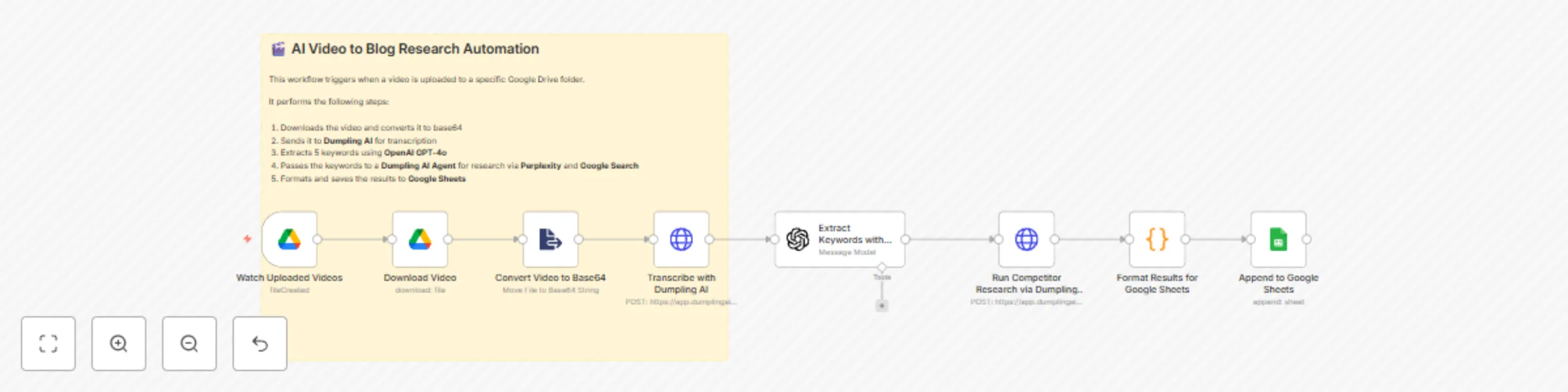
## 📄 What this workflow does This workflow automatically turns any uploaded video into structured blog research using AI tools. It transcribes the video, extracts keywords, runs research based on those keywords, and saves the final result to a Google Sheet. It uses Dumpling AI for transcription and research, OpenAI for keyword extraction, and Google Sheets for organizing the output. --- ## 👤 Who is this for This workflow is perfect for: - Content creators who repurpose video content into blog posts - SEO and marketing teams looking to extract topics and keyword insights from video materials - Anyone who wants to automate video-to-text and research workflows without doing it manually --- ## ✅ Requirements - **Google Drive** account with a folder to watch for video uploads - **Dumpling AI** API access for transcription and agent research - **OpenAI (GPT-4o)** credentials for keyword extraction - **Google Sheets** document with the following column headers: - `Keywords` - `topicsFromPerplexity` - `blogPostsFromGoogle` --- ## ⚙️ How to set up 1. Connect your **Google Drive** and choose the folder where videos will be uploaded. 2. Set up your **Dumpling AI** and **OpenAI GPT-4o** API credentials. 3. Create a **Google Sheet** with the required columns. 4. Replace the default folder ID and spreadsheet ID in the workflow with your own. 5. Activate the workflow to start watching for new videos. --- ## 🔁 How it works (Workflow Steps) 1. **Watch Uploaded Videos**: Triggers when a new video is added to your selected Google Drive folder. 2. **Download Video**: Downloads the uploaded video file. 3. **Convert Video to Base64**: Prepares the video for API submission by converting it to base64. 4. **Transcribe with Dumpling AI**: Sends the video to Dumpling AI to get a full transcript. 5. **Extract Keywords with OpenAI**: Analyzes the transcript and extracts five key SEO keywords. 6. **Run Competitor Research via Dumpling AI**: Uses those keywords to fetch related topics and blog examples from Perplexity and Google. 7. **Format Results for Google Sheets**: Formats the research results into clean text blocks. 8. **Append to Google Sheets**: Saves the data into your specified Google Sheet. --- ## 🛠️ Customization Ideas - Add a translation step after transcription to support multilingual content research. - Modify the GPT prompt to extract summaries or titles instead of keywords. - Change the Google Sheet structure to log video filenames and timestamps. - Add email or Slack notifications to alert you when research is complete.

Y
Yang
Content Creation
4 Aug 2025
415
0
Workflow preview: Cold email icebreakers from local business search with GPT-4 and Dumpling AI
Free intermediate

Cold email icebreakers from local business search with GPT-4 and Dumpling AI

This workflow helps digital marketers and outreach specialists automate the research and creation of cold email icebreakers for local businesses. **What it does:** 1. Starts with a **Form Trigger**, where you input a search keyword (e.g., “Dentist in New York”). 2. Uses **Dumpling AI’s Google Maps API** to search for local businesses matching the keyword. 3. Extracts individual business data, including **website URLs**. 4. Sends each website to Dumpling AI to extract: - A **website summary** for personalization - An **email address** (if available) 5. Sends the summary and business info to **GPT-4** via OpenAI to write a short, warm, and customized icebreaker message. 6. Filters out results with missing email addresses. 7. Logs the business name, email, website, phone number, website summary, and generated icebreaker into **Google Sheets**. 8. Optionally pushes the lead and personalization to **Instantly.ai** for automated cold outreach. **Tools Used:** - Form Trigger (n8n) - Dumpling AI (Search & Extraction APIs) - OpenAI GPT-4 (via LangChain Node) - Google Sheets - Instantly.ai (optional lead delivery) ### 🛠️ How to Customize the Workflow - **Change the search region or business type:** Adjust the default keyword in the **Form Trigger** or connect a different input source (like Google Sheets). - **Customize the prompt:** Modify the **GPT-4 node prompt** to match your agency tone or outreach style. - **Add or remove data fields:** Edit the **Google Sheets node** to store additional business data or remove unnecessary ones. - **Connect to your CRM or outreach tool:** Replace or extend the **Instantly API node** with your own CRM (e.g., HubSpot, Close, Pipedrive) using HTTP Request or native integrations. - **Control batching size:** The **Split In Batches node** is set to 2 by default. You can increase this to speed up processing or reduce it to avoid rate limits. This automation is ideal for sales teams, digital marketing freelancers, and agencies who want to scale lead generation while keeping emails personal and relevant.

Y
Yang
Lead Generation
19 Jul 2025
674
0
Workflow preview: Extract marketing insights from Google Reviews using Dumpling AI + GPT-4
Free intermediate

Extract marketing insights from Google Reviews using Dumpling AI + GPT-4

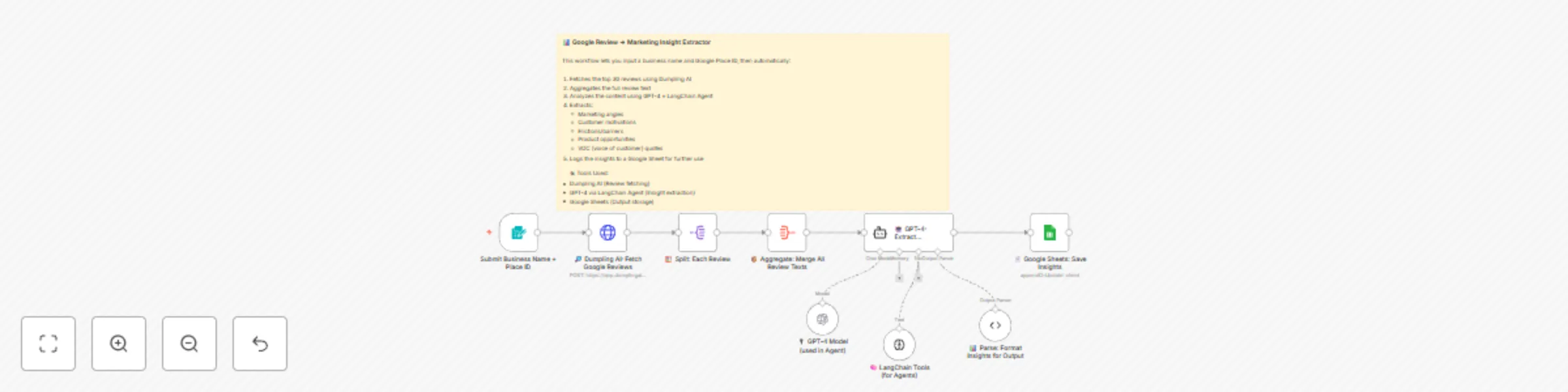
## 📄 What this workflow does This workflow helps you analyze Google reviews of any business to generate powerful marketing insights. By simply submitting a business name and its Google Place ID, it fetches the top 30 reviews and uses GPT-4 (via LangChain Agent) to extract valuable customer insights such as marketing angles, customer motivations, product pain points, and voice of customer (VOC) quotes. The output is stored automatically in a connected Google Sheet. --- ## 👤 Who is this for - Marketing teams looking for messaging inspiration - Founders or product managers exploring customer feedback - Brand strategists gathering real-world insights - Agencies running VOC or sentiment analysis --- ## 🛠️ Requirements - **Dumpling AI API key** - **OpenAI GPT-4 or GPT-4o access** - **Google Sheets connection** - A form or manual input with: - Business Name - Google Place ID --- ## ⚙️ How to set up 1. **Connect Credentials** - Dumpling AI (via HTTP Header Auth) - OpenAI (GPT-4) - Google Sheets (OAuth2) 2. **Prepare your Google Sheet** - Create columns: `Business Name`, `Place ID`, `Marketing Angles`, `Customer Motivations`, `Frictions and Barriers`, `Product Opportunities`, `VOC Snippets` 3. **Update Nodes** - Replace the Google Sheets `Document ID` and `Tab Name` with yours - Check that the Dumpling API node is linked to your credential - Optional: tweak the prompt in the LangChain Agent node to fit your tone or goals --- ## 🤖 How it works (Workflow Steps) 1. User submits business name + Google Place ID 2. Dumpling AI fetches top 30 reviews 3. Workflow aggregates review text 4. GPT-4 via LangChain analyzes the reviews 5. Insights are parsed and logged to Google Sheets --- ## 💡 Customization Ideas - Push output to Notion, Airtable, or Slack - Add sentiment scoring to prioritize themes - Create summaries for each insight category - Schedule insights to be emailed weekly --- This is a plug-and-play VOC research workflow — great for founders, marketers, and product teams who want actionable data from real customers without doing manual review scraping or summarizing.

Y
Yang
Market Research
19 Jul 2025
617
0
Workflow preview: Extract marketing insights & generate content from TikTok videos with Dumpling AI & GPT-4
Free intermediate

Extract marketing insights & generate content from TikTok videos with Dumpling AI & GPT-4

## 📄 What this workflow does This workflow turns TikTok videos into high-quality marketing insights and social-ready posts using Dumpling AI and GPT-4. It takes a TikTok URL, keyword, and product name, then automatically extracts the video transcript, analyzes the content for key marketing insights (pain points, outcomes, triggers), and rewrites it as a social media post that positions your product as the solution. Everything is logged to Google Sheets for use by your content or product team. --- ## 👤 Who is this for - Product marketers doing UGC research - Copywriters repurposing TikTok into content - Founders or VAs turning viral clips into assets - Agencies building research-based social proof --- ## ⚙️ How to set up ### ✅ Requirements - **Dumpling AI**: For TikTok transcript extraction - **OpenAI GPT-4 or GPT-4o-mini**: For analysis and rewriting - **Google Sheets**: To log the results - **n8n Form Trigger**: To input `TikTok URL`, `Keyword`, and `Product` --- ### 🔧 Setup Instructions 1. **Google Sheets** - Create a sheet with the following columns: - `Video URL`, `Original Transcription`, `Pain points`, `Desired outcomes`, `Triggers or motivating events`, `Interesting direct quotes`, `New Script` - Update the sheet ID and tab in the Google Sheets node 2. **Credentials** - Add your Dumpling AI key using `HTTP Header Auth` - Use GPT-4 via OpenAI credentials - Connect your Google Sheets using OAuth2 3. **Customization (Optional)** - You can modify the GPT-4 prompts in the LangChain nodes to change tone, output structure, or content depth --- ## 🧠 How it works 1. A form is submitted with a TikTok URL, keyword, and product 2. Dumpling AI fetches and returns the TikTok transcript 3. The VTT format is cleaned into plain text 4. GPT-4 (via LangChain agent) extracts: - Pain points - Desired outcomes - Motivating events - Direct quotes 5. GPT-4 then rewrites the transcript into a compelling marketing post 6. Results are saved to Google Sheets for further use --- ## 🛠️ Customization ideas - Push insights to Notion or Airtable instead of Sheets - Use Claude or Gemini instead of GPT-4 - Automatically generate image prompts to pair with the rewritten script - Add notification email or Slack post when draft is ready --- This workflow gives marketers and founders a fast way to convert real social content into reusable copy, backed by authentic user voice and GPT-powered insights.

Y
Yang
Market Research
19 Jul 2025
927
0
Workflow preview: Generate ad image variations using GPT-4, Dumpling AI & Google Drive
Free intermediate

Generate ad image variations using GPT-4, Dumpling AI & Google Drive

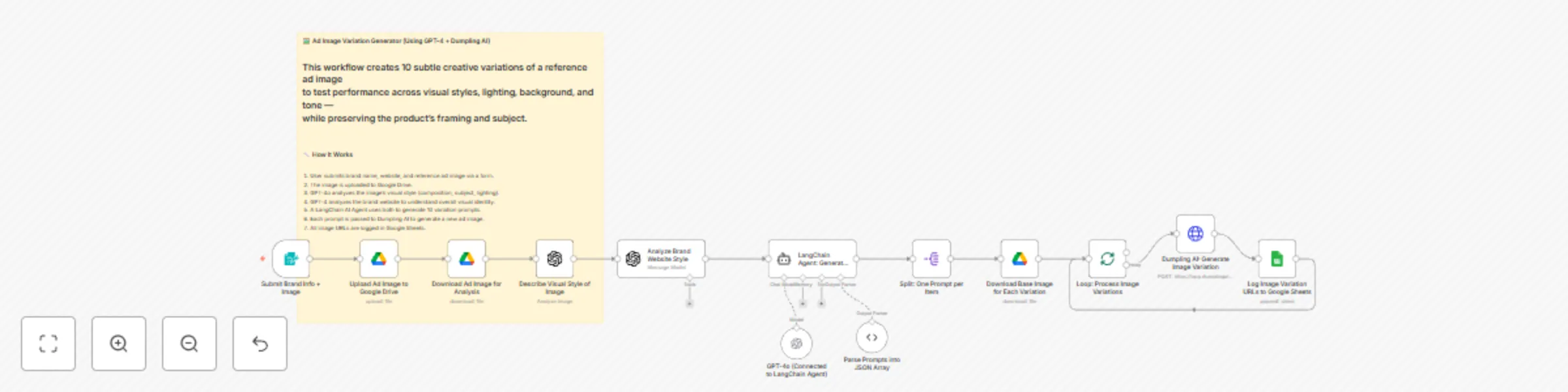
## 🧾 What this workflow does This workflow takes a reference ad image and brand website, then uses GPT-4, LangChain, and Dumpling AI to generate 10 high-quality image variations for ad testing. These image variations are visually consistent but subtly different in background, mood, lighting, and tone — perfect for performance testing on platforms like Meta Ads or TikTok. --- ## 👤 Who is this for - DTC marketers and brand designers testing ad creatives - Creative teams automating visual experimentation - Content agencies using AI for fast ad mockups - Performance marketers running multivariate testing --- ## ⚙️ How to set up ### ✅ Requirements You’ll need the following tools set up in n8n: - Google Drive (OAuth2 credential) - Google Sheets (OAuth2 credential) - OpenAI API (for GPT-4 or GPT-4o) - Dumpling AI API (via HTTP header authentication) --- ### 🛠️ Steps to configure 1. **Google Sheet Setup** - Create a sheet with one column: `Image URL` - Update the Sheet ID and tab name in the final Google Sheets node. 2. **Drive Setup** - Create a folder in Google Drive for storing the reference image. - Replace the `folderId` in the “Upload Ad Image to Google Drive” node. 3. **Dumpling AI API Key** - Use n8n’s credential manager (HTTP Header Auth) — do **not** hardcode the key. 4. **OpenAI API Key** - Required for both image description and LangChain agent prompt generation. 5. **Form Inputs Required** - `Brand Name` - `Brand Website` - `Ad Image` (upload field) --- ## 🧠 How it works 1. A user submits the brand name, website, and a reference ad image through a form. 2. The image is uploaded to Google Drive. 3. GPT-4o describes the image’s visual style (e.g., mood, lighting, composition). 4. GPT-4 analyzes the brand’s website to define its visual aesthetic. 5. A LangChain agent uses both analyses to create 10 tightly scoped variation prompts. 6. Dumpling AI generates a new image for each prompt using its “FLUX.1-pro” model. 7. Each new image’s link is logged into Google Sheets. --- ## 🛠️ How to customize - 🧪 Change prompt logic to experiment with different variations (e.g., theme, season). - 🎨 Switch image model in Dumpling AI to one that supports your desired style. - 🔗 Log additional metadata (prompt, timestamp) to Google Sheets. - 📤 Connect output images to Airtable, Notion, or a review tool like Figma. - 🎯 Modify GPT system message to reflect a different tone or brand strategy. --- This workflow gives creative teams and marketers an instant, AI-powered ad image testing system — built on real brand visuals, not generic stock content.

Y
Yang
Content Creation
9 Jul 2025
4273
0
Workflow preview: Turn YouTube transcripts into newsletter drafts using Dumpling AI + GPT-4o
Free intermediate

Turn YouTube transcripts into newsletter drafts using Dumpling AI + GPT-4o

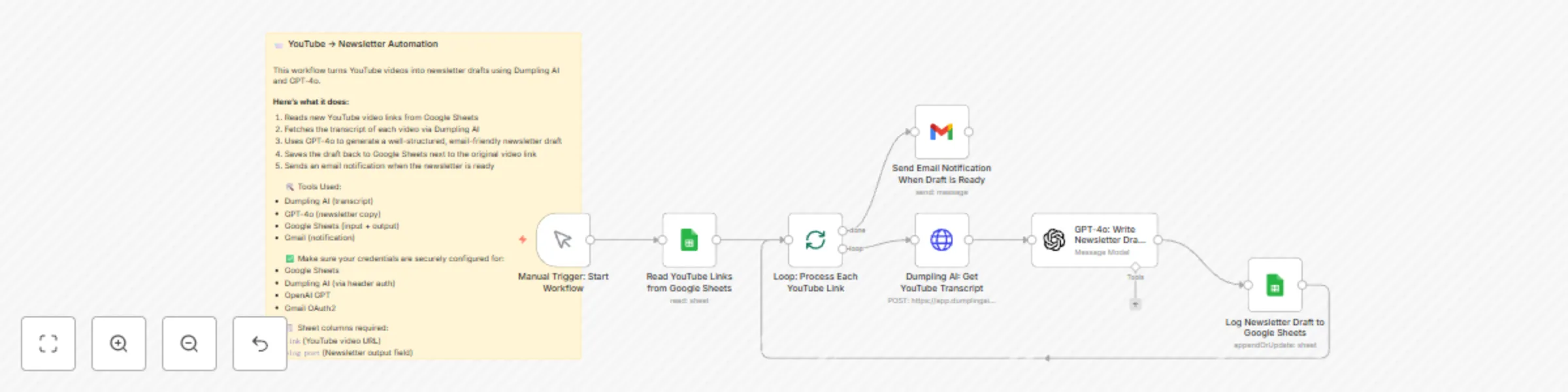
## 🧾 What this workflow does This workflow turns YouTube video links into ready-to-edit newsletter drafts using Dumpling AI and GPT-4o. It reads new video URLs from a Google Sheet, extracts their transcripts, summarizes them into email-friendly content, and logs the finished draft back into the same sheet. An email notification is also sent to alert the user once each draft is created. --- ## 👤 Who is this for - Newsletter writers or marketers repurposing video content - YouTube creators building email follow-ups from videos - Agencies or VAs batching social → email content - Automation users streamlining content workflows --- ## ⚙️ How to set up ### ✅ Requirements - **Google Sheet** with the following columns: - `link` — YouTube video URL - `blog post` — for saving the generated newsletter draft - Active accounts for: - Dumpling AI (API for YouTube transcripts) - OpenAI GPT-4 or GPT-4o - Google Sheets - Gmail (OAuth2 credential) --- ### 🔧 Setup steps 1. **Connect all credentials** using n8n's Credential Manager: - Google Sheets (OAuth2) - Dumpling AI (via HTTP Header Auth) - OpenAI - Gmail 2. **Update the sheet ID and tab name** in both Google Sheets nodes. 3. **Customize the GPT-4o prompt** (optional): - Located in the “GPT-4o: Write Newsletter Draft from Transcript” node - You can edit tone, structure, and audience targeting in the system message 4. **Verify email recipient** in the Gmail node and update if needed. --- ## 🧠 How it works 1. The workflow is triggered manually or on schedule. 2. It pulls YouTube links without drafts from the sheet. 3. Each video’s transcript is fetched using Dumpling AI. 4. GPT-4o summarizes the transcript into a clean, friendly newsletter format. 5. The draft is written back to the same row in Google Sheets. 6. An email is sent to notify the user that the draft is ready. --- ## 🛠️ Customization ideas - Send finished drafts to Notion or Airtable instead of Sheets - Generate social media posts from the same transcript - Add automatic review steps using GPT scoring or editing - Trigger this on new form submissions or YouTube uploads instead --- This is a fast, AI-powered way to turn long-form video content into clean, polished newsletters — ready to share or schedule with minimal editing.

Y
Yang
Content Creation
9 Jul 2025
1861
0
Workflow preview: Create AI news avatar videos with Dumpling AI, GPT-4o and HeyGen
Free advanced

Create AI news avatar videos with Dumpling AI, GPT-4o and HeyGen

## 🧾 What this workflow does This workflow automatically generates avatar-style videos from the latest AI-related news using Dumpling AI and HeyGen. It runs every hour, scrapes trending articles, turns them into 30–60 second spoken scripts with GPT-4o, and produces short avatar videos with HeyGen. Finally, it logs the final video URL in a Google Sheet. --- ## 👤 Who is this for - Newsletters and creators who want to automate AI trend updates - Content marketers generating short-form video content - Product teams experimenting with AI-generated summaries - Automation enthusiasts combining LLMs + video + trending data --- ## ⚙️ How to set up ### 🔐 Requirements - **Dumpling AI API Key** stored securely as HTTP Header credential - **HeyGen API Key** added as an HTTP Header credential - **OpenAI API Key** for GPT-4o (can use GPT-4o-mini if preferred) - **Google Sheets account** with one column: `Video link` ### 🛠 Step-by-step setup 1. **Google Sheet Setup** - Create a Google Sheet with a single column named: `Video link` 2. **Update Credentials** - Use n8n’s credential manager to add tokens for: - Dumpling AI - HeyGen - OpenAI - Google Sheets 3. **Optional Customizations** - In the "Dumpling AI: Search AI News" node, you can change `"query": "AI Agent"` to other trending keywords (e.g., `"Generative AI"`, `"Autonomous Agents"`, etc.) - Update the `avatar_id` and `voice_id` in the HeyGen request to match your preferred look/sound --- ## 🧠 How it works 1. The Schedule Trigger runs hourly. 2. Dumpling AI searches for fresh news related to "AI Agent." 3. The top 4 news links are scraped for full content. 4. Articles are merged and fed into GPT-4o via a LangChain Agent to produce a casual, conversational video script. 5. HeyGen creates a video using the script, avatar, and voice. 6. The workflow waits until the video rendering is complete. 7. Once done, the final video link is logged into Google Sheets. --- ## 🧪 Customization Ideas - Change the interval (e.g., every 6 hours, daily) - Swap avatar/voice in HeyGen to fit your brand - Expand to post the video directly to social media - Add image background or B-roll overlays using Creatomate --- This is a fast, automated pipeline to create explainer-style AI news updates using real-time data and generative video tools.

Y
Yang
Content Creation
9 Jul 2025
3919
0
Workflow preview: Turns Reddit Pain Points into Comic Ads using Dumpling AI and GPT-4o
Free advanced

Turns Reddit Pain Points into Comic Ads using Dumpling AI and GPT-4o

## 📝 Description ### 🤖 What this workflow does This workflow turns Reddit pain points into emotionally-driven comic-style ads using AI. It takes in a product description, scrapes Reddit for real user pain points, filters relevant posts using AI, generates ad angles, rewrites them into 4-panel comic prompts, and finally uses Dumpling AI to generate comic-style images. All final creatives are uploaded to Google Drive. --- ### 🧠 What problem is this solving? Crafting ad content that truly speaks to customer struggles is time-consuming. This workflow automates that entire process — from pain point discovery to visual creative output — using AI and Reddit as a source of truth for customer language. --- ### 👤 Who is this for? - Copywriters and performance marketers - Startup founders and indie hackers - Creatives building empathy-driven ad concepts - Automation experts looking to generate scroll-stopping content --- ## ⚙️ Setup Instructions Here’s how to set everything up, step by step: --- ### 🔹 1. Trigger: Form Input **Node**: `📝 Form - Submit Product Info` This form asks the user to enter: - Brand Name - Website - Product Description ✅ **Make sure this form is active and testable.** --- ### 🔹 2. Generate Reddit Keyword **Node**: `🧠 GPT-4o - Generate Reddit Keyword` Uses the product description to generate a search keyword based on what your audience might be discussing on Reddit. --- ### 🔹 3. Search Reddit **Node**: `🔍 Reddit - Search Posts` Uses the keyword to search Reddit for relevant threads. Make sure your Reddit integration is properly configured. --- ### 🔹 4. Filter Valid Posts **Node**: `🔎 IF - Check Upvotes & Text Length` Filters out low-effort or unpopular posts. Only keeps posts with: - Minimum 2 upvotes - Content at least 100 characters long ✅ You can adjust these thresholds in the node settings. --- ### 🔹 5. Clean Reddit Output **Node**: `🧼 Code - Structure Reddit Posts` This formats the list of posts into clean JSON for the AI agents to process. --- ### 🔹 6. Check Relevance with AI Agent **Node**: `🤔 Langchain Agent - Post Relevance Classifier` This node uses a LangChain agent (tool: `think2`) to determine if each post is **relevant to your product**. Only relevant ones are passed forward. --- ### 🔹 7. Aggregate Relevant Posts **Node**: `📦 Code - Merge Relevant Posts` Collects all relevant posts into a clean format for the next GPT-4 call. --- ### 🔹 8. Generate Ad Angles **Node**: `✍️ GPT-4o - Generate Emotional Ad Angles` Writes 10 pain-point-based marketing angles using real customer language. --- ### 🔹 9. Rank the Best Angles **Node**: `📊 GPT-4o - Rank Top 10 Angles` Scores the generated angles and ranks them from most to least powerful. Only the top 3 are passed forward. --- ### 🔹 10. Turn Angles into Comic Prompts **Node**: `🎭 GPT-4o - Write Comic Scene Prompts` Rewrites each of the top ad angles into a 4-panel comic strip structure (pain → tension → product → resolution). --- ### 🔹 11. Generate Comic Images **Node**: `🎨 Dumpling AI - Generate Comic Panels` Sends each prompt to Dumpling AI to create visual comic scenes. --- ### 🔹 12. Wait for Image Generation **Node**: `⏳ Wait - Dumpling AI Response Time` Adds a delay to give Dumpling AI time to finish generating all images. --- ### 🔹 13. Get Final Image URLs **Node**: `🔗 Code - Extract Image URLs from Dumpling Response` Extracts all image links for preview/download. --- ### 🔹 14. Upload to Google Drive **Node**: `☁️ Google Drive - Upload Comics` Uploads the comic images to your chosen Google Drive folder. ✅ Update this node with your destination folder ID. --- ### 🔹 15. Log Final Output **Optional** You can extend the flow to log the image links, ad angles, and Reddit sources to Google Sheets, Airtable, or Notion depending on your use case. --- ## 🛠️ How to Customize - ✏️ **Adjust tone**: Update GPT-4 system prompts to sound more humorous, emotional, or brand-specific. - 🧵 **Use different styles**: Swap Dumpling AI image settings for ink sketch, manga, or cartoon renderings. - 🔄 **Change input source**: Replace Reddit with X (Twitter), Quora, or YouTube comments. - 📦 **Store results differently**: Swap Google Drive for Notion, Dropbox, or Airtable. --- This workflow turns real audience struggles into thumb-stopping comic content — automatically.

Y
Yang
Content Creation
27 Jun 2025
1308
0