Error workflow: AI powered (GPT 4.1): universal
Workflow preview


 Early Deal
DISCOUNT 20%

Important notice
This workflow is provided as-is. Please review and test before using in production.
Overview
AI-Powered n8n Error Debugger & Notifier
Automatically analyze any workflow failure with AI, get actionable solutions, and receive a detailed report directly in your inbox.
Stop wasting time deciphering cryptic error messages and stack traces. This template turns your n8n instance into a self-diagnosing system. When any of your workflows fail, this error handler automatically triggers, sends the error data to an AI agent for a full analysis, and delivers a comprehensive, easy-to-read report to your email. It's like having a personal AI debugging assistant on call 24/7.
| Services Used | Features |
|---|---|
| 🤖 OpenAI / LangChain | Provides deep, AI-driven root cause analysis of errors. |
| 📧 Gmail | Delivers beautifully formatted and detailed HTML email notifications. |
| 🚨 n8n Error Trigger | Acts as a global catch-all for any workflow failure in your instance. |
| ✨ Data Formatting | Organizes raw error data and AI analysis for clear reporting. |
How It Works ⚙️
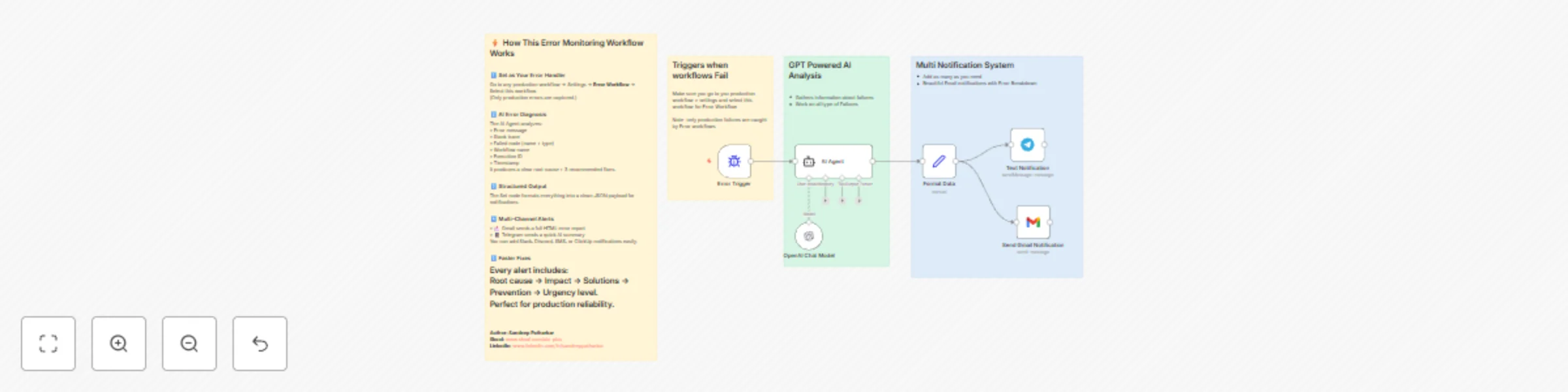
- 🚨 A Workflow Fails: When any workflow in your n8n instance encounters an error, this workflow is automatically triggered.
- 🧠 AI Analysis: The Error Trigger node passes the complete error context (message, stack trace, failing node, etc.) to a LangChain Agent. The agent is prompted to perform a deep analysis, identifying the root cause, potential solutions, impact, and urgency.
- ✨ Format Data: A Set node neatly organizes the original error details alongside the new, structured AI analysis into a single, clean data object.
- 📧 Send Detailed Report: The Gmail node uses this formatted data to construct a rich HTML email, presenting the error details and the AI's full analysis in a clear, actionable format, and sends it to your specified address.
🛠️ How to Set Up
This workflow is designed to be set as your instance's default error handler.
- 🔑 Add Credentials:
- Add your OpenAI API key to the
OpenAI Chat Modelnode. - Add your Gmail OAuth2 credentials to the
Send Gmail Notificationnode.
- Add your OpenAI API key to the
- ✏️ Configure Email: In the
Send Gmail Notificationnode, change the To field from[email protected]to your own email address or a team distribution list. - ⚙️ Set as Global Error Workflow:
- In your n8n instance, go to Settings > Workflow Default Settings.
- In the Error Workflow dropdown, select this workflow (
AI-Powered n8n Error Debugger & Notifier). - Save the changes.
- ▶️ Activate: Save and activate the workflow. It will now run automatically whenever another workflow fails.
💡 Customization Ideas
- Multi-Channel Alerts: Replace or add nodes to send notifications to Slack, Discord, or Telegram for more immediate team visibility.
- Create an Error Dashboard: Add a Google Sheets, Notion, or Baserow node after the
Format Datanode to log every error, creating a historical dashboard for tracking recurring issues. - Severity-Based Routing: Add an IF node to check the "Urgency Level" from the AI analysis. Route "Critical" errors to a PagerDuty or Twilio node to alert an on-call developer.
- Try Different Models: Swap the
OpenAI Chat Modelfor an Anthropic or Google Gemini node to compare analysis quality.
💬 Need Help or Want to Learn More?
- Join my Skool community for n8n + AI automation tutorials, live Q&A sessions, and exclusive workflows: 👉 https://www.skool.com/n8n-ai-automation-champions
Template Author: Sandeep Patharkar
Category: Utilities / DevOps
Difficulty: Intermediate
Estimated Setup Time: ⏱️ 10 minutes