Enrich company domains with business data using Perplexity AI and Google Sheets

Workflow preview

Workflow preview
100%
Enrich company domains with business data using Perplexity AI and Google Sheets preview
Open on n8n.io

Important notice

This workflow is provided as-is. Please review and test before using in production.

1. Workflow Overview

This workflow automatically enriches company domain lists with comprehensive business information using Perplexity AI's research capabilities and organizes the data in Google Sheets for easy analys...

Best for

  • Lead Generation automation workflows
  • AI Summarization automation workflows
  • intermediate n8n builders looking for reusable templates

Tools used

n8n-nodes-base.manualtrigger, n8n-nodes-base.googlesheets, n8n-nodes-base.splitinbatches, n8n-nodes-base.httprequest, n8n-nodes-base.code, n8n-nodes-base.stickynote

Source and attribution

This workflow is cataloged by N8N Workflows and links back to its original n8n.io source page by Naveen Choudhary.

Original n8n.io source

1.1 Workflow description

Title
Enrich company domains with business data using Perplexity AI and Google Sheets
Workflow name
Enrich company domains with business data using Perplexity AI and Google Sheets

This workflow automatically enriches company domain lists with comprehensive business information using Perplexity AI's research capabilities and organizes the data in Google Sheets for easy analysis and use.

Who's it for

  • Sales teams building prospect databases with accurate contact information
  • Marketing professionals researching target companies for campaigns
  • Business development teams gathering competitive intelligence
  • Data analysts enriching existing company datasets
  • Researchers collecting business information for market analysis

How it works

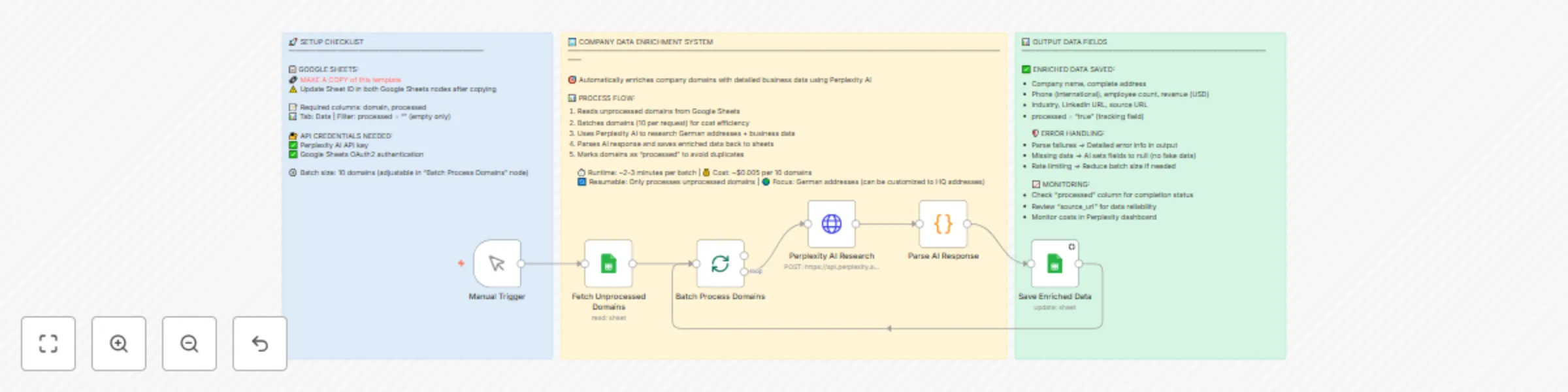
The workflow reads unprocessed company domains from a Google Sheets document, processes them in batches of 10 using Perplexity AI to research detailed business information, then saves the enriched data back to the spreadsheet. It focuses on German addresses but can be customized for any region.

What it does

  1. Fetches unprocessed domains - Reads company domains from Google Sheets that haven't been processed yet
  2. Batches for efficiency - Groups domains into batches of 10 to optimize API costs and performance
  3. AI-powered research - Uses Perplexity AI to find comprehensive business data for each company
  4. Parses structured data - Converts AI responses into clean, structured JSON format
  5. Updates spreadsheet - Saves enriched data and marks domains as processed to prevent duplicates

Requirements

  • Perplexity AI API key (Get one here)
  • Google Sheets API access (OAuth2 credentials)
  • Google Sheets template - Make a copy of this template

How to set up

  1. Make a copy of the template Google Sheet and update the document ID in both Google Sheets nodes
  2. Configure Perplexity AI credentials in the HTTP Request node
  3. Set up Google Sheets OAuth2 authentication
  4. Add your company domains to the "domain" column in the Data tab
  5. Leave the "processed" column empty for new domains
  6. Run the workflow using the manual trigger

How to customize the workflow

  • Change target region: Modify the AI prompt to research addresses in different countries
  • Adjust batch size: Change the batch size in the "Batch Process Domains" node (smaller batches = lower costs)
  • Add custom fields: Extend the AI prompt and Google Sheets mapping to include additional data points
  • Automate execution: Replace Manual Trigger with Schedule Trigger for regular processing
  • Filter criteria: Modify the Google Sheets filter to process specific subsets of domains

Output data includes

  • Complete company address (street, city, state, postal code, country)
  • International phone number format
  • Latest employee count and annual revenue (USD)
  • Industry classification
  • LinkedIn company URL
  • Reliable source URL for verification
  • Processing status tracking

1.2 Logical Blocks

This catalog entry is organized from the workflow JSON. The node-level section below shows the executable blocks available for review before importing the template.

2. Block-by-Block Analysis

Block 1 - Manual Trigger

Type / Role
n8n-nodes-base.manualTrigger - manualTrigger
Config choices
Version 1

Block 2 - Fetch Unprocessed Domains

Type / Role
n8n-nodes-base.googleSheets - googleSheets
Config choices
Version 4.6

Block 3 - Batch Process Domains

Type / Role
n8n-nodes-base.splitInBatches - splitInBatches
Config choices
Version 3

Block 4 - Perplexity AI Research

Type / Role
n8n-nodes-base.httpRequest - httpRequest
Config choices
Version 4.2

Block 5 - Parse AI Response

Type / Role
n8n-nodes-base.code - code
Config choices
Version 2

Block 6 - Save Enriched Data

Type / Role
n8n-nodes-base.googleSheets - googleSheets
Config choices
Version 4.6

Block 7 - Sticky Note

Type / Role
n8n-nodes-base.stickyNote - stickyNote
Config choices
Version 1

Block 8 - Sticky Note1

Type / Role
n8n-nodes-base.stickyNote - stickyNote
Config choices
Version 1

Block 9 - Sticky Note2

Type / Role
n8n-nodes-base.stickyNote - stickyNote
Config choices
Version 1

3. Summary Table

Workflow Enrich company domains with business data using Perplexity AI and Google Sheets
Complexity intermediate
Nodes 9
Categories Lead Generation, AI Summarization
Author Naveen Choudhary
Published 04 Aug 2025

4. Reproducing the Workflow from Scratch

  1. 1. Download the workflow JSON

    Use the JSON export at /data/workflows/6986/6986.json as the source template for this automation.

  2. 2. Import the template into n8n

    Open n8n, import the downloaded JSON, and review each node before activating the workflow.

  3. 3. Configure credentials and variables

    Replace placeholder credentials, API keys, webhook URLs, account IDs, and environment-specific values with your own settings.

  4. 4. Test with sample data

    Run the workflow manually or in a staging workspace, inspect node output, and confirm downstream systems receive the expected data.

  5. 5. Activate and monitor

    Enable the workflow only after testing, then monitor executions, errors, and rate limits during the first production runs.

5. General Notes & Resources

Review imported nodes carefully before activation. This catalog entry is intended to help you inspect the workflow structure, understand required services, and find related templates faster.

Node names, credentials, schedules, webhook paths, and external service limits may need adjustment for your workspace.

Frequently asked questions

What does Enrich company domains with business data using Perplexity AI and Google Sheets do?

This workflow automatically enriches company domain lists with comprehensive business information using Perplexity AI's research capabilities and organizes the data in Google Sheets for easy analys...

What do I need before importing this workflow?

Review the workflow JSON, configure any required credentials in n8n, and test the automation in a safe workspace before using it in production.

Can I customize this workflow?

Yes. Use the block-by-block analysis and the downloadable JSON to inspect each node, then adjust credentials, prompts, schedules, filters, or destinations for your Lead Generation, AI Summarization use case.