Email outreach drafter based on HubSpot data

Workflow preview

Workflow preview
100%
Email outreach drafter based on HubSpot data preview
Open on n8n.io

Important notice

This workflow is provided as-is. Please review and test before using in production.

1. Workflow Overview

This n8n template turns a small, targeted HubSpot list into tailored outreach. It scans each contact’s recent Gmail conversations, builds a lightweight persona with AI (tone, goals, pain points, de...

Best for

  • Lead Nurturing automation workflows
  • AI Chatbot automation workflows
  • advanced n8n builders looking for reusable templates

Tools used

n8n-nodes-base.noop, n8n-nodes-base.gmail, n8n-nodes-base.stickynote, n8n-nodes-base.splitinbatches, n8n-nodes-base.hubspot, @n8n/n8n-nodes-langchain.informationextractor, @n8n/n8n-nodes-langchain.lmchatgooglegemini, n8n-nodes-base.set

Source and attribution

This workflow is cataloged by N8N Workflows and links back to its original n8n.io source page by Miha.

Original n8n.io source

1.1 Workflow description

Title
Email outreach drafter based on HubSpot data
Workflow name
Email outreach drafter based on HubSpot data

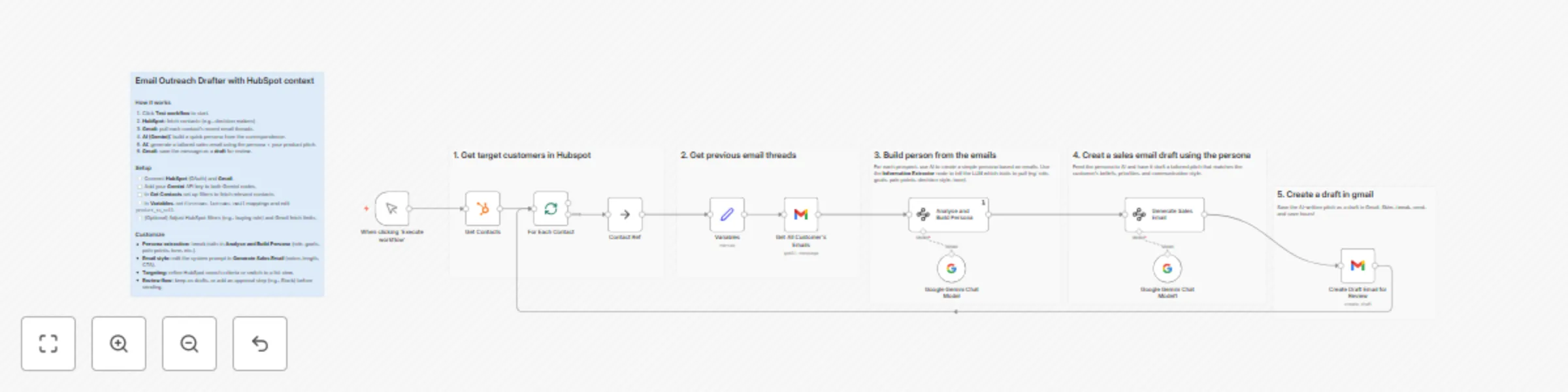
This n8n template turns a small, targeted HubSpot list into tailored outreach. It scans each contact’s recent Gmail conversations, builds a lightweight persona with AI (tone, goals, pain points, decision style), then drafts a concise sales email aligned to your offer—saved to Gmail as a reviewable draft.

Perfect for SDRs and founders who want personalization at scale without writing from scratch.

This template was originally created by Jim Le.


How it works

  • Manual trigger starts a controlled run.

  • HubSpot search pulls a focused list of contacts (e.g., hs_buying_role = DECISION_MAKER).

  • Batch loop processes contacts one by one.

  • Gmail fetch grabs up to 20 recent threads from each contact.

  • AI persona extraction (Information Extractor + Gemini) analyzes messages to capture:

    • decision-making style, communication preferences, goals/motivations
    • pain points, work style, personality traits, buying behavior, values, market awareness
  • Variables node sets core fields (first name, last name, email) and the offer you want to pitch.

  • AI email generation (Gemini) mirrors the contact’s tone and priorities; outputs subject + HTML body.

  • Gmail draft is created for the contact so a rep can skim, tweak, and send.


How to use

  1. Connect HubSpot on the “Get Contacts” node and refine the filter to your segment.
  2. Connect Gmail on both read and draft nodes (same account recommended).
  3. Add Gemini key to both Gemini nodes.
  4. In Variables, update product_to_sell with your offer and confirm the contact field mappings.
  5. (Optional) Tweak the persona attributes or the email prompt for tone/length/CTA.
  6. Click Test workflow. Review drafts in Gmail, edit if needed, then send.

Requirements

  • HubSpot (OAuth2) for contact targeting
  • Gmail (read + draft)
  • Google Gemini (API key) for persona + copy generation

Notes & customization

  • Tighter targeting: Change the HubSpot filter (e.g., industry, territory, lifecycle stage) to keep the list small and measurable.
  • Richer inputs: Increase Gmail limit or include received/sent filters to capture more context (mind rate limits).
  • Brand voice: Add a short style guide to the email generator’s system prompt (e.g., sentence length, jargon rules, sign-off).
  • Offer variants: Replace product_to_sell per segment, or branch by industry to load different value props.
  • Compliance & privacy: Limit stored outputs to essentials; avoid copying sensitive content from threads verbatim.
  • Auto-send option: Swap the draft step for “send email” if you want hands-off delivery for known segments.

1.2 Logical Blocks

This catalog entry is organized from the workflow JSON. The node-level section below shows the executable blocks available for review before importing the template.

2. Block-by-Block Analysis

Block 1 - Contact Ref

Type / Role
n8n-nodes-base.noOp - noOp
Config choices
Version 1

Block 2 - Get All Customer's Emails

Type / Role
n8n-nodes-base.gmail - gmail
Config choices
Version 2.1

Block 3 - Create Draft Email for Review

Type / Role
n8n-nodes-base.gmail - gmail
Config choices
Version 2.1

Block 4 - Sticky Note10

Type / Role
n8n-nodes-base.stickyNote - stickyNote
Config choices
Version 1

Block 5 - Sticky Note9

Type / Role
n8n-nodes-base.stickyNote - stickyNote
Config choices
Version 1

Block 6 - Sticky Note8

Type / Role
n8n-nodes-base.stickyNote - stickyNote
Config choices
Version 1

Block 7 - Sticky Note7

Type / Role
n8n-nodes-base.stickyNote - stickyNote
Config choices
Version 1

Block 8 - Sticky Note6

Type / Role
n8n-nodes-base.stickyNote - stickyNote
Config choices
Version 1

Block 9 - Sticky Note5

Type / Role
n8n-nodes-base.stickyNote - stickyNote
Config choices
Version 1

Block 10 - For Each Contact

Type / Role
n8n-nodes-base.splitInBatches - splitInBatches
Config choices
Version 3

Block 11 - Get Contacts

Type / Role
n8n-nodes-base.hubspot - hubspot
Config choices
Version 2.1

Block 12 - Analyse and Build Persona

Type / Role
@n8n/n8n-nodes-langchain.informationExtractor - informationExtractor
Config choices
Version 1

Block 13 - Generate Sales Email

Type / Role
@n8n/n8n-nodes-langchain.informationExtractor - informationExtractor
Config choices
Version 1

Block 14 - Google Gemini Chat Model1

Type / Role
@n8n/n8n-nodes-langchain.lmChatGoogleGemini - lmChatGoogleGemini
Config choices
Version 1

Block 15 - Google Gemini Chat Model

Type / Role
@n8n/n8n-nodes-langchain.lmChatGoogleGemini - lmChatGoogleGemini
Config choices
Version 1

Block 16 - Variables

Type / Role
n8n-nodes-base.set - set
Config choices
Version 3.4

Block 17 - When clicking 'Execute workflow'

Type / Role
n8n-nodes-base.manualTrigger - manualTrigger
Config choices
Version 1

3. Summary Table

Workflow Email outreach drafter based on HubSpot data
Complexity advanced
Nodes 17
Categories Lead Nurturing, AI Chatbot
Author Miha
Published 26 Sept 2025

4. Reproducing the Workflow from Scratch

  1. 1. Download the workflow JSON

    Use the JSON export at /data/workflows/8968/8968.json as the source template for this automation.

  2. 2. Import the template into n8n

    Open n8n, import the downloaded JSON, and review each node before activating the workflow.

  3. 3. Configure credentials and variables

    Replace placeholder credentials, API keys, webhook URLs, account IDs, and environment-specific values with your own settings.

  4. 4. Test with sample data

    Run the workflow manually or in a staging workspace, inspect node output, and confirm downstream systems receive the expected data.

  5. 5. Activate and monitor

    Enable the workflow only after testing, then monitor executions, errors, and rate limits during the first production runs.

5. General Notes & Resources

Review imported nodes carefully before activation. This catalog entry is intended to help you inspect the workflow structure, understand required services, and find related templates faster.

Node names, credentials, schedules, webhook paths, and external service limits may need adjustment for your workspace.

Frequently asked questions

What does Email outreach drafter based on HubSpot data do?

This n8n template turns a small, targeted HubSpot list into tailored outreach. It scans each contact’s recent Gmail conversations, builds a lightweight persona with AI (tone, goals, pain points, de...

What do I need before importing this workflow?

Review the workflow JSON, configure any required credentials in n8n, and test the automation in a safe workspace before using it in production.

Can I customize this workflow?

Yes. Use the block-by-block analysis and the downloadable JSON to inspect each node, then adjust credentials, prompts, schedules, filters, or destinations for your Lead Nurturing, AI Chatbot use case.