M

Miha

9
Workflows

Workflows by Miha

Workflow preview: AI sticky generator for n8n templates
Free intermediate

AI sticky generator for n8n templates

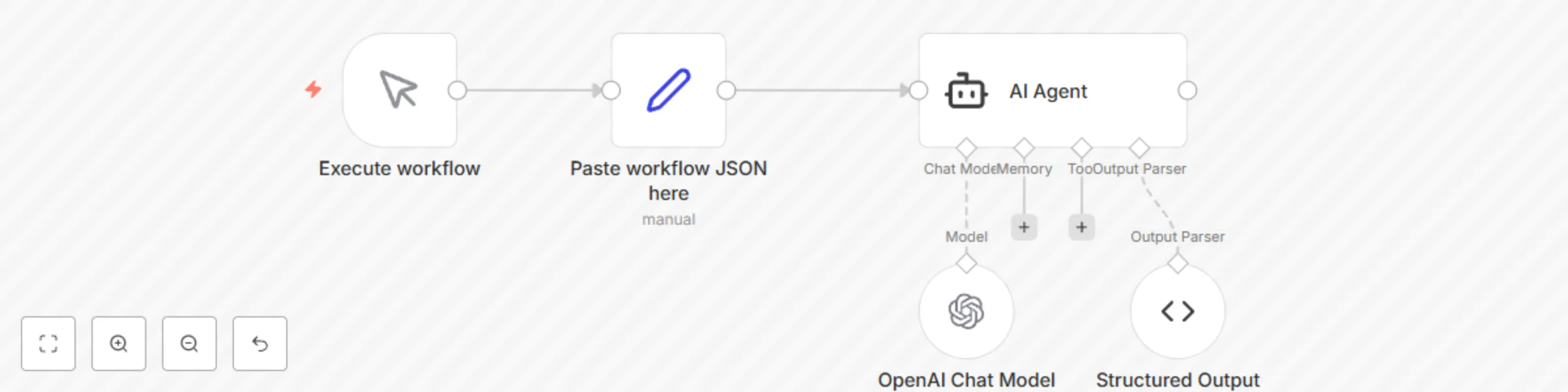
This workflow helps template creators automatically generate an overview sticky note for any n8n template. Paste your workflow JSON into the Set node, run the workflow, and the AI returns a ready-to-use sticky note node JSON with a clear title, “How it works” steps and a setup checklist - all formatted in Markdown and sized correctly for the canvas.

M
Miha
Document Extraction
14 Nov 2025
1077
0
Workflow preview: Chat with your HubSpot data
Free intermediate

Chat with your HubSpot data

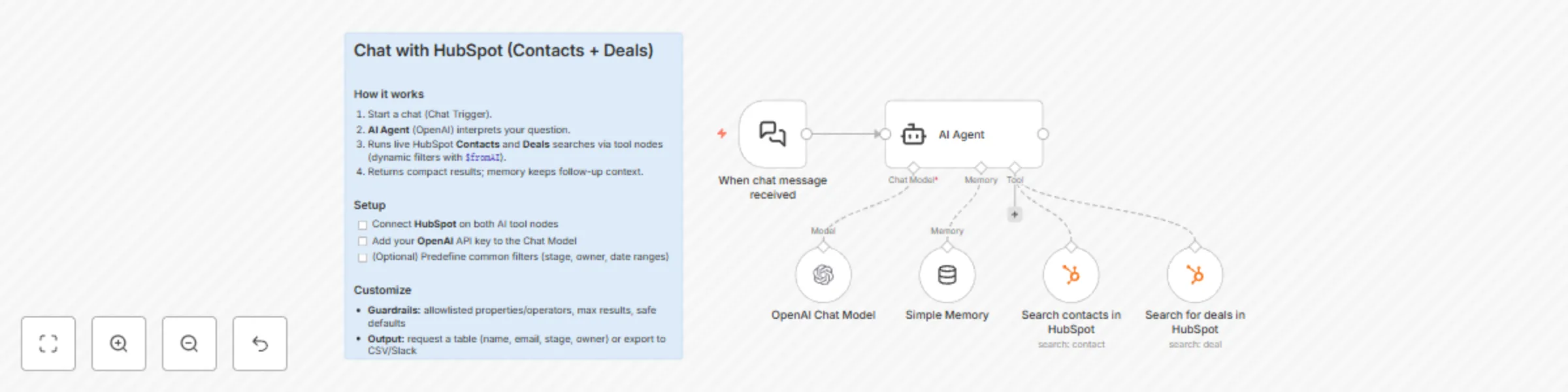
This n8n template gives you a chat-style assistant that can search your HubSpot CRM on demand. Ask natural-language questions like “show me leads in Germany” or “what deals close next month,” and the agent translates your request into precise HubSpot searches—then answers in plain English. Great for founders, AEs, and ops folks who want quick answers without clicking through the CRM. --- ## How it works * **Chat trigger** starts a session from your n8n chat UI or embed. * **AI Agent (Gemini 2.5 Pro)** interprets the message and: * Chooses the right **HubSpot search** (contacts or deals). * Fills filter **property**, **operator** (EQ, NEQ, GT, GTE, LT, LTE, BETWEEN, IN, NOT\_IN), and **value(s)**. * Requests specific properties (email, name, lifecycle stage, owner, activity timestamps, etc.). * **HubSpot tools** execute live queries: * **Contacts**: flexible property filter + free-text `query`. * **Deals**: filters by owner and core deal fields (stage, amount, pipeline, close date). * **Memory buffer** keeps the last turns so you can say “now only show closed won over 10k” and the agent understands context. --- ## How to use 1. **Connect credentials** * HubSpot OAuth on both HubSpot Tool nodes. * Google Gemini API key on the **Gemini Chat Model**. 2. **Open the chat** (the “When chat message received” node). 3. Ask questions like: * “Find contacts named **Hans** created **after Sept 1**.” * “Deals **owned by me** in **Proposal** with **amount > 10,000**.” * “Contacts with **lead status = New** and **no email reply** in the last 14 days.” 4. Refine with follow-ups: * “Sort by most recently contacted.” * “Only Germany.” * “Show top 5 with emails.” --- ## Requirements * **HubSpot** (OAuth2) * **Google Gemini** (API key) --- ## Notes & customization * **Property/operator control:** The contact search node lets the agent set both the property (e.g., `email`, `lifecyclestage`, `hs_lead_status`) and the operator (EQ, IN, BETWEEN in epoch ms for dates, etc.). * **Owner filtering for deals:** Uses `hs_all_owner_ids`; swap or extend to filter by pipeline/stage ranges. * **Guardrails:** Add allowlists for searchable properties or cap result counts to avoid noisy answers. * **Display format:** Have the agent return concise tables (name, email, stage, last activity, CTA). * **Handoffs:** Add Slack/Email actions—e.g., “post this list to #sales” or “export to CSV.” * **Telemetry:** Log queries for later dashboards (common searches, coverage gaps). --- ## Troubleshooting * **No results?** Loosen operators (use `IN` lists, broaden dates) or include a free-text `query`. * **Date filters:** Provide epoch ms for GT/GTE/LT/LTE/BETWEEN on time fields (the agent handles this; keep system time in UTC). * **Too chatty?** Reduce memory window or ask the agent to summarize to bullet points.

M
Miha
CRM
27 Sep 2025
2849
0
Workflow preview: Weekly HubSpot lead report to Slack
Free intermediate

Weekly HubSpot lead report to Slack

This n8n template posts a quick weekly snapshot to Slack so your team sees last week’s funnel movement at a glance. It counts how many contacts **entered the Lead stage** in the past week—and optionally reports **closed-won deals** from the same period. Perfect for GTM standups and Monday pipeline reviews. --- ## How it works * A **weekly schedule** (e.g., Mondays 07:00) kicks things off. * **HubSpot → Get all contacts** pulls contacts with `hs_v2_date_entered_lead`. * A **filter** keeps only those whose lead date is **within the last 7 days**. * **Summarize** counts the resulting leads. * **Slack** posts: “Last week we generated **X** leads.” * (Optional branch) **Deals**: * **HubSpot → Get all deals** with `hs_is_closed_won` and `hs_closed_won_date`. * **Filter** to **closed-won last week**. * **Summarize** to report count and (if mapped) total amount. --- ## How to use 1. **Connect HubSpot** on the contacts and (optional) deals nodes. 2. **Connect Slack** and pick the destination channel. 3. In **Schedule the report**, set your preferred day/time. 4. (Optional) For the Deals branch, include the `amount` property on “Get all deals” and set **Summarize → sum over `amount`**. 5. Activate the workflow. --- ## Requirements * **HubSpot** (OAuth2) * **Slack** (OAuth2) --- ## Notes & customization * **Time windows:** Adjust the filter to different periods (e.g., last 14 or 30 days). * **More stages:** Duplicate the contacts branch for MQL/SQL or custom lifecycle events. * **Richer Slack message:** Add emojis, trend vs. prior week, or a tiny leaderboard by owner. * **Segments:** Split by country/industry using HubSpot lists or additional filters.

M
Miha
CRM
26 Sep 2025
1181
0
Workflow preview: HubSpot contact AI enrichment
Free intermediate

HubSpot contact AI enrichment

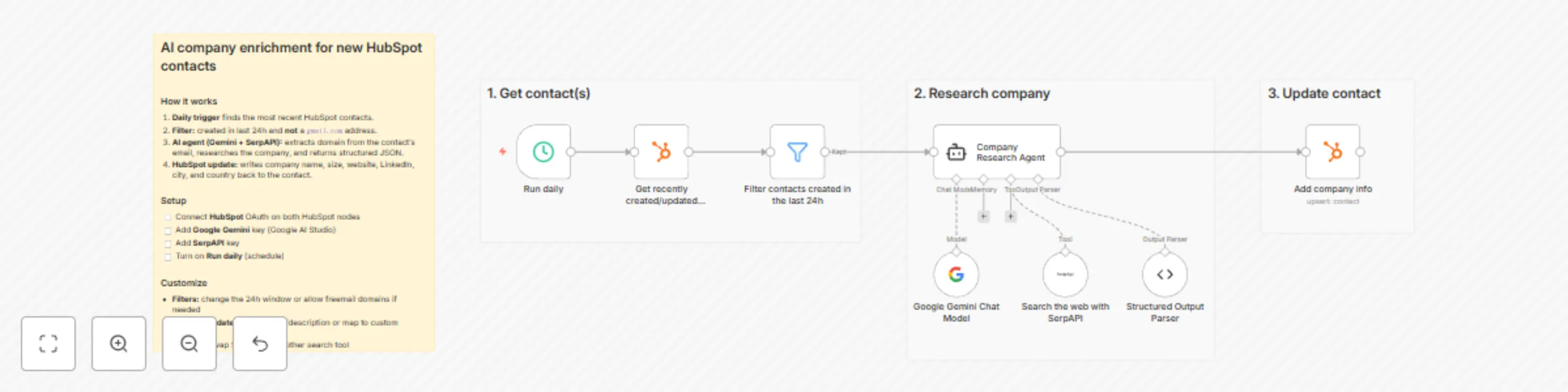
This n8n template auto-enriches brand-new HubSpot contacts with company details. Each day it finds contacts created in the last 24 hours (skipping free email domains), researches the company from the contact’s email domain, and writes back clean fields—no manual lookup needed. Perfect for GTM teams that want better segmentation and faster personalization from day one. --- ## How it works * A **daily schedule trigger** starts the workflow. * **HubSpot: Get recently created/updated contacts** pulls the newest records. * A **filter** keeps only contacts: * created **within the last 24 hours** * whose email domain **doesn’t contain `gmail.com`** (adjust as needed). * An **AI research agent (Gemini + SerpAPI)**: * extracts the company domain from the contact’s email * searches the web and returns **structured JSON**: * `company_name`, `industry`, `headquarters_city`, `headquarters_country`, `employee_count`, `website`, `linkedin`, `description` * **HubSpot: Add company info** updates the contact with the enriched fields. --- ## How to use 1. **Connect HubSpot** on both HubSpot nodes (OAuth2). 2. **Connect SerpAPI** (paste your API key). 3. **Connect Google Gemini** (Google AI Studio API key). 4. (Optional) Edit the **agent prompt** to fetch more/different fields. 5. (Optional) Tweak the **filter** to include/exclude other domains. 6. **Activate** the workflow to run daily. --- ## Requirements * **HubSpot** (OAuth2) for reading/updating contacts * **SerpAPI** for web search results * **Google Gemini** for company profiling and structured output --- ## Notes & customization * **Free domains:** Add more exclusions (e.g., `yahoo.com`, `outlook.com`) to reduce false positives. * **Confidence gating:** Require website + LinkedIn before writing to HubSpot, or route low-confidence results for manual review. * **Field mapping:** Extend the update step with additional properties (e.g., industry tags, HQ timezone). * **Frequency:** Switch the trigger to hourly for faster enrichment on high-volume inbound. * **Data hygiene:** Normalize employee count ranges and country names to your CRM picklists.

M
Miha
Lead Generation
26 Sep 2025
1145
0
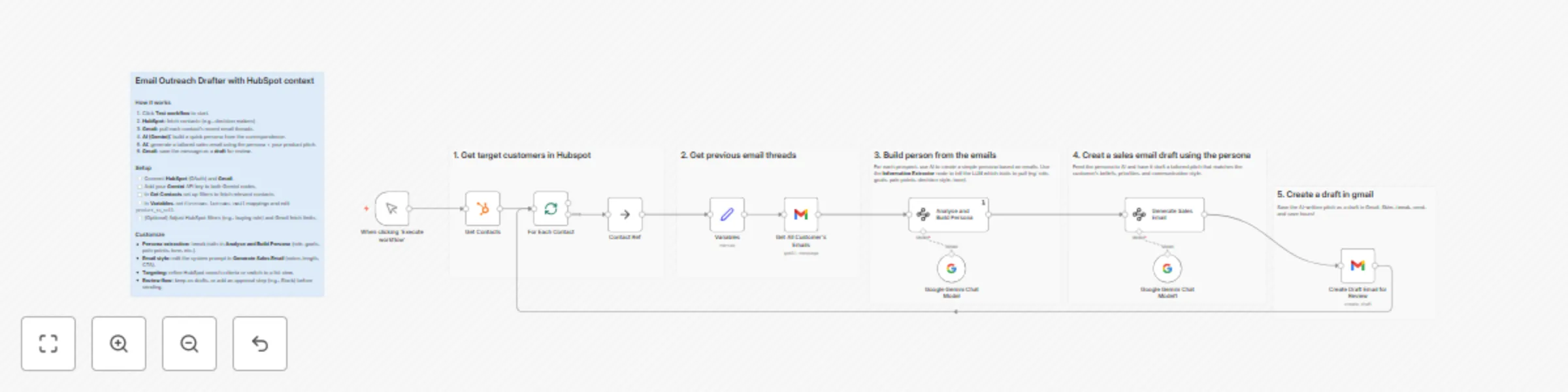
Workflow preview: Email outreach drafter based on HubSpot data
Free advanced

Email outreach drafter based on HubSpot data

This n8n template turns a small, targeted HubSpot list into tailored outreach. It scans each contact’s recent Gmail conversations, builds a lightweight persona with AI (tone, goals, pain points, decision style), then drafts a concise sales email aligned to your offer—saved to Gmail as a reviewable draft. Perfect for SDRs and founders who want personalization at scale without writing from scratch. This template was originally created by [Jim Le](https://n8n.io/creators/jimleuk/). --- ## How it works * **Manual trigger** starts a controlled run. * **HubSpot search** pulls a focused list of contacts (e.g., `hs_buying_role = DECISION_MAKER`). * **Batch loop** processes contacts one by one. * **Gmail fetch** grabs up to 20 recent threads from each contact. * **AI persona extraction** (Information Extractor + Gemini) analyzes messages to capture: * decision-making style, communication preferences, goals/motivations * pain points, work style, personality traits, buying behavior, values, market awareness * **Variables node** sets core fields (first name, last name, email) and the **offer** you want to pitch. * **AI email generation** (Gemini) mirrors the contact’s tone and priorities; outputs **subject** + **HTML body**. * **Gmail draft** is created for the contact so a rep can skim, tweak, and send. --- ## How to use 1. **Connect HubSpot** on the “Get Contacts” node and refine the filter to your segment. 2. **Connect Gmail** on both read and draft nodes (same account recommended). 3. **Add Gemini key** to both Gemini nodes. 4. In **Variables**, update `product_to_sell` with your offer and confirm the contact field mappings. 5. (Optional) Tweak the **persona attributes** or the **email prompt** for tone/length/CTA. 6. Click **Test workflow**. Review drafts in Gmail, edit if needed, then send. --- ## Requirements * **HubSpot** (OAuth2) for contact targeting * **Gmail** (read + draft) * **Google Gemini** (API key) for persona + copy generation --- ## Notes & customization * **Tighter targeting:** Change the HubSpot filter (e.g., industry, territory, lifecycle stage) to keep the list small and measurable. * **Richer inputs:** Increase Gmail `limit` or include received/sent filters to capture more context (mind rate limits). * **Brand voice:** Add a short style guide to the email generator’s system prompt (e.g., sentence length, jargon rules, sign-off). * **Offer variants:** Replace `product_to_sell` per segment, or branch by industry to load different value props. * **Compliance & privacy:** Limit stored outputs to essentials; avoid copying sensitive content from threads verbatim. * **Auto-send option:** Swap the draft step for “send email” if you want hands-off delivery for known segments.

M
Miha
Lead Nurturing
26 Sep 2025
1164
0
Workflow preview: AI email reply based on HubSpot data + Slack approval
Free advanced

AI email reply based on HubSpot data + Slack approval

This n8n template drafts customer-ready email replies using Google Gemini, enriched with HubSpot context (contact, deals, companies, tickets). Each draft is routed to Slack for one-click approval before it’s sent from Gmail—so you move fast without losing control. Ideal for support and sales teams that want speedy, personalized responses while keeping humans in the loop. --- ## How it works * **Gmail Trigger** watches for new inbound emails. * **Sender filter** excludes internal domains (e.g., `n8n.io`) to avoid auto-replying to teammates. * **HubSpot contact lookup** finds the sender and fetches associated **deals/companies/tickets** via association + batch read. * **CRM context is normalized** into clean, LLM-friendly fields (no IDs or sensitive noise). * **Gemini (Google AI Studio)** generates a concise, friendly reply using: * Sender name, subject, and message snippet * Safe, relevant HubSpot context (e.g., top 1–2 deals or an open ticket) * Style constraints (≤ \~150 words, single CTA, optional clarifying question) * **Slack approval** posts the draft to a channel; if **approved**, n8n **replies via Gmail** in the original thread. --- ## How to use 1. **Gmail:** Connect the same account for the trigger and reply nodes. 2. **HubSpot:** Connect OAuth on the search + HTTP request nodes. 3. **Gemini:** Add your **Google AI Studio** API key to the **Google Gemini Chat Model** node. 4. **Slack:** Connect and select the channel for draft approvals. 5. (Optional) **Filter:** Adjust the Allowed Sender filter before going live. 6. (Optional) **Prompt:** Edit “Draft Reply (AI Agent)” tone/length or how much CRM detail to include. 7. Activate the workflow. New emails will produce Slack-approved replies automatically. --- ## Requirements * **Gmail** (trigger + send) * **HubSpot** (OAuth2) for contact + associations * **Slack** for approval step * **Google Gemini** (Google AI Studio API key) --- ## Notes & customization * **Safety rails:** The prompt avoids exposing IDs/raw JSON and caps CRM details to what’s useful. * **Auto-send mode:** Skip Slack if you want fully automated replies for specific senders/labels. * **Richer context:** Extend the batch read to pull more properties (e.g., next step, renewal date). * **Triage:** Branch on subject/labels to route billing vs. technical requests to different prompts. * **QA queue:** If the model asks a clarifying question, keep it to **one**—the node enforces that.

M
Miha
Lead Nurturing
26 Sep 2025
2214
0
Workflow preview: AI call summary to HubSpot + follow-up task
Free intermediate

AI call summary to HubSpot + follow-up task

This n8n template turns raw call transcripts into clean HubSpot call logs and a single, actionable follow-up task—automatically. Paste a transcript and the contact’s email; the workflow finds the contact, summarizes the conversation in 120–160 words, proposes the next best action, and (optionally) updates missing contact fields. Perfect for reps and founders who want accurate CRM hygiene without the manual busywork. --- ## How it works * A **form trigger** collects two inputs: * **Contact email** * **Plain-text call transcript** * The workflow **looks up the HubSpot contact** by email to pull known properties. * An **AI agent** reads the transcript (plus known fields) to: * Extract participants, role, problem/opportunity, requirements, blockers, timeline, and metrics. * Write a **120–160 word** recap a teammate can skim. * Generate **one concrete follow-up task** (title + body). * Suggest updates for missing contact properties (city, country, job title, job function). * The recap is **logged to HubSpot** as a completed **Call** engagement. * The follow-up is **created in HubSpot** as a **Task** with subject and body. * (Optional) The **contact record is updated** using AI-suggested values if the transcript clearly mentions them. --- ## How to use 1. **Connect HubSpot (OAuth2)** on all HubSpot nodes. 2. **Connect OpenAI** on the AI nodes. 3. Open **Form: Capture Transcript**, submit the **email + transcript**. 4. (Optional) In **AI: Summarize Call & Draft Task**, tweak prompt rules (word count, date normalization). 5. (Optional) In **Update Contact from Transcript**, review the mapped fields before enabling in production. 6. Activate the workflow and paste transcripts after each call. --- ## Requirements * **HubSpot** (OAuth2) for contact search, call logging, and tasks * **OpenAI** for summarization and task drafting --- ## Notes & customization ideas * Swap the form for a **Google Drive** or **S3** watcher to ingest saved transcripts. * Add a speech-to-text step if you store **audio recordings**. * Extend **Update Contact** to include additional fields (timezone, department, seniority). * Post the summary to **Slack** or **email** the AE for quick handoffs. * Gate updates with a confidence check, or route low-confidence changes for **manual approval**.

M
Miha
CRM
26 Sep 2025
3633
0
Workflow preview: Learn n8n basics in 3 easy steps ✨
Free advanced

Learn n8n basics in 3 easy steps ✨

New to n8n? This simple tutorial is the perfect way to get started. In just a few minutes, you’ll build your first automation that runs on a schedule, fetches fresh data from the internet and delivers it straight to your inbox. ### What you’ll do 1. **Run the workflow** to grab a random inspirational quote. 2. **See how data flows** through each node as it moves from an API call to processing results. 3. **Connect Gmail** and send the quote directly to your email. ### What you’ll learn * How to trigger workflows manually and on a schedule ⏰ * How to connect to external APIs and fetch data 🌐 * How to use the **Set** node to structure and map data 🔧 * How to connect Gmail to send the data 📩 ### Why it matters This workflow shows you the n8n basics step by step - no code required. By the end, you’ll know how to build, test, and share automations that run on their own, giving you the confidence to explore more advanced use cases. 🚀

M
Miha
Personal Productivity
12 Sep 2025
132726
0
Workflow preview: Personalized AI tech newsletter using RSS, OpenAI and Gmail
Free advanced

Personalized AI tech newsletter using RSS, OpenAI and Gmail

## Combine Tech News in a Personalized Weekly Newsletter This n8n template automates the collection, storage, and summarization of technology news from top sites, turning it into a concise, personalized weekly newsletter. If you like staying informed but want to reduce daily distractions, this workflow is perfect for you. It leverages RSS feeds, vector databases, and LLMs to read and curate tech content on your behalf—so you only receive what truly matters. --- ## How it works * A **daily scheduled trigger** fetches articles from multiple popular tech RSS feeds like Wired, TechCrunch, and The Verge. * Fetched articles are: * **Normalized** to extract titles, summaries, and publish dates. * **Converted to vector embeddings** via OpenAI and stored in memory for fast semantic querying. * A **weekly scheduled trigger** activates the AI summarization flow: * The AI is provided with your interests (e.g., *AI, games, gadgets*) and the desired number of items (e.g., 15). * It queries the vector store to retrieve relevant articles and summarizes the most newsworthy stories. * The summary is converted into a clean, email-friendly format and sent to your inbox. --- ## How to use 1. Connect your **OpenAI** and **Gmail** accounts to n8n. 2. Customize the list of RSS feeds in the “Set Tech News RSS Feeds” node. 3. Update your interests and number of desired news items in the “Your Topics of Interest” node. 4. Activate the workflow and let the automation run on schedule. --- ## Requirements * **OpenAI** credentials for embeddings and summarization * **Gmail** (or another email service) for sending the newsletter --- ## Customizing this workflow * Want to use different sources? Swap in your own RSS feeds, or use an API-based news aggregator. * Replace the in-memory vector store with **Pinecone**, **Weaviate**, or another persistent vector DB for longer-term storage. * Adjust the agent's summarization style to suit internal updates, industry-specific briefings, or even entertainment recaps. * Prefer chat over email? Replace the email node with a **Telegram bot** to receive your personalized tech newsletter directly in a Telegram chat.

M
Miha
Personal Productivity
12 May 2025
64622
0