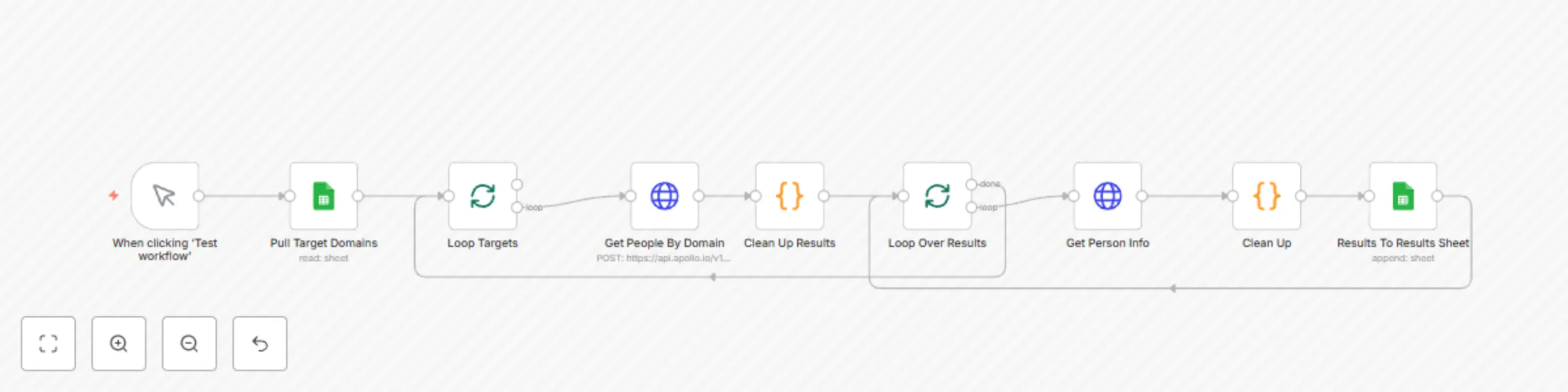
Domain to email extraction using Apollo API

Workflow preview

Workflow preview
100%
Domain to email extraction using Apollo API preview
Open on n8n.io

Important notice

This workflow is provided as-is. Please review and test before using in production.

1. Workflow Overview

Who is this for? Sales professionals looking to build lead lists from target company domains Business development teams conducting outreach campaigns Marketers building contact databases for accoun...

Best for

  • Lead Generation automation workflows
  • intermediate n8n builders looking for reusable templates

Tools used

n8n-nodes-base.manualtrigger, n8n-nodes-base.splitinbatches, n8n-nodes-base.googlesheets, n8n-nodes-base.httprequest, n8n-nodes-base.code

Source and attribution

This workflow is cataloged by N8N Workflows and links back to its original n8n.io source page by Hueston.

Original n8n.io source

1.1 Workflow description

Title
Domain to email extraction using Apollo API
Workflow name
Domain to email extraction using Apollo API

Who is this for?

  • Sales professionals looking to build lead lists from target company domains
  • Business development teams conducting outreach campaigns
  • Marketers building contact databases for account-based marketing
  • Recruiters searching for potential candidates at specific companies
  • Anyone needing to transform a list of company domains into actionable contact information

What problem is this workflow solving?

Finding business email addresses for outreach is a time-consuming process. The Apollo API doesn't provide a direct way to extract email contacts from domains in a single call. This workflow bridges that gap by:

  1. Automating the two-step process required by Apollo's API
  2. Processing multiple domains in batches without manual intervention
  3. Extracting, enriching, and storing contact information in a structured format
  4. Eliminating hours of manual data entry and API interaction

What this workflow does

This workflow creates an automated pipeline between Google Sheets and Apollo's API to:

  1. Pull a list of target domains from a Google Sheet
  2. Submit each domain to Apollo's search API to find associated people
  3. Loop through each person found and enrich their profile data
  4. Extract key information: name, title, email address, and LinkedIn URL
  5. Write the enriched contact information back to a results sheet
  6. Process the next domain automatically until all are complete

Setup

Prerequisites:

  • An n8n instance (cloud or self-hosted)
  • Apollo.io account with API access
  • Google account with access to Google Sheets

Google Sheets Setup:

  1. Create a new Google Sheet with two tabs:
    • Tab 1: "Target Domains" with a column named "Domain To Enrich"
    • Tab 2: "Results" with columns: Company, First Name, Last Name, Title, Email, LinkedIn

n8n Setup:

  1. Import the workflow JSON into your n8n instance
  2. Set up Google Sheets credentials in n8n
  3. Update the Google Sheets document ID in both Google Sheets nodes
  4. Add your Apollo API key to both HTTP Request nodes
  5. Review and adjust API rate limits if needed

Testing:

  1. Add a few test domains to your "Target Domains" sheet
  2. Run the workflow manually to verify it's working correctly
  3. Check the "Results" sheet to confirm data is being properly populated

How to customize this workflow to your needs

Adding More Contact Fields:

  1. Modify the "Clean Up" node to extract additional fields from the Apollo API response
  2. Add corresponding columns to your "Results" sheet
  3. Update the "Results To Results Sheet" node mapping to include the new fields

Filtering Results:

  1. Add a Filter node after "Clean Up" to include only contacts with specific roles
  2. Create conditions based on title, seniority, or other fields returned by Apollo

Automating Workflow Execution:

  1. Replace the manual trigger with a Schedule Trigger to run daily/weekly
  2. Add a Filter node to process only domains with "Not Processed" status
  3. Update the status field in Google Sheets after processing

Additional Notes

  • This workflow respects Apollo's API rate limits by processing one contact at a time
  • The Apollo API may not return contact information for all domains or all employees
  • Consider legal and privacy implications when collecting and storing contact information

Made with ❤️ by Hueston

1.2 Logical Blocks

This catalog entry is organized from the workflow JSON. The node-level section below shows the executable blocks available for review before importing the template.

2. Block-by-Block Analysis

Block 1 - When clicking ‘Test workflow’

Type / Role
n8n-nodes-base.manualTrigger - manualTrigger
Config choices
Version 1

Block 2 - Loop Targets

Type / Role
n8n-nodes-base.splitInBatches - splitInBatches
Config choices
Version 3

Block 3 - Pull Target Domains

Type / Role
n8n-nodes-base.googleSheets - googleSheets
Config choices
Version 4.5

Block 4 - Get People By Domain

Type / Role
n8n-nodes-base.httpRequest - httpRequest
Config choices
Version 4.2

Block 5 - Clean Up Results

Type / Role
n8n-nodes-base.code - code
Config choices
Version 2

Block 6 - Loop Over Results

Type / Role
n8n-nodes-base.splitInBatches - splitInBatches
Config choices
Version 3

Block 7 - Get Person Info

Type / Role
n8n-nodes-base.httpRequest - httpRequest
Config choices
Version 4.2

Block 8 - Clean Up

Type / Role
n8n-nodes-base.code - code
Config choices
Version 2

Block 9 - Results To Results Sheet

Type / Role
n8n-nodes-base.googleSheets - googleSheets
Config choices
Version 4.5

3. Summary Table

Workflow Domain to email extraction using Apollo API
Complexity intermediate
Nodes 9
Categories Lead Generation
Author Hueston
Published 16 Apr 2025

4. Reproducing the Workflow from Scratch

  1. 1. Download the workflow JSON

    Use the JSON export at /data/workflows/3581/3581.json as the source template for this automation.

  2. 2. Import the template into n8n

    Open n8n, import the downloaded JSON, and review each node before activating the workflow.

  3. 3. Configure credentials and variables

    Replace placeholder credentials, API keys, webhook URLs, account IDs, and environment-specific values with your own settings.

  4. 4. Test with sample data

    Run the workflow manually or in a staging workspace, inspect node output, and confirm downstream systems receive the expected data.

  5. 5. Activate and monitor

    Enable the workflow only after testing, then monitor executions, errors, and rate limits during the first production runs.

5. General Notes & Resources

Review imported nodes carefully before activation. This catalog entry is intended to help you inspect the workflow structure, understand required services, and find related templates faster.

Node names, credentials, schedules, webhook paths, and external service limits may need adjustment for your workspace.

Frequently asked questions

What does Domain to email extraction using Apollo API do?

Who is this for? Sales professionals looking to build lead lists from target company domains Business development teams conducting outreach campaigns Marketers building contact databases for accoun...

What do I need before importing this workflow?

Review the workflow JSON, configure any required credentials in n8n, and test the automation in a safe workspace before using it in production.

Can I customize this workflow?

Yes. Use the block-by-block analysis and the downloadable JSON to inspect each node, then adjust credentials, prompts, schedules, filters, or destinations for your Lead Generation use case.