H

Hueston

2
Workflows

Workflows by Hueston

Workflow preview: Extract named entities from web pages with Google Natural Language API
Free intermediate

Extract named entities from web pages with Google Natural Language API

### Who is this for? - Content strategists analyzing web page semantic content - SEO professionals conducting entity-based analysis - Data analysts extracting structured data from web pages - Marketers researching competitor content strategies - Researchers organizing and categorizing web content - Anyone needing to automatically extract entities from web pages ### What problem is this workflow solving? Manually identifying and categorizing entities (people, organizations, locations, etc.) on web pages is time-consuming and error-prone. This workflow solves this challenge by: - Automating the extraction of named entities from any web page - Leveraging Google's powerful Natural Language API for accurate entity recognition - Processing web pages through a simple webhook interface - Providing structured entity data that can be used for analysis or further processing - Eliminating hours of manual content analysis and categorization ## What this workflow does This workflow creates an automated pipeline between a webhook and Google's Natural Language API to: 1. Receive a URL through a webhook endpoint 2. Fetch the HTML content from the specified URL 3. Clean and prepare the HTML for processing 4. Submit the HTML to Google's Natural Language API for entity analysis 5. Return the structured entity data through the webhook response 6. Extract entities including people, organizations, locations, and more with their salience scores ### Setup Prerequisites: - An n8n instance (cloud or self-hosted) - Google Cloud Platform account with Natural Language API enabled - Google API key with access to the Natural Language API ### Google Cloud Setup: - Create a project in Google Cloud Platform - Enable the Natural Language API for your project - Create an API key with access to the Natural Language API - Copy your API key for use in the workflow ### n8n Setup: - Import the workflow JSON into your n8n instance - Replace "YOUR-GOOGLE-API-KEY" in the "Google Entities" node with your actual API key - Activate the workflow to enable the webhook endpoint - Copy the webhook URL from the "Webhook" node for later use ### Testing: - Use a tool like Postman or cURL to send a POST request to your webhook URL - Include a JSON body with the URL you want to analyze: {"url": "https://example.com"} - Verify that you receive a response containing the entity analysis data ### How to customize this workflow to your needs ### Analyzing Specific Entity - Modify the "Google Entities" node parameters to include entityType filters - Add a "Function" node after "Google Entities" to filter specific entity types - Create conditions to extract only entities of interest (people, organizations, etc.) ### Processing Multiple URLs in Batch: - Replace the webhook with a different trigger (HTTP Request, Google Sheets, etc.) - Add a "Split In Batches" node to process multiple URLs - Use a "Merge" node to combine results before sending the response ### Enhancing Entity Data: - Add additional API calls to enrich extracted entities with more information - Implement sentiment analysis alongside entity extraction - Create a data transformation node to format entities by type or relevance ### Additional Notes - This workflow respects Google's API rate limits by processing one URL at a time - The Natural Language API may not identify all entities on a page, particularly for highly technical content - HTML content is trimmed to 100,000 characters if longer to avoid API limitations - Consider legal and privacy implications when analyzing and storing entity data from web pages - You may want to adjust the HTML cleaning process for specific website structures ❤️ [Hueston SEO Team](https://hueston.co)

H
Hueston
Market Research
9 May 2025
428
0
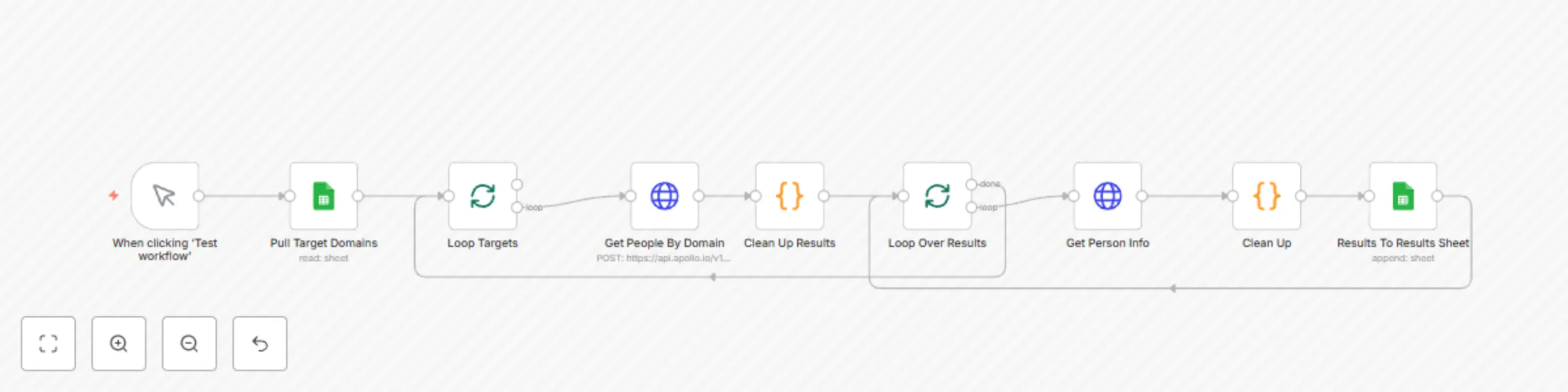
Workflow preview: Domain to email extraction using Apollo API
Free intermediate

Domain to email extraction using Apollo API

## Who is this for? - Sales professionals looking to build lead lists from target company domains - Business development teams conducting outreach campaigns - Marketers building contact databases for account-based marketing - Recruiters searching for potential candidates at specific companies - Anyone needing to transform a list of company domains into actionable contact information ## What problem is this workflow solving? Finding business email addresses for outreach is a time-consuming process. The Apollo API doesn't provide a direct way to extract email contacts from domains in a single call. This workflow bridges that gap by: 1. Automating the two-step process required by Apollo's API 2. Processing multiple domains in batches without manual intervention 3. Extracting, enriching, and storing contact information in a structured format 4. Eliminating hours of manual data entry and API interaction ## What this workflow does This workflow creates an automated pipeline between Google Sheets and Apollo's API to: 1. Pull a list of target domains from a Google Sheet 2. Submit each domain to Apollo's search API to find associated people 3. Loop through each person found and enrich their profile data 4. Extract key information: name, title, email address, and LinkedIn URL 5. Write the enriched contact information back to a results sheet 6. Process the next domain automatically until all are complete ## Setup ### Prerequisites: - An n8n instance (cloud or self-hosted) - Apollo.io account with API access - Google account with access to Google Sheets ### Google Sheets Setup: 1. Create a new Google Sheet with two tabs: - Tab 1: "Target Domains" with a column named "Domain To Enrich" - Tab 2: "Results" with columns: Company, First Name, Last Name, Title, Email, LinkedIn ### n8n Setup: 1. Import the workflow JSON into your n8n instance 2. Set up Google Sheets credentials in n8n 3. Update the Google Sheets document ID in both Google Sheets nodes 4. Add your Apollo API key to both HTTP Request nodes 5. Review and adjust API rate limits if needed ### Testing: 1. Add a few test domains to your "Target Domains" sheet 2. Run the workflow manually to verify it's working correctly 3. Check the "Results" sheet to confirm data is being properly populated ## How to customize this workflow to your needs ### Adding More Contact Fields: 1. Modify the "Clean Up" node to extract additional fields from the Apollo API response 2. Add corresponding columns to your "Results" sheet 3. Update the "Results To Results Sheet" node mapping to include the new fields ### Filtering Results: 1. Add a Filter node after "Clean Up" to include only contacts with specific roles 2. Create conditions based on title, seniority, or other fields returned by Apollo ### Automating Workflow Execution: 1. Replace the manual trigger with a Schedule Trigger to run daily/weekly 2. Add a Filter node to process only domains with "Not Processed" status 3. Update the status field in Google Sheets after processing ## Additional Notes - This workflow respects Apollo's API rate limits by processing one contact at a time - The Apollo API may not return contact information for all domains or all employees - Consider legal and privacy implications when collecting and storing contact information Made with ❤️ by [Hueston](https://hueston.co/)

H
Hueston
Lead Generation
17 Apr 2025
2872
0