Cv resume PDF parsing with multimodal vision AI

Workflow preview

Workflow preview
100%
Cv resume PDF parsing with multimodal vision AI preview
Open on n8n.io

Important notice

This workflow is provided as-is. Please review and test before using in production.

1. Workflow Overview

This n8n workflow demonstrates how we can use Multimodal LLMs to parse and extract from PDF documents in n8n. In this particular scenario, we're passing a candidate's CV/resume to an AI which filte...

Best for

  • HR automation workflows
  • AI Summarization automation workflows
  • intermediate n8n builders looking for reusable templates

Tools used

n8n-nodes-base.manualtrigger, n8n-nodes-base.stickynote, @n8n/n8n-nodes-langchain.outputparserstructured, n8n-nodes-base.if, n8n-nodes-base.googledrive, n8n-nodes-base.httprequest, n8n-nodes-base.editimage, @n8n/n8n-nodes-langchain.lmchatgooglegemini

Source and attribution

This workflow is cataloged by N8N Workflows and links back to its original n8n.io source page by Jimleuk.

Original n8n.io source

1.1 Workflow description

Title
Cv resume PDF parsing with multimodal vision AI
Workflow name
Cv resume PDF parsing with multimodal vision AI

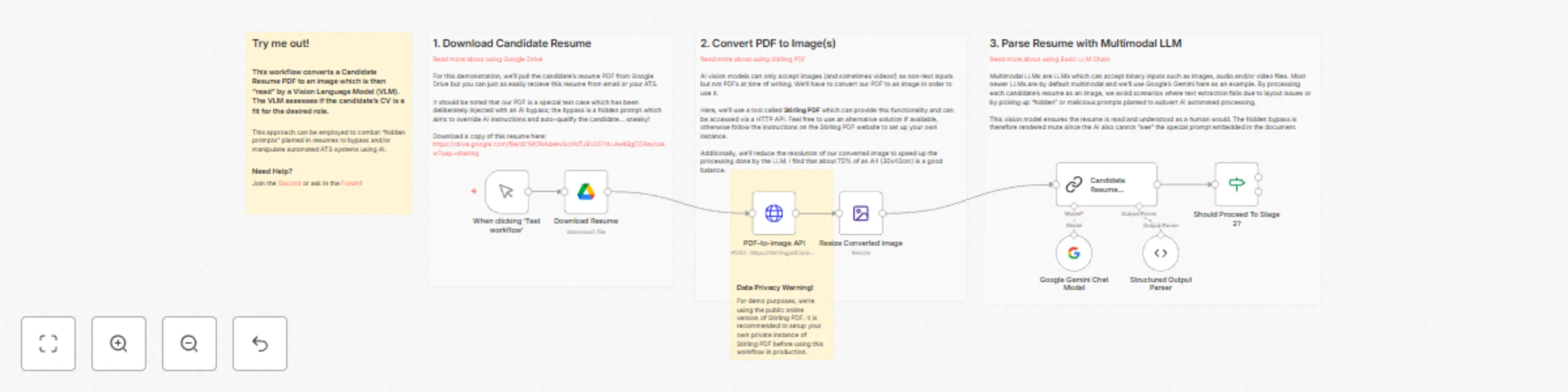
This n8n workflow demonstrates how we can use Multimodal LLMs to parse and extract from PDF documents in n8n.

In this particular scenario, we're passing a candidate's CV/resume to an AI which filters out unqualified applications. However, this sneaky candidate has added in hidden prompt to bypass our bot! Whatever will we do? No fret, using AI Vision is one approach to solve this problem... read on!

How it works

  • Our candidate's CV/Resume is a PDF downloaded via Google Drive for this demonstration.
  • The PDF is then converted into an image PNG using a tool called Stirling PDF. Since the hidden prompt has a white font color, it is is invisible in the converted image.
  • The image is then forwarded to a Basic LLM node to process using our multimodal model - in this example, we'll use Google's Gemini 1.5 Pro.
  • In the Basic LLM node, we'll need to set a User Message with the type of Binary. This allows us to directly send the image file in our request.
  • The LLM is now immune to the hidden prompt and its response is has expected.

The example CV/Resume with hidden prompt can be found here: https://drive.google.com/file/d/1MORAdeev6cMcTJBV2EYALAwll8gCDRav/view?usp=sharing

Requirements

  • Google Gemini API Key. Alternatively, GPT4 will also work for this use-case.
  • Stirling PDF or another service which can convert PDFs into images. Note for data privacy, this example uses a public API and it is recommended that you self-host and use a private instance of Stirling PDF instead.

Customising the workflow

  • Swap out the manual trigger for another trigger such as a webhook to integrate into your existing services.
  • This example demonstrates a validation use-case ie. "does the candidate look qualified?". You can try additionally extracting data points instead such as years of experiences, previous companies etc.

1.2 Logical Blocks

This catalog entry is organized from the workflow JSON. The node-level section below shows the executable blocks available for review before importing the template.

2. Block-by-Block Analysis

Block 1 - When clicking ‘Test workflow’

Type / Role
n8n-nodes-base.manualTrigger - manualTrigger
Config choices
Version 1

Block 2 - Sticky Note

Type / Role
n8n-nodes-base.stickyNote - stickyNote
Config choices
Version 1

Block 3 - Structured Output Parser

Type / Role
@n8n/n8n-nodes-langchain.outputParserStructured - outputParserStructured
Config choices
Version 1.2

Block 4 - Should Proceed To Stage 2?

Type / Role
n8n-nodes-base.if - if
Config choices
Version 2

Block 5 - Sticky Note1

Type / Role
n8n-nodes-base.stickyNote - stickyNote
Config choices
Version 1

Block 6 - Download Resume

Type / Role
n8n-nodes-base.googleDrive - googleDrive
Config choices
Version 3

Block 7 - Sticky Note2

Type / Role
n8n-nodes-base.stickyNote - stickyNote
Config choices
Version 1

Block 8 - Sticky Note3

Type / Role
n8n-nodes-base.stickyNote - stickyNote
Config choices
Version 1

Block 9 - PDF-to-Image API

Type / Role
n8n-nodes-base.httpRequest - httpRequest
Config choices
Version 4.2

Block 10 - Resize Converted Image

Type / Role
n8n-nodes-base.editImage - editImage
Config choices
Version 1

Block 11 - Google Gemini Chat Model

Type / Role
@n8n/n8n-nodes-langchain.lmChatGoogleGemini - lmChatGoogleGemini
Config choices
Version 1

Block 12 - Candidate Resume Analyser

Type / Role
@n8n/n8n-nodes-langchain.chainLlm - chainLlm
Config choices
Version 1.4

Block 13 - Sticky Note4

Type / Role
n8n-nodes-base.stickyNote - stickyNote
Config choices
Version 1

3. Summary Table

Workflow Cv resume PDF parsing with multimodal vision AI
Complexity intermediate
Nodes 13
Categories HR, AI Summarization
Author Jimleuk
Published 16 Sept 2024

4. Reproducing the Workflow from Scratch

  1. 1. Download the workflow JSON

    Use the JSON export at /data/workflows/2416/2416.json as the source template for this automation.

  2. 2. Import the template into n8n

    Open n8n, import the downloaded JSON, and review each node before activating the workflow.

  3. 3. Configure credentials and variables

    Replace placeholder credentials, API keys, webhook URLs, account IDs, and environment-specific values with your own settings.

  4. 4. Test with sample data

    Run the workflow manually or in a staging workspace, inspect node output, and confirm downstream systems receive the expected data.

  5. 5. Activate and monitor

    Enable the workflow only after testing, then monitor executions, errors, and rate limits during the first production runs.

5. General Notes & Resources

Review imported nodes carefully before activation. This catalog entry is intended to help you inspect the workflow structure, understand required services, and find related templates faster.

Node names, credentials, schedules, webhook paths, and external service limits may need adjustment for your workspace.

Frequently asked questions

What does Cv resume PDF parsing with multimodal vision AI do?

This n8n workflow demonstrates how we can use Multimodal LLMs to parse and extract from PDF documents in n8n. In this particular scenario, we're passing a candidate's CV/resume to an AI which filte...

What do I need before importing this workflow?

Review the workflow JSON, configure any required credentials in n8n, and test the automation in a safe workspace before using it in production.

Can I customize this workflow?

Yes. Use the block-by-block analysis and the downloadable JSON to inspect each node, then adjust credentials, prompts, schedules, filters, or destinations for your HR, AI Summarization use case.