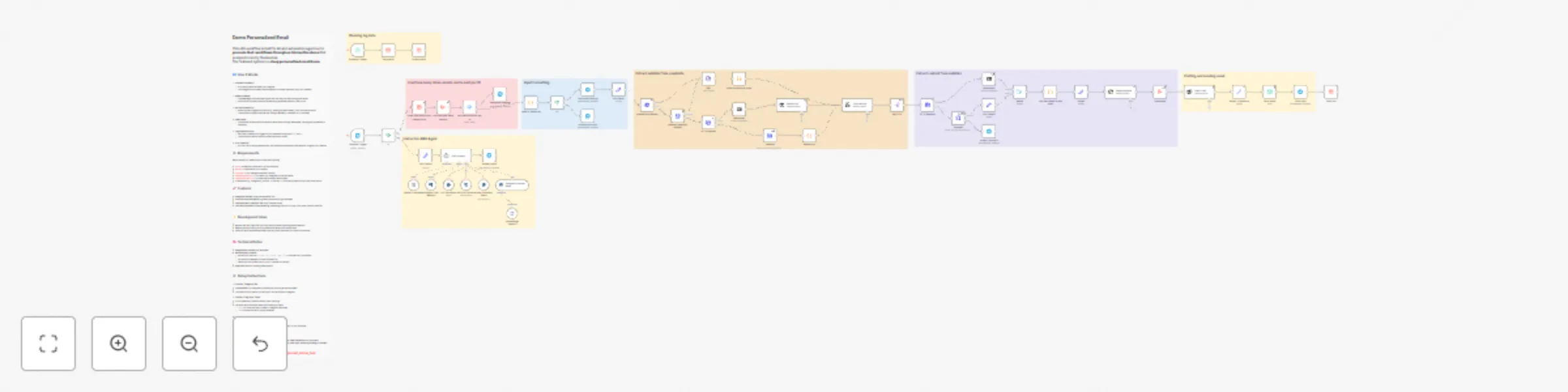
Create personalized email outreach with AI, Telegram bot & website scraping

Workflow preview

Workflow preview
100%
Create personalized email outreach with AI, Telegram bot & website scraping preview
Open on n8n.io

Important notice

This workflow is provided as-is. Please review and test before using in production.

1. Workflow Overview

Demo Personalized Email This n8n workflow is built for AI and automation agencies to promote their workflows through an interactive demo that prospects can try themselves. The featured system is a ...

Best for

  • Lead Nurturing automation workflows
  • AI Chatbot automation workflows
  • advanced n8n builders looking for reusable templates

Tools used

n8n-nodes-base.telegramtrigger, n8n-nodes-base.set, n8n-nodes-base.httprequest, n8n-nodes-base.markdown, @n8n/n8n-nodes-langchain.openai, n8n-nodes-base.splitout, n8n-nodes-base.aggregate, n8n-nodes-base.emailsend

Source and attribution

This workflow is cataloged by N8N Workflows and links back to its original n8n.io source page by Michael A Putra.

Original n8n.io source

1.1 Workflow description

Title
Create personalized email outreach with AI, Telegram bot & website scraping
Workflow name
Create personalized email outreach with AI, Telegram bot & website scraping

Demo Personalized Email

This n8n workflow is built for AI and automation agencies to promote their workflows through an interactive demo that prospects can try themselves.
The featured system is a deep personalized email demo.


🔄 How It Works

  1. Prospect Interaction

    • A prospect starts the demo via Telegram.
    • The Telegram bot (created with BotFather) connects directly to your n8n instance.
  2. Demo Guidance

    • The RAG agent and instructor guide the user step-by-step through the demo.
    • Instructions and responses are dynamically generated based on user input.
  3. Workflow Execution

    • When the user triggers an action (e.g., testing the email demo), n8n runs the workflow.
    • The workflow collects website data using Crawl4AI or standard HTTP requests.
  4. Email Demo

    • The system personalizes and sends a demo email through SparkPost, showing the automation’s capability.
  5. Logging and Control

    • Each user interaction is logged in your database using their name and id.
    • The workflow checks limits to prevent misuse or spam.
  6. Error Handling

    • If a low-CPU scraping method fails, the workflow automatically escalates to a higher-CPU method.

⚙️ Requirements

Before setting up, make sure you have the following:

  • n8n — Automation platform to run the workflow
  • Docker — Required to run Crawl4AI
  • Crawl4AI — For intelligent website crawling
  • Telegram Account — To create your Telegram bot via BotFather
  • SparkPost Account — To send personalized demo emails
  • A database (e.g., PostgreSQL, MySQL, or SQLite) — To store log data such as user name and ID

🚀 Features

  • Telegram interface using the BotFather API
  • Instructor and RAG agent to guide prospects through the demo
  • Flow generation limits per user ID to prevent abuse
  • Low-cost yet powerful web scraping, escalating from low- to high-CPU flows if earlier ones fail

đź’ˇ Development Ideas

  • Replace the RAG logic with your own query-answering and guidance method
  • Remove the flow limit if you’re confident the demo can’t be misused
  • Swap the personalized email demo with any other workflow you want to showcase

đź§  Technical Notes

  • Telegram bot created with BotFather
  • Website crawl process:
    • Extract sub-links via /sitemap.xml, sitemap_index.xml, or standard HTTP requests
    • Fall back to Crawl4AI if normal requests fail
    • Fetch sub-link content via HTTPS or Crawl4AI as backup
  • SparkPost used for sending demo emails

⚙️ Setup Instructions

1. Create a Telegram Bot

  • Use BotFather on Telegram to create your bot and get the API token.
  • This token will be used to connect your n8n workflow to Telegram.

2. Create a Log Data Table

  • In your database, create a table to store user logs.
  • The table must include at least the following columns:
    • name — to store the user’s name or Telegram username.
    • id — to store the user’s unique identifier.

3. Install Crawl4AI with Docker

  • Follow the installation guide from the official repository:
    👉 https://github.com/unclecode/crawl4ai
  • Crawl4AI will handle website crawling and content extraction in your workflow.

📦 Notes

This setup is optimized for low cost, easy scalability, and real-time interaction with prospects.
You can customize each component — Telegram bot behavior, RAG logic, scraping strategy, and email workflow — to fit your agency’s demo needs.

👉 You can try the live demo here: @email_demo_bot


1.2 Logical Blocks

This catalog entry is organized from the workflow JSON. The node-level section below shows the executable blocks available for review before importing the template.

2. Block-by-Block Analysis

Block 1 - Telegram Trigger

Type / Role
n8n-nodes-base.telegramTrigger - telegramTrigger
Config choices
Version 1.2

Block 2 - Edit Fields

Type / Role
n8n-nodes-base.set - set
Config choices
Version 3.4

Block 3 - HTTP Request

Type / Role
n8n-nodes-base.httpRequest - httpRequest
Config choices
Version 4.2

Block 4 - Markdown

Type / Role
n8n-nodes-base.markdown - markdown
Config choices
Version 1

Block 5 - getting link

Type / Role
@n8n/n8n-nodes-langchain.openAi - openAi
Config choices
Version 1.8

Block 6 - Split Out

Type / Role
n8n-nodes-base.splitOut - splitOut
Config choices
Version 1

Block 7 - HTTP Request1

Type / Role
n8n-nodes-base.httpRequest - httpRequest
Config choices
Version 4.2

Block 8 - Markdown1

Type / Role
n8n-nodes-base.markdown - markdown
Config choices
Version 1

Block 9 - Page Sumarize

Type / Role
@n8n/n8n-nodes-langchain.openAi - openAi
Config choices
Version 1.8

Block 10 - Aggregate

Type / Role
n8n-nodes-base.aggregate - aggregate
Config choices
Version 1

Block 11 - Send email

Type / Role
n8n-nodes-base.emailSend - emailSend
Config choices
Version 2.1

Block 12 - Email Craft

Type / Role
@n8n/n8n-nodes-langchain.openAi - openAi
Config choices
Version 1.8

Block 13 - Delete row(s)

Type / Role
n8n-nodes-base.dataTable - dataTable
Config choices
Version 1

Block 14 - Schedule Trigger

Type / Role
n8n-nodes-base.scheduleTrigger - scheduleTrigger
Config choices
Version 1.2

Block 15 - Get row(s)1

Type / Role
n8n-nodes-base.dataTable - dataTable
Config choices
Version 1

Block 16 - If1

Type / Role
n8n-nodes-base.if - if
Config choices
Version 2.2

Block 17 - OpenAI Chat Model

Type / Role
@n8n/n8n-nodes-langchain.lmChatOpenAi - lmChatOpenAi
Config choices
Version 1

Block 18 - Postgres Chat Memory

Type / Role
@n8n/n8n-nodes-langchain.memoryPostgresChat - memoryPostgresChat
Config choices
Version 1

Block 19 - RAG AI Agent

Type / Role
@n8n/n8n-nodes-langchain.agent - agent
Config choices
Version 1.6

Block 20 - List Documents

Type / Role
n8n-nodes-base.postgresTool - postgresTool
Config choices
Version 2.5

Block 21 - Get File Contents

Type / Role
n8n-nodes-base.postgresTool - postgresTool
Config choices
Version 2.5

Block 22 - Query Document Rows

Type / Role
n8n-nodes-base.postgresTool - postgresTool
Config choices
Version 2.5

Block 23 - Embeddings OpenAI2

Type / Role
@n8n/n8n-nodes-langchain.embeddingsOpenAi - embeddingsOpenAi
Config choices
Version 1.2

Block 24 - Postgres PGVector Store

Type / Role
@n8n/n8n-nodes-langchain.vectorStorePGVector - vectorStorePGVector
Config choices
Version 1.3

Showing the first 24 of 58 workflow blocks. Download the JSON for the full node graph.

3. Summary Table

Workflow Create personalized email outreach with AI, Telegram bot & website scraping
Complexity advanced
Nodes 58
Categories Lead Nurturing, AI Chatbot
Author Michael A Putra
Published 25 Oct 2025

4. Reproducing the Workflow from Scratch

  1. 1. Download the workflow JSON

    Use the JSON export at /data/workflows/10143/10143.json as the source template for this automation.

  2. 2. Import the template into n8n

    Open n8n, import the downloaded JSON, and review each node before activating the workflow.

  3. 3. Configure credentials and variables

    Replace placeholder credentials, API keys, webhook URLs, account IDs, and environment-specific values with your own settings.

  4. 4. Test with sample data

    Run the workflow manually or in a staging workspace, inspect node output, and confirm downstream systems receive the expected data.

  5. 5. Activate and monitor

    Enable the workflow only after testing, then monitor executions, errors, and rate limits during the first production runs.

5. General Notes & Resources

Review imported nodes carefully before activation. This catalog entry is intended to help you inspect the workflow structure, understand required services, and find related templates faster.

Node names, credentials, schedules, webhook paths, and external service limits may need adjustment for your workspace.

Frequently asked questions

What does Create personalized email outreach with AI, Telegram bot & website scraping do?

Demo Personalized Email This n8n workflow is built for AI and automation agencies to promote their workflows through an interactive demo that prospects can try themselves. The featured system is a ...

What do I need before importing this workflow?

Review the workflow JSON, configure any required credentials in n8n, and test the automation in a safe workspace before using it in production.

Can I customize this workflow?

Yes. Use the block-by-block analysis and the downloadable JSON to inspect each node, then adjust credentials, prompts, schedules, filters, or destinations for your Lead Nurturing, AI Chatbot use case.